My external hard drive is AutoRunning

Hans L

New member
Member
VIP
Local time
7:25 AM
Messages
175
After I installed an SSD and reinstalled Windows 7 Ultimate, 64-bit, my external drive is AutoRunning with regular intervals. How come? Can I stop it?

Thanks,

Hans L
 

My Computer My Computer

At a glance

Windows 7 UltimateIntel Core Duo E6600 @ 2.40 GHz3 GBNvidia eVGA GeForce 8600 GTS & 7600 GT
Computer Manufacturer/Model Number
BIOS American MegaTrend 1238
OS
Windows 7 Ultimate
CPU
Intel Core Duo E6600 @ 2.40 GHz
Motherboard
ASUS P5B-Deluxe
Memory
3 GB
Graphics Card(s)
Nvidia eVGA GeForce 8600 GTS & 7600 GT
Monitor(s) Displays
Iiyama PLE431S/PLH431S
That means that something is causing it to disconnect and reconnect. Could be a faulty USB port or cable, malfunctioning drive, etc.
 

My Computer My Computer

At a glance

Windows 7 Ultimate RTM (Technet)3.00 gigahertz Intel Core2 Duo E84004GBATI Radeon X1950 Pro
Computer Manufacturer/Model Number
Custom
OS
Windows 7 Ultimate RTM (Technet)
CPU
3.00 gigahertz Intel Core2 Duo E8400
Motherboard
ASUSTeK Computer INC. P5K/EPU Rev 1.xx
Memory
4GB
Graphics Card(s)
ATI Radeon X1950 Pro
Sound Card
Built in HD Audio
Monitor(s) Displays
22" Gateway LCD
Screen Resolution
1920 x 1200
Hard Drives
ST3160023A [Hard drive] (160.04 GB) -- drive 0, rev 8.01, ST3500630AS [Hard drive] (500.11 GB) -- drive 2, rev 3.AAK
ST3500630AS [Hard drive] (500.11 GB) -- drive 1, rev 3.AAK
Keyboard
Logitech G11
Mouse
Microsoft Wireless Laser Mouse 5000
Internet Speed
13.44 Mbps
Sounds ominous, MacGyvr.

I usually hear a low-frequency buzz (about 1-2 seconds long) twice before it happens. Does that explain anything?

regards,

Hans L
 

My Computer My Computer

At a glance

Windows 7 UltimateIntel Core Duo E6600 @ 2.40 GHz3 GBNvidia eVGA GeForce 8600 GTS & 7600 GT
Computer Manufacturer/Model Number
BIOS American MegaTrend 1238
OS
Windows 7 Ultimate
CPU
Intel Core Duo E6600 @ 2.40 GHz
Motherboard
ASUS P5B-Deluxe
Memory
3 GB
Graphics Card(s)
Nvidia eVGA GeForce 8600 GTS & 7600 GT
Monitor(s) Displays
Iiyama PLE431S/PLH431S
You know what, the power plug, which is just behind my footrest, was not pushed in all the way. I'll let you know.

Regards,

Hans L
 

My Computer My Computer

At a glance

Windows 7 UltimateIntel Core Duo E6600 @ 2.40 GHz3 GBNvidia eVGA GeForce 8600 GTS & 7600 GT
Computer Manufacturer/Model Number
BIOS American MegaTrend 1238
OS
Windows 7 Ultimate
CPU
Intel Core Duo E6600 @ 2.40 GHz
Motherboard
ASUS P5B-Deluxe
Memory
3 GB
Graphics Card(s)
Nvidia eVGA GeForce 8600 GTS & 7600 GT
Monitor(s) Displays
Iiyama PLE431S/PLH431S
Yes, that would tell me that the external hard drive is probably failing. However, it could also be the power supply for the drive going bad.

Edit: Well, what you say about the plug not being all the way in would go along with my suspicion of the power supply. You're probably not going to have that problem again, but let us know!
 

My Computer My Computer

At a glance

Windows 7 Ultimate RTM (Technet)3.00 gigahertz Intel Core2 Duo E84004GBATI Radeon X1950 Pro
Computer Manufacturer/Model Number
Custom
OS
Windows 7 Ultimate RTM (Technet)
CPU
3.00 gigahertz Intel Core2 Duo E8400
Motherboard
ASUSTeK Computer INC. P5K/EPU Rev 1.xx
Memory
4GB
Graphics Card(s)
ATI Radeon X1950 Pro
Sound Card
Built in HD Audio
Monitor(s) Displays
22" Gateway LCD
Screen Resolution
1920 x 1200
Hard Drives
ST3160023A [Hard drive] (160.04 GB) -- drive 0, rev 8.01, ST3500630AS [Hard drive] (500.11 GB) -- drive 2, rev 3.AAK
ST3500630AS [Hard drive] (500.11 GB) -- drive 1, rev 3.AAK
Keyboard
Logitech G11
Mouse
Microsoft Wireless Laser Mouse 5000
Internet Speed
13.44 Mbps
Nope, came back from the TV, and the darn AutoRun box was up again.

Hans L
 

My Computer My Computer

At a glance

Windows 7 UltimateIntel Core Duo E6600 @ 2.40 GHz3 GBNvidia eVGA GeForce 8600 GTS & 7600 GT
Computer Manufacturer/Model Number
BIOS American MegaTrend 1238
OS
Windows 7 Ultimate
CPU
Intel Core Duo E6600 @ 2.40 GHz
Motherboard
ASUS P5B-Deluxe
Memory
3 GB
Graphics Card(s)
Nvidia eVGA GeForce 8600 GTS & 7600 GT
Monitor(s) Displays
Iiyama PLE431S/PLH431S
When you plug the external in, it should open an AutoRun box which gives you access to your files.

Is it doing anything more ominous than that?

If so, post back a screenshot of your full Disk Mgmt drive map with listings, using Snipping Tool in Start Menu.
 
Greg....it's repeating autorun without the user disconnecting it and reconnecting it.
 

My Computer My Computer

At a glance

Windows 7 Ultimate RTM (Technet)3.00 gigahertz Intel Core2 Duo E84004GBATI Radeon X1950 Pro
Computer Manufacturer/Model Number
Custom
OS
Windows 7 Ultimate RTM (Technet)
CPU
3.00 gigahertz Intel Core2 Duo E8400
Motherboard
ASUSTeK Computer INC. P5K/EPU Rev 1.xx
Memory
4GB
Graphics Card(s)
ATI Radeon X1950 Pro
Sound Card
Built in HD Audio
Monitor(s) Displays
22" Gateway LCD
Screen Resolution
1920 x 1200
Hard Drives
ST3160023A [Hard drive] (160.04 GB) -- drive 0, rev 8.01, ST3500630AS [Hard drive] (500.11 GB) -- drive 2, rev 3.AAK
ST3500630AS [Hard drive] (500.11 GB) -- drive 1, rev 3.AAK
Keyboard
Logitech G11
Mouse
Microsoft Wireless Laser Mouse 5000
Internet Speed
13.44 Mbps
I came back from the TV again, and the box was there again. Just after I clicked it away, I happened to look at the power light on the drive, and it seemed to dim a little. An,d more importantly, the other lights (god know what they are for) are not on. Maybe it is sleeping or hybernating.

Now, the power ligt on the drive is varying, seemingly from max light to a little less. And there are those buzzes just before the box shows up.

I have just set the power options not to let the computer fall asleep (which, strangely enough, it never seemed to do, in spite of the 30 minutes inactivity time).

The lack of the non-power lights on the drive worries me (four slots with lights). They were always on before. Maybe the external drive is sleeping or something. Don't know how that would have happened.

I run an error check, and it says it is okay.

Any thoughts?

Hans L
 

My Computer My Computer

At a glance

Windows 7 UltimateIntel Core Duo E6600 @ 2.40 GHz3 GBNvidia eVGA GeForce 8600 GTS & 7600 GT
Computer Manufacturer/Model Number
BIOS American MegaTrend 1238
OS
Windows 7 Ultimate
CPU
Intel Core Duo E6600 @ 2.40 GHz
Motherboard
ASUS P5B-Deluxe
Memory
3 GB
Graphics Card(s)
Nvidia eVGA GeForce 8600 GTS & 7600 GT
Monitor(s) Displays
Iiyama PLE431S/PLH431S
Could be a short. Some externals will disconnect/reconnect if you move them.
 
I just remember that I deleted some Seagate firmware on the drive. That's probably it. I'll get it back and let you know.

Regards,

Hans L
 

My Computer My Computer

At a glance

Windows 7 UltimateIntel Core Duo E6600 @ 2.40 GHz3 GBNvidia eVGA GeForce 8600 GTS & 7600 GT
Computer Manufacturer/Model Number
BIOS American MegaTrend 1238
OS
Windows 7 Ultimate
CPU
Intel Core Duo E6600 @ 2.40 GHz
Motherboard
ASUS P5B-Deluxe
Memory
3 GB
Graphics Card(s)
Nvidia eVGA GeForce 8600 GTS & 7600 GT
Monitor(s) Displays
Iiyama PLE431S/PLH431S
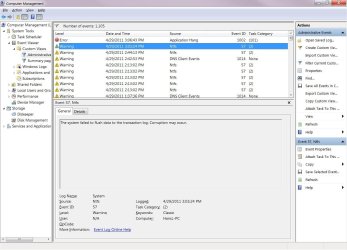
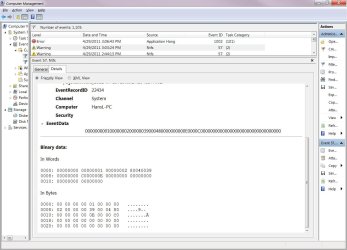
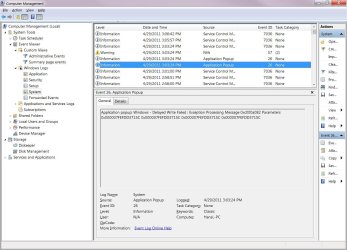
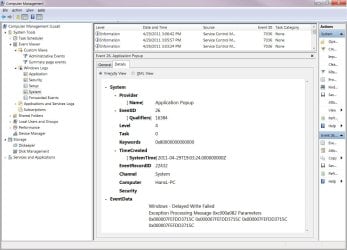
I want to add that I have now found this:

Happening 1: Device connect

Happening 2: AutoPlay

Happening 3: Disconnect (about 12 seconds after Device connect)

I had the clock going with seconds showing, so I was able to pinpoint the times exactly. I then went to the Event Viewer, and I found what you see in the attached jpg files (the file names tell were the information came from).

I will investigate further based on this, but if you gain any insights based on the files, please let me know. I have switched cable, but not outlet, which I will do tomorrow.

Regards,

Hans L
 

Attachments

  • Custom View – Administrative – General.jpg
    Custom View – Administrative – General.jpg
    116.1 KB · Views: 1
  • Custom View – Administrative – Details-1.jpg
    Custom View – Administrative – Details-1.jpg
    98 KB · Views: 1
  • Custom View – Administrative – Details-2.jpg
    Custom View – Administrative – Details-2.jpg
    104.6 KB · Views: 0
  • Windows Logs – System – General.jpg
    Windows Logs – System – General.jpg
    122.1 KB · Views: 1
  • Windows Logs – System – Details.jpg
    Windows Logs – System – Details.jpg
    110.2 KB · Views: 0

My Computer My Computer

At a glance

Windows 7 UltimateIntel Core Duo E6600 @ 2.40 GHz3 GBNvidia eVGA GeForce 8600 GTS & 7600 GT
Computer Manufacturer/Model Number
BIOS American MegaTrend 1238
OS
Windows 7 Ultimate
CPU
Intel Core Duo E6600 @ 2.40 GHz
Motherboard
ASUS P5B-Deluxe
Memory
3 GB
Graphics Card(s)
Nvidia eVGA GeForce 8600 GTS & 7600 GT
Monitor(s) Displays
Iiyama PLE431S/PLH431S
Back
Top