My External HD Has Gone Kaput! [Help Please]

La Nesra

New member
Local time
1:53 PM
Messages
4
Hi guys,

Really hope you can help – I’m trying to recover photos of my granddad who recently passed away. The hard drive the photos were on has been “broken” for a few years now.

At the time it stopped working I took it to a PC repair shop and they quoted me £500 “and it may or may not work” – I ended up leaving it.

However now I really want to try to recover the photos I once had on there.

First things first:

Operating System

Windows 7 Ultimate
64 Bit Operating System

What Happens When I Plug The Hardrive In

I hear the noise that my computer makes when I connect a USB device.
However, no new hard disk drives appear

What Happens When I Go On Disk Management

Under Disk Management I see the following:
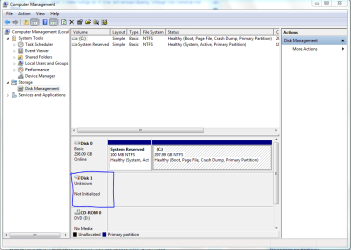
1.PNG

Disk 1
Unknown
Not Initialized

This is the hard drive – I know this because if I unplug it, this drive disappears.

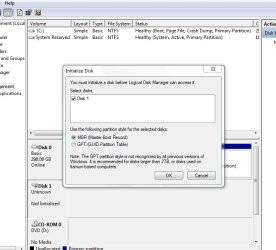
Here are the options I see
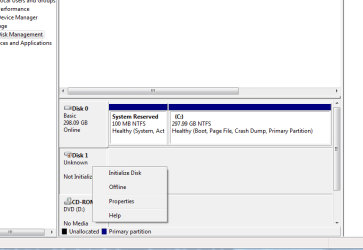
2a.PNG

When I try to initialize the disk (either option MBR or GBT I get an error saying “The Device Is Not Ready”)
2b.PNG

3.PNG

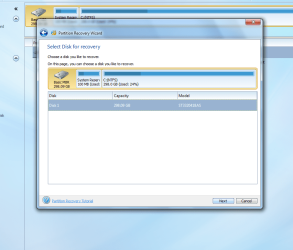
After digging around I found this thread recommending MiniTool Partition Wizard Free Edition.

When I follow the steps, here’s what I see:

4.PNG

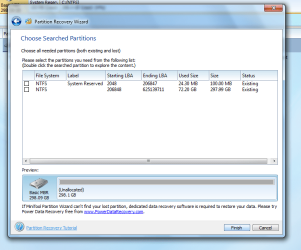
5.PNG

Quick Scan Results:

6.PNG

Full Scan Results:

7.PNG

At this point I’m out of ideas.

Is this the end – should I just kiss goodbye to any hopes of getting my photos back?
Or is there something else I can try?


I’d really appreciate any assistance.

Thanks in advance.
 

My Computer My Computer

Computer type
PC/Desktop
OS
Windows 7 64 Bit
Whatever you do. Don't try to initialize the disk again. You could destroy the data that's on the hard disk.

It may be that the drive has seized up and is unusable. You could try giving the drive a couple of sharp taps with your knuckles when you plug it in. It may jar the drive into spinning long enough to get some pictures off of it. Since the drive is broken, you really have nothing to lose.

The alternative is a data recovery service, and they can be quite expensive.

Unfortunately, this is a hard lesson on doing backups, and I'm sorry it happened to you, but every hard disk will fail eventually. Always back up those precious memories.
 

My Computer My Computer

Computer type
PC/Desktop
Computer Manufacturer/Model Number
Mellon Labs (custom build)
OS
Win 7 Pro x64/Win 10 Pro x64 dual boot
CPU
AMD FX 8350 Vishera @ 4200
Motherboard
ASUS M5A97 R2.0
Memory
16 GB Mushkin Blackline DDR3-2400 @ 1866 (9-10-10-10-31)
Graphics Card(s)
XFX Radeon R9 280 Double D Black Edition
Sound Card
Realtek HD Audio on MB. Sounds great.
Monitor(s) Displays
Acer 24", Acer 22"
Screen Resolution
3840 x 1080
Hard Drives
1 x Mushkin Chronos 120 GB SSD (Win 10)
1 x Samsung 850 EVO 250 GB SSD (Win 7)
1 x WD 1TB SATA Blue
1 x WD 1TB SATA Green
PSU
Corsair TX-750
Case
CoolerMaster HAF 912+
Cooling
Coolermaster Seidon 240M Liquid AIO. 6 case fans
Keyboard
Logitech G710+
Mouse
Logitech G500s
Internet Speed
Much better since I got fiber, but still way overpriced.
Antivirus
MSE, Malware Bytes for scanning
Browser
Firefox
Other Info
Corsair VOID USB headphones.

A Mellon Labs X-1 - LCD Smartie driven system status display.

Brought to you by the letter E
Thanks for your reply Mellon Head.

So aside from a few taps when I plug it in, there's no other hope?

Oh gosh...that's disappointing
I guess I've learned my lesson the hard way
 

My Computer My Computer

Computer type
PC/Desktop
OS
Windows 7 64 Bit
Just tried the sharp tap approach. It doesn't seem to work
 

My Computer My Computer

Computer type
PC/Desktop
OS
Windows 7 64 Bit
That's a shame. I was hoping it might jog the drive into spinning for a while. :(
 

My Computer My Computer

Computer type
PC/Desktop
Computer Manufacturer/Model Number
Mellon Labs (custom build)
OS
Win 7 Pro x64/Win 10 Pro x64 dual boot
CPU
AMD FX 8350 Vishera @ 4200
Motherboard
ASUS M5A97 R2.0
Memory
16 GB Mushkin Blackline DDR3-2400 @ 1866 (9-10-10-10-31)
Graphics Card(s)
XFX Radeon R9 280 Double D Black Edition
Sound Card
Realtek HD Audio on MB. Sounds great.
Monitor(s) Displays
Acer 24", Acer 22"
Screen Resolution
3840 x 1080
Hard Drives
1 x Mushkin Chronos 120 GB SSD (Win 10)
1 x Samsung 850 EVO 250 GB SSD (Win 7)
1 x WD 1TB SATA Blue
1 x WD 1TB SATA Green
PSU
Corsair TX-750
Case
CoolerMaster HAF 912+
Cooling
Coolermaster Seidon 240M Liquid AIO. 6 case fans
Keyboard
Logitech G710+
Mouse
Logitech G500s
Internet Speed
Much better since I got fiber, but still way overpriced.
Antivirus
MSE, Malware Bytes for scanning
Browser
Firefox
Other Info
Corsair VOID USB headphones.

A Mellon Labs X-1 - LCD Smartie driven system status display.

Brought to you by the letter E
Unfortunately not. Anything else I could maybe try? Or is this the end of the line?
Thanks
 

My Computer My Computer

Computer type
PC/Desktop
OS
Windows 7 64 Bit
Partition Wizard did not list your external drive at all. Not a good sign. ( You ran PRW on your system drive. What for?)

And you never mentioned details of your external drive. Manufacturer/model No, Model name ,capacity etc.,

Please install the HDD manufacturer's diagnostic/repair Utility, run the Short and Long Tests and check the drive. Please note down the time taken for short and long tests. If the tests fail, you may have to take the HDD out of the enclosure, hook it up as a secondary internal drive on a Desktop and check it.
 

My Computer My Computer

OS
Windows 7 Home Premium 32 bit
Hello La Nesra,

If the files on the drive are valuable, you should bring it to professional data recovery center.
The recovery will cost you much and they cannot guarantee, because they don't know how bad the situation is.
The more you power up your drive and try to recover data yourself, the worse situation may become.

Few examples:
If drive head is stuck or damaged, it can be fixed and replaced without major loss.
If drive controller gone bad, it can be replaced from same model drive and data will be safe.
If drive head is scratching your drive platters, then data corrupts physically with each moment you power it up and recovery chances are decreasing.

In my opinion R-Studio is one of best programs for data recovery, but it's not free and will cost you $80.

I hope, you will be able to recover photos of your grandfather.
 

My Computer My Computer

Computer type
PC/Desktop
Computer Manufacturer/Model Number
Custom
OS
Windows 7 Professional 64-bit
CPU
Intel Core i5-4670 LGA1150
Memory
8GB
Graphics Card(s)
GeForce GTX 1060 GIGABYTE GV-N1060G1 GAMING-6GD
PSU
Enermax Platimax EPM600 AWT 600W 80 Plus Platinum
Other Info
For history:
GPU: Asus GeForce GTS450 ENGTS450/DI/1GD5
Back
Top