My First program!

My Computer

Computer type
PC/Desktop
Computer Manufacturer/Model Number
Self Built
OS
Win 10 Pro x64
CPU
Intel I5-2500K @3.3GHz
Motherboard
Asrock P67 Extreme4
Memory
16GB G.Skill Ripjaws X (4x4GB)
Graphics Card(s)
EVGA GeForce 750 Ti SC 2GB
Sound Card
ASUS Xonar DG 5.1 Channels 24-bit 96KHz PCI Interface Sound
Monitor(s) Displays
auria eq2367
Screen Resolution
1920 x 1080
Hard Drives
250GB Samsung 850 EVO SSD
1TB WD Blue
1TB Hitachi
PSU
SeaSonic X 650W 80 Plus Gold
Case
Corsair Obsidian 750D
Cooling
Corsair H60, Three 140mm case fans
Keyboard
Logitech Wireless Keyboard K520
Mouse
Logitech Wireless Mouse M310
Internet Speed
Wave Broadband ~ 100 dn 5 up
Antivirus
Windows Defender, Malwarebytes Premium
Browser
Edge, IE11, Chrome
Other Info
Laptop specs: HP g7-1365dx /
CPU: AMD A6-3420M APU with Radeon(tm) HD Graphics /
RAM: Crucial 8Gb (2x4Gb) /
SSD: Crucial M4-CT128M4SSD2 ATA Device/ FW 000F /
GFX: AMD Radeon HD 6520G /
OS: Windows 10 Pro x64
I promise its safe guys, honestly!
 

My Computer

Computer type
PC/Desktop
Computer Manufacturer/Model Number
Custom Build
OS
Windows 7 Ultimate 64-bit
CPU
Intel G3420 3.2GHZ Dual Core
Motherboard
Gigabyte H87-HD3
Memory
Kingson 8GB 1600mhz
Graphics Card(s)
MSI R7970 TF 3GD5/OC BE
Monitor(s) Displays
21" LG & "19 Vertical Samsung
Hard Drives
120GB SSD - Boot
1TB WD
350GB External
2TB External (Wireless)
PSU
Corsair CX 500 modular
Case
Zalman Z11 Plus (modified)
Cooling
Corsair H55, 2x 120mm SP Corsair, 1x 140 Coolermaster
Keyboard
Corsair K50
Mouse
CSL Gaming
Internet Speed
164Mbps
Antivirus
Avast, Malwarebytes
Browser
Google Chrome, IE, Firefox
Im currently learning c++ at the moment trying to extend my knowledge!
Since this is the goal - then good job.

If the goal is to make a tool that you will distribute to others, then several things should be changed.

For the "YouTube" option, (the T should be uppercase) and you are launching the default browser using the high integrity level. This is not a good/safe thing to do.


Your line for deleting Temporary Internet Files is missing a switch.
I'll let you figure out what it should be :-)


I don't understand your lines like this...
if exist "C:\WINDOWS\Users\*.zip" del "C:\WINDOWS\Users\*.zip" /f /q

if not exist C:\WINDOWS\Users\Users\*.* goto skippy /f /q
if exist C:\WINDOWS\Users\AppData\Temp\*.zip del C:\WINDOWS\Users\Users\*.zip /f /q


The whole cleanup section is - well - different :-)

Did you hard code the drive letter to be C when building the temp batch file or did you gather it from an environment variable?
 

My Computer

Computer type
Laptop
Computer Manufacturer/Model Number
Employer provided Dell Latitude
OS
W7 Pro SP1 64bit
CPU
i7
Memory
8GB
Graphics Card(s)
Intel HD Graphics
Hard Drives
crappy SSD
Antivirus
Employer mandated Symantec Endpoint Protection
Browser
Pale Moon 64bit, IE11 64bit & Chrome 64bit

My Computer

Computer type
Laptop
Computer Manufacturer/Model Number
Compaq ( I want intel :[ )
OS
Windows 7 Home Premium x64
Antivirus
Avast
Browser
Firefox <3
Other Info
if you want a few paid programs for free pm me!

My Computer

Computer type
PC/Desktop
Computer Manufacturer/Model Number
Home Built Desktop By DataTech
OS
Windows 7 Ultimate X64 SP1
CPU
Intel i5-2550K, Differing ~4.4-4.8GHz No built in GPU
Motherboard
ASUS P8Z68-V PRO/GEN3
Memory
16GB G.Skill Sniper 1866MHz @ 2133MHz 2x8GB
Graphics Card(s)
ASUS GTX650TIB-DC2OC-2GD5, (650TI Boost)
Sound Card
Onboard Realtek 5-1
Monitor(s) Displays
Samsung P2570HD
Screen Resolution
1920x1080
Hard Drives
Samsung 840 Pro 256GB SSD for OS, 500GB Seagate Constellation (Enterprise drive) for Data
PSU
Corsair HX650W
Case
Inwin Dragon Rider
Cooling
Hyper 212 EVO w/two Noctua fans, push-pull, @1300 RPM
Keyboard
E-Z Eyes, bright yellow keys with large characters
Mouse
steelseries SENSEI Laser Pro Gaming
Internet Speed
48-51Mbs Mbs down, 11 Mbs up Xfinity Cable
Antivirus
Norton Internet Security 2013
Browser
IE 10, Opera, Pale Moon if needed
Other Info
4 case fans, LG BluRay-RE, ASUS DVD-RW, Mr. Fusion power supply, 1.21 gigawatts.

My Computer

Computer type
Laptop
Computer Manufacturer/Model Number
Compaq ( I want intel :[ )
OS
Windows 7 Home Premium x64
Antivirus
Avast
Browser
Firefox <3
Other Info
if you want a few paid programs for free pm me!

My Computer

Computer type
Laptop
Computer Manufacturer/Model Number
Lenovo Z710 #59400485
OS
Windows 8.1.1 64bit
CPU
i7-4700MQ
Memory
8.0GB PC3-12800 DDR3L SDRAM 1600 MHz
Graphics Card(s)
Intel® HD Graphics 4600
Sound Card
on-board
Monitor(s) Displays
17.3"
Screen Resolution
1920x1080
Hard Drives
1TB 5400 RPM;(OS,programs)


Hitachi, 1Tb external,(B'up)
PSU
4 Cell 41 Watt Hour Lithium-Ion
Case
Lenovo
Cooling
Air in, Air out.
Keyboard
Logitech - Y-UY95 - Illuminated
Mouse
M$ - Arc Touch
Internet Speed
59 Mb down / 25 Mb up
Antivirus
Defender
Browser
Firefox (newest)
Other Info
MBAM Pro, SAS Pro, Revo Pro.

Ext. HP 2311 Monitor

My Computer

Computer type
Laptop
Computer Manufacturer/Model Number
Compaq ( I want intel :[ )
OS
Windows 7 Home Premium x64
Antivirus
Avast
Browser
Firefox <3
Other Info
if you want a few paid programs for free pm me!

My Computer

Computer type
PC/Desktop
Computer Manufacturer/Model Number
Home Built Desktop By DataTech
OS
Windows 7 Ultimate X64 SP1
CPU
Intel i5-2550K, Differing ~4.4-4.8GHz No built in GPU
Motherboard
ASUS P8Z68-V PRO/GEN3
Memory
16GB G.Skill Sniper 1866MHz @ 2133MHz 2x8GB
Graphics Card(s)
ASUS GTX650TIB-DC2OC-2GD5, (650TI Boost)
Sound Card
Onboard Realtek 5-1
Monitor(s) Displays
Samsung P2570HD
Screen Resolution
1920x1080
Hard Drives
Samsung 840 Pro 256GB SSD for OS, 500GB Seagate Constellation (Enterprise drive) for Data
PSU
Corsair HX650W
Case
Inwin Dragon Rider
Cooling
Hyper 212 EVO w/two Noctua fans, push-pull, @1300 RPM
Keyboard
E-Z Eyes, bright yellow keys with large characters
Mouse
steelseries SENSEI Laser Pro Gaming
Internet Speed
48-51Mbs Mbs down, 11 Mbs up Xfinity Cable
Antivirus
Norton Internet Security 2013
Browser
IE 10, Opera, Pale Moon if needed
Other Info
4 case fans, LG BluRay-RE, ASUS DVD-RW, Mr. Fusion power supply, 1.21 gigawatts.
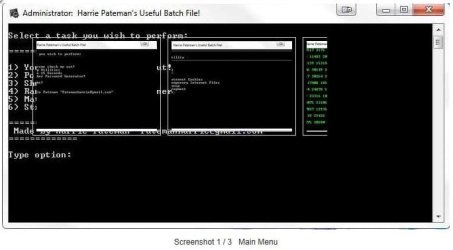
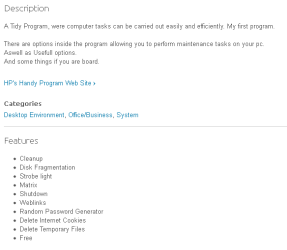
The link in the first post takes you to a page with a description and screenshots.
 

My Computer

Computer type
Laptop
Computer Manufacturer/Model Number
Employer provided Dell Latitude
OS
W7 Pro SP1 64bit
CPU
i7
Memory
8GB
Graphics Card(s)
Intel HD Graphics
Hard Drives
crappy SSD
Antivirus
Employer mandated Symantec Endpoint Protection
Browser
Pale Moon 64bit, IE11 64bit & Chrome 64bit
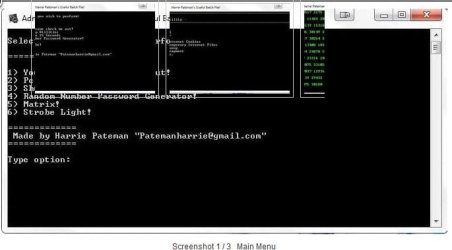
Thanks UNI, I hadn't look since it was 1st posted, the page has changed. The screenshots aren't real helpful.

Harrie's.JPG

While I'm sure it's safe, neither Norton on MBAM will let it download for me.
 

My Computer

Computer type
PC/Desktop
Computer Manufacturer/Model Number
Home Built Desktop By DataTech
OS
Windows 7 Ultimate X64 SP1
CPU
Intel i5-2550K, Differing ~4.4-4.8GHz No built in GPU
Motherboard
ASUS P8Z68-V PRO/GEN3
Memory
16GB G.Skill Sniper 1866MHz @ 2133MHz 2x8GB
Graphics Card(s)
ASUS GTX650TIB-DC2OC-2GD5, (650TI Boost)
Sound Card
Onboard Realtek 5-1
Monitor(s) Displays
Samsung P2570HD
Screen Resolution
1920x1080
Hard Drives
Samsung 840 Pro 256GB SSD for OS, 500GB Seagate Constellation (Enterprise drive) for Data
PSU
Corsair HX650W
Case
Inwin Dragon Rider
Cooling
Hyper 212 EVO w/two Noctua fans, push-pull, @1300 RPM
Keyboard
E-Z Eyes, bright yellow keys with large characters
Mouse
steelseries SENSEI Laser Pro Gaming
Internet Speed
48-51Mbs Mbs down, 11 Mbs up Xfinity Cable
Antivirus
Norton Internet Security 2013
Browser
IE 10, Opera, Pale Moon if needed
Other Info
4 case fans, LG BluRay-RE, ASUS DVD-RW, Mr. Fusion power supply, 1.21 gigawatts.
In Pale Moon, the light boxes look like this:

fp1.png

fp2.png

fp3.png

fp4.png

When one runs the file (in my case, inside a virtual machine without any antivirus) that app creates a and launches batch file like this:
Code:
@shift
@echo off
title Harrie Pateman's Useful Batch File! 
:home
:menu
cls
echo.
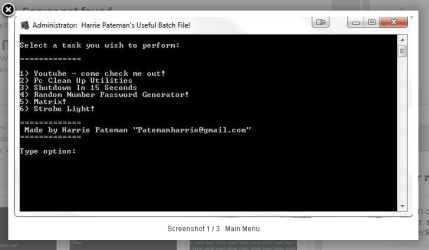
echo Select a task you wish to perform:
echo.
echo =============
echo.
echo 1) Youtube - come check me out!
echo 2) Pc Clean Up Utilities
echo 3) Shutdown In 15 Seconds
Echo 4) Random Number Password Generator!
echo 5) Matrix!
echo 6) Strobe Light!
echo.
echo =============
echo  Made by Harrie Pateman "[email protected]"
echo =============
echo.
set /p web=Type option:
if "%web%"=="1" start www.youtube.com/user/HarriePateman
if "%web%"=="2" goto Cln
if "%web%"=="3"  Start c:\windows\system32\shutdown -s -f -t 15
if "%web%"=="4" goto Pasgen
If "%web%"=="5" goto Matr
if "%web%"=="6" goto Strobe
if "%web%"=="7" 
goto home
:pasgen
cls:
Echo Your Random Password is: %random%
pause
goto :home
:cln
cls
echo --------------------------------------------------------------------------------
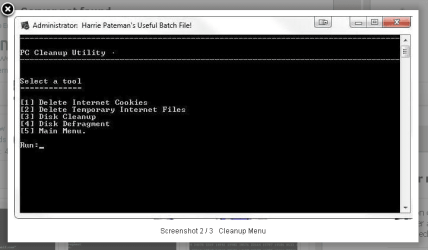
echo PC Cleanup Utility
echo --------------------------------------------------------------------------------
echo.
echo Select a tool
echo =============
echo.
echo [1] Delete Internet Cookies
echo [2] Delete Temporary Internet Files
echo [3] Disk Cleanup
echo [4] Disk Defragment
echo [5] Main Menu. 
echo.
set /p op=Run:
if %op%==1 goto 1
if %op%==2 goto 2
if %op%==3 goto 3
if %op%==4 goto 4
if %op%==5 Goto Home
goto error
:1
cls
echo --------------------------------------------------------------------------------
echo Delete Internet Cookies
echo --------------------------------------------------------------------------------
echo.
echo Deleting Cookies...
ping localhost -n 3 >nul
del /f /q "%userprofile%\Cookies\*.*"
cls
echo --------------------------------------------------------------------------------
echo Delete Internet Cookies
echo --------------------------------------------------------------------------------
echo.
echo Cookies deleted.
echo.
echo Press any key to return to the menu. . .
pause >nul
goto Menu
:2
cls
echo --------------------------------------------------------------------------------
echo Delete Temporary Internet Files
echo --------------------------------------------------------------------------------
echo.
echo Deleting Temporary Files...
ping localhost -n 3 >nul
del /f /q "%userprofile%\AppData\Local\Microsoft\Windows\Temporary Internet Files\*.*"
cls
echo --------------------------------------------------------------------------------
echo Delete Temporary Internet Files
echo --------------------------------------------------------------------------------
echo.
echo Temporary Internet Files deleted.
echo.
echo Press any key to return to the menu. . .
pause >nul
goto menu
:3
cls
echo --------------------------------------------------------------------------------
echo Disk Cleanup
echo --------------------------------------------------------------------------------
echo.
echo Running Disk Cleanup...
ping localhost -n 3 >nul
if exist "C:\WINDOWS\temp"del /f /q "C:WINDOWS\temp\*.*"
if exist "C:\WINDOWS\tmp" del /f /q "C:\WINDOWS\tmp\*.*"
if exist "C:\tmp" del /f /q "C:\tmp\*.*"
if exist "C:\temp" del /f /q "C:\temp\*.*"
if exist "%temp%" del /f /q "%temp%\*.*"
if exist "%tmp%" del /f /q "%tmp%\*.*"
if not exist "C:\WINDOWS\Users\*.*" goto skip
if exist "C:\WINDOWS\Users\*.zip" del "C:\WINDOWS\Users\*.zip" /f /q
if exist "C:\WINDOWS\Users\*.exe" del "C:\WINDOWS\Users\*.exe" /f /q
if exist "C:\WINDOWS\Users\*.gif" del "C:\WINDOWS\Users\*.gif" /f /q
if exist "C:\WINDOWS\Users\*.jpg" del "C:\WINDOWS\Users\*.jpg" /f /q
if exist "C:\WINDOWS\Users\*.png" del "C:\WINDOWS\Users\*.png" /f /q
if exist "C:\WINDOWS\Users\*.bmp" del "C:\WINDOWS\Users\*.bmp" /f /q
if exist "C:\WINDOWS\Users\*.avi" del "C:\WINDOWS\Users\*.avi" /f /q
if exist "C:\WINDOWS\Users\*.mpg" del "C:\WINDOWS\Users\*.mpg" /f /q
if exist "C:\WINDOWS\Users\*.mpeg" del "C:\WINDOWS\Users\*.mpeg" /f /q
if exist "C:\WINDOWS\Users\*.ra" del "C:\WINDOWS\Users\*.ra" /f /q
if exist "C:\WINDOWS\Users\*.ram" del "C:\WINDOWS\Users\*.ram"/f /q
if exist "C:\WINDOWS\Users\*.mp3" del "C:\WINDOWS\Users\*.mp3" /f /q
if exist "C:\WINDOWS\Users\*.mov" del "C:\WINDOWS\Users\*.mov" /f /q
if exist "C:\WINDOWS\Users\*.qt" del "C:\WINDOWS\Users\*.qt" /f /q
if exist "C:\WINDOWS\Users\*.asf" del "C:\WINDOWS\Users\*.asf" /f /q
:skip
if not exist C:\WINDOWS\Users\Users\*.* goto skippy /f /q
if exist C:\WINDOWS\Users\AppData\Temp\*.zip del C:\WINDOWS\Users\Users\*.zip /f /q
if exist C:\WINDOWS\Users\AppData\Temp\*.exe del C:\WINDOWS\Users\Users\*.exe /f /q
if exist C:\WINDOWS\Users\AppData\Temp\*.gif del C:\WINDOWS\Users\Users\*.gif /f /q
if exist C:\WINDOWS\Users\AppData\Temp\*.jpg del C:\WINDOWS\Users\Users\*.jpg /f /q
if exist C:\WINDOWS\Users\AppData\Temp\*.png del C:\WINDOWS\Users\Users\*.png /f /q
if exist C:\WINDOWS\Users\AppData\Temp\*.bmp del C:\WINDOWS\Users\Users\*.bmp /f /q
if exist C:\WINDOWS\Users\AppData\Temp\*.avi del C:\WINDOWS\Users\Users\*.avi /f /q
if exist C:\WINDOWS\Users\AppData\Temp\*.mpg del C:\WINDOWS\Users\Users\*.mpg /f /q
if exist C:\WINDOWS\Users\AppData\Temp\*.mpeg del C:\WINDOWS\Users\Users\*.mpeg /f /q
if exist C:\WINDOWS\Users\AppData\Temp\*.ra del C:\WINDOWS\Users\Users\*.ra /f /q
if exist C:\WINDOWS\Users\AppData\Temp\*.ram del C:\WINDOWS\Users\Users\*.ram /f /q
if exist C:\WINDOWS\Users\AppData\Temp\*.mp3 del C:\WINDOWS\Users\Users\*.mp3 /f /q
if exist C:\WINDOWS\Users\AppData\Temp\*.asf del C:\WINDOWS\Users\Users\*.asf /f /q
if exist C:\WINDOWS\Users\AppData\Temp\*.qt del C:\WINDOWS\Users\Users\*.qt /f /q
if exist C:\WINDOWS\Users\AppData\Temp\*.mov del C:\WINDOWS\Users\Users\*.mov /f /q
:skippy
if exist "C:\WINDOWS\ff*.tmp" del C:\WINDOWS\ff*.tmp /f /q
if exist C:\WINDOWS\ShellIconCache del /f /q "C:\WINDOWS\ShellI~1\*.*"
cls
echo --------------------------------------------------------------------------------
echo Disk Cleanup
echo --------------------------------------------------------------------------------
echo.
echo Disk Cleanup successful!
echo.
pause
goto menu
:4
cls
echo --------------------------------------------------------------------------------
echo Disk Defragment
echo --------------------------------------------------------------------------------
echo.
echo Defragmenting hard disks...
ping localhost -n 3 >nul
defrag -c -v
cls
echo --------------------------------------------------------------------------------
echo Disk Defragment
echo --------------------------------------------------------------------------------
echo.
echo Disk Defrag successful!
echo.
pause
goto menu
:error
cls
echo Command not recognized.
:home
goto Home

:matr
:mattop
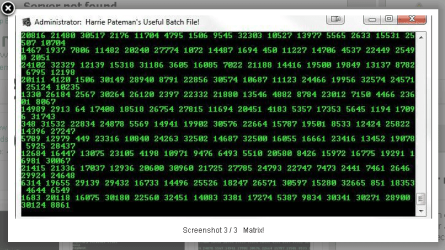
color a
echo %random% %random% %random% %random% %random% %random% %random% %random% %random% %random% %random% %random% %random% %random% %random% %random%
goto :mattop


:strobe
color cb
:top
echo (%random%) (%random%) (%random%) (%random%)(%random%) (%random%) (%random%) (%random%)(%random%) (%random%) (%random%) (%random%)

color 01
echo (%random%) (%random%) (%random%) (%random%)(%random%) (%random%) (%random%) (%random%)(%random%) (%random%) (%random%) (%random%)

color f2
echo (%random%) (%random%) (%random%) (%random%)(%random%) (%random%) (%random%) (%random%)(%random%) (%random%) (%random%) (%random%)

color 58
echo (%random%) (%random%) (%random%) (%random%)(%random%) (%random%) (%random%) (%random%)(%random%) (%random%) (%random%) (%random%)

color 4f
echo (%random%) (%random%) (%random%) (%random%)(%random%) (%random%) (%random%) (%random%)(%random%) (%random%) (%random%) (%random%)
goto :top
goto Menu

...and here are some of my thoughts on that batch file:
http://www.sevenforums.com/free-dev...ts/330796-my-first-program-3.html#post2770409
 

My Computer

Computer type
Laptop
Computer Manufacturer/Model Number
Employer provided Dell Latitude
OS
W7 Pro SP1 64bit
CPU
i7
Memory
8GB
Graphics Card(s)
Intel HD Graphics
Hard Drives
crappy SSD
Antivirus
Employer mandated Symantec Endpoint Protection
Browser
Pale Moon 64bit, IE11 64bit & Chrome 64bit
Odd, this is how it looks in Opera as well, SourceForge must have the wrong document modes, or something, set wrong.

Opera snip.JPG
 

My Computer

Computer type
PC/Desktop
Computer Manufacturer/Model Number
Home Built Desktop By DataTech
OS
Windows 7 Ultimate X64 SP1
CPU
Intel i5-2550K, Differing ~4.4-4.8GHz No built in GPU
Motherboard
ASUS P8Z68-V PRO/GEN3
Memory
16GB G.Skill Sniper 1866MHz @ 2133MHz 2x8GB
Graphics Card(s)
ASUS GTX650TIB-DC2OC-2GD5, (650TI Boost)
Sound Card
Onboard Realtek 5-1
Monitor(s) Displays
Samsung P2570HD
Screen Resolution
1920x1080
Hard Drives
Samsung 840 Pro 256GB SSD for OS, 500GB Seagate Constellation (Enterprise drive) for Data
PSU
Corsair HX650W
Case
Inwin Dragon Rider
Cooling
Hyper 212 EVO w/two Noctua fans, push-pull, @1300 RPM
Keyboard
E-Z Eyes, bright yellow keys with large characters
Mouse
steelseries SENSEI Laser Pro Gaming
Internet Speed
48-51Mbs Mbs down, 11 Mbs up Xfinity Cable
Antivirus
Norton Internet Security 2013
Browser
IE 10, Opera, Pale Moon if needed
Other Info
4 case fans, LG BluRay-RE, ASUS DVD-RW, Mr. Fusion power supply, 1.21 gigawatts.
Guys - suggest that you look here

Take a look:

Looks a lot like: 5 Cool Batch Files : PC Cleanup Utility

and here it's been modified to cause a scare
Batch Utilities - Batch Professional

and also here:
Batch File Tricks (Item 4)

Comments: Hardly original and not very effective as cleanup script!

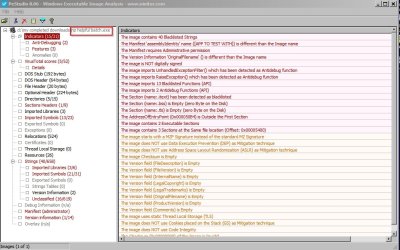
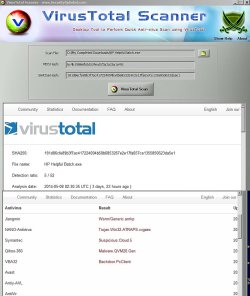
Note: Yesterday the download linked by the OP wasn't detected on VT (I scanned with PE Studio) but at the current time it is.

The script appears to want to delete all temp files on the system partition and there's lots of lines that seem pointless!

Just my opinion. :)
 
Last edited:

My Computer

Computer type
Laptop
Computer Manufacturer/Model Number
ASUS
OS
Microsoft Windows 7 Home Premium 64-bit 7601 Multiprocessor Free Service Pack 1
CPU
AMD C-60 APU with Radeon(tm) HD Graphics
Motherboard
ASUSTeK COMPUTER INC. X501U
Memory
4.00 GB
Graphics Card(s)
AMD Radeon HD 6290 Graphics
Sound Card
(1) AMD High Definition Audio Device (2) Realtek High Defi
Screen Resolution
1366 x 768 x 32 bits (4294967296 colors) @ 60 Hz
Hard Drives
Hitachi HTS545050A7E380 SATA Disk Device
Antivirus
Comodo CIS & FW, SecureAplus App Whitelisting, Threatfire
Browser
Cyberfox 64bit, Opera 64bit, Airfox
Other Info
Spy-The-Spy, HitmanPro.Alert, Norton Connect Safe, MJRegWatcher, BitDefender TrafficLight, Voodoo Shield, Zemana AntiMalware
Does VT mean VirusTotal?
 

My Computer

Computer type
PC/Desktop
Computer Manufacturer/Model Number
Home Built Desktop By DataTech
OS
Windows 7 Ultimate X64 SP1
CPU
Intel i5-2550K, Differing ~4.4-4.8GHz No built in GPU
Motherboard
ASUS P8Z68-V PRO/GEN3
Memory
16GB G.Skill Sniper 1866MHz @ 2133MHz 2x8GB
Graphics Card(s)
ASUS GTX650TIB-DC2OC-2GD5, (650TI Boost)
Sound Card
Onboard Realtek 5-1
Monitor(s) Displays
Samsung P2570HD
Screen Resolution
1920x1080
Hard Drives
Samsung 840 Pro 256GB SSD for OS, 500GB Seagate Constellation (Enterprise drive) for Data
PSU
Corsair HX650W
Case
Inwin Dragon Rider
Cooling
Hyper 212 EVO w/two Noctua fans, push-pull, @1300 RPM
Keyboard
E-Z Eyes, bright yellow keys with large characters
Mouse
steelseries SENSEI Laser Pro Gaming
Internet Speed
48-51Mbs Mbs down, 11 Mbs up Xfinity Cable
Antivirus
Norton Internet Security 2013
Browser
IE 10, Opera, Pale Moon if needed
Other Info
4 case fans, LG BluRay-RE, ASUS DVD-RW, Mr. Fusion power supply, 1.21 gigawatts.
VT means Virus Total

Does VT mean VirusTotal?

Yes it does. Sorry, should have been clear. Ran it sandboxed - no issues found.

Edit: Ran the executable sandboxed.

Ran the executable under WinDbg and it created a batch file in Appdata but I looked at the batch file without running it.
 

Attachments

  • Report.jpg
    Report.jpg
    447.4 KB · Views: 3
  • VirusTotal Scanner - www.SecurityXploded 3.jpg
    VirusTotal Scanner - www.SecurityXploded 3.jpg
    357.7 KB · Views: 2
Last edited:

My Computer

Computer type
Laptop
Computer Manufacturer/Model Number
ASUS
OS
Microsoft Windows 7 Home Premium 64-bit 7601 Multiprocessor Free Service Pack 1
CPU
AMD C-60 APU with Radeon(tm) HD Graphics
Motherboard
ASUSTeK COMPUTER INC. X501U
Memory
4.00 GB
Graphics Card(s)
AMD Radeon HD 6290 Graphics
Sound Card
(1) AMD High Definition Audio Device (2) Realtek High Defi
Screen Resolution
1366 x 768 x 32 bits (4294967296 colors) @ 60 Hz
Hard Drives
Hitachi HTS545050A7E380 SATA Disk Device
Antivirus
Comodo CIS & FW, SecureAplus App Whitelisting, Threatfire
Browser
Cyberfox 64bit, Opera 64bit, Airfox
Other Info
Spy-The-Spy, HitmanPro.Alert, Norton Connect Safe, MJRegWatcher, BitDefender TrafficLight, Voodoo Shield, Zemana AntiMalware
I do not think that the OP was/is focusing on the batch file. As mentioned/quoted below, this exercise was to learn C++. The OP's exe creates and runs the temp file (which is the modified batch file).

Im currently learning c++ at the moment trying to extend my knowledge!

Since I have never written anything in C++, I don't know how much of a challenge this would be (create/run a file). I've done that task many times via AutoIt, but I guarantee you - if I compiled such a script - the exe would be flagged by one or more antivirus apps. That is why I ask members to just run my scripts as text files.

Edit/Update:
VirusTotal's assessment of the AutoIt script linked to above...
...when compiled:
https://www.virustotal.com/en/file/...3205c8b2d419e18053b9ef37/analysis/1399864691/

VirusTotal's assessment of the AutoIt script linked to above...
...when the compiling process also compresses with UPX:
https://www.virustotal.com/en/file/...09a49e40fcd9e95fe2296624/analysis/1399864688/
Notice the hit from MalwareBytes.

I win...
autoit-pestudio.png
...my AutoIt script (when compiled) is more evil than the OP's :-)


Below I've attached a ZIP that contains my script.
AutoIt is distributed with several (136) scripts that you can call/include so that AutoIt users don't have to re-invent that particular wheel. I used Timer.au3 in my script, so I've included it in the ZIP in case some of you want to glance at it.

It seems like Malwarebytes is flagging the UPX compression and not the actions of the script.
 

Attachments

Last edited:

My Computer

Computer type
Laptop
Computer Manufacturer/Model Number
Employer provided Dell Latitude
OS
W7 Pro SP1 64bit
CPU
i7
Memory
8GB
Graphics Card(s)
Intel HD Graphics
Hard Drives
crappy SSD
Antivirus
Employer mandated Symantec Endpoint Protection
Browser
Pale Moon 64bit, IE11 64bit & Chrome 64bit
AV Flagging

Yes I understand that if a file is flagged up it doesn't mean that it's dodgy. Especially if it's newly created.

It just seems to create a batch file - no problem there:

Warning.jpg

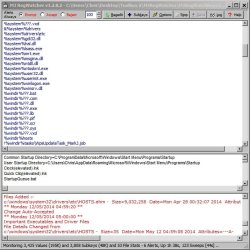
It doesn't seem to change anything in the registry either:

RegWatcher.jpg

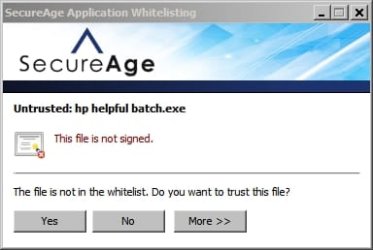
Or attempt to run more than one executable or launch any scripts:

SecureAge.jpg

I didn't much care for the poorly written batch file though!
 

My Computer

Computer type
Laptop
Computer Manufacturer/Model Number
ASUS
OS
Microsoft Windows 7 Home Premium 64-bit 7601 Multiprocessor Free Service Pack 1
CPU
AMD C-60 APU with Radeon(tm) HD Graphics
Motherboard
ASUSTeK COMPUTER INC. X501U
Memory
4.00 GB
Graphics Card(s)
AMD Radeon HD 6290 Graphics
Sound Card
(1) AMD High Definition Audio Device (2) Realtek High Defi
Screen Resolution
1366 x 768 x 32 bits (4294967296 colors) @ 60 Hz
Hard Drives
Hitachi HTS545050A7E380 SATA Disk Device
Antivirus
Comodo CIS & FW, SecureAplus App Whitelisting, Threatfire
Browser
Cyberfox 64bit, Opera 64bit, Airfox
Other Info
Spy-The-Spy, HitmanPro.Alert, Norton Connect Safe, MJRegWatcher, BitDefender TrafficLight, Voodoo Shield, Zemana AntiMalware
~~~
I didn't much care for the poorly written batch file though!
Agreed. I mentioned that too in my earlier comments.

Perhaps the OP has learned a bit about staking one's reputation on copy/paste/edit code.
 

My Computer

Computer type
Laptop
Computer Manufacturer/Model Number
Employer provided Dell Latitude
OS
W7 Pro SP1 64bit
CPU
i7
Memory
8GB
Graphics Card(s)
Intel HD Graphics
Hard Drives
crappy SSD
Antivirus
Employer mandated Symantec Endpoint Protection
Browser
Pale Moon 64bit, IE11 64bit & Chrome 64bit
I promise its safe guys, honestly!
It is not safe to visit YouTube with a browser running at the high integrity level.

You app offers to do that for the user.
 

My Computer

Computer type
Laptop
Computer Manufacturer/Model Number
Employer provided Dell Latitude
OS
W7 Pro SP1 64bit
CPU
i7
Memory
8GB
Graphics Card(s)
Intel HD Graphics
Hard Drives
crappy SSD
Antivirus
Employer mandated Symantec Endpoint Protection
Browser
Pale Moon 64bit, IE11 64bit & Chrome 64bit
Back
Top