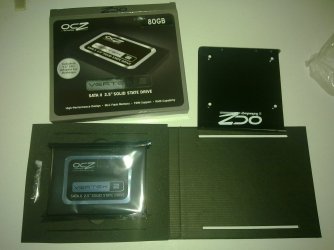
My first solid state.

<<And plus,also worries me (i don't trust) my <<old>> system,especially my motherboard ga-x38-ds4.>>
Please view my Specs.
Any idea for that?
As long as your MB can do SATA (yours does) your system specs are fine for an SSD drive. You'll also have no issues under Windows 7, in fact SSD drives are perfect for 7.

You have nothing to worry about ;)
 

My Computer

Computer type
PC/Desktop
Computer Manufacturer/Model Number
Custom built by me.
OS
Windows 10 Pro
CPU
Intel Core i7-4770K (3.5Ghz)
Motherboard
Gigabyte G1 Sniper 5 (F10 Bios)
Memory
32 gig Corsair Dominator Platinum (4x8Gig)
Graphics Card(s)
Sapphire Tri-X R9 Fury
Sound Card
Soundblaster ZXR
Monitor(s) Displays
NEC PA242W 24" LCD Monitor
Screen Resolution
1920 x 1200
Hard Drives
Primary - Samsung 850 Pro (512gig), Samsung 840 Pro (256gig), 2TB WD Caviar Black.
PSU
EVGA Supernova 1000 G2
Case
Cooler Master HAF X
Cooling
Corsair H100i with Corsair Air Series SP120 Quiet Fans
Keyboard
Logitech Wireless Wave
Mouse
Logitech Performance MX
Internet Speed
High Speed Cable
Antivirus
Norton Security
Browser
IE11
Other Info
Memory Timings - 1866MHz @ 9-9-9-27-1T @ 1.5 volts
<<And plus,also worries me (i don't trust) my <<old>> system,especially my motherboard ga-x38-ds4.>>
Please view my Specs.
Any idea for that?
As long as your MB can do SATA (yours does) your system specs are fine for an SSD drive. You'll also have no issues under Windows 7, in fact SSD drives are perfect for 7.

You have nothing to worry about ;)
I hope so! :)
 

My Computer

Computer Manufacturer/Model Number
Custom Built by me.
OS
Windows 7 Ultimate 64bit SP1
CPU
Intel Core 2 Quad Q6600
Motherboard
Gigabyte GA-X38-DS4
Memory
2X2GB DDR2 PC6400 800MHZ DUAL CHANNEL
Graphics Card(s)
XFX RADEON HD 6850 1GB GDDR5
Sound Card
2/4/5.1/7.1-channel Realtek High Definition
Monitor(s) Displays
Samsung LE40A656F1 1080p 100Hz LCD HD TV 50,000:1
Screen Resolution
1366x768 in Desktop,1920x1080p in gaming and video
Hard Drives
C:\WD VelociRaptor 150 GB,10,000 RPM
E:\WESTERN DIGITAL WD15EADS 1.5TB CAVIAR GREEN SATA2 F:\WESTERN DIGITAL WD15EADS 1.5TB CAVIAR GREEN SATA2
PSU
THERMALTAKE W0229 TOUGHPOWER XT 750W
Case
A-Case Twin Engine BB
Cooling
3 x thermaltake smart case fan II + 1 arctic cooling fan
Keyboard
Wireless Logitech LX710
Mouse
Logitech Wireless Gaming Mouse G700
Internet Speed
ADSL 12000 plus
Other Info
Mouse Logitech G700,with 13 buttons who needs keyboard in RPG?

D:\Sony high speed sata Dvd Rewriter
Logitech Cordless Rumblepad 2
ssd benefits?

Ok,the truth is that i order the ssd for speed.
But which are the really benefits of it?
My everyday pc use is:
Internet browsing,HD movies,Gaming,Downloading,scanning with esetss/mbam/superant
 
Last edited:

My Computer

Computer Manufacturer/Model Number
Custom Built by me.
OS
Windows 7 Ultimate 64bit SP1
CPU
Intel Core 2 Quad Q6600
Motherboard
Gigabyte GA-X38-DS4
Memory
2X2GB DDR2 PC6400 800MHZ DUAL CHANNEL
Graphics Card(s)
XFX RADEON HD 6850 1GB GDDR5
Sound Card
2/4/5.1/7.1-channel Realtek High Definition
Monitor(s) Displays
Samsung LE40A656F1 1080p 100Hz LCD HD TV 50,000:1
Screen Resolution
1366x768 in Desktop,1920x1080p in gaming and video
Hard Drives
C:\WD VelociRaptor 150 GB,10,000 RPM
E:\WESTERN DIGITAL WD15EADS 1.5TB CAVIAR GREEN SATA2 F:\WESTERN DIGITAL WD15EADS 1.5TB CAVIAR GREEN SATA2
PSU
THERMALTAKE W0229 TOUGHPOWER XT 750W
Case
A-Case Twin Engine BB
Cooling
3 x thermaltake smart case fan II + 1 arctic cooling fan
Keyboard
Wireless Logitech LX710
Mouse
Logitech Wireless Gaming Mouse G700
Internet Speed
ADSL 12000 plus
Other Info
Mouse Logitech G700,with 13 buttons who needs keyboard in RPG?

D:\Sony high speed sata Dvd Rewriter
Logitech Cordless Rumblepad 2
Ok,the truth is that i order the ssd for speed.
But which are the really benefits of it?
My everyday pc use is:
Internet browsing,Gaming,Downloading,scanning with esetss/mbam/superant

I bought one a month ago, mostly on an impulse.

The only clearcut advantage is in boot speeds as far as I can tell. From 47 seconds down to 31 seconds. Whoopee.

My SSD has Windows and all my apps. I don't notice that programs or files open any quicker. Excel opens nearly instantaneously, but it did so before the SSD. I have a large Excel file that takes about 6 seconds to open now and it took about 6 seconds before I bought the SSD.

Don't expect to be bowled over.


Your scans might be quicker---I use MBAM and MSE, but haven't noticed any difference.

Defrag would probably be faster, but you don't defrag SSDs.
 

My Computer

Computer type
PC/Desktop
Computer Manufacturer/Model Number
Ignatz Special; 4 speed manual gearbox; factory air conditioning; one of one
OS
Windows 7 Home Premium SP1, 64-bit
CPU
Intel Skylake i5-6600K, not overclocked
Motherboard
AsRock Z170M Extreme 4, micro ATX
Memory
8 GB HyperX DDR4-2666 (2 x 4 GB)
Graphics Card(s)
none; graphics are integrated on CPU
Sound Card
onboard: Realtek ALC1150; external: USB Behringer UF0-202
Monitor(s) Displays
Dell S2340M 23 inch IPS
Screen Resolution
1600 x 900
Hard Drives
System: Crucial MX100 series SSD, 128 GB;
Data: Samsung Spinpoint 103SJ, 1 TB;
Backup: WD Caviar Green WD30EZRX-00D8PB0, 3 TB
PSU
Rosewill SilentNight 500 watt fanless, semi-modular
Case
Antec Solo II
Cooling
Noctua NH-U12S; Noctua F12 intake, Noctua S12A exhaust
Keyboard
Microsoft 200 6JH-00001 USB
Mouse
Dell or Microsoft optical wired; USB
Antivirus
Microsoft Security Essentials and Malwarebytes Premium
Browser
Pale Moon
Other Info
All fans PWM; speeds at idle: CPU circa 500 rpm; intake circa 600 rpm; exhaust circa 600 rpm; CPU temps 27 idle and 47 C load in a warm room (27 C/81 F) when running Intel Extreme Tuning Utility stress test.
The only clearcut advantage is in boot speeds as far as I can tell. From 47 seconds down to 31 seconds. Whoopee.
My boot times went from about 40 seconds down to 16. And I see big differences in virus scans as well as malwarebyte scans.

My SSD has Windows and all my apps. I don't notice that programs or files open any quicker. Excel opens nearly instantaneously, but it did so before the SSD.
My fast opening apps like Office, stayed about the same. However, things like games went from loading in 15-20 seconds down to 3-4. It's a very noticeable difference there. My video editing application, Sony Vegas Movie Studio HD opens much faster with my SSD than it did on my standard spinner drive.

I don't consider SSD's a requirement. In fact, i only have 1 computer with an SSD and don't have plans to upgrade the others.
 

My Computer

Computer Manufacturer/Model Number
Self-Built in July 2009
OS
Windows 7 Ultimate x64
CPU
Intel Q9550 2.83Ghz OC'd to 3.40Ghz
Motherboard
Gigabyte GA-EP45-UD3R rev. 1.1, F12 BIOS
Memory
8GB G.Skill PI DDR2-800, 4-4-4-12 timings
Graphics Card(s)
EVGA 1280MB Nvidia GeForce GTX570
Sound Card
Realtek ALC899A 8 channel onboard audio
Monitor(s) Displays
23" Acer x233H
Screen Resolution
1920x1080
Hard Drives
Intel X25-M 80GB Gen 2 SSD
Western Digital 1TB Caviar Black, 32MB cache. WD1001FALS
PSU
Corsair 620HX modular
Case
Antec P182
Cooling
stock
Keyboard
ABS M1 Mechanical
Mouse
Logitech G9 Laser Mouse
Internet Speed
15/2 cable modem
Other Info
Windows and Linux enthusiast. Logitech G35 Headset.
If you don't trust the system now, and feel it is unstable, getting an SSD isn't going to solve that problem for you. Figure out that issue first, and then worry about using the SSD.

As for the bad things you've read on the internet...stick to reading from reputable sites.

As for the reasons to get an SSD, you should already know these if you've been asking which SSD you want. Boot speed is nearly meaningless to me, as the difference between 20 to 40 seconds once a day doesn't amount to much. The responsiveness of the system is why I am using SSDs for my system drivers in two computers now.
 

My Computer

OS
Windows 7 Ultimate x64 SP1
CPU
Intel Core i7-2600
Motherboard
Gigabyte GA-P67A-UD3P-B3
Memory
12 GB Patriot Extreme DDR3-1333
Graphics Card(s)
Nvidia GTX 470
Monitor(s) Displays
Dell UltraSharp 2209WA
Hard Drives
OCZ Agility3 240 GB, WD5001AALS, WD7501AALS
PSU
OCZ ModStream 700W
Case
CoolerMaster HAF 912 Advanced
Cooling
CoolerMaster Hyper 212 Plus
PParks:

Have you noticed any faster opening of Photoshop?? I have not. I just checked---CS3 takes 10 seconds to open, about what it took on a spinning drive.

Is that 16 seconds boot as measured by the Visual Basic script found on this site--or through another program's measurement? I get 31 seconds using the script and 12 seconds using another program (Bootracer) that clearly measures something else--excludes the time spent in the BIOS I think---rather than a complete shutdown/reboot cycle.

I'm underwhelmed by SSDs, but did not expect to be overwhelmed. Overall, neutral. I won't buy another until 1 TB sizes fall to where 80 GB sizes are now. I expect to reuse my current 80 GB for foreseeable future builds--5 to 10 years.
 

My Computer

Computer type
PC/Desktop
Computer Manufacturer/Model Number
Ignatz Special; 4 speed manual gearbox; factory air conditioning; one of one
OS
Windows 7 Home Premium SP1, 64-bit
CPU
Intel Skylake i5-6600K, not overclocked
Motherboard
AsRock Z170M Extreme 4, micro ATX
Memory
8 GB HyperX DDR4-2666 (2 x 4 GB)
Graphics Card(s)
none; graphics are integrated on CPU
Sound Card
onboard: Realtek ALC1150; external: USB Behringer UF0-202
Monitor(s) Displays
Dell S2340M 23 inch IPS
Screen Resolution
1600 x 900
Hard Drives
System: Crucial MX100 series SSD, 128 GB;
Data: Samsung Spinpoint 103SJ, 1 TB;
Backup: WD Caviar Green WD30EZRX-00D8PB0, 3 TB
PSU
Rosewill SilentNight 500 watt fanless, semi-modular
Case
Antec Solo II
Cooling
Noctua NH-U12S; Noctua F12 intake, Noctua S12A exhaust
Keyboard
Microsoft 200 6JH-00001 USB
Mouse
Dell or Microsoft optical wired; USB
Antivirus
Microsoft Security Essentials and Malwarebytes Premium
Browser
Pale Moon
Other Info
All fans PWM; speeds at idle: CPU circa 500 rpm; intake circa 600 rpm; exhaust circa 600 rpm; CPU temps 27 idle and 47 C load in a warm room (27 C/81 F) when running Intel Extreme Tuning Utility stress test.
PParks:

Have you noticed any faster opening of Photoshop?? I have not. I just checked---CS3 takes 10 seconds to open, about what it took on a spinning drive.

I'm to poor to afford photoshop. Honestly, I don't need photoshop and I don't pirate software, so photoshop is something that I don't use.

Is that 16 seconds boot as measured by the Visual Basic script found on this site--or through another program's measurement?
It's a stopwatch timing. From the point that my BIOS hands off to Windows, and the screen goes black and says Starting Windows to my desktop is 16 seconds with a stopwatch. I think Bootracer claimed about 14 seconds if memory serves correctly.


I'm underwhelmed by SSDs, but did not expect to be overwhelmed. Overall, neutral. I won't buy another until 1 TB sizes fall to where 80 GB sizes are now. I expect to reuse my current 80 GB for foreseeable future builds--5 to 10 years.
I've seen quite a number of people here who claim they will never touch another computer that doesn't have an SSD again. I don't feel that way. In fact, my work computers all have spinners (WD Caviar Blue's) and I don't feel they are slow in any way, nor do they have to be any faster.

My boss actually sent me a link today and said, "hey, if I can get our team approval for this, which SSD drive of these do you want?". But all of the drives were 80GB and with my laptop I dual boot Windows and Ubuntu and I have about 90GB of stuff on my C drive because of VM's and the like. So, my opinion was that I probably would just stick with my 160GB spinner drive rather than try to survive on an 80GB SSD. The performance difference just isn't worth the lack of space on my laptop.

But for my home computer, where I have an SSD and a 1TB spinner, I'm glad I bought the SSD and don't regret it in any way. That machine always feels faster when i sit down and use it.
 

My Computer

Computer Manufacturer/Model Number
Self-Built in July 2009
OS
Windows 7 Ultimate x64
CPU
Intel Q9550 2.83Ghz OC'd to 3.40Ghz
Motherboard
Gigabyte GA-EP45-UD3R rev. 1.1, F12 BIOS
Memory
8GB G.Skill PI DDR2-800, 4-4-4-12 timings
Graphics Card(s)
EVGA 1280MB Nvidia GeForce GTX570
Sound Card
Realtek ALC899A 8 channel onboard audio
Monitor(s) Displays
23" Acer x233H
Screen Resolution
1920x1080
Hard Drives
Intel X25-M 80GB Gen 2 SSD
Western Digital 1TB Caviar Black, 32MB cache. WD1001FALS
PSU
Corsair 620HX modular
Case
Antec P182
Cooling
stock
Keyboard
ABS M1 Mechanical
Mouse
Logitech G9 Laser Mouse
Internet Speed
15/2 cable modem
Other Info
Windows and Linux enthusiast. Logitech G35 Headset.
:shock::shock::shock::shock::shock::shock::shock::shock::shock::shock::shock::shock:
I thing i will cancel the order for now.....
 

My Computer

Computer Manufacturer/Model Number
Custom Built by me.
OS
Windows 7 Ultimate 64bit SP1
CPU
Intel Core 2 Quad Q6600
Motherboard
Gigabyte GA-X38-DS4
Memory
2X2GB DDR2 PC6400 800MHZ DUAL CHANNEL
Graphics Card(s)
XFX RADEON HD 6850 1GB GDDR5
Sound Card
2/4/5.1/7.1-channel Realtek High Definition
Monitor(s) Displays
Samsung LE40A656F1 1080p 100Hz LCD HD TV 50,000:1
Screen Resolution
1366x768 in Desktop,1920x1080p in gaming and video
Hard Drives
C:\WD VelociRaptor 150 GB,10,000 RPM
E:\WESTERN DIGITAL WD15EADS 1.5TB CAVIAR GREEN SATA2 F:\WESTERN DIGITAL WD15EADS 1.5TB CAVIAR GREEN SATA2
PSU
THERMALTAKE W0229 TOUGHPOWER XT 750W
Case
A-Case Twin Engine BB
Cooling
3 x thermaltake smart case fan II + 1 arctic cooling fan
Keyboard
Wireless Logitech LX710
Mouse
Logitech Wireless Gaming Mouse G700
Internet Speed
ADSL 12000 plus
Other Info
Mouse Logitech G700,with 13 buttons who needs keyboard in RPG?

D:\Sony high speed sata Dvd Rewriter
Logitech Cordless Rumblepad 2
I would expect photoshop to be more like this;


Or like this;


My Computer

Computer Manufacturer/Model Number
Self-Built in July 2009
OS
Windows 7 Ultimate x64
CPU
Intel Q9550 2.83Ghz OC'd to 3.40Ghz
Motherboard
Gigabyte GA-EP45-UD3R rev. 1.1, F12 BIOS
Memory
8GB G.Skill PI DDR2-800, 4-4-4-12 timings
Graphics Card(s)
EVGA 1280MB Nvidia GeForce GTX570
Sound Card
Realtek ALC899A 8 channel onboard audio
Monitor(s) Displays
23" Acer x233H
Screen Resolution
1920x1080
Hard Drives
Intel X25-M 80GB Gen 2 SSD
Western Digital 1TB Caviar Black, 32MB cache. WD1001FALS
PSU
Corsair 620HX modular
Case
Antec P182
Cooling
stock
Keyboard
ABS M1 Mechanical
Mouse
Logitech G9 Laser Mouse
Internet Speed
15/2 cable modem
Other Info
Windows and Linux enthusiast. Logitech G35 Headset.
:shock::shock::shock::shock::shock::shock::shock::shock::shock::shock::shock::shock:
I thing i will cancel the order for now.....
It doesn't mean to cancel your order. It means to do your research so you know what to expect....and not get hung up on trivial matters, such as boot time.
 

My Computer

OS
Windows 7 Ultimate x64 SP1
CPU
Intel Core i7-2600
Motherboard
Gigabyte GA-P67A-UD3P-B3
Memory
12 GB Patriot Extreme DDR3-1333
Graphics Card(s)
Nvidia GTX 470
Monitor(s) Displays
Dell UltraSharp 2209WA
Hard Drives
OCZ Agility3 240 GB, WD5001AALS, WD7501AALS
PSU
OCZ ModStream 700W
Case
CoolerMaster HAF 912 Advanced
Cooling
CoolerMaster Hyper 212 Plus
:shock::shock::shock::shock::shock::shock::shock::shock::shock::shock::shock::shock:
I thing i will cancel the order for now.....
It doesn't mean to cancel your order. It means to do your research so you know what to expect....and not get hung up on trivial matters, such as boot time.
Its ok,i believe is better for me to wait a little more.
 

My Computer

Computer Manufacturer/Model Number
Custom Built by me.
OS
Windows 7 Ultimate 64bit SP1
CPU
Intel Core 2 Quad Q6600
Motherboard
Gigabyte GA-X38-DS4
Memory
2X2GB DDR2 PC6400 800MHZ DUAL CHANNEL
Graphics Card(s)
XFX RADEON HD 6850 1GB GDDR5
Sound Card
2/4/5.1/7.1-channel Realtek High Definition
Monitor(s) Displays
Samsung LE40A656F1 1080p 100Hz LCD HD TV 50,000:1
Screen Resolution
1366x768 in Desktop,1920x1080p in gaming and video
Hard Drives
C:\WD VelociRaptor 150 GB,10,000 RPM
E:\WESTERN DIGITAL WD15EADS 1.5TB CAVIAR GREEN SATA2 F:\WESTERN DIGITAL WD15EADS 1.5TB CAVIAR GREEN SATA2
PSU
THERMALTAKE W0229 TOUGHPOWER XT 750W
Case
A-Case Twin Engine BB
Cooling
3 x thermaltake smart case fan II + 1 arctic cooling fan
Keyboard
Wireless Logitech LX710
Mouse
Logitech Wireless Gaming Mouse G700
Internet Speed
ADSL 12000 plus
Other Info
Mouse Logitech G700,with 13 buttons who needs keyboard in RPG?

D:\Sony high speed sata Dvd Rewriter
Logitech Cordless Rumblepad 2
If you don't trust the system now, and feel it is unstable, getting an SSD isn't going to solve that problem for you. Figure out that issue first, and then worry about using the SSD.

Agreed. No need in moving problems over to a new drive, whether spinner or SSD.

As for the reasons to get an SSD, you should already know these if you've been asking which SSD you want. Boot speed is nearly meaningless to me, as the difference between 20 to 40 seconds once a day doesn't amount to much. The responsiveness of the system is why I am using SSDs for my system drivers in two computers now.

Agree again.

Don't get caught up in all the hype about read/write speeds or you’re be chasing SSD drives forever. And as so many have stated, the OCZ Vertex two isn’t a bad drive for the price.

Anyway I swear I questioned the need to upgrade to an SSD drive just like you; I also questioned to price to gigabyte ratio. In the end I took the plunge and can clearly say it was the best upgrade I ever did to my system.

Nothing you do to your system will give you the noticeable performance increase you'll experience moving from a spinner HD to an SSD, Guarantee it.

In the end it’s your money and decision, but once you make the plunge, you’ll be impressed by the immediate and very noticeable performance increase.

My two cents.
 

My Computer

Computer type
PC/Desktop
Computer Manufacturer/Model Number
Custom built by me.
OS
Windows 10 Pro
CPU
Intel Core i7-4770K (3.5Ghz)
Motherboard
Gigabyte G1 Sniper 5 (F10 Bios)
Memory
32 gig Corsair Dominator Platinum (4x8Gig)
Graphics Card(s)
Sapphire Tri-X R9 Fury
Sound Card
Soundblaster ZXR
Monitor(s) Displays
NEC PA242W 24" LCD Monitor
Screen Resolution
1920 x 1200
Hard Drives
Primary - Samsung 850 Pro (512gig), Samsung 840 Pro (256gig), 2TB WD Caviar Black.
PSU
EVGA Supernova 1000 G2
Case
Cooler Master HAF X
Cooling
Corsair H100i with Corsair Air Series SP120 Quiet Fans
Keyboard
Logitech Wireless Wave
Mouse
Logitech Performance MX
Internet Speed
High Speed Cable
Antivirus
Norton Security
Browser
IE11
Other Info
Memory Timings - 1866MHz @ 9-9-9-27-1T @ 1.5 volts
One of this days i will buy my first solid state drive.
So i need an expert advice,especially from someone who already has ssd.
First : Most of all worries me the compatibility issue with my GA-X38-DS4 motherboard,i don't want to throw the money for nothing. And i didn't found anything in the web about this.
--------------------------------------------
Second: IF IS NOT THERE ANY COMPATIBILITY ISSUE!! Then....Which one is better,faster?
A) Corsair Force Series F80A - solid state drive - 80 GB - SATA-300
B) OCZ Agility 2 Series - Solid state drive - 80 GB - internal - 2.5" - SATA-300
C) OCZ Vertex 2 Series - Solid state drive - 80 GB - internal - 2.5" - SATA-300

Faster how? What will you use it for? Boot speed isn't a good reason IMO. neither is how fast a program loads. Once it loads in Windows 7, if you have enough memory, it is a snap to reload the program. I think your concern should be in once a program is running, how can an SSD speed it up. For instance, if your program needs fast sequential writes and reads of non-compressible data (e.g. Phootshop scratch space), then you want an SSD that can perform these fast like an Intel 510 or 310 series (Sandforce based SSDs like OCZ and Corsair depend on compression for their speed). If you need lots of IOPs or fast random reads and writes then maybe OCZ may be better.

The newer OCZ Agility 2 have lower sequential write speeds (due to a switch to 25nm from 34 nm technology) without a rebranding of the model so caveat emptor. You may want to look into the Intel 310 series as well - solid performance, reliability.

If you are going to wait, keep your eyes peeled for a drop in price of the newer Intel 510 or 310 series, or the OCZ Vertex 3.
 

My Computer

Computer type
PC/Desktop
Computer Manufacturer/Model Number
Home built (GeneO industries)/Model 4
OS
Windows 10 Pro. EFI boot partition, full EFI boot
CPU
i7 4770k 4.4GHz (44-44-43-43 turbo) @ 1.248V
Motherboard
ASUS Maximus VI Hero
Memory
16GB (8GBx2) @2200 MHz G.skill Sniper 10-11-10-30-1, 1.6V
Graphics Card(s)
MSI GTX 970 Gaming 4G
Sound Card
Onboard SupremeFX Audio
Monitor(s) Displays
NEC Spectraview 2490WUXi-SV
Screen Resolution
1920 x 1200
Hard Drives
Samsung 850 Pro 256GB (OS), Samsung 2x 128GB 840 Pro SSD in RAID0, 3x WD Blue 6Gb/s 1TB RAID0, WD 2TB Black external USB 3.0, 2TB WD20EARS Green external USB 3.0, 2x 500GB Seagate and 1 750 GB external USB, 1x 350GB external USB3
PSU
Seasonic X-850 (2012 KM3 model)
Case
Fractal Design Define R4
Cooling
NH-D14, NF-F12, NF-A15; NF-P14, NF-P12,NF-A14, S12A PWM
Keyboard
Cooler Master Storm Quickfire Rapid - Brown
Mouse
Logitech G602
Internet Speed
126.4 Mb/s down, 24.3 Mb/s up
Other Info
USB 3.0 x8 , SATA III x8, eSATA, USB 2.0 x6. Samsung DVD R/W drive.

WEI: CPU 7.8, Memory 7.9, Graphics 7.9, Disk 7.9
Ocz Vertex 2 Solid State 80GB

I just received my Solid state Drive :D

So please lets refresh this Thread.

I want some advices before starting the windows 7 installation etc.

I want the best performance,well the best of it in any way!
 

Attachments

  • 29082011703.jpg
    29082011703.jpg
    291.7 KB · Views: 6

My Computer

Computer Manufacturer/Model Number
Custom Built by me.
OS
Windows 7 Ultimate 64bit SP1
CPU
Intel Core 2 Quad Q6600
Motherboard
Gigabyte GA-X38-DS4
Memory
2X2GB DDR2 PC6400 800MHZ DUAL CHANNEL
Graphics Card(s)
XFX RADEON HD 6850 1GB GDDR5
Sound Card
2/4/5.1/7.1-channel Realtek High Definition
Monitor(s) Displays
Samsung LE40A656F1 1080p 100Hz LCD HD TV 50,000:1
Screen Resolution
1366x768 in Desktop,1920x1080p in gaming and video
Hard Drives
C:\WD VelociRaptor 150 GB,10,000 RPM
E:\WESTERN DIGITAL WD15EADS 1.5TB CAVIAR GREEN SATA2 F:\WESTERN DIGITAL WD15EADS 1.5TB CAVIAR GREEN SATA2
PSU
THERMALTAKE W0229 TOUGHPOWER XT 750W
Case
A-Case Twin Engine BB
Cooling
3 x thermaltake smart case fan II + 1 arctic cooling fan
Keyboard
Wireless Logitech LX710
Mouse
Logitech Wireless Gaming Mouse G700
Internet Speed
ADSL 12000 plus
Other Info
Mouse Logitech G700,with 13 buttons who needs keyboard in RPG?

D:\Sony high speed sata Dvd Rewriter
Logitech Cordless Rumblepad 2
What I would do is shut down the PC, and unplug all other HDs.
Install the SSD, and plug it into the very first SATA Port.

Start up, go into the bios, and change to AHCI mode.
Install Windows.

Once your up and running, you can shut down again and hook up all the other drives, and format/partition however you choose to do.


Once in Windows, if you run the WEI and then reboot the machine, it will make appropriate adjustments after that first run.
(disbale Defrag on the SSD, as well as Prefetch)

This is all you need to do.
I wouldn't do any tweaks to it other than maybe disabling Hiberfile if you do not use Hibernate to free up some space.
 

My Computer

Computer Manufacturer/Model Number
Custom (Self Build)
OS
Windows 7 Home Premium 64bit
CPU
Intel Core i7 2700k
Motherboard
eVGA P67 SLI
Memory
8GB Mushkin Redline Ridgebacks @1866
Graphics Card(s)
EVGA GTX570 SC
Sound Card
XiFi Titanium HD
Monitor(s) Displays
LG W2453V
Screen Resolution
1920x1080
Hard Drives
Intel 320 80GB -- Intel X25-V 40GB --WD Black 1TB x2 -- WD Blue 640GB
PSU
Seasonic x750
Case
Corsair 600T SE White
Cooling
eVGA Superclocked CPU Cooler
Keyboard
Saitek Cyborg
Antivirus
Kaspersky
Browser
IE
Other Info
LG BD/DVD
There is very little you have to manually do to get performance out of your SSD drive. If you can handle it, reinstall the operating systems to it. This ensures that partitions are aligned and unnecessary software is not loaded to the drive. When installing your OS, it's often recommended to ensure your BIOS is set to AHCI mode (versus IDE mode) for best performance.
 

My Computer

Computer Manufacturer/Model Number
Self-Built in July 2009
OS
Windows 7 Ultimate x64
CPU
Intel Q9550 2.83Ghz OC'd to 3.40Ghz
Motherboard
Gigabyte GA-EP45-UD3R rev. 1.1, F12 BIOS
Memory
8GB G.Skill PI DDR2-800, 4-4-4-12 timings
Graphics Card(s)
EVGA 1280MB Nvidia GeForce GTX570
Sound Card
Realtek ALC899A 8 channel onboard audio
Monitor(s) Displays
23" Acer x233H
Screen Resolution
1920x1080
Hard Drives
Intel X25-M 80GB Gen 2 SSD
Western Digital 1TB Caviar Black, 32MB cache. WD1001FALS
PSU
Corsair 620HX modular
Case
Antec P182
Cooling
stock
Keyboard
ABS M1 Mechanical
Mouse
Logitech G9 Laser Mouse
Internet Speed
15/2 cable modem
Other Info
Windows and Linux enthusiast. Logitech G35 Headset.
Ok i start now,i cant wait!

I will post back with results and news when ill have again windows 7 :D
 

My Computer

Computer Manufacturer/Model Number
Custom Built by me.
OS
Windows 7 Ultimate 64bit SP1
CPU
Intel Core 2 Quad Q6600
Motherboard
Gigabyte GA-X38-DS4
Memory
2X2GB DDR2 PC6400 800MHZ DUAL CHANNEL
Graphics Card(s)
XFX RADEON HD 6850 1GB GDDR5
Sound Card
2/4/5.1/7.1-channel Realtek High Definition
Monitor(s) Displays
Samsung LE40A656F1 1080p 100Hz LCD HD TV 50,000:1
Screen Resolution
1366x768 in Desktop,1920x1080p in gaming and video
Hard Drives
C:\WD VelociRaptor 150 GB,10,000 RPM
E:\WESTERN DIGITAL WD15EADS 1.5TB CAVIAR GREEN SATA2 F:\WESTERN DIGITAL WD15EADS 1.5TB CAVIAR GREEN SATA2
PSU
THERMALTAKE W0229 TOUGHPOWER XT 750W
Case
A-Case Twin Engine BB
Cooling
3 x thermaltake smart case fan II + 1 arctic cooling fan
Keyboard
Wireless Logitech LX710
Mouse
Logitech Wireless Gaming Mouse G700
Internet Speed
ADSL 12000 plus
Other Info
Mouse Logitech G700,with 13 buttons who needs keyboard in RPG?

D:\Sony high speed sata Dvd Rewriter
Logitech Cordless Rumblepad 2
I'm not second guessing anyone. I was asked to post.

A fresh install of Windows 7 is the best way to go.

Wishmaster is telling you right.
What I would do is shut down the PC, and unplug all other HDs.
Install the SSD, and plug it into the very first SATA Port.
Start up, go into the bios, and change to AHCI mode.
Install Windows.
Windows will install just like when you put it on an HDD.
It will set all the needed settings such as offset automatically.

If you want to use an image of your OS as it is now that can also be done.
I did mine this way and learned a lot but you can run into unexpected issues.
I don't recommend going this way for first timers. Experienced users or in my case the too hard headed to quit. :o

After you have Win 7 installed on the SSD you can make new images for back up and using these is just like reimaging an HDD. Easy.

You will want to disable hibernation. That is one of the last things to do so can be covered when you are done with other things.

Don't make any changes to the HDD's except unplugging them while installing Windows to SSD. If a problem arises installing to SSD you can plug the Win7 HD back in and use it.
Good to have a back up until the SSD is operational.
 

My Computer

Computer Manufacturer/Model Number
Hopalong/ Godzilla
OS
Windows7 Pro 64bit SP-1; Windows XP Pro 32bit
CPU
Intel Core i7-870 Lynnfield 2.93GHz LGA 1156 95W Quad-Core
Motherboard
ASUS P7P55D-E PRO
Memory
8GB@1400MHz Crucial Ballistix DDR3-1600 4x2GB
Graphics Card(s)
ASUS ENGTX460 DirectCU/2DI/1GD5 1GB 256-bit GDDR5
Sound Card
VIA Onboard
Monitor(s) Displays
Asus VS248H-P 24"; Samsung SyncMaster 941BW 19"ws
Screen Resolution
1920x1080; 1440x900
Hard Drives
Samsung 830 120GB SSD
Intel 320 120GB SSD
Western Digital Caviar Black WD7501AALS 750GB 7200 RPM SATA 3.0Gb/s
Western Digital Caviar Black WD6401AALS 640GB 7200 RPM SATA 3.0Gb/s
PSU
COOLER MASTER Silent Pro RS850-AMBAJ3-US 850W Modular
Case
COOLER MASTER HAF 932 RC-932-KKN5-GP Black
Cooling
Scythe "Mugen-2 Rev.B" (2 ScytheKaze-Jyuni PWM fans)
Keyboard
Logitech K-320
Mouse
Kensington
Antivirus
Avast Inernet Suite
Browser
IE 9 ; Chrome
I finish,i have done all the above,now im with my ssd here :)

But when i start the computer in POST I take this message

""Detective Driver No Driver Found""

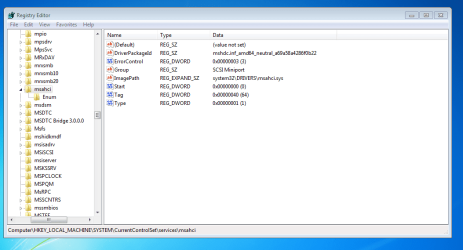
I set ANCI in bios.Do i need to change anything else in bios?

Do i have to enable it in windows also?

I attached a screenshot from my regedit,i dont know if anci is enable in windows or not.
 

Attachments

  • regedit.PNG
    regedit.PNG
    30.5 KB · Views: 9

My Computer

Computer Manufacturer/Model Number
Custom Built by me.
OS
Windows 7 Ultimate 64bit SP1
CPU
Intel Core 2 Quad Q6600
Motherboard
Gigabyte GA-X38-DS4
Memory
2X2GB DDR2 PC6400 800MHZ DUAL CHANNEL
Graphics Card(s)
XFX RADEON HD 6850 1GB GDDR5
Sound Card
2/4/5.1/7.1-channel Realtek High Definition
Monitor(s) Displays
Samsung LE40A656F1 1080p 100Hz LCD HD TV 50,000:1
Screen Resolution
1366x768 in Desktop,1920x1080p in gaming and video
Hard Drives
C:\WD VelociRaptor 150 GB,10,000 RPM
E:\WESTERN DIGITAL WD15EADS 1.5TB CAVIAR GREEN SATA2 F:\WESTERN DIGITAL WD15EADS 1.5TB CAVIAR GREEN SATA2
PSU
THERMALTAKE W0229 TOUGHPOWER XT 750W
Case
A-Case Twin Engine BB
Cooling
3 x thermaltake smart case fan II + 1 arctic cooling fan
Keyboard
Wireless Logitech LX710
Mouse
Logitech Wireless Gaming Mouse G700
Internet Speed
ADSL 12000 plus
Other Info
Mouse Logitech G700,with 13 buttons who needs keyboard in RPG?

D:\Sony high speed sata Dvd Rewriter
Logitech Cordless Rumblepad 2
Back
Top