My first solid state.

My Computer

OS
Windows 7 Ultimate x64 SP1
CPU
Intel Core i7-2600
Motherboard
Gigabyte GA-P67A-UD3P-B3
Memory
12 GB Patriot Extreme DDR3-1333
Graphics Card(s)
Nvidia GTX 470
Monitor(s) Displays
Dell UltraSharp 2209WA
Hard Drives
OCZ Agility3 240 GB, WD5001AALS, WD7501AALS
PSU
OCZ ModStream 700W
Case
CoolerMaster HAF 912 Advanced
Cooling
CoolerMaster Hyper 212 Plus
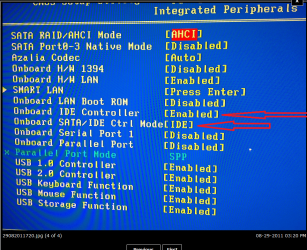
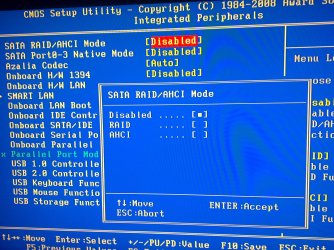
Look at the 2 items I marked. Those are the only things i question.
bios.PNG
 

My Computers

System One System Two

  • Computer type
    PC/Desktop
    Computer Manufacturer/Model Number
    ALWAYS UNDER CONSTRUCTION
    OS
    Windows 11 Pro
    CPU
    Ryzen 9 5900X
    Motherboard
    Asus X570 Crosshair Viii Hero
    Memory
    32GB G Skill DDR4-3600
    Graphics Card(s)
    EVGA RTX 3080 FTW 3 Ultra
    Sound Card
    On Board/Sennheiser PC37X Headset
    Monitor(s) Displays
    3 X Asus 27"
    Screen Resolution
    2560x1440
    Hard Drives
    2 X 1 TB NVME drives
    PSU
    EVGA 850
    Case
    Phanteks Eclipse P400A
    Cooling
    EVGA 280 AIO
    Keyboard
    Logitech G510s/ Logitech G13
    Mouse
    Logitech G502
    Internet Speed
    24/1
    Antivirus
    ESET/MBAM Pro/SAS Pro
    Browser
    Chrome/ Firefox/ Edge
  • Computer type
    Laptop
    System Manufacturer/Model Number
    Dell 16 Plus
    OS
    Windows 11 Pro
    CPU
    Intel Ultra 9 288V
    Memory
    32 GB LPDDR5X 8533
    Monitor(s) Displays
    16" Mini-LED HDR600 Touch 90 Hz
    Screen Resolution
    2560X1600
    Hard Drives
    1 TB NVME
I know it can be set later, but if it is BSoD'ing during the install....on an Intel chipset...then there's a problem. It would also make me afraid the system would BSoD on the first reboot after changing.

Deacon, you are right in what you are saying. It shouldn't bsod in ahci mode. I have the same drive in another machine and it will run in ahci on Intel and AMD. That's why I think there is a problem with the way bios is set.
 

My Computers

System One System Two

  • Computer type
    PC/Desktop
    Computer Manufacturer/Model Number
    ALWAYS UNDER CONSTRUCTION
    OS
    Windows 11 Pro
    CPU
    Ryzen 9 5900X
    Motherboard
    Asus X570 Crosshair Viii Hero
    Memory
    32GB G Skill DDR4-3600
    Graphics Card(s)
    EVGA RTX 3080 FTW 3 Ultra
    Sound Card
    On Board/Sennheiser PC37X Headset
    Monitor(s) Displays
    3 X Asus 27"
    Screen Resolution
    2560x1440
    Hard Drives
    2 X 1 TB NVME drives
    PSU
    EVGA 850
    Case
    Phanteks Eclipse P400A
    Cooling
    EVGA 280 AIO
    Keyboard
    Logitech G510s/ Logitech G13
    Mouse
    Logitech G502
    Internet Speed
    24/1
    Antivirus
    ESET/MBAM Pro/SAS Pro
    Browser
    Chrome/ Firefox/ Edge
  • Computer type
    Laptop
    System Manufacturer/Model Number
    Dell 16 Plus
    OS
    Windows 11 Pro
    CPU
    Intel Ultra 9 288V
    Memory
    32 GB LPDDR5X 8533
    Monitor(s) Displays
    16" Mini-LED HDR600 Touch 90 Hz
    Screen Resolution
    2560X1600
    Hard Drives
    1 TB NVME
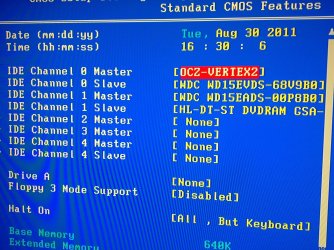
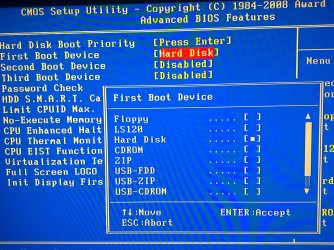
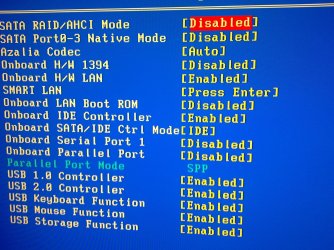
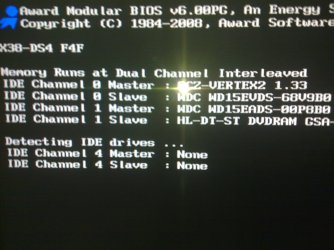
Here how it looks now,i said enable IDE i mean disable ANCI.

Do you see anything wrong??
 

Attachments

  • 30082011724.jpg
    30082011724.jpg
    636.2 KB · Views: 2
  • 30082011725.jpg
    30082011725.jpg
    573.8 KB · Views: 1
  • 30082011726.jpg
    30082011726.jpg
    598.3 KB · Views: 1
  • 30082011727.jpg
    30082011727.jpg
    555.5 KB · Views: 1
  • 30082011729.jpg
    30082011729.jpg
    306.2 KB · Views: 1

My Computer

Computer Manufacturer/Model Number
Custom Built by me.
OS
Windows 7 Ultimate 64bit SP1
CPU
Intel Core 2 Quad Q6600
Motherboard
Gigabyte GA-X38-DS4
Memory
2X2GB DDR2 PC6400 800MHZ DUAL CHANNEL
Graphics Card(s)
XFX RADEON HD 6850 1GB GDDR5
Sound Card
2/4/5.1/7.1-channel Realtek High Definition
Monitor(s) Displays
Samsung LE40A656F1 1080p 100Hz LCD HD TV 50,000:1
Screen Resolution
1366x768 in Desktop,1920x1080p in gaming and video
Hard Drives
C:\WD VelociRaptor 150 GB,10,000 RPM
E:\WESTERN DIGITAL WD15EADS 1.5TB CAVIAR GREEN SATA2 F:\WESTERN DIGITAL WD15EADS 1.5TB CAVIAR GREEN SATA2
PSU
THERMALTAKE W0229 TOUGHPOWER XT 750W
Case
A-Case Twin Engine BB
Cooling
3 x thermaltake smart case fan II + 1 arctic cooling fan
Keyboard
Wireless Logitech LX710
Mouse
Logitech Wireless Gaming Mouse G700
Internet Speed
ADSL 12000 plus
Other Info
Mouse Logitech G700,with 13 buttons who needs keyboard in RPG?

D:\Sony high speed sata Dvd Rewriter
Logitech Cordless Rumblepad 2
So if you set both options for AHCI, you then BSoD during your Windows 7 install?
 

My Computer

OS
Windows 7 Ultimate x64 SP1
CPU
Intel Core i7-2600
Motherboard
Gigabyte GA-P67A-UD3P-B3
Memory
12 GB Patriot Extreme DDR3-1333
Graphics Card(s)
Nvidia GTX 470
Monitor(s) Displays
Dell UltraSharp 2209WA
Hard Drives
OCZ Agility3 240 GB, WD5001AALS, WD7501AALS
PSU
OCZ ModStream 700W
Case
CoolerMaster HAF 912 Advanced
Cooling
CoolerMaster Hyper 212 Plus
So if you set both options for AHCI, you then BSoD during your Windows 7 install?

I reinstalled windows 4 times!


If i remember well,


I touch only 2 things in bios the SATA RAID\AHCI Mode and the Onboard SATA/IDE Ctrl Mode.
In my first win7 installation i set only Onboard SATA/IDE Ctrl Mode to AHCI and i get some strange messages.

In the second win7 installation i set both SATA RAID\AHCI Mode and the Onboard SATA/IDE Ctrl Mode in AHCI,i get BSOD.

In the thirth win7 installation i set only SATA RAID\AHCI Mode to AHCI,again BSOD.

And now i my last win7 installation i set the SATA RAID\AHCI Mode to Disable and SATA/IDE Ctrl Mode to IDE and im still here.
---------------------------------------------

I may set again in bios the SATA RAID\AHCI Mode to AHCI and the Onboard SATA/IDE Ctrl Mode to IDE and reinstall windows.

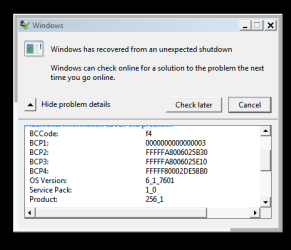
In the first crashes i snip this fast because is crash again very fast without minidump.
 

Attachments

  • error.PNG
    error.PNG
    6.5 KB · Views: 2

My Computer

Computer Manufacturer/Model Number
Custom Built by me.
OS
Windows 7 Ultimate 64bit SP1
CPU
Intel Core 2 Quad Q6600
Motherboard
Gigabyte GA-X38-DS4
Memory
2X2GB DDR2 PC6400 800MHZ DUAL CHANNEL
Graphics Card(s)
XFX RADEON HD 6850 1GB GDDR5
Sound Card
2/4/5.1/7.1-channel Realtek High Definition
Monitor(s) Displays
Samsung LE40A656F1 1080p 100Hz LCD HD TV 50,000:1
Screen Resolution
1366x768 in Desktop,1920x1080p in gaming and video
Hard Drives
C:\WD VelociRaptor 150 GB,10,000 RPM
E:\WESTERN DIGITAL WD15EADS 1.5TB CAVIAR GREEN SATA2 F:\WESTERN DIGITAL WD15EADS 1.5TB CAVIAR GREEN SATA2
PSU
THERMALTAKE W0229 TOUGHPOWER XT 750W
Case
A-Case Twin Engine BB
Cooling
3 x thermaltake smart case fan II + 1 arctic cooling fan
Keyboard
Wireless Logitech LX710
Mouse
Logitech Wireless Gaming Mouse G700
Internet Speed
ADSL 12000 plus
Other Info
Mouse Logitech G700,with 13 buttons who needs keyboard in RPG?

D:\Sony high speed sata Dvd Rewriter
Logitech Cordless Rumblepad 2
For your benefit, start using the proper term in case someone joins the thread later and is trying to follow up.

It's AHCI - Advanced Host Controller Interface. Someone could get confused if they are trying to read along.

I'm still thinking you should go back to OCZ and see if there's a problem with the drive. You shouldn't be BSoDing. Either that, or try to load the Intel drivers during the Windows 7 install, and see if that allows you to finish without the BSoD.
 

My Computer

OS
Windows 7 Ultimate x64 SP1
CPU
Intel Core i7-2600
Motherboard
Gigabyte GA-P67A-UD3P-B3
Memory
12 GB Patriot Extreme DDR3-1333
Graphics Card(s)
Nvidia GTX 470
Monitor(s) Displays
Dell UltraSharp 2209WA
Hard Drives
OCZ Agility3 240 GB, WD5001AALS, WD7501AALS
PSU
OCZ ModStream 700W
Case
CoolerMaster HAF 912 Advanced
Cooling
CoolerMaster Hyper 212 Plus
In post 102 above is from yesterday when you were putting it in AHCI mode. I think IDE control mode should be disabled and onboard sata/IDE mode should be AHCI not IDE. Deacon has a gigabyte board and can advise if I am wrong.
 

My Computers

System One System Two

  • Computer type
    PC/Desktop
    Computer Manufacturer/Model Number
    ALWAYS UNDER CONSTRUCTION
    OS
    Windows 11 Pro
    CPU
    Ryzen 9 5900X
    Motherboard
    Asus X570 Crosshair Viii Hero
    Memory
    32GB G Skill DDR4-3600
    Graphics Card(s)
    EVGA RTX 3080 FTW 3 Ultra
    Sound Card
    On Board/Sennheiser PC37X Headset
    Monitor(s) Displays
    3 X Asus 27"
    Screen Resolution
    2560x1440
    Hard Drives
    2 X 1 TB NVME drives
    PSU
    EVGA 850
    Case
    Phanteks Eclipse P400A
    Cooling
    EVGA 280 AIO
    Keyboard
    Logitech G510s/ Logitech G13
    Mouse
    Logitech G502
    Internet Speed
    24/1
    Antivirus
    ESET/MBAM Pro/SAS Pro
    Browser
    Chrome/ Firefox/ Edge
  • Computer type
    Laptop
    System Manufacturer/Model Number
    Dell 16 Plus
    OS
    Windows 11 Pro
    CPU
    Intel Ultra 9 288V
    Memory
    32 GB LPDDR5X 8533
    Monitor(s) Displays
    16" Mini-LED HDR600 Touch 90 Hz
    Screen Resolution
    2560X1600
    Hard Drives
    1 TB NVME
In post 102 above is from yesterday when you were putting it in AHCI mode. I think IDE control mode should be disabled and onboard sata/IDE mode should be AHCI not IDE. Deacon has a gigabyte board and can advise if I am wrong.

Ok ofcurse i will follow the advices.

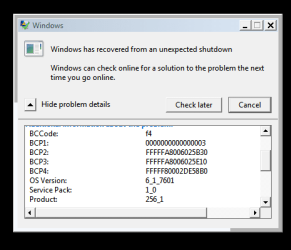
Btw what about this error? Any clues from it?
If i remember well is from the first installation,i finish everything,updates etc,shutdown the pc,and the morning when i start the pc is started with BSOD.
 

Attachments

  • error.PNG
    error.PNG
    6.5 KB · Views: 1

My Computer

Computer Manufacturer/Model Number
Custom Built by me.
OS
Windows 7 Ultimate 64bit SP1
CPU
Intel Core 2 Quad Q6600
Motherboard
Gigabyte GA-X38-DS4
Memory
2X2GB DDR2 PC6400 800MHZ DUAL CHANNEL
Graphics Card(s)
XFX RADEON HD 6850 1GB GDDR5
Sound Card
2/4/5.1/7.1-channel Realtek High Definition
Monitor(s) Displays
Samsung LE40A656F1 1080p 100Hz LCD HD TV 50,000:1
Screen Resolution
1366x768 in Desktop,1920x1080p in gaming and video
Hard Drives
C:\WD VelociRaptor 150 GB,10,000 RPM
E:\WESTERN DIGITAL WD15EADS 1.5TB CAVIAR GREEN SATA2 F:\WESTERN DIGITAL WD15EADS 1.5TB CAVIAR GREEN SATA2
PSU
THERMALTAKE W0229 TOUGHPOWER XT 750W
Case
A-Case Twin Engine BB
Cooling
3 x thermaltake smart case fan II + 1 arctic cooling fan
Keyboard
Wireless Logitech LX710
Mouse
Logitech Wireless Gaming Mouse G700
Internet Speed
ADSL 12000 plus
Other Info
Mouse Logitech G700,with 13 buttons who needs keyboard in RPG?

D:\Sony high speed sata Dvd Rewriter
Logitech Cordless Rumblepad 2
What happen if you disconnect the other 3 drives and then install panais have you tried that?
 

My Computer

Computer Manufacturer/Model Number
Alienware
OS
Windows 7 Ultimate x64
CPU
I7
Motherboard
GA-X58-USB3
Memory
6 x 1.5V DDR3 DIMM sockets supporting up to 24 GB of system
Graphics Card(s)
GeForce GTX 580
Sound Card
Realtek ALC892 codec 2/4/5.1/7.1-channel
Monitor(s) Displays
NEC Display Solutions E321 Black 32"
Screen Resolution
1366 x 768
Hard Drives
OCZ Colossus LT Series OCZSSD2-1CLSLT1T 3.5" 1TB SATA II MLC Internal Solid State Drive
PSU
XFX Black Edition XPS-850W-BES 850W ATX12V
Case
Antec
Cooling
Zalman
Keyboard
Microsoft
Mouse
Microsoft
What happen if you disconnect the other 3 drives and then install panais have you tried that?

Yes!

Anyone any idea from that error?
 

My Computer

Computer Manufacturer/Model Number
Custom Built by me.
OS
Windows 7 Ultimate 64bit SP1
CPU
Intel Core 2 Quad Q6600
Motherboard
Gigabyte GA-X38-DS4
Memory
2X2GB DDR2 PC6400 800MHZ DUAL CHANNEL
Graphics Card(s)
XFX RADEON HD 6850 1GB GDDR5
Sound Card
2/4/5.1/7.1-channel Realtek High Definition
Monitor(s) Displays
Samsung LE40A656F1 1080p 100Hz LCD HD TV 50,000:1
Screen Resolution
1366x768 in Desktop,1920x1080p in gaming and video
Hard Drives
C:\WD VelociRaptor 150 GB,10,000 RPM
E:\WESTERN DIGITAL WD15EADS 1.5TB CAVIAR GREEN SATA2 F:\WESTERN DIGITAL WD15EADS 1.5TB CAVIAR GREEN SATA2
PSU
THERMALTAKE W0229 TOUGHPOWER XT 750W
Case
A-Case Twin Engine BB
Cooling
3 x thermaltake smart case fan II + 1 arctic cooling fan
Keyboard
Wireless Logitech LX710
Mouse
Logitech Wireless Gaming Mouse G700
Internet Speed
ADSL 12000 plus
Other Info
Mouse Logitech G700,with 13 buttons who needs keyboard in RPG?

D:\Sony high speed sata Dvd Rewriter
Logitech Cordless Rumblepad 2
I ran my SSD in IDE mode for nearly 1 year as my BIOS introduced an 8 second delay at each boot that I didn't want to deal with. All of the automatic OS settings like disabling defrag and TRIM worked just fine on the drive in this configuration.

After running like this for some time, there was a BIOS update for my mobo which reduced the 8 second delay to 2 seconds. I installed the new BIOS, backed up my data and reinstalled Windows after switching to AHCI mode.

Honestly, i cannot tell, nor can I prove with a stopwatch that ANYTHING is noticeably faster in AHCI mode. A benchmark shows that it's faster in random 4K reads/writes (If I recall correctly), that was not measurable from a day to day perspective.

So, honestly, if your box blue screens in AHCI mode but runs fine in IDE mode....perhaps it's best to just run IDE mode. Go by how the drive actually performs, not by looking at screenshots of benchmarks that you cannot read and understand. If you installed in IDE mode and it boots fast, and launches applications instantly, and loads games faster than ever before....it's working.

 

My Computer

Computer Manufacturer/Model Number
Self-Built in July 2009
OS
Windows 7 Ultimate x64
CPU
Intel Q9550 2.83Ghz OC'd to 3.40Ghz
Motherboard
Gigabyte GA-EP45-UD3R rev. 1.1, F12 BIOS
Memory
8GB G.Skill PI DDR2-800, 4-4-4-12 timings
Graphics Card(s)
EVGA 1280MB Nvidia GeForce GTX570
Sound Card
Realtek ALC899A 8 channel onboard audio
Monitor(s) Displays
23" Acer x233H
Screen Resolution
1920x1080
Hard Drives
Intel X25-M 80GB Gen 2 SSD
Western Digital 1TB Caviar Black, 32MB cache. WD1001FALS
PSU
Corsair 620HX modular
Case
Antec P182
Cooling
stock
Keyboard
ABS M1 Mechanical
Mouse
Logitech G9 Laser Mouse
Internet Speed
15/2 cable modem
Other Info
Windows and Linux enthusiast. Logitech G35 Headset.
Seth, he tried that.
 

My Computers

System One System Two

  • Computer type
    PC/Desktop
    Computer Manufacturer/Model Number
    ALWAYS UNDER CONSTRUCTION
    OS
    Windows 11 Pro
    CPU
    Ryzen 9 5900X
    Motherboard
    Asus X570 Crosshair Viii Hero
    Memory
    32GB G Skill DDR4-3600
    Graphics Card(s)
    EVGA RTX 3080 FTW 3 Ultra
    Sound Card
    On Board/Sennheiser PC37X Headset
    Monitor(s) Displays
    3 X Asus 27"
    Screen Resolution
    2560x1440
    Hard Drives
    2 X 1 TB NVME drives
    PSU
    EVGA 850
    Case
    Phanteks Eclipse P400A
    Cooling
    EVGA 280 AIO
    Keyboard
    Logitech G510s/ Logitech G13
    Mouse
    Logitech G502
    Internet Speed
    24/1
    Antivirus
    ESET/MBAM Pro/SAS Pro
    Browser
    Chrome/ Firefox/ Edge
  • Computer type
    Laptop
    System Manufacturer/Model Number
    Dell 16 Plus
    OS
    Windows 11 Pro
    CPU
    Intel Ultra 9 288V
    Memory
    32 GB LPDDR5X 8533
    Monitor(s) Displays
    16" Mini-LED HDR600 Touch 90 Hz
    Screen Resolution
    2560X1600
    Hard Drives
    1 TB NVME

My Computer

Computer Manufacturer/Model Number
Alienware
OS
Windows 7 Ultimate x64
CPU
I7
Motherboard
GA-X58-USB3
Memory
6 x 1.5V DDR3 DIMM sockets supporting up to 24 GB of system
Graphics Card(s)
GeForce GTX 580
Sound Card
Realtek ALC892 codec 2/4/5.1/7.1-channel
Monitor(s) Displays
NEC Display Solutions E321 Black 32"
Screen Resolution
1366 x 768
Hard Drives
OCZ Colossus LT Series OCZSSD2-1CLSLT1T 3.5" 1TB SATA II MLC Internal Solid State Drive
PSU
XFX Black Edition XPS-850W-BES 850W ATX12V
Case
Antec
Cooling
Zalman
Keyboard
Microsoft
Mouse
Microsoft
In post 102 above is from yesterday when you were putting it in AHCI mode. I think IDE control mode should be disabled and onboard sata/IDE mode should be AHCI not IDE. Deacon has a gigabyte board and can advise if I am wrong.

Ok ofcurse i will follow the advices.

Btw what about this error? Any clues from it?
If i remember well is from the first installation,i finish everything,updates etc,shutdown the pc,and the morning when i start the pc is started with BSOD.

I ran my SSD in IDE mode for nearly 1 year as my BIOS introduced an 8 second delay at each boot that I didn't want to deal with. All of the automatic OS settings like disabling defrag and TRIM worked just fine on the drive in this configuration.

After running like this for some time, there was a BIOS update for my mobo which reduced the 8 second delay to 2 seconds. I installed the new BIOS, backed up my data and reinstalled Windows after switching to AHCI mode.

Honestly, i cannot tell, nor can I prove with a stopwatch that ANYTHING is noticeably faster in AHCI mode. A benchmark shows that it's faster in random 4K reads/writes (If I recall correctly), that was not measurable from a day to day perspective.

So, honestly, if your box blue screens in AHCI mode but runs fine in IDE mode....perhaps it's best to just run IDE mode. Go by how the drive actually performs, not by looking at screenshots of benchmarks that you cannot read and understand. If you installed in IDE mode and it boots fast, and launches applications instantly, and loads games faster than ever before....it's working.

I bought this ssd to work,play in AHCI and boost little my old system.....


Well,you are right all of you guys you are advice the right way

I may set again in bios the SATA RAID\AHCI Mode to AHCI and the Onboard SATA/IDE Ctrl Mode to disable if possile and reinstall windows. If i BSOD again i will disable AHCI, install again win7 and stick with IDE.
 

My Computer

Computer Manufacturer/Model Number
Custom Built by me.
OS
Windows 7 Ultimate 64bit SP1
CPU
Intel Core 2 Quad Q6600
Motherboard
Gigabyte GA-X38-DS4
Memory
2X2GB DDR2 PC6400 800MHZ DUAL CHANNEL
Graphics Card(s)
XFX RADEON HD 6850 1GB GDDR5
Sound Card
2/4/5.1/7.1-channel Realtek High Definition
Monitor(s) Displays
Samsung LE40A656F1 1080p 100Hz LCD HD TV 50,000:1
Screen Resolution
1366x768 in Desktop,1920x1080p in gaming and video
Hard Drives
C:\WD VelociRaptor 150 GB,10,000 RPM
E:\WESTERN DIGITAL WD15EADS 1.5TB CAVIAR GREEN SATA2 F:\WESTERN DIGITAL WD15EADS 1.5TB CAVIAR GREEN SATA2
PSU
THERMALTAKE W0229 TOUGHPOWER XT 750W
Case
A-Case Twin Engine BB
Cooling
3 x thermaltake smart case fan II + 1 arctic cooling fan
Keyboard
Wireless Logitech LX710
Mouse
Logitech Wireless Gaming Mouse G700
Internet Speed
ADSL 12000 plus
Other Info
Mouse Logitech G700,with 13 buttons who needs keyboard in RPG?

D:\Sony high speed sata Dvd Rewriter
Logitech Cordless Rumblepad 2
Seth, I searched also. Most of the ones I found say it is hardware related and usually either ram or hard drive.
 

My Computers

System One System Two

  • Computer type
    PC/Desktop
    Computer Manufacturer/Model Number
    ALWAYS UNDER CONSTRUCTION
    OS
    Windows 11 Pro
    CPU
    Ryzen 9 5900X
    Motherboard
    Asus X570 Crosshair Viii Hero
    Memory
    32GB G Skill DDR4-3600
    Graphics Card(s)
    EVGA RTX 3080 FTW 3 Ultra
    Sound Card
    On Board/Sennheiser PC37X Headset
    Monitor(s) Displays
    3 X Asus 27"
    Screen Resolution
    2560x1440
    Hard Drives
    2 X 1 TB NVME drives
    PSU
    EVGA 850
    Case
    Phanteks Eclipse P400A
    Cooling
    EVGA 280 AIO
    Keyboard
    Logitech G510s/ Logitech G13
    Mouse
    Logitech G502
    Internet Speed
    24/1
    Antivirus
    ESET/MBAM Pro/SAS Pro
    Browser
    Chrome/ Firefox/ Edge
  • Computer type
    Laptop
    System Manufacturer/Model Number
    Dell 16 Plus
    OS
    Windows 11 Pro
    CPU
    Intel Ultra 9 288V
    Memory
    32 GB LPDDR5X 8533
    Monitor(s) Displays
    16" Mini-LED HDR600 Touch 90 Hz
    Screen Resolution
    2560X1600
    Hard Drives
    1 TB NVME
Yeah that also what I found..
 

My Computer

Computer Manufacturer/Model Number
Alienware
OS
Windows 7 Ultimate x64
CPU
I7
Motherboard
GA-X58-USB3
Memory
6 x 1.5V DDR3 DIMM sockets supporting up to 24 GB of system
Graphics Card(s)
GeForce GTX 580
Sound Card
Realtek ALC892 codec 2/4/5.1/7.1-channel
Monitor(s) Displays
NEC Display Solutions E321 Black 32"
Screen Resolution
1366 x 768
Hard Drives
OCZ Colossus LT Series OCZSSD2-1CLSLT1T 3.5" 1TB SATA II MLC Internal Solid State Drive
PSU
XFX Black Edition XPS-850W-BES 850W ATX12V
Case
Antec
Cooling
Zalman
Keyboard
Microsoft
Mouse
Microsoft
Seth, I searched also. Most of the ones I found say it is hardware related and usually either ram or hard drive.

You mean the above last error?

I will run also the memtest then.
 

My Computer

Computer Manufacturer/Model Number
Custom Built by me.
OS
Windows 7 Ultimate 64bit SP1
CPU
Intel Core 2 Quad Q6600
Motherboard
Gigabyte GA-X38-DS4
Memory
2X2GB DDR2 PC6400 800MHZ DUAL CHANNEL
Graphics Card(s)
XFX RADEON HD 6850 1GB GDDR5
Sound Card
2/4/5.1/7.1-channel Realtek High Definition
Monitor(s) Displays
Samsung LE40A656F1 1080p 100Hz LCD HD TV 50,000:1
Screen Resolution
1366x768 in Desktop,1920x1080p in gaming and video
Hard Drives
C:\WD VelociRaptor 150 GB,10,000 RPM
E:\WESTERN DIGITAL WD15EADS 1.5TB CAVIAR GREEN SATA2 F:\WESTERN DIGITAL WD15EADS 1.5TB CAVIAR GREEN SATA2
PSU
THERMALTAKE W0229 TOUGHPOWER XT 750W
Case
A-Case Twin Engine BB
Cooling
3 x thermaltake smart case fan II + 1 arctic cooling fan
Keyboard
Wireless Logitech LX710
Mouse
Logitech Wireless Gaming Mouse G700
Internet Speed
ADSL 12000 plus
Other Info
Mouse Logitech G700,with 13 buttons who needs keyboard in RPG?

D:\Sony high speed sata Dvd Rewriter
Logitech Cordless Rumblepad 2
Panais, You don't have to reinstall. You can simply do the registry hack Hopalong linked to and change to ahci. If it bsods again, just change bios back to IDE and it will boot fine.
 

My Computers

System One System Two

  • Computer type
    PC/Desktop
    Computer Manufacturer/Model Number
    ALWAYS UNDER CONSTRUCTION
    OS
    Windows 11 Pro
    CPU
    Ryzen 9 5900X
    Motherboard
    Asus X570 Crosshair Viii Hero
    Memory
    32GB G Skill DDR4-3600
    Graphics Card(s)
    EVGA RTX 3080 FTW 3 Ultra
    Sound Card
    On Board/Sennheiser PC37X Headset
    Monitor(s) Displays
    3 X Asus 27"
    Screen Resolution
    2560x1440
    Hard Drives
    2 X 1 TB NVME drives
    PSU
    EVGA 850
    Case
    Phanteks Eclipse P400A
    Cooling
    EVGA 280 AIO
    Keyboard
    Logitech G510s/ Logitech G13
    Mouse
    Logitech G502
    Internet Speed
    24/1
    Antivirus
    ESET/MBAM Pro/SAS Pro
    Browser
    Chrome/ Firefox/ Edge
  • Computer type
    Laptop
    System Manufacturer/Model Number
    Dell 16 Plus
    OS
    Windows 11 Pro
    CPU
    Intel Ultra 9 288V
    Memory
    32 GB LPDDR5X 8533
    Monitor(s) Displays
    16" Mini-LED HDR600 Touch 90 Hz
    Screen Resolution
    2560X1600
    Hard Drives
    1 TB NVME

My Computers

System One System Two

  • Computer type
    PC/Desktop
    Computer Manufacturer/Model Number
    ALWAYS UNDER CONSTRUCTION
    OS
    Windows 11 Pro
    CPU
    Ryzen 9 5900X
    Motherboard
    Asus X570 Crosshair Viii Hero
    Memory
    32GB G Skill DDR4-3600
    Graphics Card(s)
    EVGA RTX 3080 FTW 3 Ultra
    Sound Card
    On Board/Sennheiser PC37X Headset
    Monitor(s) Displays
    3 X Asus 27"
    Screen Resolution
    2560x1440
    Hard Drives
    2 X 1 TB NVME drives
    PSU
    EVGA 850
    Case
    Phanteks Eclipse P400A
    Cooling
    EVGA 280 AIO
    Keyboard
    Logitech G510s/ Logitech G13
    Mouse
    Logitech G502
    Internet Speed
    24/1
    Antivirus
    ESET/MBAM Pro/SAS Pro
    Browser
    Chrome/ Firefox/ Edge
  • Computer type
    Laptop
    System Manufacturer/Model Number
    Dell 16 Plus
    OS
    Windows 11 Pro
    CPU
    Intel Ultra 9 288V
    Memory
    32 GB LPDDR5X 8533
    Monitor(s) Displays
    16" Mini-LED HDR600 Touch 90 Hz
    Screen Resolution
    2560X1600
    Hard Drives
    1 TB NVME
Back
Top