Solved My Internet USB Modem starts downloading by itself

Riff88

New member
Member
Local time
12:14 PM
Messages
56
Location
Pretoria, South Africa
Hi Everyone,

I have a Huawei E367 Internet USB Modem, which I use on my Laptop (Windows 7, 32-bit), and my PC (Windows 7, 32-bit). (Internet connection is MTN South Africa)

The USB works fine on my Laptop, it opens the Internet when I ask it to, and it downloads only when I ask it to.

When I put the USB in my PC, and press connect, to connect to the Internet, it starts downloading, continuously in Mb's. This happens when I open a webpage or not. Even if I close all my webpages, it continues to download in volumes, until I disconnect it.

I've checked in my downloads folder, there is nothing there. Windows Update is not set to automating updating, and there is no program on my PC, that I am aware of, that should be downloading anything. I don't know what the problem is.

Any help is appreciated. Thank you!
 

My Computer My Computer

At a glance

Microsoft Windows 7 Professional 64-bit 7601 ...Intel(R) Celeron(R) CPU 540 @ 1.86GHz2.00gGB(1) Mobile Intel(R) 965 Express Chipset Family
Computer type
Laptop
Computer Manufacturer/Model Number
Toshiba
OS
Microsoft Windows 7 Professional 64-bit 7601 Multiprocessor Free Service Pack 1
CPU
Intel(R) Celeron(R) CPU 540 @ 1.86GHz
Motherboard
Intel Corporation SANTA ROSA CRB
Memory
2.00gGB
Graphics Card(s)
(1) Mobile Intel(R) 965 Express Chipset Family
Sound Card
High Definition Audio Device (Microsoft)
Monitor(s) Displays
Generic Monitor
Screen Resolution
1280 x 800 x 32 bits (4294967296 colors) @ 60 Hz
Hard Drives
(1) WDC WD3200BPVT-22JJ5T0 ATA Device (2) HUAWEI TF CARD Storage USB Device
Keyboard
Standard PS/2 Keyboard
Mouse
Synaptics PS/ Port Touchpad
Antivirus
Avast
Browser
Google Chrome
I'm not sure what causing your problem on one computer.

If it was my computer I would do security scan looking for a nasty that is accessing the internet.

I would also take a look in msconfig to see if their are thing that are activated to auto update.

I would also take a look in Task Manager/Processes to see where all the activity is coming from.

**Do both your computer use the same anti virus programs?
**Do by chance have any program that is doing auto backups or anything else to a Cloud?
 

My Computer My Computer

At a glance

Windows 10 Pro. 64/ version 1709 Windows 7 Pr...Intel i7-6800K @ 4.3Corsair Platinum 16 gig @2400EVGA GTX 1070 OC
Computer type
PC/Desktop
Computer Manufacturer/Model Number
Home made Desktop
OS
Windows 10 Pro. 64/ version 1709 Windows 7 Pro/64
CPU
Intel i7-6800K @ 4.3
Motherboard
ASUS X-99 Deluxe II
Memory
Corsair Platinum 16 gig @2400
Graphics Card(s)
EVGA GTX 1070 OC
Monitor(s) Displays
Asus 27" LED LCD/VE278Q
Screen Resolution
1920-1080 or 1280-720 HDMI
Hard Drives
INTEL SSD 730-240 Gb Sata 3.0/
PSU
EVGA Platium 1200W
Case
Phanteks Luxe Tempered Glass 8 fans/ one radiator
Cooling
XSPC/ Water Cooled CPU
Keyboard
Das 4 Professional
Mouse
Logitech M705/MX Anywhere 2-S
Internet Speed
100 mbits
Antivirus
Microsoft Security Essentials/ Malwarebytes Premium 3.0/ SAS
Browser
I.E. 11 default/Firefox/ ISP Time Warner Cable/Spectrum
Other Info
LG BluRay Burner/
Sound system-KLipsch-THX/
Icy Dock ssd Hot Swap bays.
Hi Riff,

Do you know what is being downloaded? Do you know what servers are being connected to?

You can check by going into the Resource Monitor on Windows (search "resource" and it should be at the top) and going into the "Network" tab at the top below the "File", "Monitor" and "Help" tabs. This lets you know what exactly is connecting to the internet so you can see what program is causing the problem. Click the other sub-sections like "Network Activity" to expand them. If you could screenshot the page and upload it here, that would be very useful.

Also, do you have any anti-malware programs running or installed?

Kind Regards,

Mark
 

My Computer My Computer

At a glance

Windows 7 Home Premium x64AMD FX - 6200 3.8GHzPatriot Viper 3 Series DDR3 1600MHzSapphire AMD Radeon HD 7850
Computer type
PC/Desktop
Computer Manufacturer/Model Number
Custom Build
OS
Windows 7 Home Premium x64
CPU
AMD FX - 6200 3.8GHz
Motherboard
ASUS M5A99X EVO R2.0
Memory
Patriot Viper 3 Series DDR3 1600MHz
Graphics Card(s)
Sapphire AMD Radeon HD 7850
Hard Drives
2 x Seagate Barracuda 3.5" 2TB 6GB/s
Antivirus
Kaspersky Total Security 2016
Thank you for the replies. I will try suggestions, and report back. I use Avast antivirus, and Malwarebytes Anti-Malware, I have scanned thoroughly for any bugs, nothing has come up. Yes, Layback Bear, I use the same antivirus and anti-malware on both computers, I have nothing that I backup to Clouds.
 

My Computer My Computer

At a glance

Microsoft Windows 7 Professional 64-bit 7601 ...Intel(R) Celeron(R) CPU 540 @ 1.86GHz2.00gGB(1) Mobile Intel(R) 965 Express Chipset Family
Computer type
Laptop
Computer Manufacturer/Model Number
Toshiba
OS
Microsoft Windows 7 Professional 64-bit 7601 Multiprocessor Free Service Pack 1
CPU
Intel(R) Celeron(R) CPU 540 @ 1.86GHz
Motherboard
Intel Corporation SANTA ROSA CRB
Memory
2.00gGB
Graphics Card(s)
(1) Mobile Intel(R) 965 Express Chipset Family
Sound Card
High Definition Audio Device (Microsoft)
Monitor(s) Displays
Generic Monitor
Screen Resolution
1280 x 800 x 32 bits (4294967296 colors) @ 60 Hz
Hard Drives
(1) WDC WD3200BPVT-22JJ5T0 ATA Device (2) HUAWEI TF CARD Storage USB Device
Keyboard
Standard PS/2 Keyboard
Mouse
Synaptics PS/ Port Touchpad
Antivirus
Avast
Browser
Google Chrome
Hi Riff,

Do you know what is being downloaded? Do you know what servers are being connected to?

You can check by going into the Resource Monitor on Windows (search "resource" and it should be at the top) and going into the "Network" tab at the top below the "File", "Monitor" and "Help" tabs. This lets you know what exactly is connecting to the internet so you can see what program is causing the problem. Click the other sub-sections like "Network Activity" to expand them. If you could screenshot the page and upload it here, that would be very useful.

Also, do you have any anti-malware programs running or installed?

Kind Regards,

Mark

Thank you, Mark, your solution has helped.

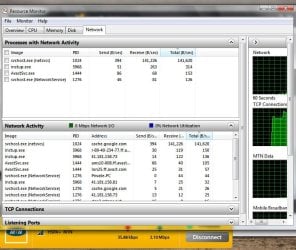
I opened Resource Monitor, and opened the network activity. At fist I thought it was Avast, because it (instup.exe) kept trying to update itself, I went to update it manually. No problem.

Then - as you can see from the screenshot - I saw a process called SVCHOST.EXE (NETWORK SERVICE), with its address "CACHE.GOOGLE.COM". I went and cleared Google Chrome's cache, cookies etc. and the problem was solved! I restarted, opened my Internet USB, connected, without opening a page, and it did nothing, just stayed quiet, no downloading, nothing.

It appears that something in the Google Chrome cache, was still downloading something.

Thank you so much for your help, appreciate it!

Resource Monitor Screenshot.jpg
 

My Computer My Computer

At a glance

Microsoft Windows 7 Professional 64-bit 7601 ...Intel(R) Celeron(R) CPU 540 @ 1.86GHz2.00gGB(1) Mobile Intel(R) 965 Express Chipset Family
Computer type
Laptop
Computer Manufacturer/Model Number
Toshiba
OS
Microsoft Windows 7 Professional 64-bit 7601 Multiprocessor Free Service Pack 1
CPU
Intel(R) Celeron(R) CPU 540 @ 1.86GHz
Motherboard
Intel Corporation SANTA ROSA CRB
Memory
2.00gGB
Graphics Card(s)
(1) Mobile Intel(R) 965 Express Chipset Family
Sound Card
High Definition Audio Device (Microsoft)
Monitor(s) Displays
Generic Monitor
Screen Resolution
1280 x 800 x 32 bits (4294967296 colors) @ 60 Hz
Hard Drives
(1) WDC WD3200BPVT-22JJ5T0 ATA Device (2) HUAWEI TF CARD Storage USB Device
Keyboard
Standard PS/2 Keyboard
Mouse
Synaptics PS/ Port Touchpad
Antivirus
Avast
Browser
Google Chrome
No problem, happy you got your problem sorted! 😊
 

My Computer My Computer

At a glance

Windows 7 Home Premium x64AMD FX - 6200 3.8GHzPatriot Viper 3 Series DDR3 1600MHzSapphire AMD Radeon HD 7850
Computer type
PC/Desktop
Computer Manufacturer/Model Number
Custom Build
OS
Windows 7 Home Premium x64
CPU
AMD FX - 6200 3.8GHz
Motherboard
ASUS M5A99X EVO R2.0
Memory
Patriot Viper 3 Series DDR3 1600MHz
Graphics Card(s)
Sapphire AMD Radeon HD 7850
Hard Drives
2 x Seagate Barracuda 3.5" 2TB 6GB/s
Antivirus
Kaspersky Total Security 2016
Back
Top