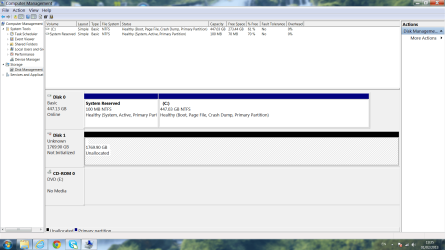
My internal hard drive won't show up on my computer?

ZEPJ

New member
Local time
9:22 AM
Messages
3
Location
London
Hi there,

My internal hard drive won't show up on my computer, and I've tried disk management to change the letter but all it does is stay at being called disk one. It also states that it's offline and unallocated? Please help all my uni work and itunes are on it.

Many thanks,
ZEPJ
 

My Computer My Computer

At a glance

windows 7,
OS
windows 7,
How did you come to this situation? Did you place it in a new computer? Did it happen randomly?

We need a little more detail.
 

My Computer My Computer

At a glance

Windows 7 professional X64AMD A10-5800K OC@ 4.4Ghz.8GB Kingston HyperX Blu 1333mhzXFX HD7870 2GB Core Edition
Computer type
PC/Desktop
OS
Windows 7 professional X64
CPU
AMD A10-5800K OC@ 4.4Ghz.
Motherboard
Gigabyte F2A85X-UP4
Memory
8GB Kingston HyperX Blu 1333mhz
Graphics Card(s)
XFX HD7870 2GB Core Edition
Monitor(s) Displays
Acer AL2216W
Screen Resolution
1680x1050
Hard Drives
Seagate Barracuda 500gb 7200rpm
Seagate Barracuda 1.5TB 7200rpm
PSU
Cooler Master Silent Pro M 850W
Case
Thermaltake Commander MS-I
Cooling
Cooler Master N520
Mouse
Logitech M504
Internet Speed
10Mbps
Hi Erick,

I was just going about my normal routine of using my computer when I tried clicking on iTunes this message appeared: 'The drive or network connection that the shortcut 'itunes.ink' refers to is unavailable. Make sure the disk is properly inserted or the network resource is available, and then try again.' After reading this message I checked my computer and under hard disk drives my hard disk D Drive no longer appears. I checked to see if any leads had become loose on disk D but they were all fine. I then went into my computer >right clicked on computer>Manage>Disk management and then a initialise disk window came up for disk 1, I closed the initialised disk window. I have attached a screen shot showing disk 1 as unallocated and offline!

Thank you for your quick response.
ZEPJ
 

Attachments

  • problem.png
    problem.png
    88.3 KB · Views: 23

My Computer My Computer

At a glance

windows 7,
OS
windows 7,
Wait for someone else to confirm, but I think you can right-click on it and choose to Initialize. I want to say that won't be destructive to any data, but someone else can confirm. Either way, if you get it online, back up the data on it, and run some manufacturer diag tests on it.
 

My Computer My Computer

At a glance

Windows 7 Ultimate x64 SP1Intel Core i7-260012 GB Patriot Extreme DDR3-1333Nvidia GTX 470
OS
Windows 7 Ultimate x64 SP1
CPU
Intel Core i7-2600
Motherboard
Gigabyte GA-P67A-UD3P-B3
Memory
12 GB Patriot Extreme DDR3-1333
Graphics Card(s)
Nvidia GTX 470
Monitor(s) Displays
Dell UltraSharp 2209WA
Hard Drives
OCZ Agility3 240 GB, WD5001AALS, WD7501AALS
PSU
OCZ ModStream 700W
Case
CoolerMaster HAF 912 Advanced
Cooling
CoolerMaster Hyper 212 Plus
Thank you Deacon Frost, I shall await confirmation! :)
 

My Computer My Computer

At a glance

windows 7,
OS
windows 7,
1. Do not format the D drive.

2. Do not run chkdsk.

Straightaway try the Partition Recovery Wizard.

Download, install and run MiniTools Partition Wizard Home Edition 7.7 Best Free Partition Manager Freeware and free partition magic for Windows 7, Windows 8, Windows Vista and Windows XP 32 bit & 64 bit. MiniTool Free Partition Manager Software Home Edition. and use the Partition Recovery Wizard in it on your internal drive D.

Head to the topic Recovery with Partition Wizard: SanDisk Cruzer Blade 16GB (In your case select the D drive for partition recovery) in http://www.sevenforums.com/software/266879-recover-flash-drive-turned-raw-partition-wizard-testdisk.html


If the lost partition is found, double click on it and check whether you can see all the files in the Partition Explorer. If yes, finish and give the drive its letter.


We know that it works when the Disk Management shows the drive as RAW. Here it shows as unallocated. But absolutely no harm in trying.


Good luck.
 

My Computer My Computer

At a glance

Windows 7 Home Premium 32 bit
OS
Windows 7 Home Premium 32 bit
Right click on Computer Management in the storage area, and right click the non-working drive, and right click "initialize." Go through the initialization wizard. It should work now but you will have to format the drive. It will loose all of the files.
 

My Computer My Computer

At a glance

Windows 7 Ultimate x32 (I now use windows 8, ...AMD8gb Hyper X with 4gb of Crucial Memory. (DDr3)AMD
Computer type
PC/Desktop
Computer Manufacturer/Model Number
Custom Build
OS
Windows 7 Ultimate x32 (I now use windows 8, they're the same but start screen)
CPU
AMD
Motherboard
AMD A Series Black Edition
Memory
8gb Hyper X with 4gb of Crucial Memory. (DDr3)
Graphics Card(s)
AMD
Sound Card
None because you don't need em.
Monitor(s) Displays
HP W2072a
Screen Resolution
1900x900
Hard Drives
Adata 120gb SSD
Unknown Laptop 160gb HDD
Western Digital Black 1TB HDD
PSU
Corsair CX430
Case
NzXT
Cooling
NZXT Stock Case Fan and CPU Stock Cooler
Keyboard
Logitech K520
Mouse
Logitech M310
Internet Speed
Unkown
Antivirus
None because I am not a noob. :D #getrektviruses
Browser
Mozila Firefox
Other Info
blank
Back
Top