
Hi,I am new to this forum and it feels great here.
My problem is i've bought a new laptop and 6monnths has passed since i bought it !! Earlier i could play games like Just cause 2 and COD MW2 without any serious lag but one day i formatted my C drive and re-installed windows ! And from then onwards games are lagging a bit more and at regular intervals( lagging for every 7secs)
One more point i would like to state is , games like AC:brotherhood do not lag when laptop is not plugged in but when i plug in it gets periodic lag (as describd above)and games like prototype lag even if i unplug the laptop !!
My rig :
Dell inspiron 15R
i5-2450 processor 2.4Ghz
6gb ram
650Gb harddisk
Win 7 OS
Intel hd 3000 graphics
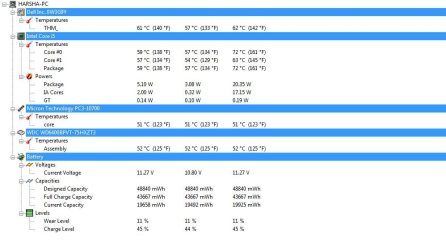
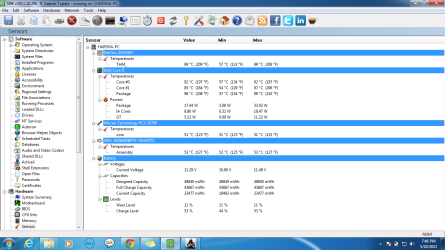
Also i've attached screenshots my laptop conditions at idle state(scre.jpg) and while game is running(cscree2.png)
Please help I've done all these things
->CCleaner
->defragmented
->Updated drivers
->scanned for viruses
And i am about to cry now please someone help me . Thanx
My problem is i've bought a new laptop and 6monnths has passed since i bought it !! Earlier i could play games like Just cause 2 and COD MW2 without any serious lag but one day i formatted my C drive and re-installed windows ! And from then onwards games are lagging a bit more and at regular intervals( lagging for every 7secs)
One more point i would like to state is , games like AC:brotherhood do not lag when laptop is not plugged in but when i plug in it gets periodic lag (as describd above)and games like prototype lag even if i unplug the laptop !!
My rig :
Dell inspiron 15R
i5-2450 processor 2.4Ghz
6gb ram
650Gb harddisk
Win 7 OS
Intel hd 3000 graphics
Also i've attached screenshots my laptop conditions at idle state(scre.jpg) and while game is running(cscree2.png)
Please help I've done all these things
->CCleaner
->defragmented
->Updated drivers
->scanned for viruses
And i am about to cry now please someone help me . Thanx
Attachments
My Computer
At a glance
windows 7
- OS
- windows 7


