My laptop shut down automatically when slightly displaced

sujit193

New member
Local time
7:04 PM
Messages
1
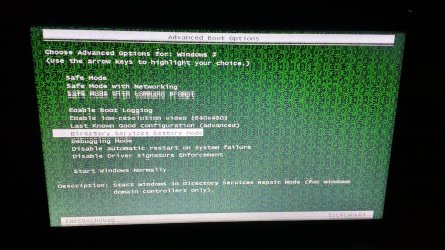
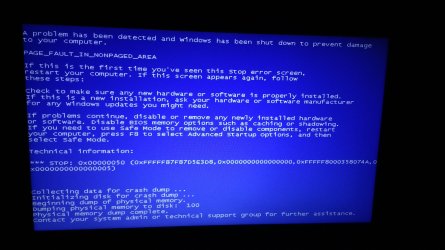
I have a HP pavillion g6 2226TU model laptop . It was running well from two years without any problem or repair.Suddenly it arises a problem that when i slightly displace the laptop while running, it suddenly switched off as like a TV:sick:..please go through my screenshots attached. it also shows the screen full of green dots
while touching the lower region(position of hard drive) of my PC. A error is also occurred showing a blue-screen(screenshot attached)


Thank You .Please help me out ..
 

Attachments
  • IMG_20160530_044805491.jpg
    IMG_20160530_044805491.jpg
    694.6 KB · Views: 3
  • IMG_20160530_045418604_HDR.jpg
    IMG_20160530_045418604_HDR.jpg
    1.4 MB · Views: 3

My Computer My Computer

Computer type
Laptop
Computer Manufacturer/Model Number
HP
OS
windows 7 ultimate x64
Memory
4GB
Graphics Card(s)
Intel 4000
Hard Drives
500GB
Antivirus
QUICKHEAL TOTAL
Browser
CHROME
Hi and welcome to SevenForums,
Seems with the description the hard drive has come loose or is going out completely
Remove the battery and see if it's loose.
 

My Computer My Computer

Computer type
PC/Desktop
Computer Manufacturer/Model Number
Custom assembled by me :}
OS
Win-7-Pro64bit 7-H-Prem-64bit
CPU
i7-5930K 2nd i9-9940x both water blocked VRM's too
Motherboard
ASUS SABERTOOTH X99 2nd ASUS x299 Apex
Memory
Trident-z 3200C14 2nd Trident-z 3600C16
Graphics Card(s)
EVGA 1080ti ftw3 2nd Titan Xp both water blocked
Sound Card
Built-in Realtek
Monitor(s) Displays
1-AOC G2460PG 24"G-Sync 144Hz/ 2nd 1-ASUS VG248QE 24" 144Hz
Screen Resolution
1920 x 1080 144Hz
Hard Drives
2-Samsung M.2 Evo & Evo Plus
2-Samsung 850 EVO 500GB SSD's/ 3-2.5 W.D. Black 1tb-&3-1tb/3-3.5 WD Black 1tb hdd's
PSU
EVGA SuperNOVA 1000-P2 2nd 1200-P2
Case
2-Corsair Obsidian Series 450D Black ATX Mid Tower
Cooling
Custom water loops
Keyboard
Logitech G710+/ 2nd Logitech G910
Mouse
2-RedDragon M901 Perdition 16400 dpi Gaming mouse = wired
Internet Speed
Comcast Ping 19ms 89.31mbps download speed 6.12mbps upload
Antivirus
Malwarebytes Pro/ Superantispyware Pro
Browser
FireFox & Pale moon
Other Info
2nd ASUS X299 Apex/Intel i9-9940x with Custom water loop/7H-Prem-x64/Corsair 450D case/Ram Trident-z 3600C16 4x8gb / Samsung970Evo plus 500gb SSD/Dual ssd EZ swap evo/PSU EVGA SuperNova 1200w-P2 80+Platinum/GPU Titan Xp /8-ML-140 on push-pull on 2-280GTX rads
It seems to me like the GPU (graphics chip) is becoming loose. The solder joints have cracked, maybe from the heatsink pressing onto it for so long, bending motherboard. Just a wild guess based on the second screenshot.

I would BACK UP all your data onto an external hard drive if you can AS SOON AS POSSIBLE as I've had a laptop with similar issues, which has failed a few days later (would not work anymore)
 

My Computer My Computer

OS
Windows 7 x64
On the Green Screen, it says "Enable Last Known Good Configuration". You need to do that when you come to that screen next time.
 

My Computer My Computer

Computer type
PC/Desktop
Computer Manufacturer/Model Number
Custom Build
OS
Windows 7 Home Premium 32-Bit - Build 7600 SP1
CPU
Intel Core i3-2120 3.30Ghz
Motherboard
Asus P8Z68-V LX Intel Z68 Socket H2 ATX
Memory
Kingston 4 GB DDR3 1333 mhz
Graphics Card(s)
AMD Radeon HD6670
Sound Card
Sound Blaster Audigy SE 24-Bit
Monitor(s) Displays
Asus VE228
Screen Resolution
1440 X 900
Hard Drives
OCZ Vertex 3 120 GB Sata 3 SSD ==
Kingston SH103/S3 120 G Hyper X 120 GB SSD ==
Western Digital 500 GB Caviar Green 7200 RPM ==
PSU
Corsair CX600M == 600 Watt
Case
NZXT Apollo - Silver with Clear Side Panel
Cooling
Three 120 mm Fans
Keyboard
Microsoft Natural 4000
Mouse
Microsoft Custom Optical 3000
Internet Speed
AT&T Fiber Optic Wireless Network
Antivirus
Microsoft Security Essentials
Browser
Chrome
Other Info
120 mm Blue LED Fan -- Three Blue LED Lazer Light Sticks
Back
Top