My laptop web cam stopped working

igor253

New member
Local time
5:24 PM
Messages
18
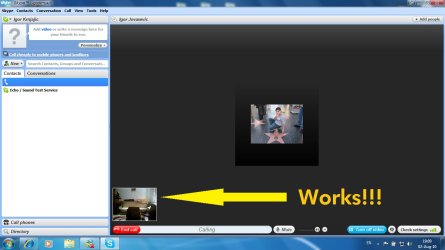
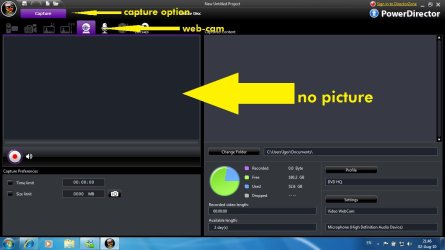
Just one more little thing, my laptop web cam stopped working around the time my library collapsed, I downloaded all the latest drivers, so those shouldn't be a problem. Again it worked fine a few days ago and it still works when I use it with skype, but when I try to open it with "amcap" I get the screen below. The real reason I need this camera is because I'm using a video editing software, and the program can't find the cam, therefore I get no picture.

Thank you so much, if there is anything I can help with, just ask :)
 

Attachments

  • web-cam.jpg
    web-cam.jpg
    29.6 KB · Views: 29
  • skype.jpg
    skype.jpg
    89.6 KB · Views: 13
Last edited by a moderator:

My Computer My Computer

OS
windows 7
Try uninstalling and then reinstalling Amcap. I presume you have the full version and not the trial version?
 

My Computer My Computer

Computer type
PC/Desktop
OS
Microsoft Windows 7 Home Premium 64-bit 7601 Multiprocessor Free Service Pack 1
CPU
Intel(R) Core(TM) i7-3770 CPU @ 3.40GHz
Motherboard
ASUSTeK COMPUTER INC. P8H77-M
Memory
8.00 GB
Graphics Card(s)
Intel(R) HD Graphics 4000
Sound Card
On Board
Monitor(s) Displays
Dell 24"
Screen Resolution
1920 x 1080
Hard Drives
(1) INTEL SSDSC2CT180A3 ATA Device (2) ST500DM002-1BD142 ATA Device (3) WDC WD3200AAKS-75L9A0 ATA Device (4) Generic- Compact Flash USB Device (5) Generic- MS/MS-Pro USB Device (6) Generic- SD/MMC USB Device (7) Generic- SM/xD-Picture USB
PSU
500w Corsair
Case
Cooler Master
Cooling
3 Fans
Keyboard
Logitech MK300
Mouse
Logitech WOM
Internet Speed
75Mb
Antivirus
Norton 360
Browser
Firefox, Opera, IE
Just downloaded the trial version of Amcap and it found my webcam immediately. I assume your webcam is built in to the laptop? If so try going to Device Manager, finding the webcam, checking for drivers and if that's no good try disabling the webcam. Leave for 30 seconds then enable th e webcam and try again.
I assume you have a separate video program to do your editing after capture if so may I suggest you save your captured video clips to AVI as these are the easiest of files to edit!
 

My Computer My Computer

Computer type
PC/Desktop
OS
Microsoft Windows 7 Home Premium 64-bit 7601 Multiprocessor Free Service Pack 1
CPU
Intel(R) Core(TM) i7-3770 CPU @ 3.40GHz
Motherboard
ASUSTeK COMPUTER INC. P8H77-M
Memory
8.00 GB
Graphics Card(s)
Intel(R) HD Graphics 4000
Sound Card
On Board
Monitor(s) Displays
Dell 24"
Screen Resolution
1920 x 1080
Hard Drives
(1) INTEL SSDSC2CT180A3 ATA Device (2) ST500DM002-1BD142 ATA Device (3) WDC WD3200AAKS-75L9A0 ATA Device (4) Generic- Compact Flash USB Device (5) Generic- MS/MS-Pro USB Device (6) Generic- SD/MMC USB Device (7) Generic- SM/xD-Picture USB
PSU
500w Corsair
Case
Cooler Master
Cooling
3 Fans
Keyboard
Logitech MK300
Mouse
Logitech WOM
Internet Speed
75Mb
Antivirus
Norton 360
Browser
Firefox, Opera, IE
Just downloaded the trial version of Amcap and it found my webcam immediately. I assume your webcam is built in to the laptop? If so try going to Device Manager, finding the webcam, checking for drivers and if that's no good try disabling the webcam. Leave for 30 seconds then enable th e webcam and try again.
I assume you have a separate video program to do your editing after capture if so may I suggest you save your captured video clips to AVI as these are the easiest of files to edit!

Thank you for repling,
I tried disabling the cam for 30 seconds but it didn't work. As for the drivers, I said I already downloaded the latest. Yes I'm using a different program to edit my videos. But in this program there is an option where I am able to capture videos via my inbuilt webcam.

Thank you for your help!
 

Attachments

  • Untitled.jpg
    Untitled.jpg
    70.7 KB · Views: 5

My Computer My Computer

OS
windows 7
Click the Devices menu and make sure your webcam is selected
 

My Computer My Computer

Computer Manufacturer/Model Number
Custom Built
OS
Windows 7 Ultimate
CPU
AMD Athlon II X2 245 2.90Ghz
Motherboard
Some Gigabyte one, dont remember model
Memory
3.00 GB
Graphics Card(s)
8800GTS 512MB
Sound Card
Sound Blaster X-Fi Titanium Fatal1ty
Monitor(s) Displays
Dual 22" widescreen
Hard Drives
250GB internal, 500GB internal
PSU
CORSAIR CMPSU-850TX 850W Power Supply
Case
Thermalkake Tsunami Dream
Cooling
Thermaltake Golden Orb II
Keyboard
Saitek Eclipse 2
Mouse
Logitech MX518
Click the Devices menu and make sure your webcam is selected

It is selected and it says that the device is working proprely, but still no picture
 

My Computer My Computer

OS
windows 7
Have you done what I suggested in Post #2 above?
If yes and still no good, look at item 2 in the help section of Amcap FAQ and see if that helps!
 

My Computer My Computer

Computer type
PC/Desktop
OS
Microsoft Windows 7 Home Premium 64-bit 7601 Multiprocessor Free Service Pack 1
CPU
Intel(R) Core(TM) i7-3770 CPU @ 3.40GHz
Motherboard
ASUSTeK COMPUTER INC. P8H77-M
Memory
8.00 GB
Graphics Card(s)
Intel(R) HD Graphics 4000
Sound Card
On Board
Monitor(s) Displays
Dell 24"
Screen Resolution
1920 x 1080
Hard Drives
(1) INTEL SSDSC2CT180A3 ATA Device (2) ST500DM002-1BD142 ATA Device (3) WDC WD3200AAKS-75L9A0 ATA Device (4) Generic- Compact Flash USB Device (5) Generic- MS/MS-Pro USB Device (6) Generic- SD/MMC USB Device (7) Generic- SM/xD-Picture USB
PSU
500w Corsair
Case
Cooler Master
Cooling
3 Fans
Keyboard
Logitech MK300
Mouse
Logitech WOM
Internet Speed
75Mb
Antivirus
Norton 360
Browser
Firefox, Opera, IE
Have you done what I suggested in Post #2 above?
If yes and still no good, look at item 2 in the help section of Amcap FAQ and see if that helps!

Yes I tried everything you suggested, like I said the camera worked fine a few days ago, and it still works fine, the problem is that the program cannot read/find it. Like amcap or powerdirector, but on skype it works fine. So I think it's not hardware problem I think it's a software issue.

Thanks!
 

My Computer My Computer

OS
windows 7
OK Lets try to eliminate things. If you go to the following link and scroll to the bottom of the page and download Debut Capture software Lite.
Video Capture Software - Capture Streaming Video, Screen Record or Webcam Video Capture
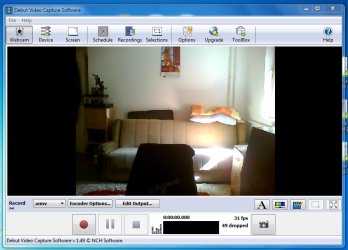
Click the download then click run. It's a very quick good download. Open the program and click "Webcam" as shown on the is screenshot:
View attachment 89616
You should see your webcam picture straight away. If you can see it we can assume the problem is with Amcap.If you can't then it is probably a webcam problem. We will have to go from there.
 
Last edited:

My Computer My Computer

Computer type
PC/Desktop
OS
Microsoft Windows 7 Home Premium 64-bit 7601 Multiprocessor Free Service Pack 1
CPU
Intel(R) Core(TM) i7-3770 CPU @ 3.40GHz
Motherboard
ASUSTeK COMPUTER INC. P8H77-M
Memory
8.00 GB
Graphics Card(s)
Intel(R) HD Graphics 4000
Sound Card
On Board
Monitor(s) Displays
Dell 24"
Screen Resolution
1920 x 1080
Hard Drives
(1) INTEL SSDSC2CT180A3 ATA Device (2) ST500DM002-1BD142 ATA Device (3) WDC WD3200AAKS-75L9A0 ATA Device (4) Generic- Compact Flash USB Device (5) Generic- MS/MS-Pro USB Device (6) Generic- SD/MMC USB Device (7) Generic- SM/xD-Picture USB
PSU
500w Corsair
Case
Cooler Master
Cooling
3 Fans
Keyboard
Logitech MK300
Mouse
Logitech WOM
Internet Speed
75Mb
Antivirus
Norton 360
Browser
Firefox, Opera, IE
OK Lets try to eliminate things. If you go to the following link and scroll to the bottom of the page and download Debut Capture software Lite.
Video Capture Software - Capture Streaming Video, Screen Record or Webcam Video Capture
Click the download then click run. It's a very quick good download. Open the program and click "Webcam" as shown on the is screenshot:
View attachment 89616
You should see your webcam picture straight away. If you can see it we can assume the problem is with Amcap.If you can't then it is probably a webcam problem. We will have to go from there.

Alright we have picture, I don't really need amcap. I need picture in my other program called power director, there is a picture in the posts above. That is why I posted this thread in the first place.

Thank you for your help!
 

Attachments

  • Untitled.jpg
    Untitled.jpg
    56.7 KB · Views: 8

My Computer My Computer

OS
windows 7
OK at least we know that your webcam is OK. You don't say what version you have of Power Director, is it the trial version because if so that might be the reason why the capture doesn't work. It seems an expensive piece of software to deal with video clips from a webcam. The free video editor that is downloadable from Microsoft for Windows 7 will be perfectly adequate. But if you want to use Power Director then just save the clips from the webcam and import them into the Power Director program. The Power Director program is capable of editing high def videos that's why I say it is a bit over the top for clips from a webcam. Those clips are usually no more than 640 x 360 px at best. These clips will not make a successful videos to play on a TV. You need at least a 720 x 576 PAL or 720 x 486 NTSC capture to do this. You don't say what you want to do with the final video, play on a TV, play on your PC or what?
Finally can you take a small clip with your webcam using the Debut Capture Software and post here the pixel size of the clip?
 

My Computer My Computer

Computer type
PC/Desktop
OS
Microsoft Windows 7 Home Premium 64-bit 7601 Multiprocessor Free Service Pack 1
CPU
Intel(R) Core(TM) i7-3770 CPU @ 3.40GHz
Motherboard
ASUSTeK COMPUTER INC. P8H77-M
Memory
8.00 GB
Graphics Card(s)
Intel(R) HD Graphics 4000
Sound Card
On Board
Monitor(s) Displays
Dell 24"
Screen Resolution
1920 x 1080
Hard Drives
(1) INTEL SSDSC2CT180A3 ATA Device (2) ST500DM002-1BD142 ATA Device (3) WDC WD3200AAKS-75L9A0 ATA Device (4) Generic- Compact Flash USB Device (5) Generic- MS/MS-Pro USB Device (6) Generic- SD/MMC USB Device (7) Generic- SM/xD-Picture USB
PSU
500w Corsair
Case
Cooler Master
Cooling
3 Fans
Keyboard
Logitech MK300
Mouse
Logitech WOM
Internet Speed
75Mb
Antivirus
Norton 360
Browser
Firefox, Opera, IE
OK at least we know that your webcam is OK. You don't say what version you have of Power Director, is it the trial version because if so that might be the reason why the capture doesn't work. It seems an expensive piece of software to deal with video clips from a webcam. The free video editor that is downloadable from Microsoft for Windows 7 will be perfectly adequate. But if you want to use Power Director then just save the clips from the webcam and import them into the Power Director program. The Power Director program is capable of editing high def videos that's why I say it is a bit over the top for clips from a webcam. Those clips are usually no more than 640 x 360 px at best. These clips will not make a successful videos to play on a TV. You need at least a 720 x 576 PAL or 720 x 486 NTSC capture to do this. You don't say what you want to do with the final video, play on a TV, play on your PC or what?
Finally can you take a small clip with your webcam using the Debut Capture Software and post here the pixel size of the clip?

It's Power Director 8, and it's not a trial version. I know I need HD clips for a higher quality clips, but I'm not in a movie business :), I'm just doing it for fun, uploading on youtube and stuff like that nothing big. Thanks for your help, I appreciate it! ;)
 

My Computer My Computer

OS
windows 7
I'm just doing it for fun, uploading on youtube and stuff like that nothing big. Thanks for your help, I appreciate it! ;)
Absolutely the best possible reason for doing it. Have Fun. Thanks for the feedback! Glad to be of help!
Be aware though, playing with video can be addictive, you will soon start hankering for a camcorder and taking things further. Time consuming but great fun. Come back if you need further help.
 

My Computer My Computer

Computer type
PC/Desktop
OS
Microsoft Windows 7 Home Premium 64-bit 7601 Multiprocessor Free Service Pack 1
CPU
Intel(R) Core(TM) i7-3770 CPU @ 3.40GHz
Motherboard
ASUSTeK COMPUTER INC. P8H77-M
Memory
8.00 GB
Graphics Card(s)
Intel(R) HD Graphics 4000
Sound Card
On Board
Monitor(s) Displays
Dell 24"
Screen Resolution
1920 x 1080
Hard Drives
(1) INTEL SSDSC2CT180A3 ATA Device (2) ST500DM002-1BD142 ATA Device (3) WDC WD3200AAKS-75L9A0 ATA Device (4) Generic- Compact Flash USB Device (5) Generic- MS/MS-Pro USB Device (6) Generic- SD/MMC USB Device (7) Generic- SM/xD-Picture USB
PSU
500w Corsair
Case
Cooler Master
Cooling
3 Fans
Keyboard
Logitech MK300
Mouse
Logitech WOM
Internet Speed
75Mb
Antivirus
Norton 360
Browser
Firefox, Opera, IE
Back
Top