JohnnyBucks
New member
- Local time
- 8:43 AM
- Messages
- 1
Hi Everyone
I am having problems with my Dell XPS 8300 desktop computer, which runs on Windows 7 and has a 64bit operating system.
The problem might have something to do with the network adapter as when I turn on the computer the network icon in the bottom right corner of the screen is marked with a red cross.
I connect to the internet using an EchoLife HG520s Broadband Wireless Router, which is connected via a red Ethernet cable to the back of my pc tower. I cannot connect to the internet wirelessly. The LAN1 light which is the socket where the red Ethernet cable is connected is not lit up either as it should be.
When I click on the network icon it says “No connections available” I have then clicked on the Troubleshoot link which then opens a window titled “Windows Network Diagnostics” and says this:
When this problem first occurred I found that restarting the computer 2 or 3 times seemed to fix the issue but not permanently. The longer I have left it the worse the problem seems to be getting.
What’s odd is that the driver/network adapter is installed on my computer it’s just it cannot find it nearly every time I start up the computer.
Today, it found the network adapter by pressing f12 and going into diagnostics or setup but this maybe just a coincidence.
That’s about all I can say on this matter. Any help would be greatly appreciated.
Thanks
Johnny
I am having problems with my Dell XPS 8300 desktop computer, which runs on Windows 7 and has a 64bit operating system.
The problem might have something to do with the network adapter as when I turn on the computer the network icon in the bottom right corner of the screen is marked with a red cross.
I connect to the internet using an EchoLife HG520s Broadband Wireless Router, which is connected via a red Ethernet cable to the back of my pc tower. I cannot connect to the internet wirelessly. The LAN1 light which is the socket where the red Ethernet cable is connected is not lit up either as it should be.
When I click on the network icon it says “No connections available” I have then clicked on the Troubleshoot link which then opens a window titled “Windows Network Diagnostics” and says this:
Install a driver for your network adapter
Windows did not detect a properly installed network adapter. If you have a network adapter, you will need to re-install the driver.
I then click on Next and this message appears: Windows did not detect a properly installed network adapter. If you have a network adapter, you will need to re-install the driver.
Troubleshooting has completed
Troubleshooting was unable to automatically fix all of the issues found. You can find more details below.
Problems found
Windows could not find a driver for your network adapter Detected !!
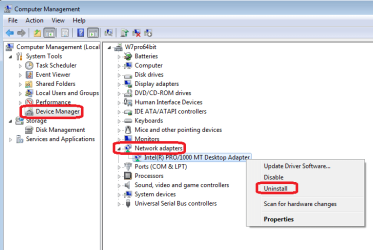
When I look in the device manager, there is no entry for “Network Adapters” either.Troubleshooting was unable to automatically fix all of the issues found. You can find more details below.
Problems found
Windows could not find a driver for your network adapter Detected !!
When this problem first occurred I found that restarting the computer 2 or 3 times seemed to fix the issue but not permanently. The longer I have left it the worse the problem seems to be getting.
What’s odd is that the driver/network adapter is installed on my computer it’s just it cannot find it nearly every time I start up the computer.
Today, it found the network adapter by pressing f12 and going into diagnostics or setup but this maybe just a coincidence.
That’s about all I can say on this matter. Any help would be greatly appreciated.
Thanks
Johnny
My Computer
At a glance
Windows 7 Home Premium 64bit Dell XPS 8300
- OS
- Windows 7 Home Premium 64bit Dell XPS 8300