My New Computer. Impressed with the O/c.

I have the actual ThermalTake smart fans which are made to be variable and use a controller, they do cost more but are worth it. They also have a much higher output than the regular cheapy fans. My system has 10 fans including the one in the power supply. I use a sunbeam rheobus extreme 30 watt 6 knob controller. It's nice to be able to turn them all down to barely audible yet still useful range, or on the hot days you can crank them up if required.

When overclocking, it's best to run your fans directly from the power supply rather than using the headers on the motherboard.
 

My Computer My Computer

At a glance

Windows 7 Ult, Windows 8.1 Pro,Q9650-4.275GHz, E8600 4.5GHz, E6750-3.8GHzG.Skill PC2 9600 1200Mhz 5 5 5 15 2TGTX480
Computer type
PC/Desktop
Computer Manufacturer/Model Number
Home built
OS
Windows 7 Ult, Windows 8.1 Pro,
CPU
Q9650-4.275GHz, E8600 4.5GHz, E6750-3.8GHz
Motherboard
Evga 780i FTW
Memory
G.Skill PC2 9600 1200Mhz 5 5 5 15 2T
Graphics Card(s)
GTX480
Sound Card
Asus Xonar D2
Monitor(s) Displays
HannsG
Screen Resolution
1680X1050
Hard Drives
GSkill Phoenix Pro 120GB SSD
PSU
ThermalTake Toughpower 1000Watt modular
Case
ThermalTake XaserV
Cooling
Xigmatek S1283
Keyboard
Logitech G15
Mouse
Logitech G9
Internet Speed
T1
As for the variance, it's actually not that odd when you think about it.
Regardless if the fan is "variable" or not, you can vary the speed simply by changing the voltage. Which is exactly what the motherboard smart fan does.
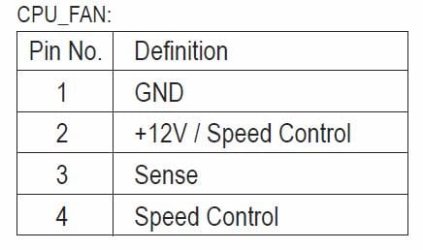
Yeah, I understand that now. My previous understanding was this…. if I hooked up a 4-pin fan to the CPU header, the header's PWM circuitry (pin 4) will vary the fan speed as the temps rise/lower, and that a 3-pin connector nullified this rule, i.e. the 3-pin connection would run full speed. I hadn’t realized how CPU Smart Fan worked, nor had I looked closely at the CPU header pin connections. As seen here…

CPU Header Fan Pins.JPG

Notice that pin number 4 is for the speed control (PWM), but also note that pin# 2 is also a speed control pin (+12V/speed control). This is what allows a 3-pin fan to be controlled by CPU Fan Speed Control

"The motherboard supports CPU fan speed con­trol, which requires the use of a CPU fan with fan speed control design."

"CPU Smart FAN Control Enables or disables the CPU fan speed control function. Enabled allows the CPU fan to run at different speed according to the CPU temperature. You can adjust the fan speed with EasyTune based on system requirements. If disabled, the CPU fan runs at full speed."

Apart from my discovery of smart fan’s function, the initial reason for my confusion was because I could have sworn I’d disabled smart fan since I needed to insure the fans were running at max speed in the first place.

The fact that the header varies its voltage based on temps even with a 3-pin fan connected is a nice feature and something I hadn’t seen/noticed with other boards (well I’ve only used Intel). As it turns out I like the way the system is setup now, with Smart Fan enabled ;)

I’m crystal now.


Those fans will run between 700-900 RPM with the LN/ULN adapters if used.
I don’t use them as I find that even with the fan running at max speed it’s plenty quiet for me.

Thanks.
 

My Computer My Computer

At a glance

Windows 10 ProIntel Core i7-4770K (3.5Ghz)32 gig Corsair Dominator Platinum (4x8Gig)Sapphire Tri-X R9 Fury
Computer type
PC/Desktop
Computer Manufacturer/Model Number
Custom built by me.
OS
Windows 10 Pro
CPU
Intel Core i7-4770K (3.5Ghz)
Motherboard
Gigabyte G1 Sniper 5 (F10 Bios)
Memory
32 gig Corsair Dominator Platinum (4x8Gig)
Graphics Card(s)
Sapphire Tri-X R9 Fury
Sound Card
Soundblaster ZXR
Monitor(s) Displays
NEC PA242W 24" LCD Monitor
Screen Resolution
1920 x 1200
Hard Drives
Primary - Samsung 850 Pro (512gig), Samsung 840 Pro (256gig), 2TB WD Caviar Black.
PSU
EVGA Supernova 1000 G2
Case
Cooler Master HAF X
Cooling
Corsair H100i with Corsair Air Series SP120 Quiet Fans
Keyboard
Logitech Wireless Wave
Mouse
Logitech Performance MX
Internet Speed
High Speed Cable
Antivirus
Norton Security
Browser
IE11
Other Info
Memory Timings - 1866MHz @ 9-9-9-27-1T @ 1.5 volts
UPDATE:

After resting the BIOS to the default factories settings, I thought I would try again.

I used Clunk's tutorial from Core i7 Overclocking Guide For Beginners

I followed as he has stated but could no longer use 1.25v when i got to 4Ghz (where I am now)

I have found what i think is a suitable setting. 1.288v @ 4Ghz (190 x 21)

I have C-State ON, i regular wonder off and leave the computer on for a few hours, so why waste money and energy and always have a hot computer when i can let the processor rest when i'm not using it?

I also have Hyper Threading ON.

Now, i did 15 passes of the IntelBurn Test. It passed no problems with temps peaking around 78*C and 44*C when idle (I have not got a very good cooling set up atm due to the computer case is half broken). I thought Cool, so i thought i'd let it run at 100% using Prime95, i used "Blends" and after 5 minutes, i got a BSOD. So i upped the voltage to what i have now, 1.88V's and still had the same problem after 5 minutes.

Why is this?

I say i "think its stable" because i don't know what program will use all 4 processors at 100% for over 5 minutes?

Thanks
Dan
 

My Computer My Computer

At a glance

Windows 7 Pro X64Intel i7, 930 2.8Ghz - O/c to 4Ghz @ 1.29v3x2GB = 6GB Mushkin Redline 998805Nvidia Geforce 8800GTX
Computer Manufacturer/Model Number
Home Grown
OS
Windows 7 Pro X64
CPU
Intel i7, 930 2.8Ghz - O/c to 4Ghz @ 1.29v
Motherboard
ASUS Rampage II Gene
Memory
3x2GB = 6GB Mushkin Redline 998805
Graphics Card(s)
Nvidia Geforce 8800GTX
Sound Card
Audigy Soundblaster 24 Bit Extreme
Monitor(s) Displays
Samsung SyncMaster 913N
Screen Resolution
1280 x 1024
Hard Drives
1x Western Digital 500GB, 16MB Crèche, 7,200RPM
1x Western Digital 150GB, 2MB Crèche, 7,200RPM
1x Seagate 250GB, 16MB Crèche, 7,200RPM
PSU
Thermaltake 850W PSU
Case
A butchered case with holes cut out for extra cooling lol
Cooling
CPU = Corsair H50 with 2x 120mm Noctua NF-S12B fans on rad
Keyboard
QWERTY
Mouse
Micky
Internet Speed
Not fast enough
I forgot to mention. I have my ram set to 9-9-9-24 in the BIOS (This is what it says on the sticker of the ram) and DRAM is AUTO.
 

My Computer My Computer

At a glance

Windows 7 Pro X64Intel i7, 930 2.8Ghz - O/c to 4Ghz @ 1.29v3x2GB = 6GB Mushkin Redline 998805Nvidia Geforce 8800GTX
Computer Manufacturer/Model Number
Home Grown
OS
Windows 7 Pro X64
CPU
Intel i7, 930 2.8Ghz - O/c to 4Ghz @ 1.29v
Motherboard
ASUS Rampage II Gene
Memory
3x2GB = 6GB Mushkin Redline 998805
Graphics Card(s)
Nvidia Geforce 8800GTX
Sound Card
Audigy Soundblaster 24 Bit Extreme
Monitor(s) Displays
Samsung SyncMaster 913N
Screen Resolution
1280 x 1024
Hard Drives
1x Western Digital 500GB, 16MB Crèche, 7,200RPM
1x Western Digital 150GB, 2MB Crèche, 7,200RPM
1x Seagate 250GB, 16MB Crèche, 7,200RPM
PSU
Thermaltake 850W PSU
Case
A butchered case with holes cut out for extra cooling lol
Cooling
CPU = Corsair H50 with 2x 120mm Noctua NF-S12B fans on rad
Keyboard
QWERTY
Mouse
Micky
Internet Speed
Not fast enough

My Computer My Computer

At a glance

Windows 10 ProIntel Core i7-4770K (3.5Ghz)32 gig Corsair Dominator Platinum (4x8Gig)Sapphire Tri-X R9 Fury
Computer type
PC/Desktop
Computer Manufacturer/Model Number
Custom built by me.
OS
Windows 10 Pro
CPU
Intel Core i7-4770K (3.5Ghz)
Motherboard
Gigabyte G1 Sniper 5 (F10 Bios)
Memory
32 gig Corsair Dominator Platinum (4x8Gig)
Graphics Card(s)
Sapphire Tri-X R9 Fury
Sound Card
Soundblaster ZXR
Monitor(s) Displays
NEC PA242W 24" LCD Monitor
Screen Resolution
1920 x 1200
Hard Drives
Primary - Samsung 850 Pro (512gig), Samsung 840 Pro (256gig), 2TB WD Caviar Black.
PSU
EVGA Supernova 1000 G2
Case
Cooler Master HAF X
Cooling
Corsair H100i with Corsair Air Series SP120 Quiet Fans
Keyboard
Logitech Wireless Wave
Mouse
Logitech Performance MX
Internet Speed
High Speed Cable
Antivirus
Norton Security
Browser
IE11
Other Info
Memory Timings - 1866MHz @ 9-9-9-27-1T @ 1.5 volts
dannyboy have a look at this tutorial... 3 Step Guide To Overclock Your Core i3, i5, or i7 – Updated! | Overclockers. I think this is a pretty good one.

Good luck.

PS. Set your memory manually; even if you use the same settings!!!

What do you mean manually?

I do. I go into BIOS then change these settings to:

ram-timings-upper.png


My ram says in grey 9-9-9-24.....

So i change the settings, the ones in blue like clunk has done there to my speeds (in grey).

I'll read the other thread.
Thanks
 

My Computer My Computer

At a glance

Windows 7 Pro X64Intel i7, 930 2.8Ghz - O/c to 4Ghz @ 1.29v3x2GB = 6GB Mushkin Redline 998805Nvidia Geforce 8800GTX
Computer Manufacturer/Model Number
Home Grown
OS
Windows 7 Pro X64
CPU
Intel i7, 930 2.8Ghz - O/c to 4Ghz @ 1.29v
Motherboard
ASUS Rampage II Gene
Memory
3x2GB = 6GB Mushkin Redline 998805
Graphics Card(s)
Nvidia Geforce 8800GTX
Sound Card
Audigy Soundblaster 24 Bit Extreme
Monitor(s) Displays
Samsung SyncMaster 913N
Screen Resolution
1280 x 1024
Hard Drives
1x Western Digital 500GB, 16MB Crèche, 7,200RPM
1x Western Digital 150GB, 2MB Crèche, 7,200RPM
1x Seagate 250GB, 16MB Crèche, 7,200RPM
PSU
Thermaltake 850W PSU
Case
A butchered case with holes cut out for extra cooling lol
Cooling
CPU = Corsair H50 with 2x 120mm Noctua NF-S12B fans on rad
Keyboard
QWERTY
Mouse
Micky
Internet Speed
Not fast enough
Last edited:

My Computer My Computer

At a glance

Windows 10 ProIntel Core i7-4770K (3.5Ghz)32 gig Corsair Dominator Platinum (4x8Gig)Sapphire Tri-X R9 Fury
Computer type
PC/Desktop
Computer Manufacturer/Model Number
Custom built by me.
OS
Windows 10 Pro
CPU
Intel Core i7-4770K (3.5Ghz)
Motherboard
Gigabyte G1 Sniper 5 (F10 Bios)
Memory
32 gig Corsair Dominator Platinum (4x8Gig)
Graphics Card(s)
Sapphire Tri-X R9 Fury
Sound Card
Soundblaster ZXR
Monitor(s) Displays
NEC PA242W 24" LCD Monitor
Screen Resolution
1920 x 1200
Hard Drives
Primary - Samsung 850 Pro (512gig), Samsung 840 Pro (256gig), 2TB WD Caviar Black.
PSU
EVGA Supernova 1000 G2
Case
Cooler Master HAF X
Cooling
Corsair H100i with Corsair Air Series SP120 Quiet Fans
Keyboard
Logitech Wireless Wave
Mouse
Logitech Performance MX
Internet Speed
High Speed Cable
Antivirus
Norton Security
Browser
IE11
Other Info
Memory Timings - 1866MHz @ 9-9-9-27-1T @ 1.5 volts

My Computer My Computer

At a glance

Windows 7 Pro X64Intel i7, 930 2.8Ghz - O/c to 4Ghz @ 1.29v3x2GB = 6GB Mushkin Redline 998805Nvidia Geforce 8800GTX
Computer Manufacturer/Model Number
Home Grown
OS
Windows 7 Pro X64
CPU
Intel i7, 930 2.8Ghz - O/c to 4Ghz @ 1.29v
Motherboard
ASUS Rampage II Gene
Memory
3x2GB = 6GB Mushkin Redline 998805
Graphics Card(s)
Nvidia Geforce 8800GTX
Sound Card
Audigy Soundblaster 24 Bit Extreme
Monitor(s) Displays
Samsung SyncMaster 913N
Screen Resolution
1280 x 1024
Hard Drives
1x Western Digital 500GB, 16MB Crèche, 7,200RPM
1x Western Digital 150GB, 2MB Crèche, 7,200RPM
1x Seagate 250GB, 16MB Crèche, 7,200RPM
PSU
Thermaltake 850W PSU
Case
A butchered case with holes cut out for extra cooling lol
Cooling
CPU = Corsair H50 with 2x 120mm Noctua NF-S12B fans on rad
Keyboard
QWERTY
Mouse
Micky
Internet Speed
Not fast enough
I don't know about being sarcastic, but I do know what my eyes saw you present. My mind reading abilities are being blocked by my monitor.

Sorry :sarc:
 

My Computer My Computer

At a glance

Windows 10 ProIntel Core i7-4770K (3.5Ghz)32 gig Corsair Dominator Platinum (4x8Gig)Sapphire Tri-X R9 Fury
Computer type
PC/Desktop
Computer Manufacturer/Model Number
Custom built by me.
OS
Windows 10 Pro
CPU
Intel Core i7-4770K (3.5Ghz)
Motherboard
Gigabyte G1 Sniper 5 (F10 Bios)
Memory
32 gig Corsair Dominator Platinum (4x8Gig)
Graphics Card(s)
Sapphire Tri-X R9 Fury
Sound Card
Soundblaster ZXR
Monitor(s) Displays
NEC PA242W 24" LCD Monitor
Screen Resolution
1920 x 1200
Hard Drives
Primary - Samsung 850 Pro (512gig), Samsung 840 Pro (256gig), 2TB WD Caviar Black.
PSU
EVGA Supernova 1000 G2
Case
Cooler Master HAF X
Cooling
Corsair H100i with Corsair Air Series SP120 Quiet Fans
Keyboard
Logitech Wireless Wave
Mouse
Logitech Performance MX
Internet Speed
High Speed Cable
Antivirus
Norton Security
Browser
IE11
Other Info
Memory Timings - 1866MHz @ 9-9-9-27-1T @ 1.5 volts
I don't know about being sarcastic, but I do know what my eyes saw you present. My mind reading abilities are being blocked by my monitor.

Sorry :sarc:

lol

the ones in blue like clunk has done there to my speeds (in grey).

Never mind, i should had made my self alot clearer
 

My Computer My Computer

At a glance

Windows 7 Pro X64Intel i7, 930 2.8Ghz - O/c to 4Ghz @ 1.29v3x2GB = 6GB Mushkin Redline 998805Nvidia Geforce 8800GTX
Computer Manufacturer/Model Number
Home Grown
OS
Windows 7 Pro X64
CPU
Intel i7, 930 2.8Ghz - O/c to 4Ghz @ 1.29v
Motherboard
ASUS Rampage II Gene
Memory
3x2GB = 6GB Mushkin Redline 998805
Graphics Card(s)
Nvidia Geforce 8800GTX
Sound Card
Audigy Soundblaster 24 Bit Extreme
Monitor(s) Displays
Samsung SyncMaster 913N
Screen Resolution
1280 x 1024
Hard Drives
1x Western Digital 500GB, 16MB Crèche, 7,200RPM
1x Western Digital 150GB, 2MB Crèche, 7,200RPM
1x Seagate 250GB, 16MB Crèche, 7,200RPM
PSU
Thermaltake 850W PSU
Case
A butchered case with holes cut out for extra cooling lol
Cooling
CPU = Corsair H50 with 2x 120mm Noctua NF-S12B fans on rad
Keyboard
QWERTY
Mouse
Micky
Internet Speed
Not fast enough

My Computer My Computer

At a glance

Windows 10 ProIntel Core i7-4770K (3.5Ghz)32 gig Corsair Dominator Platinum (4x8Gig)Sapphire Tri-X R9 Fury
Computer type
PC/Desktop
Computer Manufacturer/Model Number
Custom built by me.
OS
Windows 10 Pro
CPU
Intel Core i7-4770K (3.5Ghz)
Motherboard
Gigabyte G1 Sniper 5 (F10 Bios)
Memory
32 gig Corsair Dominator Platinum (4x8Gig)
Graphics Card(s)
Sapphire Tri-X R9 Fury
Sound Card
Soundblaster ZXR
Monitor(s) Displays
NEC PA242W 24" LCD Monitor
Screen Resolution
1920 x 1200
Hard Drives
Primary - Samsung 850 Pro (512gig), Samsung 840 Pro (256gig), 2TB WD Caviar Black.
PSU
EVGA Supernova 1000 G2
Case
Cooler Master HAF X
Cooling
Corsair H100i with Corsair Air Series SP120 Quiet Fans
Keyboard
Logitech Wireless Wave
Mouse
Logitech Performance MX
Internet Speed
High Speed Cable
Antivirus
Norton Security
Browser
IE11
Other Info
Memory Timings - 1866MHz @ 9-9-9-27-1T @ 1.5 volts
UPDATE:

After resting the BIOS to the default factories settings, I thought I would try again.

I used Clunk's tutorial from Core i7 Overclocking Guide For Beginners

I followed as he has stated but could no longer use 1.25v when i got to 4Ghz (where I am now)

I have found what i think is a suitable setting. 1.288v @ 4Ghz (190 x 21)

I have C-State ON, i regular wonder off and leave the computer on for a few hours, so why waste money and energy and always have a hot computer when i can let the processor rest when i'm not using it?

I also have Hyper Threading ON.

Now, i did 15 passes of the IntelBurn Test. It passed no problems with temps peaking around 78*C and 44*C when idle (I have not got a very good cooling set up atm due to the computer case is half broken). I thought Cool, so i thought i'd let it run at 100% using Prime95, i used "Blends" and after 5 minutes, i got a BSOD. So i upped the voltage to what i have now, 1.88V's and still had the same problem after 5 minutes.

Why is this?

I say i "think its stable" because i don't know what program will use all 4 processors at 100% for over 5 minutes?

Thanks
Dan

Proving once again what I have been saying about Prime Blend all along. It's the real deal for stablity testing. 5 minutes of Prime blend and you are far from stable my friend, not even close IMO. 10 hours of Prime Blend and you will have something. It takes a lot more than Vcore adjustments to get a system stable. ;)
 

My Computer My Computer

At a glance

Windows 7 Ult, Windows 8.1 Pro,Q9650-4.275GHz, E8600 4.5GHz, E6750-3.8GHzG.Skill PC2 9600 1200Mhz 5 5 5 15 2TGTX480
Computer type
PC/Desktop
Computer Manufacturer/Model Number
Home built
OS
Windows 7 Ult, Windows 8.1 Pro,
CPU
Q9650-4.275GHz, E8600 4.5GHz, E6750-3.8GHz
Motherboard
Evga 780i FTW
Memory
G.Skill PC2 9600 1200Mhz 5 5 5 15 2T
Graphics Card(s)
GTX480
Sound Card
Asus Xonar D2
Monitor(s) Displays
HannsG
Screen Resolution
1680X1050
Hard Drives
GSkill Phoenix Pro 120GB SSD
PSU
ThermalTake Toughpower 1000Watt modular
Case
ThermalTake XaserV
Cooling
Xigmatek S1283
Keyboard
Logitech G15
Mouse
Logitech G9
Internet Speed
T1
UPDATE:

After resting the BIOS to the default factories settings, I thought I would try again.

I used Clunk's tutorial from Core i7 Overclocking Guide For Beginners

I followed as he has stated but could no longer use 1.25v when i got to 4Ghz (where I am now)

I have found what i think is a suitable setting. 1.288v @ 4Ghz (190 x 21)

I have C-State ON, i regular wonder off and leave the computer on for a few hours, so why waste money and energy and always have a hot computer when i can let the processor rest when i'm not using it?

I also have Hyper Threading ON.

Now, i did 15 passes of the IntelBurn Test. It passed no problems with temps peaking around 78*C and 44*C when idle (I have not got a very good cooling set up atm due to the computer case is half broken). I thought Cool, so i thought i'd let it run at 100% using Prime95, i used "Blends" and after 5 minutes, i got a BSOD. So i upped the voltage to what i have now, 1.88V's and still had the same problem after 5 minutes.

Why is this?

I say i "think its stable" because i don't know what program will use all 4 processors at 100% for over 5 minutes?

Thanks
Dan

Proving once again what I have been saying about Prime Blend all along. It's the real deal for stablity testing. 5 minutes of Prime blend and you are far from stable my friend, not even close IMO. 10 hours of Prime Blend and you will have something. It takes a lot more than Vcore adjustments to get a system stable. ;)


Ah. I give up. It works fine now, PCMark Vantage works fine on it and all is ok.

Anyone willing to meet up to tune my processor. Monies waiting.
 

My Computer My Computer

At a glance

Windows 7 Pro X64Intel i7, 930 2.8Ghz - O/c to 4Ghz @ 1.29v3x2GB = 6GB Mushkin Redline 998805Nvidia Geforce 8800GTX
Computer Manufacturer/Model Number
Home Grown
OS
Windows 7 Pro X64
CPU
Intel i7, 930 2.8Ghz - O/c to 4Ghz @ 1.29v
Motherboard
ASUS Rampage II Gene
Memory
3x2GB = 6GB Mushkin Redline 998805
Graphics Card(s)
Nvidia Geforce 8800GTX
Sound Card
Audigy Soundblaster 24 Bit Extreme
Monitor(s) Displays
Samsung SyncMaster 913N
Screen Resolution
1280 x 1024
Hard Drives
1x Western Digital 500GB, 16MB Crèche, 7,200RPM
1x Western Digital 150GB, 2MB Crèche, 7,200RPM
1x Seagate 250GB, 16MB Crèche, 7,200RPM
PSU
Thermaltake 850W PSU
Case
A butchered case with holes cut out for extra cooling lol
Cooling
CPU = Corsair H50 with 2x 120mm Noctua NF-S12B fans on rad
Keyboard
QWERTY
Mouse
Micky
Internet Speed
Not fast enough
Those fans will run between 700-900 RPM with the LN/ULN adapters if used.
I don’t use them as I find that even with the fan running at max speed it’s plenty quiet for me.

Thanks.

Ditto. They're good if you are going for ultra-quiet setup (like a pure HTPC etc) but even at full tilt, the noctua fans are nice and quiet.


Ah. I give up. It works fine now, PCMark Vantage works fine on it and all is ok.

Anyone willing to meet up to tune my processor. Monies waiting.

nah mate, don't give up. Just take a break - read a bit more and you'll be tinkering again in no time ;)

It's quick and easy to ham fist a working OC - but it takes time to refine.


As for 'stability' - when overclocking, there is no such thing as an absolutely 100% stable system. However you can come pretty damn close ;)

Every overclocker has their own methods and tools that they use. Usually it's a battery of tests. It comes down to personal preference.


Often, you can start with 'loose' RAM timings to dial in your CPU O/C - then once that's sorted, you move on to 'tightening' the RAM. ( potentially eliminates initial RAM or vcore issues)

Generally, apps like IBT, LinX etc are good for 'quick and dirty' vcore testing. Make an adjustment, run for 5 passes - if all good run for 20+ etc.

Then you move onto Prime95's blend (torture test) if that passes the 12-24hr run and you have already passed IBT, LinX etc - then you are pretty much good to go.

But if you fail on Prime, then whatever FFT test you fail on gives an indication where the problem may lie. Low FFT failure is generally vcore/CPU related. Large FFT points towards RAM.

(However it's worth noting that some can pass IBT but fail Prime, or conversely pass prime but fail IBT etc)

The last and most important test is simply real world usage. If you have minimal, or preferably no BSOD's, freezes etc - then you can call it 'stable' ;)
 

My Computer My Computer

At a glance

8 Pro x64i7 3770K 4.6GHz16GB G.Skill Trident X 2666mhzx2 EVGA 780 Ti Superclocked SLI
Computer type
PC/Desktop
Computer Manufacturer/Model Number
Systems by SmartEyeball
OS
8 Pro x64
CPU
i7 3770K 4.6GHz
Motherboard
ASUS P8Z77 WS
Memory
16GB G.Skill Trident X 2666mhz
Graphics Card(s)
x2 EVGA 780 Ti Superclocked SLI
Sound Card
SB X-FI Surround 5.1 PRO USB / ATH-AD900 Headphones
Monitor(s) Displays
x3 Dell U2410 / 58" Samsung
Screen Resolution
5760*1200/ 1920*1200
Hard Drives
2x Intel 520 240GB (RAID 0) * 2x WD Caviar Blacks 2TB (RAID 0) * 2TB WD Caviar Black * Sony Optirac DVD
PSU
Silverstone Strider Evolution 1200W
Case
Thermaltake Level 10 GT Snow Edition
Cooling
Noctua NH-D14
Keyboard
Topre Realforce // Ducky Shine MX Black // Filco Ninja TKL
Mouse
Thermaltake Theron (Highly Recommended) + Razer Imperator
Antivirus
MSE
Browser
IE, FF, WaterFox
Other Info
GT Extreme V2 Sim Racing Cockpit + 40" LCD and K/B Mouse stand ▼
Fanatec CSR Elite Wheel + Clubsport V1 Pedals + CSR shifter/7G-H ▼Saitek X52 Pro ▼ TrackIR 5 Pro
Buttkicker v2 Seat Rumbler with Dedicated 5.1 and Sub Woofer attached to frame ▼
=
Bloody Big Grin
Back
Top