My RAM is over 5GB after boot

rev0

New member
Member
Local time
4:20 PM
Messages
17
Take a look at my memory usage 5 minutes after boot. (I have 8GB of Ram)
http://i40.tinypic.com/2wqvq82.png
I've tried disabling startup programs & services from MsConfig and manually starting them one at a time. Waiting 20+ minutes between programs to figure out what program has a memory leak but it hasnt helped.

I know what your thinking. . . open up task manager and check what program is using the most memory.
Task manager says the total amount of memory allocated is around 2GB but look at the bottom of this screenshot. 69% of my 8GBs are allocated; not 2GB.
http://i42.tinypic.com/14xh1sg.png

Is this some kind of memory leak?
How should I go about determing which program is causing this?


Windows 7 Ultimate x64
Core i5 2500k
G-Skill 8GB Ram
Evga 260GTX GPU
Asus P8Z68 MotherBoard
 
Last edited:

My Computer My Computer

Computer Manufacturer/Model Number
Custom
OS
W7 Ultimate 64
CPU
Core i5 2500k
Motherboard
ASUS P8Z68 Deluxe LGA 1155 Intel Z68
Memory
G.SKILL 8GB (2 x 4GB) DDR3 @ 1600
Graphics Card(s)
Evga GTX 260 216
Screen Resolution
1920x1080
Hard Drives
2 x 120GB OCZ Vertex 3 in RAID 0
1010 MBps average read
PSU
Corsair 750W
Case
Antec P183
Keyboard
G510
Thanks for providing such detailed information, makes it easier to help you. :)

Could you do another screenshot of the running processes in Task Manager please - but this time, be sure to first click the button "Show processes from all users" at the bottom.
In your screenshot above, only the processes that run under your user account are visible, but we need to see all of them.

I agree that the RAM usage increase after boot is a sign of a memory hog somewhere. We'll get this figured out.
 

My Computer My Computer

Computer type
PC/Desktop
Computer Manufacturer/Model Number
Custom-built
OS
Windows 7 Professional SP1 32-bit
CPU
Intel Core 2 Duo E6600 2.4GHz
Motherboard
Asus PL5D2
Memory
4GB DDR2-667 (4x1GB in dual-channel config)
Graphics Card(s)
nVidia GeForce 9800 GT
Sound Card
Creative X-Fi XtremeMusic
Monitor(s) Displays
Acer P236H
Screen Resolution
1920x1200 (DVI)
Hard Drives
OCZ SSD Vertex Plus 60GB SATA (Firmware 3.55), 64MB cache
Hitachi HD321KJ SATA, 320GB, 7200rpm, 16MB cache
PSU
Antec TruePower 2.0
Case
Cooler Master Centurion
Cooling
Too many fans
Keyboard
Standard
Mouse
Microsoft wireless optical mouse
Internet Speed
AT&T U-verse (18mbit/sec)
Antivirus
Microsoft Security Essentials
Browser
Firefox
Other Info
Other devices:
Compaq CQ-60 laptop
Google Nexus 7 (2012) tablet
Nvidia SHIELD tablet (US/LTE)
Hardkernel ODROID-XU single-board computer (Samsung Exynos 5420)
I never knew that button existed untill today.
http://i40.tinypic.com/2agvlzt.png
I know thats alot of processes but it still doesnt justify 4.8GB of memory.

Looks like I have some services to disable.
 

My Computer My Computer

Computer Manufacturer/Model Number
Custom
OS
W7 Ultimate 64
CPU
Core i5 2500k
Motherboard
ASUS P8Z68 Deluxe LGA 1155 Intel Z68
Memory
G.SKILL 8GB (2 x 4GB) DDR3 @ 1600
Graphics Card(s)
Evga GTX 260 216
Screen Resolution
1920x1080
Hard Drives
2 x 120GB OCZ Vertex 3 in RAID 0
1010 MBps average read
PSU
Corsair 750W
Case
Antec P183
Keyboard
G510
Folding at home set for startup?
I would just start that one manally.

Might be part of the reason so much memory is being used at start up too.
 

My Computer My Computer

Computer Manufacturer/Model Number
Custom (Self Build)
OS
Windows 7 Home Premium 64bit
CPU
Intel Core i7 2700k
Motherboard
eVGA P67 SLI
Memory
8GB Mushkin Redline Ridgebacks @1866
Graphics Card(s)
EVGA GTX570 SC
Sound Card
XiFi Titanium HD
Monitor(s) Displays
LG W2453V
Screen Resolution
1920x1080
Hard Drives
Intel 320 80GB -- Intel X25-V 40GB --WD Black 1TB x2 -- WD Blue 640GB
PSU
Seasonic x750
Case
Corsair 600T SE White
Cooling
eVGA Superclocked CPU Cooler
Keyboard
Saitek Cyborg
Antivirus
Kaspersky
Browser
IE
Other Info
LG BD/DVD
As far as I can see 3GBs account for caching - which is considered "available" RAM. But it would be clearer if we could see a pic of the Reource Monitor > Memory tab. The button for that is on the bottom right of the Task Manager window.
 

My Computer My Computer

Computer Manufacturer/Model Number
HP, Dell, Gateway, Toshiba - 4 laptops and 2 desktops
OS
Vista, Windows7, Mint Mate, Zorin, Windows 8
CPU
from 1.6GHz Duo to i7
Monitor(s) Displays
2x HP w2207
Hard Drives
5x HDD, 7x SSD, 12x Externals
Keyboard
with trackball - no mices
Mouse
Trackball mice
Internet Speed
DSL 6000

My Computer My Computer

Computer Manufacturer/Model Number
Custom
OS
W7 Ultimate 64
CPU
Core i5 2500k
Motherboard
ASUS P8Z68 Deluxe LGA 1155 Intel Z68
Memory
G.SKILL 8GB (2 x 4GB) DDR3 @ 1600
Graphics Card(s)
Evga GTX 260 216
Screen Resolution
1920x1080
Hard Drives
2 x 120GB OCZ Vertex 3 in RAID 0
1010 MBps average read
PSU
Corsair 750W
Case
Antec P183
Keyboard
G510

My Computer My Computer

Computer Manufacturer/Model Number
HP Media Center
OS
Windows 7 32 bit
CPU
AMD 5200+ dual core
Memory
2 GB
Graphics Card(s)
NVidia GeForce 6150SE 128 MB
Monitor(s) Displays
CRT
Screen Resolution
1280x1024
Hard Drives
500 GB Sata internal :

SIIG USB 3.0 docking stations w/WD Caviar Black 6 Gb/s drives
Keyboard
PS/2
Mouse
PS/2 Wheel Mouse
Other Info
SIIG USB 3.0 PCIexpress card.
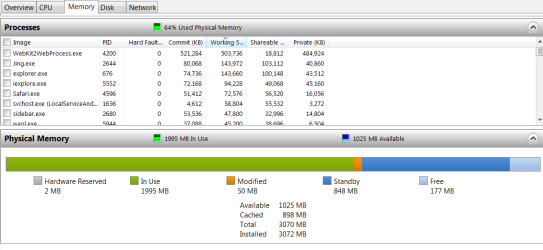
Judging by the Resource Monitor, I would say that this is not unusual for a system with 8GBs of RAM. Compare that to my picture - but I have only 3GB of RAM.
 

Attachments

  • 2011-12-08_1451.png
    2011-12-08_1451.png
    20.3 KB · Views: 25

My Computer My Computer

Computer Manufacturer/Model Number
HP, Dell, Gateway, Toshiba - 4 laptops and 2 desktops
OS
Vista, Windows7, Mint Mate, Zorin, Windows 8
CPU
from 1.6GHz Duo to i7
Monitor(s) Displays
2x HP w2207
Hard Drives
5x HDD, 7x SSD, 12x Externals
Keyboard
with trackball - no mices
Mouse
Trackball mice
Internet Speed
DSL 6000

My Computer My Computer

Computer Manufacturer/Model Number
HP, Dell, Gateway, Toshiba - 4 laptops and 2 desktops
OS
Vista, Windows7, Mint Mate, Zorin, Windows 8
CPU
from 1.6GHz Duo to i7
Monitor(s) Displays
2x HP w2207
Hard Drives
5x HDD, 7x SSD, 12x Externals
Keyboard
with trackball - no mices
Mouse
Trackball mice
Internet Speed
DSL 6000
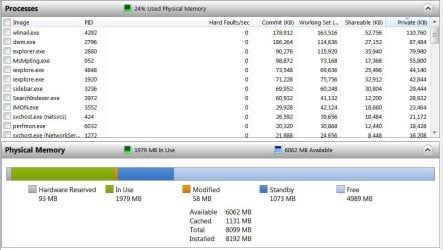
I'm not sure I would call that normal. There's a lot running on your machine I'm not familiar with but here's my 8GB memory usage at the moment.
 

Attachments

  • Resorce Monitor - Memory.JPG
    Resorce Monitor - Memory.JPG
    73.3 KB · Views: 22

My Computer My Computer

Computer type
PC/Desktop
Computer Manufacturer/Model Number
Built 2/11/2011
OS
Windows 7 Pro-x64
CPU
i7-2600 3.4GHz - 3.8GHz Turbo
Motherboard
Intel DH67BL-B3
Memory
8Gb - 2x4GB, Muskin 991770 PC3-1333
Graphics Card(s)
Integrated Intel HD 2000
Sound Card
Integrated Intel 10.1 HD, RealTek ALC892
Monitor(s) Displays
Asus LCD VH222H, Haier HL24XSL2a
Screen Resolution
1920x1080, 1920x1080
Hard Drives
Crucial SSD C300-128Gb,
Western Digital WD5002AALX - 500Gb,
Western Digital WD7501AALS - 750Gb
PSU
Seasonic 650W 80+ Gold Modular
Case
Rosewill Defender
Cooling
Stock CPU, Four 120mm case fans, PCH fan added
Keyboard
Logitech EX100 Y-RBH94 Wireless
Mouse
Logitech EX100 M-RCE95 Wireless
Internet Speed
3.0/1.5 Mbs
Antivirus
Microsoft Security Essentials
Browser
Microsoft Internet Explorer 11
Other Info
Antec Veris Premier-Multimedia IR Station,
Cyber Accoustics-3602 Speakers,
AFT XM-5U Card Reader,
Hauppauge TV-HVR-2250,
Sony LX300 USB Turntable
I'm not sure I would call that normal. There's a lot running on your machine I'm not familiar with but here's my 8GB memory usage at the moment.
True, it is a bit high. But it also depends how long the system was already running and what programs were loaded. My theory is that using a maximum of RAM is a good thing. No need to keep it empty for a rainy day.
 

My Computer My Computer

Computer Manufacturer/Model Number
HP, Dell, Gateway, Toshiba - 4 laptops and 2 desktops
OS
Vista, Windows7, Mint Mate, Zorin, Windows 8
CPU
from 1.6GHz Duo to i7
Monitor(s) Displays
2x HP w2207
Hard Drives
5x HDD, 7x SSD, 12x Externals
Keyboard
with trackball - no mices
Mouse
Trackball mice
Internet Speed
DSL 6000
Not many rainy days down here in South Texas. ;) The memory gets used. That's why my statement was qualified with "at the moment". The OP has tons of processes running but yeah, I agree, the snapshots don't tell the whole story. Could be a couple of updates running. I see one back door from WMC.

If you really want to see how busy it can get after startup, take a look at Windows scheduled events. :shock:
 

My Computer My Computer

Computer type
PC/Desktop
Computer Manufacturer/Model Number
Built 2/11/2011
OS
Windows 7 Pro-x64
CPU
i7-2600 3.4GHz - 3.8GHz Turbo
Motherboard
Intel DH67BL-B3
Memory
8Gb - 2x4GB, Muskin 991770 PC3-1333
Graphics Card(s)
Integrated Intel HD 2000
Sound Card
Integrated Intel 10.1 HD, RealTek ALC892
Monitor(s) Displays
Asus LCD VH222H, Haier HL24XSL2a
Screen Resolution
1920x1080, 1920x1080
Hard Drives
Crucial SSD C300-128Gb,
Western Digital WD5002AALX - 500Gb,
Western Digital WD7501AALS - 750Gb
PSU
Seasonic 650W 80+ Gold Modular
Case
Rosewill Defender
Cooling
Stock CPU, Four 120mm case fans, PCH fan added
Keyboard
Logitech EX100 Y-RBH94 Wireless
Mouse
Logitech EX100 M-RCE95 Wireless
Internet Speed
3.0/1.5 Mbs
Antivirus
Microsoft Security Essentials
Browser
Microsoft Internet Explorer 11
Other Info
Antec Veris Premier-Multimedia IR Station,
Cyber Accoustics-3602 Speakers,
AFT XM-5U Card Reader,
Hauppauge TV-HVR-2250,
Sony LX300 USB Turntable
When that snapshot was taken the memory wasnt too bad. Keep in mind some days it will go up to 6-7Gb when Im only using winamp and IE.
 

My Computer My Computer

Computer Manufacturer/Model Number
Custom
OS
W7 Ultimate 64
CPU
Core i5 2500k
Motherboard
ASUS P8Z68 Deluxe LGA 1155 Intel Z68
Memory
G.SKILL 8GB (2 x 4GB) DDR3 @ 1600
Graphics Card(s)
Evga GTX 260 216
Screen Resolution
1920x1080
Hard Drives
2 x 120GB OCZ Vertex 3 in RAID 0
1010 MBps average read
PSU
Corsair 750W
Case
Antec P183
Keyboard
G510
Hopefully you'll be able to get one and post it when it's "in state".
 

My Computer My Computer

Computer type
PC/Desktop
Computer Manufacturer/Model Number
Custom
OS
Windows 10 Pro x64
CPU
Intel Core i7 4790K @ 4.5GHz
Motherboard
Asus Maximus Hero VII
Memory
32GB DDR3
Graphics Card(s)
Nvidia GeForce GTX970
Sound Card
Realtek HD Audio
Screen Resolution
1920x1200
Hard Drives
1x Samsung 250GB SSD
4x WD RE 2TB (RAIDZ)
PSU
Corsair AX760i
Case
Fractal Design Define R4
Cooling
Noctua NH-D15
Ive started to launch one program at a time again. Letting the comp run for awhile to see if there is a spike in memory. So far nothing.
 

My Computer My Computer

Computer Manufacturer/Model Number
Custom
OS
W7 Ultimate 64
CPU
Core i5 2500k
Motherboard
ASUS P8Z68 Deluxe LGA 1155 Intel Z68
Memory
G.SKILL 8GB (2 x 4GB) DDR3 @ 1600
Graphics Card(s)
Evga GTX 260 216
Screen Resolution
1920x1080
Hard Drives
2 x 120GB OCZ Vertex 3 in RAID 0
1010 MBps average read
PSU
Corsair 750W
Case
Antec P183
Keyboard
G510
Back
Top