My Sound Quit Working in Minesweeper (Windows 7)

jimginpa

New member
Local time
3:03 PM
Messages
1
It happened after I muted a DVD in Media Center. The sound option is checked and I've tried a System Restore to no avail. Audio seems to work on everything else. I'm baffled.
 

My Computer My Computer

At a glance

windows 72.608 GB
Computer Manufacturer/Model Number
Gateway/DX4300
OS
windows 7
CPU
2.60
Memory
8 GB
It happened after I muted a DVD in Media Center. The sound option is checked and I've tried a System Restore to no avail. Audio seems to work on everything else. I'm baffled.


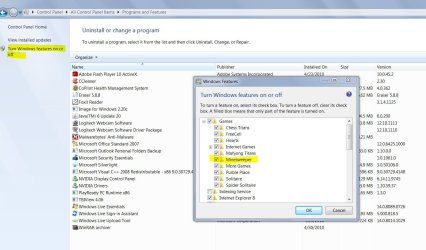
You could try to uninstall and reinstall minesweeper using the Control Panel Program Uninstall. You will have to check "Turn Windows features on and off" in the left side of the screen. I think its all under games . Just Unckeck and uninstall and reboot then go back and install again.
 

Attachments

  • minesweep.JPG
    minesweep.JPG
    133.3 KB · Views: 24

My Computer My Computer

At a glance

Windows 10 ProIntel i5I'm old and lost a few chipsYup
Computer type
PC/Desktop
Computer Manufacturer/Model Number
Self Built
OS
Windows 10 Pro
CPU
Intel i5
Motherboard
I have a fatherboard
Memory
I'm old and lost a few chips
Graphics Card(s)
Yup
Sound Card
Yup
Monitor(s) Displays
Samsung 32" UHD
Screen Resolution
3840 x 2160
Hard Drives
Samsung 860 EVO drives
PSU
450 Watt and some fans that blow
Case
Small tower
Cooling
Yes I am cool. lol
Keyboard
Who needs a keyboard?
Mouse
Logitech Laser G7 wireless
Internet Speed
Zippy fast UP and DOWN
Antivirus
I got a shot
Browser
The new Improved EDGE 2020
Back
Top