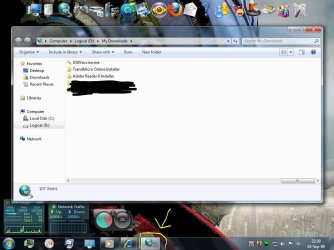
My taskbar Windows Explorer icon changed.

MadMatt

New member
Local time
8:29 AM
Messages
51
It changed, it's dynamic now. I like it now. But I'm curious, what has change it? Can I get it back to the general icon which is a yellow folder icon?
 

Attachments

  • Capture.JPG
    Capture.JPG
    90.1 KB · Views: 567

My Computer

Computer Manufacturer/Model Number
custom built
OS
7600.16385 x86
CPU
Intel Pentium E8400
Motherboard
Gigabyte GA-X48T-DQ6
Graphics Card(s)
HIS 4890
Internet Speed
broadband 384kbps bandwidth
well , i think that you have to make a restore point to get it back
try that ;)
 

My Computer

OS
seven
but do u know what triggers it?
 

My Computer

Computer Manufacturer/Model Number
custom built
OS
7600.16385 x86
CPU
Intel Pentium E8400
Motherboard
Gigabyte GA-X48T-DQ6
Graphics Card(s)
HIS 4890
Internet Speed
broadband 384kbps bandwidth
This happened to me too, it changed to a mic after I lunched an MP3 from the downloads folder. I fixed it by closing WMP and all open explorer windows, then reopened a window and the icon was back to normal and has been since then. I'm guessing its a random glitch.
 

My Computer

Computer Manufacturer/Model Number
Dell Inspiron 1720
OS
Windows 7 Pro x64
CPU
Intel Core 2 Duo 2.2 GhzT7500
Motherboard
Dell BIOS Revision A09
Memory
3 Gigs
Graphics Card(s)
Nvidia GeForce 8600M GT
Sound Card
Intergrated HD Audio
Monitor(s) Displays
17" Laptop Screen
Screen Resolution
1920x1200
Hard Drives
160 GB Segate 5,400 RPM
250 GB Segate (external)
Case
Inspiron 172X Series
Mouse
Logitech MX 620
Internet Speed
DL: 9932 kbps (1241.5 KB/sec); UP: 969 kbps (121.1 KB/sec)
Back
Top