My Windows 7 instal cannot continue

Jerry Manner

New member
Local time
10:18 PM
Messages
8
Hi

Today I wanted to install Windows 7 on my pc. On my pc I had Windows Vista. I placed an iso file of Windows 7 on my pc. I mounted the iso file as a virtual drive. From that drive I started the executable to install Windows 7.

The install started and I could see the progress bar. The install got to a point that it warned me that the current Windows folder would be renamed to Windows.old and I could still reach the files in that folder. I clicked OK to let it continue. Then the install restarted the pc. from there on the Windows install never continued and I keep seeing a black screen forever.

I think that my mistake was to start the installation from a virtual drive on my pc. This virtual drive is not available when the machine restarts itself.

I tried several things to solve this.
- I tried starting the pc in safe mode. But then I get a windows message saying that I cannot continue opening the pc in safe mode untill the windows 7 install is finished.

- Then i tried to solve this issue by creating a dvd that has the Windows 7 install files on it. I changed the boot option on the pc to the dvd drive. But onfurtunately the setup on the drive is not started.

it looks like my pc is still waiting to continue the Windows 7 install, but the files on the virtual drive are not there anymore. What else can I do to stop the Windows 7 install and start all over again?

Regards
Jerry M.
 

My Computer

Computer type
PC/Desktop
OS
Windows 7
- Then i tried to solve this issue by creating a dvd that has the Windows 7 install files on it. I changed the boot option on the pc to the dvd drive. But unfortunately the setup on the drive is not started.

Did you burn the ISO file to the dvd as you would burn pictures or documents? Or did you burn it as an image? You can just browse the DVD in another computer and if you see the ISO file, it wasn't burned correctly, and we'll get back to you on how to do that correctly by burning it as an image, rather than a file or other document.
 

My Computer

Computer type
PC/Desktop
Computer Manufacturer/Model Number
Custom Build
OS
Windows 7 Home Premium
CPU
AMD FX-4170 4.2GHz
Motherboard
ASRock 960GM/U3S3 FX
Memory
8GB Transcend Information DDR3 1333MHz PC3-10600
Graphics Card(s)
NVidia GTX 650-Ti 2Gb (Zotac Amp Edition)
Sound Card
Integrated
Monitor(s) Displays
Yup, I've got one of those.
Screen Resolution
I'm not into resolutions. I always break them.
Hard Drives
SG 1.5TB
WDC 1TB (Backup)
PSU
550W
Case
Mini ATX
Cooling
Fan
Keyboard
Cheap
Mouse
Logitec M510
Internet Speed
50Mph. I mean Mbps.
Antivirus
Avast
Browser
Firefox
Other Info
You forgot speakers, man. I've got those too! I've had these babies since windows 98!

My Computer

Computer type
PC/Desktop
Computer Manufacturer/Model Number
Custom Build
OS
Windows 7 Home Premium
CPU
AMD FX-4170 4.2GHz
Motherboard
ASRock 960GM/U3S3 FX
Memory
8GB Transcend Information DDR3 1333MHz PC3-10600
Graphics Card(s)
NVidia GTX 650-Ti 2Gb (Zotac Amp Edition)
Sound Card
Integrated
Monitor(s) Displays
Yup, I've got one of those.
Screen Resolution
I'm not into resolutions. I always break them.
Hard Drives
SG 1.5TB
WDC 1TB (Backup)
PSU
550W
Case
Mini ATX
Cooling
Fan
Keyboard
Cheap
Mouse
Logitec M510
Internet Speed
50Mph. I mean Mbps.
Antivirus
Avast
Browser
Firefox
Other Info
You forgot speakers, man. I've got those too! I've had these babies since windows 98!
Welcome Jerry Manner,


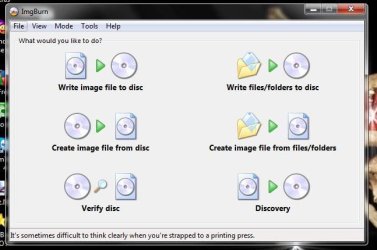
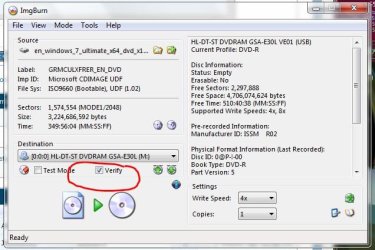
Or burn the .iso to DVD with FreeWare ImgBurn at 4x speed with verify ON.

:ar: The Official ImgBurn Website


That makes a bootable DVD ;)
 

Attachments

  • ImgBurn.JPG
    ImgBurn.JPG
    40.3 KB · Views: 3
  • ImgBurn_Verify.JPG
    ImgBurn_Verify.JPG
    54.5 KB · Views: 2

My Computer

Computer type
PC/Desktop
Computer Manufacturer/Model Number
Built them myself, Science Experiments !
OS
Win7 Enterprise, Win7 x86 (Ult 7600), Win7 x64 Ult 7600, TechNet RTM on AMD x64 (2.8Ghz)
CPU
AMD fx8350 4ghz, AMD-32 2400mhz, AMD-64 3200mhz, AMDx64 2.8G
Motherboard
SIS 755, ECS-K8M890M-M (Ult 7600), GigaByte & others
Memory
2gb, 4gb on the Ult 7600, 4gb on Technet RTM, 32gb on FX8350
Graphics Card(s)
Draw my own Graphics, several nVidia cards
Sound Card
on motherboard
Monitor(s) Displays
19" flat scr, 28" I-Inc widescr,22" Emprex Widescr, 23" Acer
Screen Resolution
1280 x 1024, 1440 x 900, 1920 x 1080
Hard Drives
6 pata Ide HD's & 2 Sata HD's
added 80gb external on Ult 7600 computer,
numerous extra 1tb, 2TB, 3Tb SATA HD's
A collection of ext HD Docks w/ HDs
PSU
430w, 550w, 600w, 700, 800, etc
Case
All Generic Full Towers
Cooling
Open Air & a few fans, some w/ colored LEDs
Keyboard
Compaq & Dell recycled from GoodWill
Mouse
Made in China Optical Wired Mouse
Internet Speed
Fast Cable InterNet
Antivirus
AVG Free on 24 different Desktops, NO Problems!
Browser
IE 8 is preferred, but use FireFox sometimes
Other Info
Linksys Routers, switches, & Hubs
Too Many USB Flash Drives to count, Biggest is 64GB !
Eight computers in my home network.
Sixteen computers at my business network.
Linked via TeamViewer !
Lots of old used spare computer parts everywhere!
Once you have a bootable installer then boot it to do a http://www.sevenforums.com/tutorials/1649-clean-install-windows-7-a.html.

At Step 7 use the Drive options to delete all partitions to create and format New one(s) as you wish, or just click Next and Windows will create and format your install partition for you along with a small boot partition you can ignore.

Other tips are here to assure you get a perfect install, same for retail: http://www.sevenforums.com/tutorials/219487-clean-reinstall-factory-oem-windows-7-a.html#post1839164
 
My Windows 7 install cannot continue

Hi

Thank you for the tips.

I burned the iso as an image to a dvd. That dvd was bootable in my pc. It started the Windows 7 install. Problem I have now is that it seems that the install is in a loop. It gets to the point where it is unpaccking the files. After that phase the pc restarts itself and I get the same prompt on which drive I want to install Windows 7. I have done this now twice and the iinstall begans again from the beginning.
Could it be that the very first install I tried yesterday is still waiting?

Rgards
 

My Computer

Computer type
PC/Desktop
OS
Windows 7
Hi

The problem I have now (I think) is that there are now 4 unfinished WIndows 7 installs on my pc.
Before I get the Windows logo I see a very quick Windows startup screen. On that screen I see 4 times Windows 7 right under each other. That indicates that there are 4 Windows 7 installs on the pc.

How can I terminate all of them and start clean again?

Regards
Jerry
 

My Computer

Computer type
PC/Desktop
OS
Windows 7

My Computer

Computer type
PC/Desktop
Computer Manufacturer/Model Number
Built them myself, Science Experiments !
OS
Win7 Enterprise, Win7 x86 (Ult 7600), Win7 x64 Ult 7600, TechNet RTM on AMD x64 (2.8Ghz)
CPU
AMD fx8350 4ghz, AMD-32 2400mhz, AMD-64 3200mhz, AMDx64 2.8G
Motherboard
SIS 755, ECS-K8M890M-M (Ult 7600), GigaByte & others
Memory
2gb, 4gb on the Ult 7600, 4gb on Technet RTM, 32gb on FX8350
Graphics Card(s)
Draw my own Graphics, several nVidia cards
Sound Card
on motherboard
Monitor(s) Displays
19" flat scr, 28" I-Inc widescr,22" Emprex Widescr, 23" Acer
Screen Resolution
1280 x 1024, 1440 x 900, 1920 x 1080
Hard Drives
6 pata Ide HD's & 2 Sata HD's
added 80gb external on Ult 7600 computer,
numerous extra 1tb, 2TB, 3Tb SATA HD's
A collection of ext HD Docks w/ HDs
PSU
430w, 550w, 600w, 700, 800, etc
Case
All Generic Full Towers
Cooling
Open Air & a few fans, some w/ colored LEDs
Keyboard
Compaq & Dell recycled from GoodWill
Mouse
Made in China Optical Wired Mouse
Internet Speed
Fast Cable InterNet
Antivirus
AVG Free on 24 different Desktops, NO Problems!
Browser
IE 8 is preferred, but use FireFox sometimes
Other Info
Linksys Routers, switches, & Hubs
Too Many USB Flash Drives to count, Biggest is 64GB !
Eight computers in my home network.
Sixteen computers at my business network.
Linked via TeamViewer !
Lots of old used spare computer parts everywhere!
Hi

But that means that I will loose all my files that are not in the Windows folder. Isn't there anotherway to solve this without formatting my whole HD?

Regards
 

My Computer

Computer type
PC/Desktop
OS
Windows 7
You may have to wait for gregrocker to come online and explain how to clean these 4 prev. installs in order to save your other files. I have always had a backup of my files before I start a new install.
 

My Computer

Computer type
PC/Desktop
Computer Manufacturer/Model Number
Built them myself, Science Experiments !
OS
Win7 Enterprise, Win7 x86 (Ult 7600), Win7 x64 Ult 7600, TechNet RTM on AMD x64 (2.8Ghz)
CPU
AMD fx8350 4ghz, AMD-32 2400mhz, AMD-64 3200mhz, AMDx64 2.8G
Motherboard
SIS 755, ECS-K8M890M-M (Ult 7600), GigaByte & others
Memory
2gb, 4gb on the Ult 7600, 4gb on Technet RTM, 32gb on FX8350
Graphics Card(s)
Draw my own Graphics, several nVidia cards
Sound Card
on motherboard
Monitor(s) Displays
19" flat scr, 28" I-Inc widescr,22" Emprex Widescr, 23" Acer
Screen Resolution
1280 x 1024, 1440 x 900, 1920 x 1080
Hard Drives
6 pata Ide HD's & 2 Sata HD's
added 80gb external on Ult 7600 computer,
numerous extra 1tb, 2TB, 3Tb SATA HD's
A collection of ext HD Docks w/ HDs
PSU
430w, 550w, 600w, 700, 800, etc
Case
All Generic Full Towers
Cooling
Open Air & a few fans, some w/ colored LEDs
Keyboard
Compaq & Dell recycled from GoodWill
Mouse
Made in China Optical Wired Mouse
Internet Speed
Fast Cable InterNet
Antivirus
AVG Free on 24 different Desktops, NO Problems!
Browser
IE 8 is preferred, but use FireFox sometimes
Other Info
Linksys Routers, switches, & Hubs
Too Many USB Flash Drives to count, Biggest is 64GB !
Eight computers in my home network.
Sixteen computers at my business network.
Linked via TeamViewer !
Lots of old used spare computer parts everywhere!

My Computer

Computer type
PC/Desktop
Computer Manufacturer/Model Number
Pauly Special
OS
Win7 Ultimate X64
CPU
Intel i5 3570K
Motherboard
Gigabyte Z77X-DS3H
Memory
8GB DDR3 1600
Graphics Card(s)
Onboard
Sound Card
Onboard
Screen Resolution
1280x1024
Hard Drives
Samsung 840 Evo SSD (OS)
1TB Spinner (Data)
PSU
800W Arctic
Case
Cooler Master
Cooling
3x120mm Fans
Keyboard
MS Wireless
Mouse
MS Wireless
Internet Speed
20M
Hi

You are right about the backup. I should have done this before the first install.
Because I have done installs before and allways could found my files back on the HD i did the same this time.

But unfortunately like allways in live when things can go wrong it does :-)

i hope it is possible to solve this without loosing my files.

Regards
 

My Computer

Computer type
PC/Desktop
OS
Windows 7
Jerry,

I sent gregrocker a message to come here when he comes online today.
 

My Computer

Computer type
PC/Desktop
Computer Manufacturer/Model Number
Built them myself, Science Experiments !
OS
Win7 Enterprise, Win7 x86 (Ult 7600), Win7 x64 Ult 7600, TechNet RTM on AMD x64 (2.8Ghz)
CPU
AMD fx8350 4ghz, AMD-32 2400mhz, AMD-64 3200mhz, AMDx64 2.8G
Motherboard
SIS 755, ECS-K8M890M-M (Ult 7600), GigaByte & others
Memory
2gb, 4gb on the Ult 7600, 4gb on Technet RTM, 32gb on FX8350
Graphics Card(s)
Draw my own Graphics, several nVidia cards
Sound Card
on motherboard
Monitor(s) Displays
19" flat scr, 28" I-Inc widescr,22" Emprex Widescr, 23" Acer
Screen Resolution
1280 x 1024, 1440 x 900, 1920 x 1080
Hard Drives
6 pata Ide HD's & 2 Sata HD's
added 80gb external on Ult 7600 computer,
numerous extra 1tb, 2TB, 3Tb SATA HD's
A collection of ext HD Docks w/ HDs
PSU
430w, 550w, 600w, 700, 800, etc
Case
All Generic Full Towers
Cooling
Open Air & a few fans, some w/ colored LEDs
Keyboard
Compaq & Dell recycled from GoodWill
Mouse
Made in China Optical Wired Mouse
Internet Speed
Fast Cable InterNet
Antivirus
AVG Free on 24 different Desktops, NO Problems!
Browser
IE 8 is preferred, but use FireFox sometimes
Other Info
Linksys Routers, switches, & Hubs
Too Many USB Flash Drives to count, Biggest is 64GB !
Eight computers in my home network.
Sixteen computers at my business network.
Linked via TeamViewer !
Lots of old used spare computer parts everywhere!
I burned the iso as an image to a dvd. That dvd was bootable in my pc. It started the Windows 7 install. Problem I have now is that it seems that the install is in a loop. It gets to the point where it is unpaccking the files. After that phase the pc restarts itself and I get the same prompt on which drive I want to install Windows 7. I have done this now twice and the iinstall begans again from the beginning.
Could it be that the very first install I tried yesterday is still waiting?

This is why I suggested to delete all partitions during install so it is all Unallocated Space, then create and format new Partition(s) as desired, or just click Next and the installer will do it for you. Did you miss these clear instructions? If not then there is no failed install on the HD to interfere.

DVD should not boot again at restart during install, so do not choose to boot it, or remove it from drive.

Where did you get the ISO? Confirm it's size and burn another good-quality DVD using ImgBurn at 4x speed from Doc's link.

If this fails, boot DVD and at first screen press Shift + F10 to open a Command Line to run Diskpart Clean Command
 
I burned the iso as an image to a dvd. That dvd was bootable in my pc. It started the Windows 7 install. Problem I have now is that it seems that the install is in a loop. It gets to the point where it is unpaccking the files. After that phase the pc restarts itself and I get the same prompt on which drive I want to install Windows 7. I have done this now twice and the iinstall begans again from the beginning.
Could it be that the very first install I tried yesterday is still waiting?

This is why I suggested to delete all partitions during install so it is all Unallocated Space, then create and format new Partition(s) as desired, or just click Next and the installer will do it for you. Did you miss these clear instructions? If not then there is no failed install on the HD to interfere.

Diskpart Clean Command

Hi gregrocker,

You are right. I missed step 7. I wonder (maybe this is a stupid question, but i am not a psecialist) if i select all the drives that are visible at stpe 7 ( Drive options advanced) and choose Delete. Will that also delete all files on that drive? or is just to remove it from the list of drives to select?

Regards
 

My Computer

Computer type
PC/Desktop
OS
Windows 7
You only have to format the partition you want to install windows on, not the entire drive.

If you have partitions with data on them, leave them alone.
 

My Computer

Computer type
PC/Desktop
Computer Manufacturer/Model Number
Skylake Special #666
OS
Windows 10 Pro x64
CPU
Intel Core i7 6700K
Motherboard
Asus Sabertooth Z170 Mark 1
Memory
GSkill TridentZ RGB 16GB 3600 16-16-16-36
Graphics Card(s)
EVGA GTX 980 Ti SC x2
Sound Card
Realtek High Definition
Monitor(s) Displays
AOC G2460PG
Screen Resolution
1920 x 1080 144Hz
Hard Drives
Samsung 860 Pro 256GB, Seagate Barracuda 4TB x2
PSU
EVGA 1000 P2, EVGA White Custom Braided Cables
Case
Corsair Vengeance C70 Gunmetal Black
Cooling
Corsair H100i v2, Corsair ML120 x2, Thermal Grizzly Kryonaut
Keyboard
Logitech G910 Orion Spectrum
Mouse
Logitech G700s
Internet Speed
Verizon Fios Quantum Gateway 75/75
Antivirus
Windows Defender, Malwarebytes Free 3.8.3
Browser
Chrome
Other Info
Corsair SP120 x4, LG Blu-ray Drive, Durabrand HT-395 100 Watt Dolby Digital Amp, Corsair H2100 Wireless 7.1 Headset
Update: Cannot install Windows 7

Hi

First of all my apologies for not giving a feedback sooner.

I used the tip of gregrocker (shift + F10) to copy my data to an external drive. Then at Step 7(in the link below) I used the Drive options to delete all partitions and then clicked Next. In the screen at step 7 I could see that the free space (on the drive I selected) is the same as the Total Size.

http://www.sevenforums.com/tutorials/1649-clean-install-windows-7-a.html

After a while the installation got to the last step, Completing Installation. Then the machine restarted itself, the window startup logo appears. And then a black screen follows. I thought that this is part of the installation and waited a while. But the black screen stays to long for me to think that this is normal.

Then i booted again from the dvd to get the screen at step 7. I saw in the list 2 names:
- Disk 0: Unallocated space 100 MB 100 MB
- Disk 0 partition 1 : System 465,6 GB 453,6 GB

I selected the second name and clicked Next. This gave me the same result as before.

Have i forgoten something? why is the installation hanging after "Completing Installation" ? Could it be that my HD got defected?

Regards
Jerry
 

My Computer

Computer type
PC/Desktop
OS
Windows 7
Unplug all other HD's and peripherals,

Boot into BIOS setup, reset to defaults, save changes. (If an EFI BIOS you'll need to decide if you want UEFI BIOS vs. Legacy BIOS. If UEFI follow these special steps for Install, otherwise enable Legacy BIOS or Compatibility Support Module to proceed with normal install.) Set DVD drive first to boot, HD second, set SATA controller to AHCI, Save changes and Exit.

Then boot into Windows 7 installer DVD or flash stick burned or written using tool and latest ISO for your licensed OS version here.

At first installer screen Press Shift + F10, or enter System Recovery Options to open a Command Box, type:

DISKPART
LIST DISK
SELECT DISK 0 (after confirming Windows 7 target HD #)
CLEAN
CREATE PARTITION PRIMARY
FORMAT FS=NTFS LABEL="WINDOWS 7"
ACTIVE
EXIT
EXIT

Next click Install Now, then Custom install to Clean Install Windows 7 to the partition you created. If it fails then report back at which step and the verbatim error message.

In addition read over these steps to understand the tools and methods which work best to get and maintain a perfect Clean Reinstall - Factory OEM Windows 7. The steps are the same for retail.

After install you can adjust partition size or Create new partitions for data, etc. in Disk Mgmt. You are creating the partition here for the purpose of wiping the HD and marking Active which overcomes certain install failures.
 
Back
Top