
Mystery with my Compact Flash

merkat106

Network Engineer
Guru
Local time
6:50 AM
Messages
462
Location
Phoenix, Arizona
Background: Needed to pull the pictures off my Sony A350 DSLR camera. This camera takes a compact flash card & I currently use a 8 GB one. Out of curiousity, I decided to check how much space I have left on it. I don't take a lot of pictures so I thought I would have plenty of space. Wrong, nearly 5 GB space is being used. Yet, I only have a little over 800 MB of pictures. The system files the camera uses is 153 MB. I have the computer see to show all files (hidden & system). So, what is eating up 4 GB of compact flash? :confused:
CF is formated NTFS and I am using the memory card reader on my HP AiO networked printer (Photosmart C7280) since none of my PCs can read CF & my data cable is missing.
Take a look for yourselves.
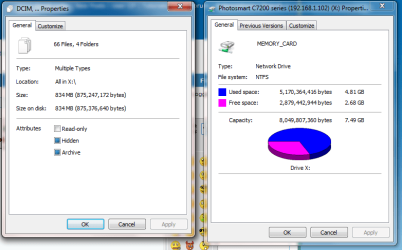
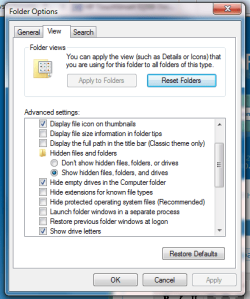
Untitled.png

Untitled2.png
 

My Computer My Computer

Computer Manufacturer/Model Number
ATX Custom Build 2012
OS
Windows 7 Enterprise x64 SP1
CPU
Intel Core i3-2100 @ 3.10GHz
Motherboard
Intel DH67CL desktop ATX
Memory
10 GB DDR3
Graphics Card(s)
Asus EAH5450 series (Radeon)
Monitor(s) Displays
Samsung SyncMaster 226BW, Samsung Syncmaster P2450H
Screen Resolution
226BW: 1680 x 1050 & P2450H: 1920 x 1080
Hard Drives
Western Digital 320 GB sata (boot), Samsung 640 GB sata, Seagate 2 TB sata (data)
PSU
Cooler Master Extreme Power Plus 500W
Case
Thermaltake V3 Black Edition
Cooling
stock cooling with added intake fan
Keyboard
HP Wireless Elite Keyboard Wireless Keyboard
Mouse
Microsoft Touch
Internet Speed
Comcast Cable business class <=18Mb {averages 12Mb}
Other Info
Optical drives: LG SuperMulti Blue, HP DVD 1260T
Other: Kensington Bluetooth Receiver
Network: Buffalo Wireless N USB, DLink N router/DLink Ethernet Switch/DLink Xtreme N wireless bridge
Printer: HP Photosmart Plus, HP Officejet Pro 8600 Plus
PCs: HP dv6-3040us (7 x64 SP1), HP DM4-2165dx (7 x64 SP1), HP Pavilion zv6130us (7 x86), Apple Macbook Air (Lion)
************
That's weird ... does your camera also indicate that there is 5GB of used space on the card (when the card is plugged into it)?
 

My Computer My Computer

Computer Manufacturer/Model Number
Alienware X51
OS
Windows 7 Home Premium x64
CPU
Intel Core i7-2600 @3.40GHz
Memory
8.00GB DDR3
Graphics Card(s)
NVIDIA GeForce GTX 555 w/1.0GB RAM
Monitor(s) Displays
BenQ XL2420TX
Screen Resolution
1920x1080@120Hz
Hard Drives
1TB
PSU
330-watt
Keyboard
Logitech Wireless Illuminated Keyboard K800
Mouse
Razer Orochi
Internet Speed
Campus Internet
Dunno

Cannot figure out where to do it in the menu...

Also, I deleted some pictures off of it earlier. I did empty the recycle bin. Still 5 GB used.
 

My Computer My Computer

Computer Manufacturer/Model Number
ATX Custom Build 2012
OS
Windows 7 Enterprise x64 SP1
CPU
Intel Core i3-2100 @ 3.10GHz
Motherboard
Intel DH67CL desktop ATX
Memory
10 GB DDR3
Graphics Card(s)
Asus EAH5450 series (Radeon)
Monitor(s) Displays
Samsung SyncMaster 226BW, Samsung Syncmaster P2450H
Screen Resolution
226BW: 1680 x 1050 & P2450H: 1920 x 1080
Hard Drives
Western Digital 320 GB sata (boot), Samsung 640 GB sata, Seagate 2 TB sata (data)
PSU
Cooler Master Extreme Power Plus 500W
Case
Thermaltake V3 Black Edition
Cooling
stock cooling with added intake fan
Keyboard
HP Wireless Elite Keyboard Wireless Keyboard
Mouse
Microsoft Touch
Internet Speed
Comcast Cable business class <=18Mb {averages 12Mb}
Other Info
Optical drives: LG SuperMulti Blue, HP DVD 1260T
Other: Kensington Bluetooth Receiver
Network: Buffalo Wireless N USB, DLink N router/DLink Ethernet Switch/DLink Xtreme N wireless bridge
Printer: HP Photosmart Plus, HP Officejet Pro 8600 Plus
PCs: HP dv6-3040us (7 x64 SP1), HP DM4-2165dx (7 x64 SP1), HP Pavilion zv6130us (7 x86), Apple Macbook Air (Lion)
************
Can you actually use your computer to browse through the directories on the card manually?
 

My Computer My Computer

Computer Manufacturer/Model Number
Alienware X51
OS
Windows 7 Home Premium x64
CPU
Intel Core i7-2600 @3.40GHz
Memory
8.00GB DDR3
Graphics Card(s)
NVIDIA GeForce GTX 555 w/1.0GB RAM
Monitor(s) Displays
BenQ XL2420TX
Screen Resolution
1920x1080@120Hz
Hard Drives
1TB
PSU
330-watt
Keyboard
Logitech Wireless Illuminated Keyboard K800
Mouse
Razer Orochi
Internet Speed
Campus Internet
Went to photography class last night and learned more about this mystery. Apparently, deleting pictures off the cf via windows leaves some sort of trace or ghost of the picture on the cf. It is sort of like the pictures weren't actually deleted off the cf.

I am told that if I wanted to delete pictures off the card, I must do so with the camera. And the only way to free the 5 gb off the cf is to reformat the cf with the camera.

And to answer your question: Yes. And doing so got me into this mess. :)
 

My Computer My Computer

Computer Manufacturer/Model Number
ATX Custom Build 2012
OS
Windows 7 Enterprise x64 SP1
CPU
Intel Core i3-2100 @ 3.10GHz
Motherboard
Intel DH67CL desktop ATX
Memory
10 GB DDR3
Graphics Card(s)
Asus EAH5450 series (Radeon)
Monitor(s) Displays
Samsung SyncMaster 226BW, Samsung Syncmaster P2450H
Screen Resolution
226BW: 1680 x 1050 & P2450H: 1920 x 1080
Hard Drives
Western Digital 320 GB sata (boot), Samsung 640 GB sata, Seagate 2 TB sata (data)
PSU
Cooler Master Extreme Power Plus 500W
Case
Thermaltake V3 Black Edition
Cooling
stock cooling with added intake fan
Keyboard
HP Wireless Elite Keyboard Wireless Keyboard
Mouse
Microsoft Touch
Internet Speed
Comcast Cable business class <=18Mb {averages 12Mb}
Other Info
Optical drives: LG SuperMulti Blue, HP DVD 1260T
Other: Kensington Bluetooth Receiver
Network: Buffalo Wireless N USB, DLink N router/DLink Ethernet Switch/DLink Xtreme N wireless bridge
Printer: HP Photosmart Plus, HP Officejet Pro 8600 Plus
PCs: HP dv6-3040us (7 x64 SP1), HP DM4-2165dx (7 x64 SP1), HP Pavilion zv6130us (7 x86), Apple Macbook Air (Lion)
************
Went to photography class last night and learned more about this mystery. Apparently, deleting pictures off the cf via windows leaves some sort of trace or ghost of the picture on the cf. It is sort of like the pictures weren't actually deleted off the cf.

I am told that if I wanted to delete pictures off the card, I must do so with the camera. And the only way to free the 5 gb off the cf is to reformat the cf with the camera.

And to answer your question: Yes. And doing so got me into this mess. :)

... which is why I stick with Secure Digital, which I don't believe has this problem.

Well, please let us know if that solution works for you! :)
 

My Computer My Computer

Computer Manufacturer/Model Number
Alienware X51
OS
Windows 7 Home Premium x64
CPU
Intel Core i7-2600 @3.40GHz
Memory
8.00GB DDR3
Graphics Card(s)
NVIDIA GeForce GTX 555 w/1.0GB RAM
Monitor(s) Displays
BenQ XL2420TX
Screen Resolution
1920x1080@120Hz
Hard Drives
1TB
PSU
330-watt
Keyboard
Logitech Wireless Illuminated Keyboard K800
Mouse
Razer Orochi
Internet Speed
Campus Internet
Went to photography class last night and learned more about this mystery. Apparently, deleting pictures off the cf via windows leaves some sort of trace or ghost of the picture on the cf. It is sort of like the pictures weren't actually deleted off the cf.

I am told that if I wanted to delete pictures off the card, I must do so with the camera. And the only way to free the 5 gb off the cf is to reformat the cf with the camera.

And to answer your question: Yes. And doing so got me into this mess. :)

... which is why I stick with Secure Digital, which I don't believe has this problem.

Well, please let us know if that solution works for you! :)

SD is not compatible with my camera. Sony either uses CF or Memory stick Pro (which is proprietary). Why this camera? Because I was able to get this $700+ camera for about $300.
 

My Computer My Computer

Computer Manufacturer/Model Number
ATX Custom Build 2012
OS
Windows 7 Enterprise x64 SP1
CPU
Intel Core i3-2100 @ 3.10GHz
Motherboard
Intel DH67CL desktop ATX
Memory
10 GB DDR3
Graphics Card(s)
Asus EAH5450 series (Radeon)
Monitor(s) Displays
Samsung SyncMaster 226BW, Samsung Syncmaster P2450H
Screen Resolution
226BW: 1680 x 1050 & P2450H: 1920 x 1080
Hard Drives
Western Digital 320 GB sata (boot), Samsung 640 GB sata, Seagate 2 TB sata (data)
PSU
Cooler Master Extreme Power Plus 500W
Case
Thermaltake V3 Black Edition
Cooling
stock cooling with added intake fan
Keyboard
HP Wireless Elite Keyboard Wireless Keyboard
Mouse
Microsoft Touch
Internet Speed
Comcast Cable business class <=18Mb {averages 12Mb}
Other Info
Optical drives: LG SuperMulti Blue, HP DVD 1260T
Other: Kensington Bluetooth Receiver
Network: Buffalo Wireless N USB, DLink N router/DLink Ethernet Switch/DLink Xtreme N wireless bridge
Printer: HP Photosmart Plus, HP Officejet Pro 8600 Plus
PCs: HP dv6-3040us (7 x64 SP1), HP DM4-2165dx (7 x64 SP1), HP Pavilion zv6130us (7 x86), Apple Macbook Air (Lion)
************
Went to photography class last night and learned more about this mystery. Apparently, deleting pictures off the cf via windows leaves some sort of trace or ghost of the picture on the cf. It is sort of like the pictures weren't actually deleted off the cf.

I am told that if I wanted to delete pictures off the card, I must do so with the camera. And the only way to free the 5 gb off the cf is to reformat the cf with the camera.

And to answer your question: Yes. And doing so got me into this mess. :)

... which is why I stick with Secure Digital, which I don't believe has this problem.

Well, please let us know if that solution works for you! :)

SD is not compatible with my camera. Sony either uses CF or Memory stick Pro (which is proprietary). Why this camera? Because I was able to get this $700+ camera for about $300.

Ah, that explains it. I have a Sony camera too, but it's a brand new one that supports SD.

Anyway, now you know why CF isn't the #1 flash storage media format! :p
 

My Computer My Computer

Computer Manufacturer/Model Number
Alienware X51
OS
Windows 7 Home Premium x64
CPU
Intel Core i7-2600 @3.40GHz
Memory
8.00GB DDR3
Graphics Card(s)
NVIDIA GeForce GTX 555 w/1.0GB RAM
Monitor(s) Displays
BenQ XL2420TX
Screen Resolution
1920x1080@120Hz
Hard Drives
1TB
PSU
330-watt
Keyboard
Logitech Wireless Illuminated Keyboard K800
Mouse
Razer Orochi
Internet Speed
Campus Internet
Back
Top