NAS Not Seen by Windows Explorer

phred13

New member
Local time
2:01 PM
Messages
5
I'm running Windows 7 Ultimate with a Cisco/Linksys Router and a D-Link DNS-321 NAS. There are three Windows 7 desktops on the network, plus printers, a scanner, etc. The three desktops have wired connections to the network, as does the NAS.

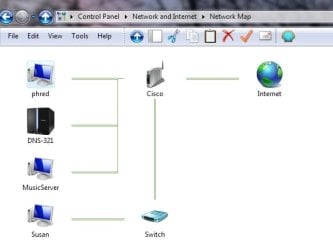
When using Windows Explorer (or clicking on the Network desktop icon) the three desktops show but the NAS does not. If I click "See full map" from the Network and Sharing Center, the NAS appears. Even odder is that when using XYplorer the NAS appears. LLTD is enabled on the NAS.

I have created a desktop shortcut for the NAS so I can now easily reach it, but when I'm in a program and need to drill through the network to get to the NAS, it's not showing. For example, my Acronis True Image backup program doesn't see it. I assume because it's "using" Windows Explorer for the drive tree.

I've looked at many possible solutions, both here at Seven Forums and all over the Internet. Nothing has worked. All ideas welcome. Thanks.

Here's the network as shown in Windows Explorer:
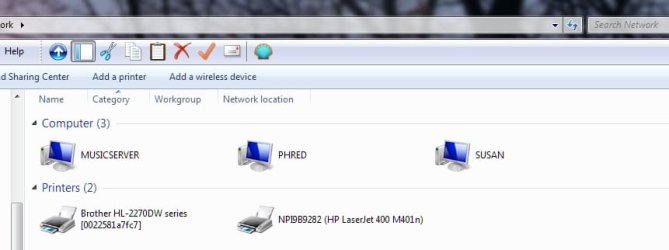
Network.jpg

Here's the Network Map:
Map.jpg

Here's the network showing in XYplorer:
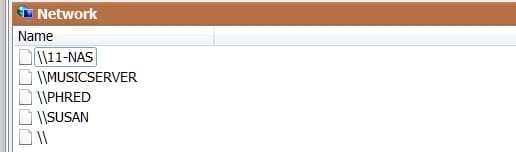
XYplorer.jpg

And here it is when trying to set up a new backup job in Acronis True Image:
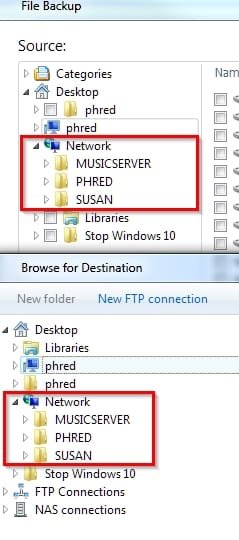
Backup.jpg
 

My Computer

Computer type
PC/Desktop
OS
Win 7 Ultimate x64
I should add that the other two desktop machines also exhibit the same behavior. IOW - they can't see the NAS from Windows Explorer.
 

My Computer

Computer type
PC/Desktop
OS
Win 7 Ultimate x64

My Computer

Computer type
PC/Desktop
Computer Manufacturer/Model Number
Custom Build
OS
Windows 7 Ultimate x64 SP1
CPU
AMD Phenom 2 1090T
Motherboard
Gigabyte GA-890FXA-UD5
Memory
2x8GB Kingston HyperX Fury Black 1600Mhz Unganged
Graphics Card(s)
MSI GTX 970 Gaming 4G
Sound Card
Realtek On-Board HD 7.1 Audio / Logitech G35
Monitor(s) Displays
3xAcer GD245HQ
Screen Resolution
1920x1080
Hard Drives
Samsung 850 Pro 512GB SSD - OS /
WD Caviar Black SATA 3 - 1 TBx2 - Dynamic RAID 0 /
WD Caviar Green SATA 2 - 640GBx2 - Dynamic RAID 0 /
WD Caviar Green SATA 2 - 640GB - Internal Backup /
Seagate Barracude SATA 3 - 3TB - External Backup/ Sync
PSU
HighPower 1000W
Case
Cooler Master HAF 932
Cooling
Noctua NH-D14
Keyboard
Logitech G19
Mouse
Logitech G500
Internet Speed
100/4 Mbit Cable (100GB quota)
Antivirus
ZoneAlarm Extreme Security / MBAM Pro / MBAE Free / SAS Free
Browser
IE 11 - Firefox - Chrome
Other Info
Logitech F710/ G27/ G940/ Z5500 // TrackIR 5 // Nvidia 3D Surround Vision
Tried entering the name directly instead of trying to browse? This should be enough normally:
Code:
\\1.2.3.4

Also, perhaps a service on your NAS is disabled/some setting unchecked etc. since common to all PCs is this device.
 

My Computer

Computer type
PC/Desktop
Computer Manufacturer/Model Number
Custom Build
OS
Windows 7 Ultimate x64 SP1
CPU
AMD Phenom 2 1090T
Motherboard
Gigabyte GA-890FXA-UD5
Memory
2x8GB Kingston HyperX Fury Black 1600Mhz Unganged
Graphics Card(s)
MSI GTX 970 Gaming 4G
Sound Card
Realtek On-Board HD 7.1 Audio / Logitech G35
Monitor(s) Displays
3xAcer GD245HQ
Screen Resolution
1920x1080
Hard Drives
Samsung 850 Pro 512GB SSD - OS /
WD Caviar Black SATA 3 - 1 TBx2 - Dynamic RAID 0 /
WD Caviar Green SATA 2 - 640GBx2 - Dynamic RAID 0 /
WD Caviar Green SATA 2 - 640GB - Internal Backup /
Seagate Barracude SATA 3 - 3TB - External Backup/ Sync
PSU
HighPower 1000W
Case
Cooler Master HAF 932
Cooling
Noctua NH-D14
Keyboard
Logitech G19
Mouse
Logitech G500
Internet Speed
100/4 Mbit Cable (100GB quota)
Antivirus
ZoneAlarm Extreme Security / MBAM Pro / MBAE Free / SAS Free
Browser
IE 11 - Firefox - Chrome
Other Info
Logitech F710/ G27/ G940/ Z5500 // TrackIR 5 // Nvidia 3D Surround Vision
Tried entering the name directly instead of trying to browse? This should be enough normally:
Code:
\\1.2.3.4
Also, perhaps a service on your NAS is disabled/some setting unchecked etc. since common to all PCs is this device.
Thanks, but still not getting to where I want to be. Using the IP address of the NAS, or its name (11-NAS) I can map additional directories. But that doesn't usually work when I'm in an application and drilling down to open or save a file such as a Word document.

I tend to agree with you regarding the issue being the NAS and not Windows, but as I stated in my first post " LLTD is enabled on the NAS." It had always been enabled, but one day while trying to figure out the cause of this issue, I noticed it was off. So I enabled it but it did not resolve the issue.
 

My Computer

Computer type
PC/Desktop
OS
Win 7 Ultimate x64
I am at a position now debating whether I understand your issue correctly.

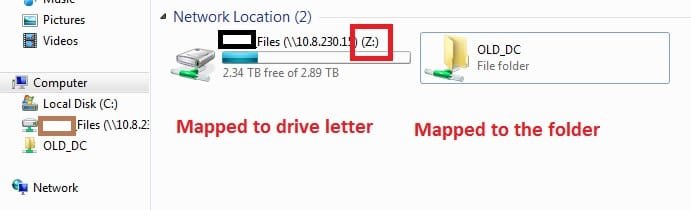
If you can map a network drive (as in map it to a "drive letter" not to a folder), any/most modern applications should be able to see it under computer. At work I have a file server which is mapped to Z. MS Office files are as you would guess are majority of my files. No issues with working from the server. Mapping even works through the Internet.

map network 2.jpg

You can modify and copy paste to Run (Win+R) this one. Will make the letter persistent.
Code:
net use Z: "[URL="file://\\1.2.3.4\MyShare"]\\1.2.3.4\MyShare[/URL]" /persistent:yes

I wonder if your issue is due to using Network list. Anyway I notice in all your screenshots all you show is Network and not Computer. In Acronis, after mapping to a drive letter can you check under the computer icon "phred" (not the folder icon though) if you can see it?

By the way, there is one more common component we are missing, your switch/router. Check its settings in case something was changed.

Remember to not use A or B as drive letters (due to their traditional use for floppies some apps have issues).
 

My Computer

Computer type
PC/Desktop
Computer Manufacturer/Model Number
Custom Build
OS
Windows 7 Ultimate x64 SP1
CPU
AMD Phenom 2 1090T
Motherboard
Gigabyte GA-890FXA-UD5
Memory
2x8GB Kingston HyperX Fury Black 1600Mhz Unganged
Graphics Card(s)
MSI GTX 970 Gaming 4G
Sound Card
Realtek On-Board HD 7.1 Audio / Logitech G35
Monitor(s) Displays
3xAcer GD245HQ
Screen Resolution
1920x1080
Hard Drives
Samsung 850 Pro 512GB SSD - OS /
WD Caviar Black SATA 3 - 1 TBx2 - Dynamic RAID 0 /
WD Caviar Green SATA 2 - 640GBx2 - Dynamic RAID 0 /
WD Caviar Green SATA 2 - 640GB - Internal Backup /
Seagate Barracude SATA 3 - 3TB - External Backup/ Sync
PSU
HighPower 1000W
Case
Cooler Master HAF 932
Cooling
Noctua NH-D14
Keyboard
Logitech G19
Mouse
Logitech G500
Internet Speed
100/4 Mbit Cable (100GB quota)
Antivirus
ZoneAlarm Extreme Security / MBAM Pro / MBAE Free / SAS Free
Browser
IE 11 - Firefox - Chrome
Other Info
Logitech F710/ G27/ G940/ Z5500 // TrackIR 5 // Nvidia 3D Surround Vision
There are about 12 folders on the NAS. Before the icon went missing from Windows Explorer I had mapped a -folder- to X: and a -folder- to Z:.

If I try to map the NAS to a drive letter (either by using its IP or its name) Windows throws a network error stating that it cannot access \\192.168.1.2 )or \\11-NAS.) If I tack on a -folder- to the address, it gets mapped - \\192.168.1.2\Pictures.

I just tried creating a desktop shortcut to the NAS using its IP address and it worked. So I now have the Network shortcut icon, which when opened shows only the three computers attached to the network, and a NAS shortcut icon, which when opened shows the folders on the NAS.

As for the pre-existing folders mapped to drive letters, they can be seen by any of the three computers on the network.

The problem with the MSO files on the network is that they're archival and are in a folder that hasn't been mapped previously. If/when I needed one of those files, I just drilled down to it and I had it. Now I can't drill down to them, nor can I set up a mapped drive letter to them.

I had previously gone through the configuration of the Router (Cisco-Linksys EA4500) and have done it again today. I'm finding nothing that would stop one IP address from showing up.

Lastly, I take back what I said earlier today about all things point to the NAS. If you look at the first screenshots, you'll see that the NAS shows up on both the Network Map, and in XYplorer. And that is common on all three machines. So I'm back to blaming Windows, which I admit is an easy target.

Thanks.
 

My Computer

Computer type
PC/Desktop
OS
Win 7 Ultimate x64
Back
Top