Navigation pane in Windows Explore unstable

bawldiggle

GrayGhost2 ret.
Pro User
VIP
Local time
6:29 AM
Messages
895
Location
Australia
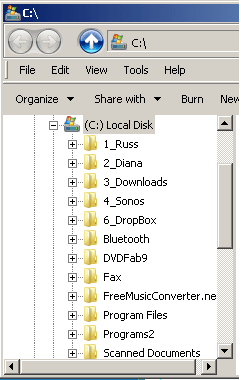
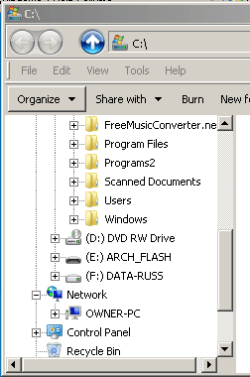
When I open Windows Explore, after about 2 seconds navigation-pane scrolls down near bottom of the navigation-pane.
Shortcut Target = C:\Windows\explorer.exe /e,C:\

Same result whether "Show all Folders" enabled or disabled.
and "SaveAs" dialog and "Browse" dialogs


Also occurs when navigating through Navigation pane with keyboard navigation keys.
I have to drag the nav-pane back up to the selected folder

EDIT: Just noticed "Organize" btn is selected in the "after" image -- not by my actions.

Thank you in advance for any help :)

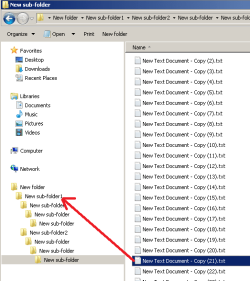
Before + after images:

win-exp unstable_1.PNG win-exp unstable_2.PNG

-----

SPECS
Toshiba Satellite C665
OS:= Windows 7 Home Premium (32-bit), sp1 (Build 7601) OEM
UI:=Classic Shell Start + Classic Explorer
 

My Computer My Computer

Computer type
PC/Desktop
Computer Manufacturer/Model Number
Toshiba, Lenovo (laptops) + 4 rigs
OS
XP Pro (x86) | 7 HP (x86) & (x64) | 7 Pro (x64)
I think that it is attempting to show you that it found a computer on your network.

If that is want it is doing, then I'm not sure how best to prevent that.
 

My Computer My Computer

Computer type
Laptop
Computer Manufacturer/Model Number
Employer provided Dell Latitude
OS
W7 Pro SP1 64bit
CPU
i7
Memory
8GB
Graphics Card(s)
Intel HD Graphics
Hard Drives
crappy SSD
Antivirus
Employer mandated Symantec Endpoint Protection
Browser
Pale Moon 64bit, IE11 64bit & Chrome 64bit
Thank you UsernameIssues for your response, :)

There is no network. Just this "Owner-PC" laptop.
 

My Computer My Computer

Computer type
PC/Desktop
Computer Manufacturer/Model Number
Toshiba, Lenovo (laptops) + 4 rigs
OS
XP Pro (x86) | 7 HP (x86) & (x64) | 7 Pro (x64)
Do you see in your second screenshot - where it shows Network and OWNER-PC?

That might be the same laptop that you are on.

Open Explorer and manually scroll down to that area real fast.
See if you see the info for that computer being added within a few seconds.
 

My Computer My Computer

Computer type
Laptop
Computer Manufacturer/Model Number
Employer provided Dell Latitude
OS
W7 Pro SP1 64bit
CPU
i7
Memory
8GB
Graphics Card(s)
Intel HD Graphics
Hard Drives
crappy SSD
Antivirus
Employer mandated Symantec Endpoint Protection
Browser
Pale Moon 64bit, IE11 64bit & Chrome 64bit
It is this laptop.
When I rebooted this laptop (just now) -- read your post -- opened WinExp and tried to manually scroll-down "real fast",
"Network" was listed but it was closed, within seconds "Network" opened to reveal this laptop "Owner-PC"

Would hiding "Network" help ?

This laptop is used to sync with android phones via Samsung "KiAir" via WiFi, on odd occasions.
But no plans for a network.

My external-USB-powered HD is NTFS format and as such, drive property "Type" is "Local Disc" and not "Removable Drive"
I wonder if this is the problem ?
If I remember rightly ... FAT32 format maximum file size is 4GB ?

I would appreciate your comments :)

Thank you
 

My Computer My Computer

Computer type
PC/Desktop
Computer Manufacturer/Model Number
Toshiba, Lenovo (laptops) + 4 rigs
OS
XP Pro (x86) | 7 HP (x86) & (x64) | 7 Pro (x64)
I'm not sure how best to prevent this issue. I see this at work and it is quite annoying. Imagine that network list with more than a 100 computers. I get to scroll way up or way down. :-(

Let's see if others had a safe suggestion for stopping this.
 

My Computer My Computer

Computer type
Laptop
Computer Manufacturer/Model Number
Employer provided Dell Latitude
OS
W7 Pro SP1 64bit
CPU
i7
Memory
8GB
Graphics Card(s)
Intel HD Graphics
Hard Drives
crappy SSD
Antivirus
Employer mandated Symantec Endpoint Protection
Browser
Pale Moon 64bit, IE11 64bit & Chrome 64bit

My Computer My Computer

Computer Manufacturer/Model Number
HP Media Center
OS
Windows 7 32 bit
CPU
AMD 5200+ dual core
Memory
2 GB
Graphics Card(s)
NVidia GeForce 6150SE 128 MB
Monitor(s) Displays
CRT
Screen Resolution
1280x1024
Hard Drives
500 GB Sata internal :

SIIG USB 3.0 docking stations w/WD Caviar Black 6 Gb/s drives
Keyboard
PS/2
Mouse
PS/2 Wheel Mouse
Other Info
SIIG USB 3.0 PCIexpress card.
Last edited:

My Computer My Computer

Computer type
PC/Desktop
Computer Manufacturer/Model Number
Toshiba, Lenovo (laptops) + 4 rigs
OS
XP Pro (x86) | 7 HP (x86) & (x64) | 7 Pro (x64)
That is a "feature" (according to some self-proclaimed MS person).

That bug is one of the handful of annoyances that exist in W7 (IMO).

If MS had just fixed that small number of issues on W8 (and not bolted on a tablet interface) it would be selling a lot better.
 
Last edited:

My Computer My Computer

Computer type
PC/Desktop
Computer Manufacturer/Model Number
n/a
OS
W7 Ultimate SP1, LM19.2 MATE, W10 Home 1703, W10 Pro 1703 VM, #All 64 bit
CPU
AMD Phenom II x6 1100T, 3.3 GHz
Motherboard
ASUS M4A88T-M/USB3 (AM3)
Memory
12GB DDR3 1333 G-Skill (4GB x 2), G-Skill (2GB x 2)
Graphics Card(s)
NVIDIA GeForce GTX 660
Sound Card
Realtek?
Monitor(s) Displays
Samsung S23B350
Screen Resolution
1920x1080
Hard Drives
WD Green 2TB (SATA), WD Green 3TB (SATA), WD Blue 4TB (SATA), WD Blue 6TB (SATA)
PSU
Cooler Master
Case
Antec GX300 Tower
Cooling
3x Antec TRICOOL 120mm Fans
Mouse
Wired Optical
Internet Speed
DSL
Antivirus
Avast
Browser
Pale Moon (64 bit)
Other Info
2018-12-27 Upgraded HDDs
2015-12-10 Upgraded case, graphics card, storage
2015-08-15 Upgraded motherboard & RAM
2015-07-15 Upgraded LM17.1 to LM17.2
Unfortunately I don't still have my W7 machine. But I seem to remember getting around this using the Doors2windows tool. It was something like checking only files and folders. Than adding Favorites so that it was positioned below them. Then I dragged the favorites down so that they appeared collapsed. But I'm just going from memory.

I don't know if there is a solution for once you start expanding the files and folders in the nav pane.
 

My Computer My Computer

Computer Manufacturer/Model Number
HP Media Center
OS
Windows 7 32 bit
CPU
AMD 5200+ dual core
Memory
2 GB
Graphics Card(s)
NVidia GeForce 6150SE 128 MB
Monitor(s) Displays
CRT
Screen Resolution
1280x1024
Hard Drives
500 GB Sata internal :

SIIG USB 3.0 docking stations w/WD Caviar Black 6 Gb/s drives
Keyboard
PS/2
Mouse
PS/2 Wheel Mouse
Other Info
SIIG USB 3.0 PCIexpress card.
Any Resolution? I Get This Too, very annoying.

I hope there is a setting that fixes this. The same thing happens to me at home. Drives me nuts. AND, we're getting Windows 7 installed at work now, and NO additional software can be installed there (completely locked down with no admin rights). So, I hope there's a setting, or MS has fixed it.
 

My Computer My Computer

Computer Manufacturer/Model Number
custom build (I Buy Power)
OS
Windows 7 64 bit
Motherboard
Asus
Memory
16 GB
I hope there is a setting that fixes this. The same thing happens to me at home. Drives me nuts. AND, we're getting Windows 7 installed at work now, and NO additional software can be installed there (completely locked down with no admin rights). So, I hope there's a setting, or MS has fixed it.
Welcome to the Seven Forums.

I was just thinking about this issue again the other day, because it caused me to click on the wrong thing in the left pane. I've still not found a solution. I can make it all go away, but doing that breaks other things.

MS will not be fixing this "feature". It appears that they want us to slow down and let the network items finish being listed before we attempt to do any real work :-(

I wish you (and your company) luck. It is hard to run a company where the users have no admin rights. The IT help desk phones will stay very busy.
 

My Computer My Computer

Computer type
Laptop
Computer Manufacturer/Model Number
Employer provided Dell Latitude
OS
W7 Pro SP1 64bit
CPU
i7
Memory
8GB
Graphics Card(s)
Intel HD Graphics
Hard Drives
crappy SSD
Antivirus
Employer mandated Symantec Endpoint Protection
Browser
Pale Moon 64bit, IE11 64bit & Chrome 64bit
Suggestion

I don't actually know if this will work, just that I don't see the same problem on my machine. In any case it's easy to undo the changes!

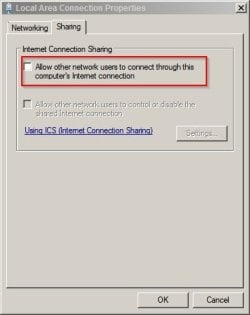
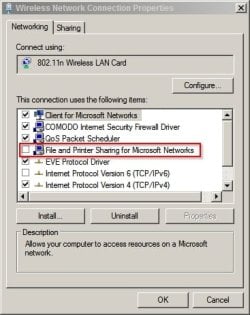
Control Panel > Network and Sharing Center > Change Adapter Settings

For each connection shown try the following settings.

Local Area Connection Properties.jpg

Wireless Network Connection Properties.jpg

Then reboot or log off/on.

On my machine in an Explorer Window the only item listed under Network is my router.

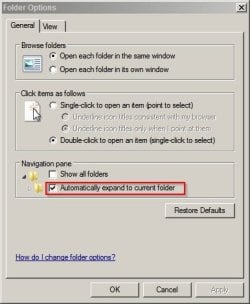
Also try Organize > Folder options:

Folder Options.jpg
 
Last edited:

My Computer My Computer

Computer type
Laptop
Computer Manufacturer/Model Number
ASUS
OS
Microsoft Windows 7 Home Premium 64-bit 7601 Multiprocessor Free Service Pack 1
CPU
AMD C-60 APU with Radeon(tm) HD Graphics
Motherboard
ASUSTeK COMPUTER INC. X501U
Memory
4.00 GB
Graphics Card(s)
AMD Radeon HD 6290 Graphics
Sound Card
(1) AMD High Definition Audio Device (2) Realtek High Defi
Screen Resolution
1366 x 768 x 32 bits (4294967296 colors) @ 60 Hz
Hard Drives
Hitachi HTS545050A7E380 SATA Disk Device
Antivirus
Comodo CIS & FW, SecureAplus App Whitelisting, Threatfire
Browser
Cyberfox 64bit, Opera 64bit, Airfox
Other Info
Spy-The-Spy, HitmanPro.Alert, Norton Connect Safe, MJRegWatcher, BitDefender TrafficLight, Voodoo Shield, Zemana AntiMalware
Callender,
Thank - but that had no impact.

I can shutdown a few services and make the list go away... :-)
...but then I can't connect to other computers :-(
 

My Computer My Computer

Computer type
Laptop
Computer Manufacturer/Model Number
Employer provided Dell Latitude
OS
W7 Pro SP1 64bit
CPU
i7
Memory
8GB
Graphics Card(s)
Intel HD Graphics
Hard Drives
crappy SSD
Antivirus
Employer mandated Symantec Endpoint Protection
Browser
Pale Moon 64bit, IE11 64bit & Chrome 64bit
File Sharing

Callender,
Thank - but that had no impact.

I can shutdown a few services and make the list go away... :-)
...but then I can't connect to other computers :-(


I see that on my machine all file sharing options are turned off and I'm guessing that's why I don't see the "jumping" behavior and that seems to be confirmed by the comment on page 44 of the extensive thread on the subject here:

Windows Explorer expands folders inappropriately, jumping the folder you expand to the bottom of the navigation pane

There doesn't seem to be a decent solution other than installing Classic Shell.

The strange thing is that I don't see the problem on Windows 7 machines in my workplace but the only admins are IT department and they are miles away and probably wouldn't want to explain whatever workaround they've put in place!
 

My Computer My Computer

Computer type
Laptop
Computer Manufacturer/Model Number
ASUS
OS
Microsoft Windows 7 Home Premium 64-bit 7601 Multiprocessor Free Service Pack 1
CPU
AMD C-60 APU with Radeon(tm) HD Graphics
Motherboard
ASUSTeK COMPUTER INC. X501U
Memory
4.00 GB
Graphics Card(s)
AMD Radeon HD 6290 Graphics
Sound Card
(1) AMD High Definition Audio Device (2) Realtek High Defi
Screen Resolution
1366 x 768 x 32 bits (4294967296 colors) @ 60 Hz
Hard Drives
Hitachi HTS545050A7E380 SATA Disk Device
Antivirus
Comodo CIS & FW, SecureAplus App Whitelisting, Threatfire
Browser
Cyberfox 64bit, Opera 64bit, Airfox
Other Info
Spy-The-Spy, HitmanPro.Alert, Norton Connect Safe, MJRegWatcher, BitDefender TrafficLight, Voodoo Shield, Zemana AntiMalware
Something to try

Perhaps try expanding (C:) then scroll manually down the folder list by:

1). Press the letter of the alphabet that corresponds to the folder name that you wish to navigate to. Example "P" for Program Files.

2). The navigation pane should jump to the first folder name beginning with "P"

3). Instead of using the mouse - use the UP/ DOWN Arrows to get to the folder you need.

4). When the folder is highlighted - press ENTER.

Or alternatively just scroll down through all the folders on your drive using the arrow keys and press ENTER when required.

Same goes for the right hand pane.

I suppose that it's just a question of breaking old habits!

Hopefully this helps some users.
 
Last edited:

My Computer My Computer

Computer type
Laptop
Computer Manufacturer/Model Number
ASUS
OS
Microsoft Windows 7 Home Premium 64-bit 7601 Multiprocessor Free Service Pack 1
CPU
AMD C-60 APU with Radeon(tm) HD Graphics
Motherboard
ASUSTeK COMPUTER INC. X501U
Memory
4.00 GB
Graphics Card(s)
AMD Radeon HD 6290 Graphics
Sound Card
(1) AMD High Definition Audio Device (2) Realtek High Defi
Screen Resolution
1366 x 768 x 32 bits (4294967296 colors) @ 60 Hz
Hard Drives
Hitachi HTS545050A7E380 SATA Disk Device
Antivirus
Comodo CIS & FW, SecureAplus App Whitelisting, Threatfire
Browser
Cyberfox 64bit, Opera 64bit, Airfox
Other Info
Spy-The-Spy, HitmanPro.Alert, Norton Connect Safe, MJRegWatcher, BitDefender TrafficLight, Voodoo Shield, Zemana AntiMalware
Funny that you should mention navigating via the keyboard. I was quite good at that within XP. I could pause just long enough on a folder in the left pane to let the OS know that I wanted to see the contents in the right pane. When I moved to W7, that pause became useless. I had to move off of the arrow keys and hit enter. I'm still not thrilled about that.

Make a folder on your desktop - then double click on it.
Does it appear below your Network listings in Explorer's left pane?

The Network listing expands by default... and it does so in bunches. At first, I see no computers, then in a second or so, I see 5 or 6 computers, then a few seconds later, more computers. This continues until the left pane is completely filled with computers. Then I can scroll up or down to get to my work.

Imagine attempting to drag a file to a folder that is a moving target:
drag.png
 

My Computer My Computer

Computer type
Laptop
Computer Manufacturer/Model Number
Employer provided Dell Latitude
OS
W7 Pro SP1 64bit
CPU
i7
Memory
8GB
Graphics Card(s)
Intel HD Graphics
Hard Drives
crappy SSD
Antivirus
Employer mandated Symantec Endpoint Protection
Browser
Pale Moon 64bit, IE11 64bit & Chrome 64bit
Make a folder on your desktop - then double click on it.
Does it appear below your Network listings in Explorer's left pane?

The Network listing expands by default... and it does so in bunches. At first, I see no computers, then in a second or so, I see 5 or 6 computers, then a few seconds later, more computers. This continues until the left pane is completely filled with computers. Then I can scroll up or down to get to my work.
Hi,

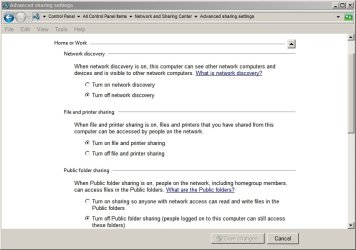
Indeed a new folder created on my desktop does appear below Network listings in the left pane but Network does not expand. I checked Control Panel\All Control Panel Items\Network and Sharing Center\Advanced sharing settings and I see that Network Discovery is switched off so perhaps that explains it. I'll be heading off to work soon so I will check to see if these settings are the same on the computers in the office.
 

Attachments

  • Advanced sharing settings.jpg
    Advanced sharing settings.jpg
    54.9 KB · Views: 0

My Computer My Computer

Computer type
Laptop
Computer Manufacturer/Model Number
ASUS
OS
Microsoft Windows 7 Home Premium 64-bit 7601 Multiprocessor Free Service Pack 1
CPU
AMD C-60 APU with Radeon(tm) HD Graphics
Motherboard
ASUSTeK COMPUTER INC. X501U
Memory
4.00 GB
Graphics Card(s)
AMD Radeon HD 6290 Graphics
Sound Card
(1) AMD High Definition Audio Device (2) Realtek High Defi
Screen Resolution
1366 x 768 x 32 bits (4294967296 colors) @ 60 Hz
Hard Drives
Hitachi HTS545050A7E380 SATA Disk Device
Antivirus
Comodo CIS & FW, SecureAplus App Whitelisting, Threatfire
Browser
Cyberfox 64bit, Opera 64bit, Airfox
Other Info
Spy-The-Spy, HitmanPro.Alert, Norton Connect Safe, MJRegWatcher, BitDefender TrafficLight, Voodoo Shield, Zemana AntiMalware
That setting will turn off the list all together (not just collapse it by default as XP does). I'll need to check with IT to see if they care if I change that setting. I'm not sure what impact the setting has on discovering network printers. My guess is, printers will not be discoverable... but that should only matter when setting up a new printer.

Thanks for your time on this.
 

My Computer My Computer

Computer type
Laptop
Computer Manufacturer/Model Number
Employer provided Dell Latitude
OS
W7 Pro SP1 64bit
CPU
i7
Memory
8GB
Graphics Card(s)
Intel HD Graphics
Hard Drives
crappy SSD
Antivirus
Employer mandated Symantec Endpoint Protection
Browser
Pale Moon 64bit, IE11 64bit & Chrome 64bit
Network Discovery

That setting will turn off the list all together (not just collapse it by default as XP does). I'll need to check with IT to see if they care if I change that setting. I'm not sure what impact the setting has on discovering network printers. My guess is, printers will not be discoverable... but that should only matter when setting up a new printer.

Thanks for your time on this.

Hi.

Well I checked how the machines at work are set up and on all machines Network Discovery is set to off.

File and Printer Sharing is on.

Each user's desktop is hosted on a remote server so when a new folder is created on the desktop it doesn't appear below "Network" in the left pane of an Explorer window and the desktop is not located at C:\Users\Username\Desktop.

I can still browse to and connect to printers. Like you say - you'd need to check with IT.
 

My Computer My Computer

Computer type
Laptop
Computer Manufacturer/Model Number
ASUS
OS
Microsoft Windows 7 Home Premium 64-bit 7601 Multiprocessor Free Service Pack 1
CPU
AMD C-60 APU with Radeon(tm) HD Graphics
Motherboard
ASUSTeK COMPUTER INC. X501U
Memory
4.00 GB
Graphics Card(s)
AMD Radeon HD 6290 Graphics
Sound Card
(1) AMD High Definition Audio Device (2) Realtek High Defi
Screen Resolution
1366 x 768 x 32 bits (4294967296 colors) @ 60 Hz
Hard Drives
Hitachi HTS545050A7E380 SATA Disk Device
Antivirus
Comodo CIS & FW, SecureAplus App Whitelisting, Threatfire
Browser
Cyberfox 64bit, Opera 64bit, Airfox
Other Info
Spy-The-Spy, HitmanPro.Alert, Norton Connect Safe, MJRegWatcher, BitDefender TrafficLight, Voodoo Shield, Zemana AntiMalware
Back
Top