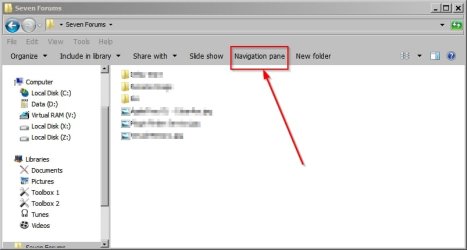
Can you add a button to toggle navigation pane in Windows Explorer?

deac33

New member
Local time
12:56 PM
Messages
1
Can you add a button to open and close the Windows Explorer navigation pane in Windows 7?

The toolbar button to toggle the Navigation Pane (and up directory) in Windows XP seems missing in Windows 7. I've been unable to find an option to bring it back nor have I found a plug-in which enables it.

Anyone have a way to let me quickly open and close the Nav Pane?

thanks,
-deac
 

My Computer My Computer

Computer type
PC/Desktop
Computer Manufacturer/Model Number
Mac - Parallels
OS
Windows 7 Ultimate
CPU
2.8 GHz Intel Core I5
Memory
8 GB
Graphics Card(s)
ATI Radeon HD 5750 1024 MB
Hard Drives
1 TB internal
Antivirus
Microsoft Security Essentials
Browser
IE, CHROME, FIREFOX, OPERA
You need third party software

The only way I know of is to use third party software. Perhaps someone else will come up with a way to do it manually.

You can add a button to toggle the navigation pane on/off using:

WinAero: Explorer Toolbar Editor

(need to have network http.sendRefererHeader enabled for the download to work) - if you've disabled it previously.
 

Attachments

  • Navigation Pane Toggle .jpg
    Navigation Pane Toggle .jpg
    26.6 KB · Views: 1

My Computer My Computer

Computer type
Laptop
Computer Manufacturer/Model Number
ASUS
OS
Microsoft Windows 7 Home Premium 64-bit 7601 Multiprocessor Free Service Pack 1
CPU
AMD C-60 APU with Radeon(tm) HD Graphics
Motherboard
ASUSTeK COMPUTER INC. X501U
Memory
4.00 GB
Graphics Card(s)
AMD Radeon HD 6290 Graphics
Sound Card
(1) AMD High Definition Audio Device (2) Realtek High Defi
Screen Resolution
1366 x 768 x 32 bits (4294967296 colors) @ 60 Hz
Hard Drives
Hitachi HTS545050A7E380 SATA Disk Device
Antivirus
Comodo CIS & FW, SecureAplus App Whitelisting, Threatfire
Browser
Cyberfox 64bit, Opera 64bit, Airfox
Other Info
Spy-The-Spy, HitmanPro.Alert, Norton Connect Safe, MJRegWatcher, BitDefender TrafficLight, Voodoo Shield, Zemana AntiMalware

My Computer My Computer

Computer type
PC/Desktop
Computer Manufacturer/Model Number
Self built custom
OS
64-bit Windows 11 Pro for Workstations
CPU
Intel i7-8700K OC'd to 5 GHz
Motherboard
ASUS ROG Maximus XI Formula Z390
Memory
64 GB (4x16GB) G.SKILL TridentZ RGB DDR4 3600 MHz
Graphics Card(s)
ASUS ROG-STRIX-GTX1080TI-O11G-GAMING
Sound Card
Integrated
Monitor(s) Displays
2 x Samsung Odyssey G7 27"
Screen Resolution
2560x1440
Hard Drives
1TB Samsung 990 PRO M.2,
4TB Samsung 990 PRO PRO M.2,
TerraMaster F8 SSD Plus NAS
PSU
Seasonic Prime Titanium 850W
Case
Thermaltake Core P3
Cooling
Corsair Hydro H115i
Keyboard
Logitech wireless K800
Mouse
Logitech MX Master 4
Internet Speed
2 Gb/s Download and 100 Mb/s Upload
Antivirus
Malwarebyte Anti-Malware Premium
Browser
Google Chrome
Other Info
Logitech Z625 speaker system,
Logitech BRIO 4K Pro webcam,
HP Color LaserJet Pro MFP M477fdn,
APC SMART-UPS RT 1000 XL - SURT1000XLI,
Galaxy S23 Plus phone
The latest Classic Shell has buttons to toggle navigation pane, details pane and preview pane.
 

My Computer My Computer

Computer type
PC/Desktop
OS
Windows 7 Ultimate
Back
Top