Navigation pane in Windows Explore unstable

Hmmm. For post #19, I tested using a VM that is not in the domain at work... turning off Network Discovery kills the list.

But the host computer (that is in the domain) already had Network Discovery is set to off for each type of connection and yet these computers continue to be listed. I'll add this to the long list of issues for IT to look into.
 

My Computer My Computer

At a glance

W7 Pro SP1 64biti78GBIntel HD Graphics
Computer type
Laptop
Computer Manufacturer/Model Number
Employer provided Dell Latitude
OS
W7 Pro SP1 64bit
CPU
i7
Memory
8GB
Graphics Card(s)
Intel HD Graphics
Hard Drives
crappy SSD
Antivirus
Employer mandated Symantec Endpoint Protection
Browser
Pale Moon 64bit, IE11 64bit & Chrome 64bit
Some more info

Hmmm. For post #19, I tested using a VM that is not in the domain at work... turning off Network Discovery kills the list.

But the host computer (that is in the domain) already had Network Discovery is set to off for each type of connection and yet these computers continue to be listed. I'll add this to the long list of issues for IT to look into.


Apparently turning off network discovery on your machine means that other computers cant access your computer but you should still be able to see other network computers if they have not turned off discovery.
Turn off network Discovery: Still able to browse network

Another way to remove the Network Icon:


How to Remove “Network” from Windows 7 Explorer Navigation Pane?


I'm not sure what happens if you do this but leave Network Discovery switched on. It would appear that you should still be able to browse the network and connect to other devices via Network and Sharing Center.


That's as far as I can tell - I haven't confirmed this.
 

My Computer My Computer

At a glance

Microsoft Windows 7 Home Premium 64-bit 7601 ...AMD C-60 APU with Radeon(tm) HD Graphics4.00 GBAMD Radeon HD 6290 Graphics
Computer type
Laptop
Computer Manufacturer/Model Number
ASUS
OS
Microsoft Windows 7 Home Premium 64-bit 7601 Multiprocessor Free Service Pack 1
CPU
AMD C-60 APU with Radeon(tm) HD Graphics
Motherboard
ASUSTeK COMPUTER INC. X501U
Memory
4.00 GB
Graphics Card(s)
AMD Radeon HD 6290 Graphics
Sound Card
(1) AMD High Definition Audio Device (2) Realtek High Defi
Screen Resolution
1366 x 768 x 32 bits (4294967296 colors) @ 60 Hz
Hard Drives
Hitachi HTS545050A7E380 SATA Disk Device
Antivirus
Comodo CIS & FW, SecureAplus App Whitelisting, Threatfire
Browser
Cyberfox 64bit, Opera 64bit, Airfox
Other Info
Spy-The-Spy, HitmanPro.Alert, Norton Connect Safe, MJRegWatcher, BitDefender TrafficLight, Voodoo Shield, Zemana AntiMalware
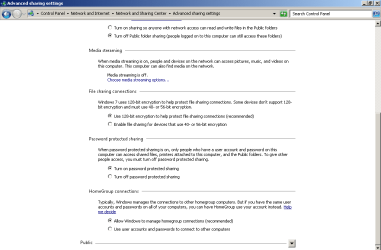
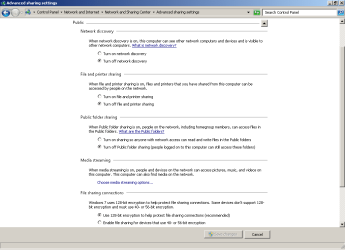
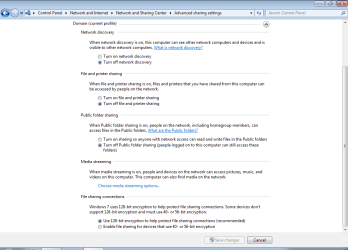
I'm not able to see other computers in the Network list if the computer is out of the domain and Network Discovery is off:

off-1.png

off-2.png

off-3.png

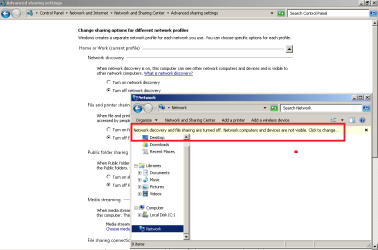
The screenshot below is while in the domain - but the pesky list still appears.

off-4.png


Thanks. Making Explorer not show the Network link via the registry works in or out of the domain :-)

Maybe that is what the OP wants to do too.
 

My Computer My Computer

At a glance

W7 Pro SP1 64biti78GBIntel HD Graphics
Computer type
Laptop
Computer Manufacturer/Model Number
Employer provided Dell Latitude
OS
W7 Pro SP1 64bit
CPU
i7
Memory
8GB
Graphics Card(s)
Intel HD Graphics
Hard Drives
crappy SSD
Antivirus
Employer mandated Symantec Endpoint Protection
Browser
Pale Moon 64bit, IE11 64bit & Chrome 64bit
Back
Top