Need advice for extending router

Jack1933

New member
Local time
11:43 PM
Messages
20
I have a Cisco M10 Valet router and just added cable internet service. I have the cable connected to that router and it only has 4 ports, so I want to add additional ports for additional computers. I am not up to speed with this type of networking and what should I look for in equipment to extend to more ports. I have a 4 port hub, but when I connect through it, the speed of my connection through that falls off considerably.

Appreciate any help or suggestions.

Thanks
 

My Computer

Computer Manufacturer/Model Number
Home build
OS
Windows 7 32-bit
CPU
Intel i5
Motherboard
asus
Memory
8gb
Hi Jack,

A gigabit Switch would work, here are your selections. The Trendnet 8-Port seems to be reasonable. It's best that you will have gig devices to connect to the gig switch. Also, Cat5e or higher patch network cables to go with them. Don't use Hubs, they are obsolete.

Hope this helps.
 

My Computer

Computer Manufacturer/Model Number
Lenovo Desktop/Samsung Laptop
OS
Win7 & Win8 64bit
CPU
Intel i5
Internet Speed
Charter-20 Mbps
Antivirus
Avast
Browser
FF, IE9 and Chrome
Thanks for the information. I assume that the switch would be fed from my router and then the other devices would then be fed from the switch or do I feed it from my cable modem and then feed the other devices, router, computers etc??


Hi Jack,

A gigabit Switch would work, here are your selections. The Trendnet 8-Port seems to be reasonable. It's best that you will have gig devices to connect to the gig switch. Also, Cat5e or higher patch network cables to go with them. Don't use Hubs, they are obsolete.

Hope this helps.
 

My Computer

Computer Manufacturer/Model Number
Home build
OS
Windows 7 32-bit
CPU
Intel i5
Motherboard
asus
Memory
8gb
Have a look at this....

Article
 

My Computer

Computer Manufacturer/Model Number
Custom built
OS
Windows 7 Ultimate 64 bit
CPU
AMD Phenom II X4 965 Black Edition
Motherboard
Gigabyte GA-MA790X-DS4
Memory
GSkill 4 X 2 GB PC 8500
Graphics Card(s)
XFX Radeon HD 6790 D
Sound Card
On board RealTek HD
Monitor(s) Displays
Dual monitors:Samsung SyncMaster S20B300
Screen Resolution
1600 X 900
Hard Drives
Seagate Barracuda 1TB (primary)
Seagate Barracuda 2 X 320 GB
PSU
Ultra X4 750 watt fully modular
Case
Thermaltake Overseer RX 1 full tower
Cooling
Core-Contact 92 mm CPU Cooler
Keyboard
Logitech G510
Mouse
Razor DeathAdder
Internet Speed
50/5 Mbps UL/DL
Other Info
Optical: Super Muliti DVD burner w/lightscribe, Hauppauge WinTV HVR-1800
Modem=> Router=> Switch (connected to the LAN/Ethernet Port of the Router) => Wired devices
Thanks for the information. I assume that the switch would be fed from my router and then the other devices would then be fed from the switch or do I feed it from my cable modem and then feed the other devices, router, computers etc??
You are only concerned about connecting additional wired devices correct? No wireless devices?

Oh, I just had look at Bassfisher's link, that's what you'll need to accomplish. :)
 

My Computer

Computer Manufacturer/Model Number
Lenovo Desktop/Samsung Laptop
OS
Win7 & Win8 64bit
CPU
Intel i5
Internet Speed
Charter-20 Mbps
Antivirus
Avast
Browser
FF, IE9 and Chrome
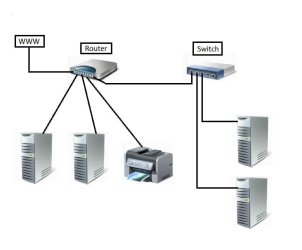
The switch is connected to your router. Basically, the switch expands the number of ports available from the router. Also, the switch doesn't have to be physically located near the router. The switch can be in another room with a single cable back to the router. Here's a quick drawing of a Switched Network.
 

Attachments

  • Local Area Switched Network.jpg
    Local Area Switched Network.jpg
    18.1 KB · Views: 2

My Computer

Computer type
PC/Desktop
Computer Manufacturer/Model Number
Built 2/11/2011
OS
Windows 7 Pro-x64
CPU
i7-2600 3.4GHz - 3.8GHz Turbo
Motherboard
Intel DH67BL-B3
Memory
8Gb - 2x4GB, Muskin 991770 PC3-1333
Graphics Card(s)
Integrated Intel HD 2000
Sound Card
Integrated Intel 10.1 HD, RealTek ALC892
Monitor(s) Displays
Asus LCD VH222H, Haier HL24XSL2a
Screen Resolution
1920x1080, 1920x1080
Hard Drives
Crucial SSD C300-128Gb,
Western Digital WD5002AALX - 500Gb,
Western Digital WD7501AALS - 750Gb
PSU
Seasonic 650W 80+ Gold Modular
Case
Rosewill Defender
Cooling
Stock CPU, Four 120mm case fans, PCH fan added
Keyboard
Logitech EX100 Y-RBH94 Wireless
Mouse
Logitech EX100 M-RCE95 Wireless
Internet Speed
3.0/1.5 Mbs
Antivirus
Microsoft Security Essentials
Browser
Microsoft Internet Explorer 11
Other Info
Antec Veris Premier-Multimedia IR Station,
Cyber Accoustics-3602 Speakers,
AFT XM-5U Card Reader,
Hauppauge TV-HVR-2250,
Sony LX300 USB Turntable
Thanks!!


The switch is connected to your router. Basically, the switch expands the number of ports available from the router. Also, the switch doesn't have to be physically located near the router. The switch can be in another room with a single cable back to the router. Here's a quick drawing of a Switched Network.
 

My Computer

Computer Manufacturer/Model Number
Home build
OS
Windows 7 32-bit
CPU
Intel i5
Motherboard
asus
Memory
8gb
Back
Top