Solved need connecting cable and...

padyboy

Banned
Local time
10:46 PM
Messages
61
I have purchased a wd7502aaex internal hard drive.

This product was "bare" without a cable or screws for the drive cage. I have a 64 bit system, but the available info does not indicate whether this is 32 or 64 bit.

I now have to locate the required cable and screws to install this drive.

Any assistance in this regard would be appreciated.
 

My Computer

Computer Manufacturer/Model Number
HP Pavilion a4310f, 3.0GHz dual core processor,4GB ram, dual core
OS
win 7 home premium 64 bit
CPU
processor AMD Athlon(tm) II x2 250 processor 3.00GHz
Motherboard
M2N68-LA (Narra6)
Memory
4.00GB RAM
Graphics Card(s)
Integrated graphics using nVidea GeForce615SE
Sound Card
Integrated RealtekALC888S
Monitor(s) Displays
Dell 17" LCD
Hard Drives
-640GB SATA, 3.0GB/s, 7200rpm
-Lacie Rugged XL backup drive, 1TB
-SuperMulti DVD burner
Keyboard
HP USB heyboard
Mouse
USB optical mouse
Hello Padyboy,

It doesn't matter if you have a 32-bit or 64-bit system to install a HDD. The HDD you bought is a SATA HDD. After you mount (screw in) the HDD in your computer, you will just need to connect a SATA data cable to the HDD and to a SATA connector on your motherboard, and connect a SATA power connector to the HDD from your PSU (power supply).

Hope this helps some. If not, please post back with any other questions you have. :)
 

My Computer

Computer type
PC/Desktop
Computer Manufacturer/Model Number
Self built custom
OS
64-bit Windows 11 Pro for Workstations
CPU
Intel i7-8700K OC'd to 5 GHz
Motherboard
ASUS ROG Maximus XI Formula Z390
Memory
64 GB (4x16GB) G.SKILL TridentZ RGB DDR4 3600 MHz
Graphics Card(s)
ASUS ROG-STRIX-GTX1080TI-O11G-GAMING
Sound Card
Integrated
Monitor(s) Displays
2 x Samsung Odyssey G7 27"
Screen Resolution
2560x1440
Hard Drives
1TB Samsung 990 PRO M.2,
4TB Samsung 990 PRO PRO M.2,
TerraMaster F8 SSD Plus NAS
PSU
Seasonic Prime Titanium 850W
Case
Thermaltake Core P3
Cooling
Corsair Hydro H115i
Keyboard
Logitech wireless K800
Mouse
Logitech MX Master 4
Internet Speed
2 Gb/s Download and 100 Mb/s Upload
Antivirus
Malwarebyte Anti-Malware Premium
Browser
Google Chrome
Other Info
Logitech Z625 speaker system,
Logitech BRIO 4K Pro webcam,
HP Color LaserJet Pro MFP M477fdn,
APC SMART-UPS RT 1000 XL - SURT1000XLI,
Galaxy S23 Plus phone
sata stuff

HP sold me a computer containing a motherboard with sockets for extra internal drives. There ought to be power supply connections for these extra drives. I haven't checked this visually; HP website gives no details in their specifications for my desktop on their website. No manufacturer is listed.

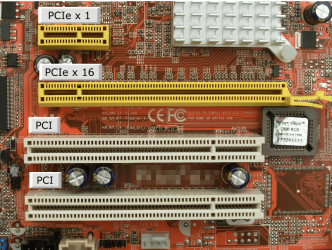
In addition, I am still trying to discern the difference between PCI-Express 1x and 16x-obviously 16x must be faster. But I don't see this property mentioned on any of the internal hard drives I have examined. My motherboard has 3 PCI-E slots-1 16x and 2 1x. What hard drives would use these sockets? Just wondrin'.
:confused:
 

My Computer

Computer Manufacturer/Model Number
HP Pavilion a4310f, 3.0GHz dual core processor,4GB ram, dual core
OS
win 7 home premium 64 bit
CPU
processor AMD Athlon(tm) II x2 250 processor 3.00GHz
Motherboard
M2N68-LA (Narra6)
Memory
4.00GB RAM
Graphics Card(s)
Integrated graphics using nVidea GeForce615SE
Sound Card
Integrated RealtekALC888S
Monitor(s) Displays
Dell 17" LCD
Hard Drives
-640GB SATA, 3.0GB/s, 7200rpm
-Lacie Rugged XL backup drive, 1TB
-SuperMulti DVD burner
Keyboard
HP USB heyboard
Mouse
USB optical mouse
Those pcie slots ar used for different things. The X16 slot is usually used for a Graphics card. The X1 lots can be used for a sound card an sata controller card or a USB 3.0 card to add USB 3.0 functionality to your computer. Maybe this will help identify the slots.

PCIe Slots.PNG
 

My Computers

System One System Two

  • Computer type
    PC/Desktop
    Computer Manufacturer/Model Number
    ALWAYS UNDER CONSTRUCTION
    OS
    Windows 11 Pro
    CPU
    Ryzen 9 5900X
    Motherboard
    Asus X570 Crosshair Viii Hero
    Memory
    32GB G Skill DDR4-3600
    Graphics Card(s)
    EVGA RTX 3080 FTW 3 Ultra
    Sound Card
    On Board/Sennheiser PC37X Headset
    Monitor(s) Displays
    3 X Asus 27"
    Screen Resolution
    2560x1440
    Hard Drives
    2 X 1 TB NVME drives
    PSU
    EVGA 850
    Case
    Phanteks Eclipse P400A
    Cooling
    EVGA 280 AIO
    Keyboard
    Logitech G510s/ Logitech G13
    Mouse
    Logitech G502
    Internet Speed
    24/1
    Antivirus
    ESET/MBAM Pro/SAS Pro
    Browser
    Chrome/ Firefox/ Edge
  • Computer type
    Laptop
    System Manufacturer/Model Number
    Dell 16 Plus
    OS
    Windows 11 Pro
    CPU
    Intel Ultra 9 288V
    Memory
    32 GB LPDDR5X 8533
    Monitor(s) Displays
    16" Mini-LED HDR600 Touch 90 Hz
    Screen Resolution
    2560X1600
    Hard Drives
    1 TB NVME
Hi Padyboy.

You need this SATA cable
sata cable.jpg

And, if there is no more SATA power source from power supply, you can use this. Sata power Cable.jpg

It's available everywhere at any PC shop.
 

My Computers

System One System Two

  • Computer type
    PC/Desktop
    Computer Manufacturer/Model Number
    MSI
    OS
    Windows 11 Prerelease
    CPU
    CORE i5 10400
    Motherboard
    MSI H510M Pro
    Memory
    16GB
    Graphics Card(s)
    GTX 750Ti
    Sound Card
    Realtek HD Integrated
    Monitor(s) Displays
    Samsung Curved 24"; Samsung TV 50"
    Screen Resolution
    1920 x 1080
    Hard Drives
    Vi-Gen NVMe 256GB
    WD 3 TB
    Seagate 2 TB
    Seagate 4TB
    PSU
    Power Striker
    Case
    VBR
    Cooling
    Conventional
    Keyboard
    Logitech Wireless
    Mouse
    Logitech Wireless
    Internet Speed
    2MBPs
  • Computer type
    Laptop
    System Manufacturer/Model Number
    Apple MacBook
    OS
    BigSur
    CPU
    Core i5
    Memory
    8 GB
    Monitor(s) Displays
    13 "
    Screen Resolution
    1366 x 768
    Hard Drives
    SSD 256 GB
The SATA hard drives connect to the SATA ports on the motherboard with SATA cables. They do not connect to the PCIe slots. The PCIe slots are for add-in cards like Video cards, sound cards, etc. Even if you had a SATA controller card plugged into the PCIe slot the drive would still connect to the SATA port on the card.
 

My Computer

Computer type
PC/Desktop
Computer Manufacturer/Model Number
Home Built
OS
Windows 10 Education 64 bit
CPU
AMD Phenom II X4 980 Black Edition Deneb 3.7GHz
Motherboard
Asus M4N68T-M V2 µATX Motherboard
Memory
8GB 4GBx2 Kingston PC10600 DDR3 1333 Memory
Graphics Card(s)
Zotac NVIDIA Geforce GT640 2 Gig DDR3 PCIe
Sound Card
VIA VT1708s High Definition Audio 8-channel Onboard
Monitor(s) Displays
22" LG E2242 1080p and 2 19" I-INC AG191D
Screen Resolution
1280x1024 - 1920x1080 - 1280x1024
Hard Drives
Crucial M100 256 GB SSD and 500 GB WD Blue SATA
PSU
Thermaltake TR 620
Case
Power Up Black ATX Mid-Tower Case
Cooling
Stock heatsink and fan
Keyboard
Logitech Wireless K350 Wave
Mouse
Logitech Wireless M570 Trackman Wheel
Internet Speed
80 Mbps Down 30 Mbps Up
Antivirus
Windows Defender
Browser
Internet Explorer 11
Other Info
HP DVD1040e Lightscribe - External USB2
Thanx, Al.
I sort of figured that PCI-E was irrelevant to my situation. I would need an extra card to aloow my motherboard to handle PCI-E; I thought it might accelerate data file transport. I watch a lot of stored movies, but I don't think I require that investment in my case.

I conversed with techs on CNET who failed to mention this in their replies. Although they have been of great assistance to me, I have found that they tend to make a situation more complicated than it is.

Thank you again for the info.

:D
 

My Computer

Computer Manufacturer/Model Number
HP Pavilion a4310f, 3.0GHz dual core processor,4GB ram, dual core
OS
win 7 home premium 64 bit
CPU
processor AMD Athlon(tm) II x2 250 processor 3.00GHz
Motherboard
M2N68-LA (Narra6)
Memory
4.00GB RAM
Graphics Card(s)
Integrated graphics using nVidea GeForce615SE
Sound Card
Integrated RealtekALC888S
Monitor(s) Displays
Dell 17" LCD
Hard Drives
-640GB SATA, 3.0GB/s, 7200rpm
-Lacie Rugged XL backup drive, 1TB
-SuperMulti DVD burner
Keyboard
HP USB heyboard
Mouse
USB optical mouse
You're most welcome Padyboy. I'm glad that we could help. :)
 

My Computer

Computer type
PC/Desktop
Computer Manufacturer/Model Number
Self built custom
OS
64-bit Windows 11 Pro for Workstations
CPU
Intel i7-8700K OC'd to 5 GHz
Motherboard
ASUS ROG Maximus XI Formula Z390
Memory
64 GB (4x16GB) G.SKILL TridentZ RGB DDR4 3600 MHz
Graphics Card(s)
ASUS ROG-STRIX-GTX1080TI-O11G-GAMING
Sound Card
Integrated
Monitor(s) Displays
2 x Samsung Odyssey G7 27"
Screen Resolution
2560x1440
Hard Drives
1TB Samsung 990 PRO M.2,
4TB Samsung 990 PRO PRO M.2,
TerraMaster F8 SSD Plus NAS
PSU
Seasonic Prime Titanium 850W
Case
Thermaltake Core P3
Cooling
Corsair Hydro H115i
Keyboard
Logitech wireless K800
Mouse
Logitech MX Master 4
Internet Speed
2 Gb/s Download and 100 Mb/s Upload
Antivirus
Malwarebyte Anti-Malware Premium
Browser
Google Chrome
Other Info
Logitech Z625 speaker system,
Logitech BRIO 4K Pro webcam,
HP Color LaserJet Pro MFP M477fdn,
APC SMART-UPS RT 1000 XL - SURT1000XLI,
Galaxy S23 Plus phone
SF,

Windows Live wanted $38 to answer just one simple question.
I am sure they are very competent techs, but this is well out of my price range.

Thanks for the durective, though.

I have tried the free version of NCH vinyl to digital software and got unacceptable sound quality; In fact, it was terrible. They indicated that I wasn't a paying member, they would probably not answer my question. I deleted their software and am searching elsewhere.
 

My Computer

Computer Manufacturer/Model Number
HP Pavilion a4310f, 3.0GHz dual core processor,4GB ram, dual core
OS
win 7 home premium 64 bit
CPU
processor AMD Athlon(tm) II x2 250 processor 3.00GHz
Motherboard
M2N68-LA (Narra6)
Memory
4.00GB RAM
Graphics Card(s)
Integrated graphics using nVidea GeForce615SE
Sound Card
Integrated RealtekALC888S
Monitor(s) Displays
Dell 17" LCD
Hard Drives
-640GB SATA, 3.0GB/s, 7200rpm
-Lacie Rugged XL backup drive, 1TB
-SuperMulti DVD burner
Keyboard
HP USB heyboard
Mouse
USB optical mouse
Back
Top