Need drivers for brand new logic board injected in Windows 7

JohnW63

New member
Local time
2:47 PM
Messages
24
I've built my brother a new PC with a Gigabyte motherboard with USB3.0 and 3.2 ports. Besides the Windows 10 drive I created, he wants to be able to boot to his old Win 7 drive, until he gets all his stuff moved and finds new versions of programs that will run under Win 10. When I try to boot his HD with 7 on it, the keyboard and mouse do not work. Even the Win 7 install disk has the same result. I have read I can some how inject the new drivers into a new Win 7 install USB stick and get it booted. Hopefully, then get those drivers downloaded into is windows 7 drive.


If you have the steps to get this working, please let me know.
 

My Computer My Computer

At a glance

Windows 7 64biti58gigGTX 1070
Computer type
PC/Desktop
Computer Manufacturer/Model Number
OEM Build
OS
Windows 7 64bit
CPU
i5
Motherboard
Gigabyte
Memory
8gig
Graphics Card(s)
GTX 1070

My Computers My Computers

  • At a glance

    7 X64i5 84002x8gb 3200mhz
    Computer type
    PC/Desktop
    OS
    7 X64
    CPU
    i5 8400
    Motherboard
    gigabyte b365m ds3h
    Memory
    2x8gb 3200mhz
    Hard Drives
    various
    PSU
    pure power 11 400w cm
    Case
    Coolermaster
    Cooling
    cryorig m9i
  • At a glance

    7x64g54008gb ddr4 2400
    Computer type
    PC/Desktop
    OS
    7x64
    CPU
    g5400
    Motherboard
    ga b365m ds3h
    Memory
    8gb ddr4 2400
    PSU
    xfx pro 450w
I hope I don't need to read all 95 pages of that !


It looks like I need to have DISM++ . Is that a downloadable product from Microsoft or already part of Windows 10 ?


What is the Windows 7 updater that was mentioned ? I know about 7Up the alternative to WinZip.


I need to make a Windows 7 install media, but when I tried that, last night, the utility from MS said I needed .Net 2.0 and exited. Obviously, I have well beyond that version of .net on Windows 10.
 

My Computer My Computer

At a glance

Windows 7 64biti58gigGTX 1070
Computer type
PC/Desktop
Computer Manufacturer/Model Number
OEM Build
OS
Windows 7 64bit
CPU
i5
Motherboard
Gigabyte
Memory
8gig
Graphics Card(s)
GTX 1070
I hope I don't need to read all 95 pages of that !

You only need to read the linked post HERE and the next couple which provide screenshots.

It looks like I need to have DISM++

It is linked in that post HERE.

This picture shows you what links look like.
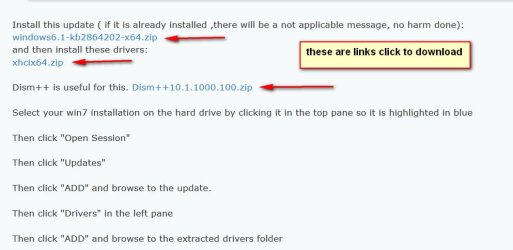
links.jpg


What is the Windows 7 updater that was mentioned ? I know about 7Up the alternative to WinZip.

7-zip is the file archiver you are referring to.

7UP ( short for 7 updater ) is something I wrote for people that wish to update their installation media.
It is not for integrating drivers and updates into an operating system that has already been installed

***********************************************************************************

I've built my brother a new PC with a Gigabyte motherboard with USB3.0 and 3.2 ports.
..he wants to be able to boot to his old Win 7 drive

To make the win7 installation from the old machine work in the new machine:

1. You need the driverframework update (windows6.1-kb2864202-x6.msu ), and the usb3 stack ( XHCI and optional UASP). Those are provided HERE

If ( and only if ) the new machine has an nvme disk, you will also want the nvme updates ( Windows6.1-KB2990941-v3-x64.msu and Windows6.1-KB3087873-v2-x64.msu). They are in my signature at the bottom of all my posts.

You can integrate all those into an existing installation using the method described HERE


2. NOTE: If the new hardware is significantly different from the machine his win7 installation was originally on, probably the registry needs adjusting to work on different hardware. Sometimes win7 can cope with moving to different hardware, but not always - depends how different it is.

It can be done manually, but I am too lazy to explain all that. Several programs are available that can do the registry adjustment.


3. Win7 will recognize it is on different hardware and will nag you to activate it. If it is not activated on the new hardware, it goes into reduced functionality and will eventually shut down.

If he wants to use win7 for a while on the new machine, he will need to use a valid windows 7 license key.

If he has a coa sticker on the old machine, he can try that key.

If it does not activate, type slui 4 in the run box then press ok and a few seconds later window will pop up giving the free MS activation phone number. The operator who answers is probably at the call center in India. If your brother is calling, from the UK they might not ask, but if they do - the correct answer is it is a different motherboard. If asked how many machines the license is being used on, the correct answer is one.

 
Last edited:

My Computers My Computers

  • At a glance

    7 X64i5 84002x8gb 3200mhz
    Computer type
    PC/Desktop
    OS
    7 X64
    CPU
    i5 8400
    Motherboard
    gigabyte b365m ds3h
    Memory
    2x8gb 3200mhz
    Hard Drives
    various
    PSU
    pure power 11 400w cm
    Case
    Coolermaster
    Cooling
    cryorig m9i
  • At a glance

    7x64g54008gb ddr4 2400
    Computer type
    PC/Desktop
    OS
    7x64
    CPU
    g5400
    Motherboard
    ga b365m ds3h
    Memory
    8gb ddr4 2400
    PSU
    xfx pro 450w
Thanks for the clarification.


I am pretty sure the Win 10 SSD drive I used is standard type and not NVME.


We're going to activate the Win install with the same key that created the HD in the first place. I've told him he may have to call MS and let them know he had to change his motherboard.


I would be slick if there was a way to install drivers from the Win 10 environment onto the Win 7 drive, since the 10 install works fine.


I'll try the steps you've provided, once I get another thumb drive. One of the pair I bought yesterday, don't not want to work on Win 10, but I was able to format it with no issues on a Mac. Shouldn't have gone with the two pack on sale and stuck with the name brand ones.
 

My Computer My Computer

At a glance

Windows 7 64biti58gigGTX 1070
Computer type
PC/Desktop
Computer Manufacturer/Model Number
OEM Build
OS
Windows 7 64bit
CPU
i5
Motherboard
Gigabyte
Memory
8gig
Graphics Card(s)
GTX 1070
I would be slick if there was a way to install drivers from the Win 10 environment onto the Win 7 drive

There is.

Dism++

Run dism++ in win10 and click the win7 installation at the top to highlight it in blue.

Then click Open Session

As in the post already linked to HERE
 
Last edited:

My Computers My Computers

  • At a glance

    7 X64i5 84002x8gb 3200mhz
    Computer type
    PC/Desktop
    OS
    7 X64
    CPU
    i5 8400
    Motherboard
    gigabyte b365m ds3h
    Memory
    2x8gb 3200mhz
    Hard Drives
    various
    PSU
    pure power 11 400w cm
    Case
    Coolermaster
    Cooling
    cryorig m9i
  • At a glance

    7x64g54008gb ddr4 2400
    Computer type
    PC/Desktop
    OS
    7x64
    CPU
    g5400
    Motherboard
    ga b365m ds3h
    Memory
    8gb ddr4 2400
    PSU
    xfx pro 450w
This is what I didn't understand:


"Install this update ( if it is already installed ,there will be a not applicable message, no harm done):
windows6.1-kb2864202-x64.zip
and then install these drivers:
xhcix64.zip "


How would actually installing drivers on Windows 10 work for a Win 7 drive ? I assume the 10 drivers are not the same as the Win 7 drivers. I expected to download win 7 drivers and push them to the Win 7 drive. After reading the thread further, it looks like I should have 7UP installed and folders for the drivers. Is that correct ?
 

My Computer My Computer

At a glance

Windows 7 64biti58gigGTX 1070
Computer type
PC/Desktop
Computer Manufacturer/Model Number
OEM Build
OS
Windows 7 64bit
CPU
i5
Motherboard
Gigabyte
Memory
8gig
Graphics Card(s)
GTX 1070
I went to the top of the long thread and tried to download 7up, but it didn't do anything. Is there a new place to get it ?


Strangely, I was following another thread that was discussing this topic and the link sent me to what looked like the same place and it downloaded automatically.
 

My Computer My Computer

At a glance

Windows 7 64biti58gigGTX 1070
Computer type
PC/Desktop
Computer Manufacturer/Model Number
OEM Build
OS
Windows 7 64bit
CPU
i5
Motherboard
Gigabyte
Memory
8gig
Graphics Card(s)
GTX 1070
I took a look at 7UP just to see how it worked. I haven't put any drivers in the folders, yet. It began the update process. What drivers does it come with pre-installed that it wants to install ?
 

My Computer My Computer

At a glance

Windows 7 64biti58gigGTX 1070
Computer type
PC/Desktop
Computer Manufacturer/Model Number
OEM Build
OS
Windows 7 64bit
CPU
i5
Motherboard
Gigabyte
Memory
8gig
Graphics Card(s)
GTX 1070
What drivers does it come with pre-installed that it wants to install ?


It comes with the usb3 stack and nvme updates and drivers. The nvme stuff is only necessary for nvme disks, but there is no harm including them.
 

My Computers My Computers

  • At a glance

    7 X64i5 84002x8gb 3200mhz
    Computer type
    PC/Desktop
    OS
    7 X64
    CPU
    i5 8400
    Motherboard
    gigabyte b365m ds3h
    Memory
    2x8gb 3200mhz
    Hard Drives
    various
    PSU
    pure power 11 400w cm
    Case
    Coolermaster
    Cooling
    cryorig m9i
  • At a glance

    7x64g54008gb ddr4 2400
    Computer type
    PC/Desktop
    OS
    7x64
    CPU
    g5400
    Motherboard
    ga b365m ds3h
    Memory
    8gb ddr4 2400
    PSU
    xfx pro 450w
Isn't that about all I need to make the keyboard and mouse work ? Gigabyte has a utility as well, and I think it had a few things more.


John
 

My Computer My Computer

At a glance

Windows 7 64biti58gigGTX 1070
Computer type
PC/Desktop
Computer Manufacturer/Model Number
OEM Build
OS
Windows 7 64bit
CPU
i5
Motherboard
Gigabyte
Memory
8gig
Graphics Card(s)
GTX 1070
Yes, you could create updated installation media with 7UP.

It is better than the gigabyte tool because it has the MS usb stack, including UASP and it also adds extra functions to boot.wim
 

My Computers My Computers

  • At a glance

    7 X64i5 84002x8gb 3200mhz
    Computer type
    PC/Desktop
    OS
    7 X64
    CPU
    i5 8400
    Motherboard
    gigabyte b365m ds3h
    Memory
    2x8gb 3200mhz
    Hard Drives
    various
    PSU
    pure power 11 400w cm
    Case
    Coolermaster
    Cooling
    cryorig m9i
  • At a glance

    7x64g54008gb ddr4 2400
    Computer type
    PC/Desktop
    OS
    7x64
    CPU
    g5400
    Motherboard
    ga b365m ds3h
    Memory
    8gb ddr4 2400
    PSU
    xfx pro 450w
I need to re-read some stuff. I need to get my head around what each utility does.


It looks like the 7Updater looks to insert drivers in a preexisting installation media, like a flash drive. I assume then that DISM and therefore the GUI version DISM++ inserts drivers into an image as well. Since 7UP has the USB driver I think I need, could I use DISM to install them on the Win 7 hard drive and be done ?


I apologize that I'm asking all the questions, but I just want to run it correctly the first time and not mess up the Windows 7 boot process. Once I get it right, I'll make an install version on a flash drive , in case my brother needs to re-install in the future.
 

My Computer My Computer

At a glance

Windows 7 64biti58gigGTX 1070
Computer type
PC/Desktop
Computer Manufacturer/Model Number
OEM Build
OS
Windows 7 64bit
CPU
i5
Motherboard
Gigabyte
Memory
8gig
Graphics Card(s)
GTX 1070
Strangely, I can not open the links above. It keeps taking me top the login screen, when I click on them, even though I am logged in.
 

My Computer My Computer

At a glance

Windows 7 64biti58gigGTX 1070
Computer type
PC/Desktop
Computer Manufacturer/Model Number
OEM Build
OS
Windows 7 64bit
CPU
i5
Motherboard
Gigabyte
Memory
8gig
Graphics Card(s)
GTX 1070
The old links, from the other thread, did not work, but the ones on the first page of this thread did.


OK, I've walked through the instructions in the other thread, but, I don't know if the drive L of Windows 7 shown in the instructions is an install drive media or an installed copy of Windows 7. On my PC, the install USB does not show in DISM++, so I have to believe that your drive L is a Win 7 installed partition, not an install iso file.


If I have that right, I think I don't need 7UP at all to do what I need, if I have the two downloads in a folder and can add them to DISM++ and then us that utility to push them to a Win 7 installed partition and make it work on the new hardware. Am I way off on this ?
 

My Computer My Computer

At a glance

Windows 7 64biti58gigGTX 1070
Computer type
PC/Desktop
Computer Manufacturer/Model Number
OEM Build
OS
Windows 7 64bit
CPU
i5
Motherboard
Gigabyte
Memory
8gig
Graphics Card(s)
GTX 1070
I have the two downloads in a folder and can add them to DISM++ and then us that utility to push them to a Win 7 installed partition

Yes, that is the idea


and make it work on the new hardware.
Not necessarily.

As I already posted:

2. NOTE: If the new hardware is significantly different from the machine his win7 installation was originally on, probably the registry needs adjusting to work on different hardware. Sometimes win7 can cope with moving to different hardware, but not always - depends how different it is.

It can be done manually, but I am too lazy to explain all that. Several programs are available that can do the registry adjustment.
 

My Computers My Computers

  • At a glance

    7 X64i5 84002x8gb 3200mhz
    Computer type
    PC/Desktop
    OS
    7 X64
    CPU
    i5 8400
    Motherboard
    gigabyte b365m ds3h
    Memory
    2x8gb 3200mhz
    Hard Drives
    various
    PSU
    pure power 11 400w cm
    Case
    Coolermaster
    Cooling
    cryorig m9i
  • At a glance

    7x64g54008gb ddr4 2400
    Computer type
    PC/Desktop
    OS
    7x64
    CPU
    g5400
    Motherboard
    ga b365m ds3h
    Memory
    8gb ddr4 2400
    PSU
    xfx pro 450w
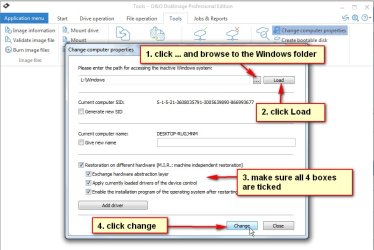
Here is an example of a program that can adjust to different hardware.

O&Oadjust.jpg
 

My Computers My Computers

  • At a glance

    7 X64i5 84002x8gb 3200mhz
    Computer type
    PC/Desktop
    OS
    7 X64
    CPU
    i5 8400
    Motherboard
    gigabyte b365m ds3h
    Memory
    2x8gb 3200mhz
    Hard Drives
    various
    PSU
    pure power 11 400w cm
    Case
    Coolermaster
    Cooling
    cryorig m9i
  • At a glance

    7x64g54008gb ddr4 2400
    Computer type
    PC/Desktop
    OS
    7x64
    CPU
    g5400
    Motherboard
    ga b365m ds3h
    Memory
    8gb ddr4 2400
    PSU
    xfx pro 450w
Yeah, it didn't work. Still no USB support on bootup.


So, with a program like the above, I can run it in Win 10. Browse to the Win 7 Windows folder, check the boxes, and hit change and it may help.


Before I try that, I want to make sure that the drivers I downloaded and pushed where the right ones. Are they new but generic, so they should work on most current motherboards ? I didn't use any of the drivers found with 7UP. I suspect I need the "windows6.1-kb2864202-x6.msu " file, but that is not a new update, as it came out in 2013.


The current version of the example program doesn't list Win 7. Do I need to find one that still supports that OS ?
 

My Computer My Computer

At a glance

Windows 7 64biti58gigGTX 1070
Computer type
PC/Desktop
Computer Manufacturer/Model Number
OEM Build
OS
Windows 7 64bit
CPU
i5
Motherboard
Gigabyte
Memory
8gig
Graphics Card(s)
GTX 1070
The driver framework update is required for the usb3 stack to work.

The current version of the example program doesn't list Win 7. Do I need to find one that still supports that OS ?

I am running O&O diskimage v15 in win7.
It is not free.

There is a giveaway of v14 for free:
Registration for your FREE license of O&O DiskImage 14

they will send an email , clcik the link and they send another email with your free license.

download pro v14 program here
Download Archive
 

My Computers My Computers

  • At a glance

    7 X64i5 84002x8gb 3200mhz
    Computer type
    PC/Desktop
    OS
    7 X64
    CPU
    i5 8400
    Motherboard
    gigabyte b365m ds3h
    Memory
    2x8gb 3200mhz
    Hard Drives
    various
    PSU
    pure power 11 400w cm
    Case
    Coolermaster
    Cooling
    cryorig m9i
  • At a glance

    7x64g54008gb ddr4 2400
    Computer type
    PC/Desktop
    OS
    7x64
    CPU
    g5400
    Motherboard
    ga b365m ds3h
    Memory
    8gb ddr4 2400
    PSU
    xfx pro 450w
So, your saying the driver frame work from 2013 isn't on a Win 7 computer that has been getting updates it's whole life ?
 

My Computer My Computer

At a glance

Windows 7 64biti58gigGTX 1070
Computer type
PC/Desktop
Computer Manufacturer/Model Number
OEM Build
OS
Windows 7 64bit
CPU
i5
Motherboard
Gigabyte
Memory
8gig
Graphics Card(s)
GTX 1070
Back
Top