Need For Speed II SE on Windows 7

Garcia

New member
Local time
10:24 AM
Messages
8
I have a soft spot for the old game Need For Speed II SE and was able to play it with XP installed. However on Windows 7 it won't work, even with the compatibility settings used. The games start screen and the setup options loads correctly, but when the actual game starts the graphics are completely corrupted, apperaing in lots of strange colors. Can this be helped?
 

My Computer My Computer

At a glance

Windows 7 Professional, 32 Bit
OS
Windows 7 Professional, 32 Bit

My Computer My Computer

At a glance

Windows 7 Ultimate x64 Service Pack 1 (Build ...Intel Core 2 Quad Q6600 (G0 Kentsfield) LGA77...Corsair TW3X4G1333C9A 4GB PC-10600 (2x XMS3 2GB)ASUS nVIDIA GeForce 560
OS
Windows 7 Ultimate x64 Service Pack 1 (Build 6.1.7601)
CPU
Intel Core 2 Quad Q6600 (G0 Kentsfield) LGA775 (FC-LGA6)
Motherboard
GIGABYTE GA-EP35C-DS3R (Rev. 2.1)
Memory
Corsair TW3X4G1333C9A 4GB PC-10600 (2x XMS3 2GB)
Graphics Card(s)
ASUS nVIDIA GeForce 560
Sound Card
RealTek ALC885/889A/890
Monitor(s) Displays
ChiMei CMV CT-730D 17inch (LCD Monitor)
Screen Resolution
1280-1024 60Hertz (Ture Colour 32bit)
Hard Drives
2x Barracuda 7200.10 SATA 3.0Gb/s 160-GB Hard Drive ST3160815AS (AHCI)
PSU
ANTEC 750w Earthwatts
Case
Thermaltake Shark (VA7000SWA ATX) Full Tower
Cooling
Front 120mm fan (1400 RPM) /Rear 120mm (1400 RPM) blue LED
Keyboard
Labtec Media Desktop Y-SAD65
Mouse
Razer DeathAdder 3G Infrared Sensor (1800DPI)
Internet Speed
Telstra BigPond Elite Liberty ADSL2+ 24Mbps/256kbps
Other Info
ASUS PCE-N13 802.11n Wireless LAN card
hello,
I have the same problem running Need for Speed II SE on windows 7 32 bit. I tried to Open the game using windows compatibility tool but the graphics are not loading properly and game is running slowly... Please anybody help
 

My Computer My Computer

At a glance

Windows 7 32 bit
OS
Windows 7 32 bit
I Find solution see below
 
Last edited:

My Computer My Computer

At a glance

Windows 7 ultimate Build 7600 x86intel pentium 4 3 ghz2 GBintel 865g
Computer Manufacturer/Model Number
intel 865g
OS
Windows 7 ultimate Build 7600 x86
CPU
intel pentium 4 3 ghz
Motherboard
gigabyte intel 865g
Memory
2 GB
Graphics Card(s)
intel 865g
Sound Card
intel onboard pci
Monitor(s) Displays
samsung 17 inch
Hard Drives
17 seagate 1 tb wdc
PSU
intel pentium 4
Case
navtech
Cooling
2 fans
see last below
 
Last edited:

My Computer My Computer

At a glance

Windows 7 ultimate Build 7600 x86intel pentium 4 3 ghz2 GBintel 865g
Computer Manufacturer/Model Number
intel 865g
OS
Windows 7 ultimate Build 7600 x86
CPU
intel pentium 4 3 ghz
Motherboard
gigabyte intel 865g
Memory
2 GB
Graphics Card(s)
intel 865g
Sound Card
intel onboard pci
Monitor(s) Displays
samsung 17 inch
Hard Drives
17 seagate 1 tb wdc
PSU
intel pentium 4
Case
navtech
Cooling
2 fans
first off, i would like to say welcome to the forums shalompanna, Garcia and Amit Verdeii. As for the problem, it's a good idea to be the admin of the computer, that way you can easily make the graphics for the game you want better. As for the problem with the strange colors, I suggest that you run the game in Compatibility view 32 bit so it won't show. I have NFS2, normal and SE (i have 2 computers that I run one or the other on) and MW and the same problems happen to me, but when i run it in 32 bit compatibility it doesn't show weird colors, it shows all the colors in the game. Hope this helps.
 

My Computer My Computer

At a glance

Windows 7 Professional 32-bit (6.1, Build 7600)4096MB RAMRadeon ATI HD4870
Computer Manufacturer/Model Number
Hewlett-Packard
OS
Windows 7 Professional 32-bit (6.1, Build 7600)
Memory
4096MB RAM
Graphics Card(s)
Radeon ATI HD4870
Monitor(s) Displays
NVIDIA GeForce GT220
Screen Resolution
1680 x 1050
I have a solution, hope this work
First of all i will tell u how to remove strange colors
1.Open notepad and type without brackets:)
(taskkill /F /IM explorer.exe
NFS2SEN.exe
start explorer.exe)

2.then save as batch file that should NFS2SEN.bat in game directory

To run game smoothly
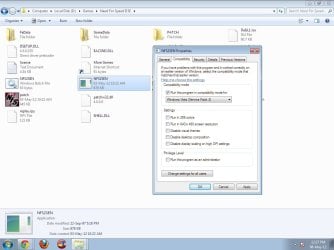
1.check compatibly mode in vista (service pack 2) of NFS2SEN.exe not NFS2SEN.bat
run batch file that is NFS2SEN.bat
Enjoy!!!!
nfs2se.jpg

If it seems hard for you u can download this batch file
View attachment NFS2SEN.bat
 
Last edited:

My Computer My Computer

At a glance

Windows 7 ultimate Build 7600 x86intel pentium 4 3 ghz2 GBintel 865g
Computer Manufacturer/Model Number
intel 865g
OS
Windows 7 ultimate Build 7600 x86
CPU
intel pentium 4 3 ghz
Motherboard
gigabyte intel 865g
Memory
2 GB
Graphics Card(s)
intel 865g
Sound Card
intel onboard pci
Monitor(s) Displays
samsung 17 inch
Hard Drives
17 seagate 1 tb wdc
PSU
intel pentium 4
Case
navtech
Cooling
2 fans
HI shalompanna,
thats works like magic, now i have better graphics for NFS2 se on win 7, so thanks for this magic bat file. but i am facing another problem, my game get stuck on first frame and i cant play the game. Even i can hear the sound of my car racing but i am stuck on the same screen....
it will be great if u can help on this...
 

My Computer My Computer

At a glance

Windows 7 32 bit
OS
Windows 7 32 bit
@Amit Verdeii - have you patched the game to the latest version (if there is one)? If so, than I do not know what the problem there is...
 

My Computer My Computer

At a glance

Windows 7 Professional 32-bit (6.1, Build 7600)4096MB RAMRadeon ATI HD4870
Computer Manufacturer/Model Number
Hewlett-Packard
OS
Windows 7 Professional 32-bit (6.1, Build 7600)
Memory
4096MB RAM
Graphics Card(s)
Radeon ATI HD4870
Monitor(s) Displays
NVIDIA GeForce GT220
Screen Resolution
1680 x 1050
Try this patch that might work, below (internet connection is required to work
patch)
View attachment 211008
 

My Computer My Computer

At a glance

Windows 7 ultimate Build 7600 x86intel pentium 4 3 ghz2 GBintel 865g
Computer Manufacturer/Model Number
intel 865g
OS
Windows 7 ultimate Build 7600 x86
CPU
intel pentium 4 3 ghz
Motherboard
gigabyte intel 865g
Memory
2 GB
Graphics Card(s)
intel 865g
Sound Card
intel onboard pci
Monitor(s) Displays
samsung 17 inch
Hard Drives
17 seagate 1 tb wdc
PSU
intel pentium 4
Case
navtech
Cooling
2 fans
or try this
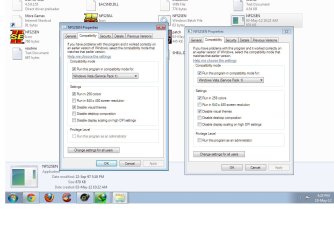
change compatibility mode to
vista service pack 1 check 256 colors and disable visual themes in both properties
of NFS2SEN.BAT and NFS2SEN.exe
Untitled.jpg
 

My Computer My Computer

At a glance

Windows 7 ultimate Build 7600 x86intel pentium 4 3 ghz2 GBintel 865g
Computer Manufacturer/Model Number
intel 865g
OS
Windows 7 ultimate Build 7600 x86
CPU
intel pentium 4 3 ghz
Motherboard
gigabyte intel 865g
Memory
2 GB
Graphics Card(s)
intel 865g
Sound Card
intel onboard pci
Monitor(s) Displays
samsung 17 inch
Hard Drives
17 seagate 1 tb wdc
PSU
intel pentium 4
Case
navtech
Cooling
2 fans
Is it possible to get a higher resolution than 640x480?
 

My Computer My Computer

At a glance

Windows 7 Ultimate x64
OS
Windows 7 Ultimate x64
It is by opening up the main menu before you start the game and change the resolution there, or go to the options menu when in game and do it there.

Oh, and Welcome to the Forums NfsFan.
 

My Computer My Computer

At a glance

Windows 7 Professional 32-bit (6.1, Build 7600)4096MB RAMRadeon ATI HD4870
Computer Manufacturer/Model Number
Hewlett-Packard
OS
Windows 7 Professional 32-bit (6.1, Build 7600)
Memory
4096MB RAM
Graphics Card(s)
Radeon ATI HD4870
Monitor(s) Displays
NVIDIA GeForce GT220
Screen Resolution
1680 x 1050
Unfortunately this is not possible in the menu. There is no option to change the resolution. It is 640x480 all the time :( I think a patch or an extra programm is needed to change the resolution.
 

My Computer My Computer

At a glance

Windows 7 Ultimate x64
OS
Windows 7 Ultimate x64
the latest patch was released late in 2002 i think it was, there is also no extra program, so sorry.
 

My Computer My Computer

At a glance

Windows 7 Professional 32-bit (6.1, Build 7600)4096MB RAMRadeon ATI HD4870
Computer Manufacturer/Model Number
Hewlett-Packard
OS
Windows 7 Professional 32-bit (6.1, Build 7600)
Memory
4096MB RAM
Graphics Card(s)
Radeon ATI HD4870
Monitor(s) Displays
NVIDIA GeForce GT220
Screen Resolution
1680 x 1050
Solution for Need for speed SE II not working in windows 7

Hello,
First download these files:

1. dgVoodoo2_15
2. Microsoft Application compatibility toolkit 5.6

after downloading both,

1. copy the files glide.dll, glide2x.dll and glide3x.dll from dgVoodoo2_15 folder to the game directory.

2. open -> start
->compatibility administrator 32-bit

under Custom Databases there should be a New Database entry, right click it and choose Create New > Application Fix.

Under Name of the program to be fixed: type Need For Speed II SE (or whatever you like)

Under Name of the vendor for this program: type Electronic Arts

Hit the browse button and navigate to the installation directory for the game, and select nfs2sen.exe.

click next, under operating system Modes choose none, and click next.

You need to check the following boxes:

EmulateCDFS
EmulateGetDiskFreeSpace
GlobalMemoryStatusLie
IgnoreException
MapMemoryB0000
SingleProcAffinity

Click next, and click finish. Click Save, and give the database a name (Need For Speed II SE), and a filename (nfs2sen7) and click save.

Then click on the file menu, and choose install. This will solve all the errors with running the exe.

Now, click "RUN" button from the top toolbar.

your game should work properly.

if you see any colour problem, then
1. click alt + enter
2. open task manager
3. goto process tab
4. right click explorer.exe
5. end process
6. click end or end now
7. click alt + tab

now, there won't be any colour lag.

enjoy palying the game.

after exiting your game,

->goto task manager,
->new task
->type - explorer
->ok

that's it.

Have fun

:)

Note:

If your game freezes at any point, then

applicable only for non - optical disc drive users

1. download any small disc file
2. right click and select open with
3. windows explorer
4. you may see that a disc drive has opened in your "my computer"
5. leave that behind and enjoy the game.

:)

If there is any sound problem, then

1. click alt + enter
2. again click alt + enter

the sound will be good as it should be.

hope it helps.

:)
 

My Computer My Computer

At a glance

Windows 7 Professional 32bit, Windows 8 Singl...2 GB DDR3 RAMAMD radeon
Computer type
Laptop
Computer Manufacturer/Model Number
HP
OS
Windows 7 Professional 32bit, Windows 8 Single Language 64bit
Memory
2 GB DDR3 RAM
Graphics Card(s)
AMD radeon
Antivirus
Windows defender
Browser
google chrome
Can run batch file that is NFS2SEN.bat.Just a black screen appeared.
Please Help !?!
 

My Computer My Computer

At a glance

Windows 7 Professional 32-bit SP1Intel Core i3 3240 @ 3.40GHz Ivy Bridge 22nm ...2.00GB Single-Channel DDR3 @ 798MHz (11-11-11...ASUS VS197 (1366x768@60Hz) Intel HD Graphics ...
Computer type
PC/Desktop
Computer Manufacturer/Model Number
Asus
OS
Windows 7 Professional 32-bit SP1
CPU
Intel Core i3 3240 @ 3.40GHz Ivy Bridge 22nm Technolog
Motherboard
ASUSTeK COMPUTER INC. BM6820_BM6620_BP6320-8 (LGA1155)
Memory
2.00GB Single-Channel DDR3 @ 798MHz (11-11-11-28)
Graphics Card(s)
ASUS VS197 (1366x768@60Hz) Intel HD Graphics (ASUStek Comput
Hard Drives
466GB Seagate ST500DM002-1BD142 ATA Device (SATA)
Antivirus
Kaspersky Internet Security 2014
Browser
Mozilla firefox 24.0
:tip: have u tried run as admin
 

My Computer My Computer

At a glance

windows 7 32 bit
Computer type
PC/Desktop
Computer Manufacturer/Model Number
Asus
OS
windows 7 32 bit
Hi Friends,

Iam Using windows 7 64 bit nfs 2 is working fine after having the batch file but its even getting hanged please help
 

My Computer My Computer

At a glance

Windows 7 64 bit4 GBNo
Computer type
PC/Desktop
Computer Manufacturer/Model Number
Custom build
OS
Windows 7 64 bit
Motherboard
Intel
Memory
4 GB
Graphics Card(s)
No
Hard Drives
1TB
Antivirus
Symantec
Browser
Chrome
Back
Top