Need Full Windows Services List

BunBun, in the add/remove programs section you should also be able to add/remove windows components. Some of the stuff you are looking for might be in there.
 

My Computer

Computer type
Laptop
Computer Manufacturer/Model Number
ASUS G60-RBBX05
OS
Win7 Home Premium 64x
CPU
Intel Core 2 Duo P7450 / 2.13 GHz (2.29 with Extreme Turbo)
Memory
4 GB PC-6400 Hyundai (2X2) at 800Mhz
Graphics Card(s)
NVIDIA GeForce GTX 260M 1GB DDR3 VRAM
Monitor(s) Displays
16" LED Backlit
Screen Resolution
1366 x 768 on laptop 1600x1050 max res on 22" external mon
Hard Drives
OCZ Agility 3 60GB SSD / 320 GB - Serial ATA-150 - 7200 rpm
PSU
6-cell Lithium ion { lasts 1.5 hours }
Case
ASUS G60 Laptop
Keyboard
Chicklet type back-lit (white light) keyboard
Mouse
Logitech G9 Laser Mouse 3200dpi and 1000 reports per minute
Internet Speed
Comcast 8.60mb/s up - 3.11mb/s down
Antivirus
MSE
Browser
Firefox
Other Info
General mid-budget gaming Comp. Low batterylife - High FrameRates - currently overheating problems :(

2nd Rig: Case: Rosewill BLACKHAWK Gaming ATX Mid Tower Computer Case

Mobo: GIGABYTE GA-990FXA-UD3
CPU: AMD FX-6200 Zambezi 3.8GHz (4.1GHz Turbo)
Heatsink: COOLER MASTER V8 CPU Cooler
RAM: Patriot Viper 3 8GB (2 x 4GB) 240-Pin DDR3 SDRAM 1866 (PC3 15000)
GPU: SAPPHIRE Radeon HD 6850 1GB 2
BunBun, in the add/remove programs section you should also be able to add/remove windows components. Some of the stuff you are looking for might be in there.

Yeah I have removed what I can from there. But aspects of those things are still in the system. Dont get me wrong I like how theres more in that list now but there needs to be more and more options.
 

My Computer

Computer Manufacturer/Model Number
Custom
OS
Windows 7 Ultimate x64
CPU
QX6700 @ 3.2Ghz (temporarily till I get the drive to tweak)
Motherboard
Asus Maximus Formula
Memory
8gb (4x2gb) OCZ PC2-8500
Graphics Card(s)
GTX280
Sound Card
Auzentech Prelude
Monitor(s) Displays
Samsung 244T & 940BF
Screen Resolution
1920x1200 & 1280x1024
Hard Drives
2 x Hitatchi 7K500 500GB in raid 0
PSU
Seasonic M-12 700w
Case
Lian Li PC-6077B
Cooling
Liquid (D-tek Fuzion 2/DDC+/240GTX)
Keyboard
Saitech Eclipse II
Mouse
Logitech G9
Internet Speed
22Mbit burst - 15 Mbit typical down / 500Kbit up
Other Info
http://pics.livejournal.com/bun_bun/pic/001c64ww
I want a listing of all winows services that run at startup or that may run sometime during the day, and what they do exactly. I want to be able to decide if I want those services running and taking up resources or not.

I want the bare minimun services running to let the OS do One Job Only - The One Job it was designed to do.. Run my software when I tell it to. Nothing more.
Well what's the final verdict? Can you give us a list of services that you modified and a brief description as to why they weren't needed for you and your setup?
 

My Computer

Computer Manufacturer/Model Number
Averatec 6130HS-20
OS
Windows 7 Professional 32-bit (6.1, Build 7600)
CPU
Intel(R) Pentium(R) 4 3.00 GHz HT
Memory
2.0 GB
Graphics Card(s)
ATI Mobility Radeon 9600 64MB
Sound Card
Realtek AC'97 Audio
Screen Resolution
1280 x 800
Hard Drives
Seagate 96023A 60GB 7200RPM -
Seagate FreeAgentDesktop 250GB
Cooling
20 Inch Box Fan
Mouse
Targus PAWM10 Wireless Optical Laptop Mouse
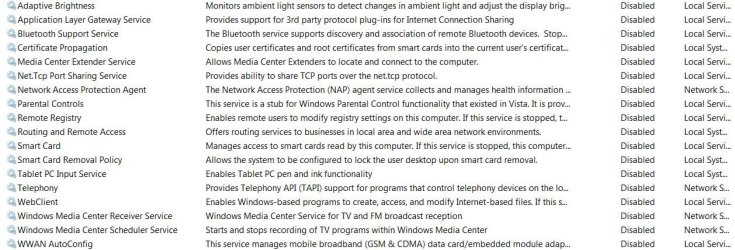
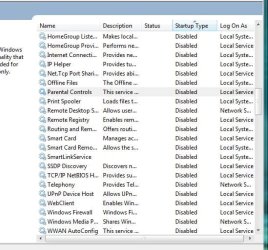
The first screen shot are my disabled services. The next are services I am planning to disable. In addition to these, there are three more I will disable.
 

Attachments

  • services disabled.JPG
    services disabled.JPG
    123.7 KB · Views: 23
  • Services to be disabled1.JPG
    Services to be disabled1.JPG
    66.6 KB · Views: 17

My Computer

Computer Manufacturer/Model Number
Home built
OS
Windows 7 Ultimate 32 bit
CPU
Intel(R) Pentium(R) 4 CPU 3.00GHz
Motherboard
ASUS P4P800-VM Motherboard Chipset: Intel 865G + ICH5
Memory
2.50 GB RAM
Graphics Card(s)
NVIDIA GeForce 7600 GS
Sound Card
SoundMax Integrated Digital Audio (Chip)
Monitor(s) Displays
ViewSonic VX 1962 wm
Screen Resolution
1680 X 1050
Hard Drives
Seagate Barracuda 7200.10 80 GB
ST380215A ATA Device 18.6 GB
Western Digital "My Book" external hard drive 750 GB
Cooling
Fan based
Keyboard
Microsoft Comfort Curve Keyboard 2000 v10 USB
Mouse
Logitec optic USB
Internet Speed
3.01 Mb/s download 0.64 Mb/s upload
The first screen shot are my disabled services. The next are services I am planning to disable. In addition to these, there are three more I will disable.
Thanks Carl, I've went over mine and compared them to yours. Of the ones you have disabled, mine are/were set to manual. A few I had already disabled but now I'm disabling all of these for a while and will see how it goes.
Capture.JPG
 

My Computer

Computer Manufacturer/Model Number
Averatec 6130HS-20
OS
Windows 7 Professional 32-bit (6.1, Build 7600)
CPU
Intel(R) Pentium(R) 4 3.00 GHz HT
Memory
2.0 GB
Graphics Card(s)
ATI Mobility Radeon 9600 64MB
Sound Card
Realtek AC'97 Audio
Screen Resolution
1280 x 800
Hard Drives
Seagate 96023A 60GB 7200RPM -
Seagate FreeAgentDesktop 250GB
Cooling
20 Inch Box Fan
Mouse
Targus PAWM10 Wireless Optical Laptop Mouse
This is beyond pointless.
 

My Computer

Computer Manufacturer/Model Number
Sony Vaio Z46GDU
OS
Windows 7 Ultimate x86-64
CPU
[email protected] 1066MHz FSB
Motherboard
Sony branded
Memory
6GB DDR3 1066MHz
Graphics Card(s)
9300M GS 256MB Dedicated (Speed) + Intel4500MHD (Stamina)
Sound Card
Realtek HD Audio
Monitor(s) Displays
13.1' WXGA
Screen Resolution
1600x900
Hard Drives
320GB 7200RPM w/ 16MB cache
Internet Speed
1MB/s

Attachments

  • 36_2_63.gif
    36_2_63.gif
    38.2 KB · Views: 90

My Computer

Computer Manufacturer/Model Number
Self
OS
W7, Xp Pro
CPU
AMD Sempron 2600+
Motherboard
K8V-MX
Memory
1GB
Graphics Card(s)
Radeon HD3650
Sound Card
Soundmax
Monitor(s) Displays
17" HP CRT
Screen Resolution
1024x768
Hard Drives
1x WDC WD800BB
1x HDS728080
PSU
? 460W
Case
Coolermaster
Cooling
enough
Keyboard
M$S
Mouse
Optical
Internet Speed
1500kbs
Other Info
OLD!!! does the job i need.
Thanks Greg. As you can see most of those are services for corporate type networking and for remote management which more than likely I will never use. If and when I purchase Bluetooth stuff I will put that one on manual. I fully realize these services would most likely never run anyway set on manual.

The remote management stuff I disabled out of my security paranoia.

Frostmourne and Hubris, it may well be pointless; I am most certainly not experienced enough to argue that. But for me it is learning experience of how my system works. And that is not pointless to me; it is knowledge.
 

My Computer

Computer Manufacturer/Model Number
Home built
OS
Windows 7 Ultimate 32 bit
CPU
Intel(R) Pentium(R) 4 CPU 3.00GHz
Motherboard
ASUS P4P800-VM Motherboard Chipset: Intel 865G + ICH5
Memory
2.50 GB RAM
Graphics Card(s)
NVIDIA GeForce 7600 GS
Sound Card
SoundMax Integrated Digital Audio (Chip)
Monitor(s) Displays
ViewSonic VX 1962 wm
Screen Resolution
1680 X 1050
Hard Drives
Seagate Barracuda 7200.10 80 GB
ST380215A ATA Device 18.6 GB
Western Digital "My Book" external hard drive 750 GB
Cooling
Fan based
Keyboard
Microsoft Comfort Curve Keyboard 2000 v10 USB
Mouse
Logitec optic USB
Internet Speed
3.01 Mb/s download 0.64 Mb/s upload
This is beyond pointless.
What, you saying it's pointless or the fact that some want things their way? I failed to mention that I'm testing this for someone. I've already said early on that I don't see the need for it but am willing to test it for possible gotchas. I'm ready to rollback at the click of a button. In addition to the screeny I posted, I've unchecked the ipv6 and disabled all components in the registry.
 

My Computer

Computer Manufacturer/Model Number
Averatec 6130HS-20
OS
Windows 7 Professional 32-bit (6.1, Build 7600)
CPU
Intel(R) Pentium(R) 4 3.00 GHz HT
Memory
2.0 GB
Graphics Card(s)
ATI Mobility Radeon 9600 64MB
Sound Card
Realtek AC'97 Audio
Screen Resolution
1280 x 800
Hard Drives
Seagate 96023A 60GB 7200RPM -
Seagate FreeAgentDesktop 250GB
Cooling
20 Inch Box Fan
Mouse
Targus PAWM10 Wireless Optical Laptop Mouse
This is beyond pointless.
What, you saying it's pointless or the fact that some want things their way? I failed to mention that I'm testing this for someone. I've already said early on that I don't see the need for it but am willing to test it for possible gotchas. I'm ready to rollback at the click of a button. In addition to the screeny I posted, I've unchecked the ipv6 and disabled all components in the registry.

Its pointless because it does nothing to your system speed or resource usage.
 

My Computer

Computer Manufacturer/Model Number
Sony Vaio Z46GDU
OS
Windows 7 Ultimate x86-64
CPU
[email protected] 1066MHz FSB
Motherboard
Sony branded
Memory
6GB DDR3 1066MHz
Graphics Card(s)
9300M GS 256MB Dedicated (Speed) + Intel4500MHD (Stamina)
Sound Card
Realtek HD Audio
Monitor(s) Displays
13.1' WXGA
Screen Resolution
1600x900
Hard Drives
320GB 7200RPM w/ 16MB cache
Internet Speed
1MB/s
Thanks Greg. As you can see most of those are services for corporate type networking and for remote management which more than likely I will never use. If and when I purchase Bluetooth stuff I will put that one on manual. I fully realize these services would most likely never run anyway set on manual.

The remote management stuff I disabled out of my security paranoia.

Frostmourne and Hubris, it may well be pointless; I am most certainly not experienced enough to argue that. But for me it is learning experience of how my system works. And that is not pointless to me; it is knowledge.

Very well put. I especially agree with "As you can see most of those are services for corporate type networking and for remote management". A single user has no need for it.
 

My Computer

Computer Manufacturer/Model Number
Averatec 6130HS-20
OS
Windows 7 Professional 32-bit (6.1, Build 7600)
CPU
Intel(R) Pentium(R) 4 3.00 GHz HT
Memory
2.0 GB
Graphics Card(s)
ATI Mobility Radeon 9600 64MB
Sound Card
Realtek AC'97 Audio
Screen Resolution
1280 x 800
Hard Drives
Seagate 96023A 60GB 7200RPM -
Seagate FreeAgentDesktop 250GB
Cooling
20 Inch Box Fan
Mouse
Targus PAWM10 Wireless Optical Laptop Mouse
This is beyond pointless.
What, you saying it's pointless or the fact that some want things their way? I failed to mention that I'm testing this for someone. I've already said early on that I don't see the need for it but am willing to test it for possible gotchas. I'm ready to rollback at the click of a button. In addition to the screeny I posted, I've unchecked the ipv6 and disabled all components in the registry.

Its pointless because it does nothing to your system speed or resource usage.
I agree. But when it comes to microsoft, manual is not the same as disabled.
 

My Computer

Computer Manufacturer/Model Number
Averatec 6130HS-20
OS
Windows 7 Professional 32-bit (6.1, Build 7600)
CPU
Intel(R) Pentium(R) 4 3.00 GHz HT
Memory
2.0 GB
Graphics Card(s)
ATI Mobility Radeon 9600 64MB
Sound Card
Realtek AC'97 Audio
Screen Resolution
1280 x 800
Hard Drives
Seagate 96023A 60GB 7200RPM -
Seagate FreeAgentDesktop 250GB
Cooling
20 Inch Box Fan
Mouse
Targus PAWM10 Wireless Optical Laptop Mouse
What, you saying it's pointless or the fact that some want things their way? I failed to mention that I'm testing this for someone. I've already said early on that I don't see the need for it but am willing to test it for possible gotchas. I'm ready to rollback at the click of a button. In addition to the screeny I posted, I've unchecked the ipv6 and disabled all components in the registry.

Its pointless because it does nothing to your system speed or resource usage.
I agree. But when it comes to microsoft, manual is not the same as disabled.

Manual services are interactive - they start as necessary.
 

My Computer

Computer Manufacturer/Model Number
Sony Vaio Z46GDU
OS
Windows 7 Ultimate x86-64
CPU
[email protected] 1066MHz FSB
Motherboard
Sony branded
Memory
6GB DDR3 1066MHz
Graphics Card(s)
9300M GS 256MB Dedicated (Speed) + Intel4500MHD (Stamina)
Sound Card
Realtek HD Audio
Monitor(s) Displays
13.1' WXGA
Screen Resolution
1600x900
Hard Drives
320GB 7200RPM w/ 16MB cache
Internet Speed
1MB/s
Frostmourne and Hubris, it may well be pointless; I am most certainly not experienced enough to argue that. But for me it is learning experience of how my system works. And that is not pointless to me; it is knowledge.

Have to admit to those points..

Too much time on your hands. ? LOL

Wonder what Charles at BV would say. ?
 

My Computer

Computer Manufacturer/Model Number
Self
OS
W7, Xp Pro
CPU
AMD Sempron 2600+
Motherboard
K8V-MX
Memory
1GB
Graphics Card(s)
Radeon HD3650
Sound Card
Soundmax
Monitor(s) Displays
17" HP CRT
Screen Resolution
1024x768
Hard Drives
1x WDC WD800BB
1x HDS728080
PSU
? 460W
Case
Coolermaster
Cooling
enough
Keyboard
M$S
Mouse
Optical
Internet Speed
1500kbs
Other Info
OLD!!! does the job i need.
Its pointless because it does nothing to your system speed or resource usage.
I agree. But when it comes to microsoft, manual is not the same as disabled.

Manual services are interactive - they start as necessary.
Necessary for what? I think the point for some that are doing this is they feel the possibility exists that upon boot/desktop loading that some of these services that are on manual are triggered and then stopped at some point shortly thereafter. If the single home user has no need for these services to do that, then it's there choice to disable them. If at some point in the future it becomes needed for them to re-enable them, I'm sure with the help of BV's guide it would be easy enough to do so. Also, if it does nothing to your system speed or resource usage then it should make no difference if it's set to manual or disabled, right? So we're back to the point of, they start as necessary. It's not necessary for a non networked single home user to have those items in the first place but they do because the OS is a one size fits all. Some just want to tailor their's to more fit them with their usage and I wish them well in doing so.
 

My Computer

Computer Manufacturer/Model Number
Averatec 6130HS-20
OS
Windows 7 Professional 32-bit (6.1, Build 7600)
CPU
Intel(R) Pentium(R) 4 3.00 GHz HT
Memory
2.0 GB
Graphics Card(s)
ATI Mobility Radeon 9600 64MB
Sound Card
Realtek AC'97 Audio
Screen Resolution
1280 x 800
Hard Drives
Seagate 96023A 60GB 7200RPM -
Seagate FreeAgentDesktop 250GB
Cooling
20 Inch Box Fan
Mouse
Targus PAWM10 Wireless Optical Laptop Mouse
I agree. But when it comes to microsoft, manual is not the same as disabled.

Manual services are interactive - they start as necessary.
Necessary for what? I think the point for some that are doing this is they feel the possibility exists that upon boot/desktop loading that some of these services that are on manual are triggered and then stopped at some point shortly thereafter. If the single home user has no need for these services to do that, then it's there choice to disable them. If at some point in the future it becomes needed for them to re-enable them, I'm sure with the help of BV's guide it would be easy enough to do so. Also, if it does nothing to your system speed or resource usage then it should make no difference if it's set to manual or disabled, right? So we're back to the point of, they start as necessary. It's not necessary for a non networked single home user to have those items in the first place but they do because the OS is a one size fits all. Some just want to tailor their's to more fit them with their usage and I wish them well in doing so.

The services are triggered if necessary, then end when necessary. Simple as that.
 

My Computer

Computer Manufacturer/Model Number
Sony Vaio Z46GDU
OS
Windows 7 Ultimate x86-64
CPU
[email protected] 1066MHz FSB
Motherboard
Sony branded
Memory
6GB DDR3 1066MHz
Graphics Card(s)
9300M GS 256MB Dedicated (Speed) + Intel4500MHD (Stamina)
Sound Card
Realtek HD Audio
Monitor(s) Displays
13.1' WXGA
Screen Resolution
1600x900
Hard Drives
320GB 7200RPM w/ 16MB cache
Internet Speed
1MB/s
Thanks Greg. As you can see most of those are services for corporate type networking and for remote management which more than likely I will never use. If and when I purchase Bluetooth stuff I will put that one on manual. I fully realize these services would most likely never run anyway set on manual.

The remote management stuff I disabled out of my security paranoia.

Frostmourne and Hubris, it may well be pointless; I am most certainly not experienced enough to argue that. But for me it is learning experience of how my system works. And that is not pointless to me; it is knowledge.

Very well put. I especially agree with "As you can see most of those are services for corporate type networking and for remote management". A single user has no need for it.

Well, perhaps after finding a good setup you could let the findings be known.

I'm a "single user". ( and single ) lol

;):)
 

My Computer

Computer Manufacturer/Model Number
Self
OS
W7, Xp Pro
CPU
AMD Sempron 2600+
Motherboard
K8V-MX
Memory
1GB
Graphics Card(s)
Radeon HD3650
Sound Card
Soundmax
Monitor(s) Displays
17" HP CRT
Screen Resolution
1024x768
Hard Drives
1x WDC WD800BB
1x HDS728080
PSU
? 460W
Case
Coolermaster
Cooling
enough
Keyboard
M$S
Mouse
Optical
Internet Speed
1500kbs
Other Info
OLD!!! does the job i need.
This is beyond pointless.
What, you saying it's pointless or the fact that some want things their way? I failed to mention that I'm testing this for someone. I've already said early on that I don't see the need for it but am willing to test it for possible gotchas. I'm ready to rollback at the click of a button. In addition to the screeny I posted, I've unchecked the ipv6 and disabled all components in the registry.

Its pointless because it does nothing to your system speed or resource usage.

No argument for me on that. I have already stated in this thread that Windows Seven does an excellent job of managing services and resources. Not being a Windows Seven programmer, I do not know if some, all or any of these services briefly run at startup or atany other time simply to see if they are needed - as a check. The ones I disabled, I know I do not need. This is simply for my edification and, like Greg, I am going to disable the components in the regisrtry.

I have backed up the registry and imaged my c: drive. If I screw something up and can roll back and will have learned what not to do.

And I did read BV's guide. Several of the services I disabled he said the he disabled also.
 

My Computer

Computer Manufacturer/Model Number
Home built
OS
Windows 7 Ultimate 32 bit
CPU
Intel(R) Pentium(R) 4 CPU 3.00GHz
Motherboard
ASUS P4P800-VM Motherboard Chipset: Intel 865G + ICH5
Memory
2.50 GB RAM
Graphics Card(s)
NVIDIA GeForce 7600 GS
Sound Card
SoundMax Integrated Digital Audio (Chip)
Monitor(s) Displays
ViewSonic VX 1962 wm
Screen Resolution
1680 X 1050
Hard Drives
Seagate Barracuda 7200.10 80 GB
ST380215A ATA Device 18.6 GB
Western Digital "My Book" external hard drive 750 GB
Cooling
Fan based
Keyboard
Microsoft Comfort Curve Keyboard 2000 v10 USB
Mouse
Logitec optic USB
Internet Speed
3.01 Mb/s download 0.64 Mb/s upload
Frostmourne and Hubris, it may well be pointless; I am most certainly not experienced enough to argue that. But for me it is learning experience of how my system works. And that is not pointless to me; it is knowledge.
Have to admit to those points..

Too much time on your hands. ? LOL

Wonder what Charles at BV would say. ?

:D:D Yes, it has been raining and cold and I can't ride my motorcycle!!!
 

My Computer

Computer Manufacturer/Model Number
Home built
OS
Windows 7 Ultimate 32 bit
CPU
Intel(R) Pentium(R) 4 CPU 3.00GHz
Motherboard
ASUS P4P800-VM Motherboard Chipset: Intel 865G + ICH5
Memory
2.50 GB RAM
Graphics Card(s)
NVIDIA GeForce 7600 GS
Sound Card
SoundMax Integrated Digital Audio (Chip)
Monitor(s) Displays
ViewSonic VX 1962 wm
Screen Resolution
1680 X 1050
Hard Drives
Seagate Barracuda 7200.10 80 GB
ST380215A ATA Device 18.6 GB
Western Digital "My Book" external hard drive 750 GB
Cooling
Fan based
Keyboard
Microsoft Comfort Curve Keyboard 2000 v10 USB
Mouse
Logitec optic USB
Internet Speed
3.01 Mb/s download 0.64 Mb/s upload
But for me it is learning experience of how my system works. And that is not pointless to me; it is knowledge.

I had a lot of fun exactly a year ago during the cold months Vliting the heck out of Win7 to try to see how fast I could make it run on a 528 mb laptop, or at least claw back enough RAM to run Avast.

Even though I ultimately found that there were no service edits that would speed it up any faster than running retail Win7, I learned so much about the services and Windows 7. By the end of the process, I knew they had gotten it as lean as possible and Win7 was the Black Viper.

BTW, I'm still using my old beat up 528mb laptop on surf trips with Home Premium retail, only Defender and one gadget, but normal speeds for web surfing, word processing and watching vids.
 
Back
Top