
Need help buying new card? PCIExpress x16? PCI 2.0?

sfafxy

New member
Local time
1:05 AM
Messages
5
So I know i could prolly google that but I want to ask you guys.

Myy current card says that the Bus Interface is a PCI Express x16?
But can I buy a card that is PCI 2.0? And put it in this computer?
I will also buy new ram,and I know that my PSU is okay. I mean I have them watts.

Current setup.
Its from 2007. And I dont have the money to buy a new cpu.
Probably just some expensive like **** RAM and a nVidia GeForce GT 630 if I can put it in the my PCI slot.
azi7b5.jpg
 

My Computer My Computer

At a glance

Win 7 Ulti, 32bit
OS
Win 7 Ulti, 32bit
Hi,

A GeForce GTS 450 1GB GDDR5 should be the best choice for your rig :) It will work perfectly! And it is a lot better than a GT 630. His price is near to the GT 630 one. I owned it and it was really a good mid-end GPU.
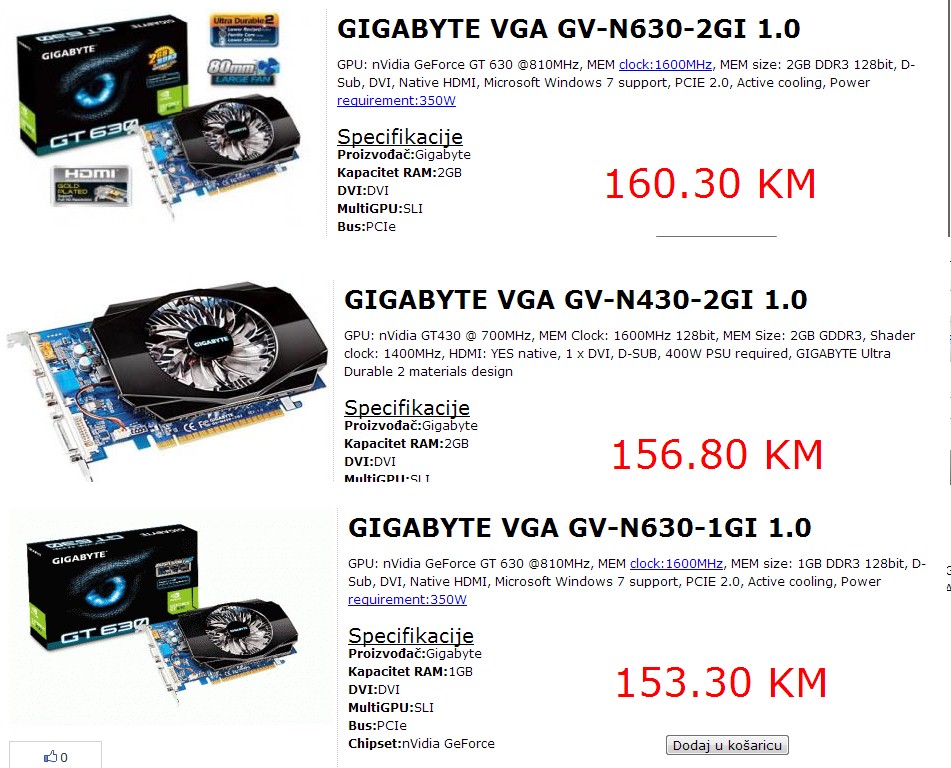
I suggest you to put in your system only PCI Express 1.0/1.1/2.0 cards. Some motherboards with PCI Express 1.0/1.1 (like yours) have issues with new cards which have PCI Express 2.1/3.0.

If you can, you should add 1GB of system RAM to get your pc perform better. 3GB are good for a 32-bit system.
 

My Computer My Computer

Computer type
PC/Desktop
Which would be the best choice.
And the GDDR5 are like 2 times this price so i cant afford it.
I think also that this computer will be used for gaming.
Soo..?
hZSzY.jpg
 

My Computer My Computer

At a glance

Win 7 Ulti, 32bit
OS
Win 7 Ulti, 32bit
Just to clarify, the slot you will use is the PCIe not the PCI, it is a x16 one (it is full length), and it is a PCIe 1.0 (first generation). It is relatively slow, but the CPU is going to limit game choice much before you actually saturate it.

A much more important question is what is your PSU (the box powering the computer)? How much power does it generate?
More modern cards need more power than what you have now.

THis page has a list of graphic cards (and it's a trusted place, that reviews such cards since a long time ago). The more powerful at the top, the weaker at the bottom. Use this as a compass to find the more powerful card you can buy with your budget.

For your rig, any card with more than 1 GB is overkill, GDDR5 is faster graphic memory than GDDR3 (better 1 GB of GDDR5 than 10 of GDDR3), but again you can live with GDDR3.
That said, you can aim for the more powerful you can find without wasting money.
 

My Computer My Computer

At a glance

Win 7 Pro 64-bit 7601AMD Phenom 9650 QuadCore, revision DR-B35 GB yes I run 2x 2GB and 1x 1GB, different b...NVIDIA GeForce 9800 GT 512 Mb, unknown manufa...
Computer type
PC/Desktop
Computer Manufacturer/Model Number
custom built
OS
Win 7 Pro 64-bit 7601
CPU
AMD Phenom 9650 QuadCore, revision DR-B3
Motherboard
ASUS M4A78
Memory
5 GB yes I run 2x 2GB and 1x 1GB, different brand, spank me.
Graphics Card(s)
NVIDIA GeForce 9800 GT 512 Mb, unknown manufacturer.
Sound Card
Crappy Realtek Integrated Audio
Monitor(s) Displays
Fujitsu Siemens P19-3P
Screen Resolution
1280 x 1024 x 32 bits @ 60 Hz Oh yeah, 4:3 rocks!
Hard Drives
(1) MAXTOR S TM3320613AS SATA Disk Device (2) STM35004 18AS SATA Disk Device (3) TOSHIBA USB 2.5"-HDD
PSU
whatever, around 450w
Case
Scavenged from old company PC, 10+ years old
Cooling
CPU fan, GPU fan, case fan, nothing fancy
Keyboard
Microsoft, PS/2, white.
Mouse
Optical, logitec.
Internet Speed
effective max speeds: 70-ish kB/s down 30-ish kB/s up
Antivirus
Avira, free edition.
Browser
Firefox with FXChrome to make it look like Google Chrome :P
Other Info
Was discarded by previous owner due to "horrible performance".
Was running Win Xp from a IDE drive. Yeah. Was a pain.
SATA II drive and Win7 and it zips away! Yay!
Like i said my PSU in 450w.
Im good with that.
 

My Computer My Computer

At a glance

Win 7 Ulti, 32bit
OS
Win 7 Ulti, 32bit
Depends from the PSU brand and if it has the 80 plus certification.
Cheap PSU aren't guaranteed by anyone to be able to reach the stated watts, and quite a few state the "peak output", that is "watts that they can provide for a few seconds at most".
Dying PSU tend to take HDDs and DVD players with them, sometimes they whole rig goes down.

Not saying that it will surely happen, but I warned you of a risk.
 

My Computer My Computer

At a glance

Win 7 Pro 64-bit 7601AMD Phenom 9650 QuadCore, revision DR-B35 GB yes I run 2x 2GB and 1x 1GB, different b...NVIDIA GeForce 9800 GT 512 Mb, unknown manufa...
Computer type
PC/Desktop
Computer Manufacturer/Model Number
custom built
OS
Win 7 Pro 64-bit 7601
CPU
AMD Phenom 9650 QuadCore, revision DR-B3
Motherboard
ASUS M4A78
Memory
5 GB yes I run 2x 2GB and 1x 1GB, different brand, spank me.
Graphics Card(s)
NVIDIA GeForce 9800 GT 512 Mb, unknown manufacturer.
Sound Card
Crappy Realtek Integrated Audio
Monitor(s) Displays
Fujitsu Siemens P19-3P
Screen Resolution
1280 x 1024 x 32 bits @ 60 Hz Oh yeah, 4:3 rocks!
Hard Drives
(1) MAXTOR S TM3320613AS SATA Disk Device (2) STM35004 18AS SATA Disk Device (3) TOSHIBA USB 2.5"-HDD
PSU
whatever, around 450w
Case
Scavenged from old company PC, 10+ years old
Cooling
CPU fan, GPU fan, case fan, nothing fancy
Keyboard
Microsoft, PS/2, white.
Mouse
Optical, logitec.
Internet Speed
effective max speeds: 70-ish kB/s down 30-ish kB/s up
Antivirus
Avira, free edition.
Browser
Firefox with FXChrome to make it look like Google Chrome :P
Other Info
Was discarded by previous owner due to "horrible performance".
Was running Win Xp from a IDE drive. Yeah. Was a pain.
SATA II drive and Win7 and it zips away! Yay!
This is serious.
Is there any way to check the PSU voltage?
 

My Computer My Computer

At a glance

Win 7 Ulti, 32bit
OS
Win 7 Ulti, 32bit
It's not just the voltage (you would just need a multimeter), it's the voltage at near max load. As at the moment your PSU is working fine, but with a bigger card you could ask too much. You need to connect something that forces the PSU to provide its stated max output at the right voltage on all the different outputs (and each output has a different max load, the 12 volt outputs are far higher than the 5 volt as the latter only powers hard drives and similar that require less).

It is a bit complex to do and requires expensive tools and decent expertise. The PSUs that have the 80 plus certification have been tested to provide 100% of their rated output with more than 80% of efficiency. They cost twice the price of cheap ones, but they won't die if asked to work hard.

Can you post the model and brand and the specs printed on your PSU? If there is something fishy or if it has been reviewed we can help.
 

My Computer My Computer

At a glance

Win 7 Pro 64-bit 7601AMD Phenom 9650 QuadCore, revision DR-B35 GB yes I run 2x 2GB and 1x 1GB, different b...NVIDIA GeForce 9800 GT 512 Mb, unknown manufa...
Computer type
PC/Desktop
Computer Manufacturer/Model Number
custom built
OS
Win 7 Pro 64-bit 7601
CPU
AMD Phenom 9650 QuadCore, revision DR-B3
Motherboard
ASUS M4A78
Memory
5 GB yes I run 2x 2GB and 1x 1GB, different brand, spank me.
Graphics Card(s)
NVIDIA GeForce 9800 GT 512 Mb, unknown manufacturer.
Sound Card
Crappy Realtek Integrated Audio
Monitor(s) Displays
Fujitsu Siemens P19-3P
Screen Resolution
1280 x 1024 x 32 bits @ 60 Hz Oh yeah, 4:3 rocks!
Hard Drives
(1) MAXTOR S TM3320613AS SATA Disk Device (2) STM35004 18AS SATA Disk Device (3) TOSHIBA USB 2.5"-HDD
PSU
whatever, around 450w
Case
Scavenged from old company PC, 10+ years old
Cooling
CPU fan, GPU fan, case fan, nothing fancy
Keyboard
Microsoft, PS/2, white.
Mouse
Optical, logitec.
Internet Speed
effective max speeds: 70-ish kB/s down 30-ish kB/s up
Antivirus
Avira, free edition.
Browser
Firefox with FXChrome to make it look like Google Chrome :P
Other Info
Was discarded by previous owner due to "horrible performance".
Was running Win Xp from a IDE drive. Yeah. Was a pain.
SATA II drive and Win7 and it zips away! Yay!
Back
Top