Solved Need help closing Background screen that seen during shutdown

papagym

New member
Local time
3:42 AM
Messages
45
Location
Central Arizona
Hey Users,

I've been seeing a strange screen that appears during shutdown. :confused: It's not there at every shutdown, and it's only on screen for a few milliseconds, so it's real hard to read.

It appears just after the blue shutdown screen.

This has been bugging me for close to a month or more. Today, I made concerted effort to see if I could read what it said by changing the background screen color. The background color had nothing to do with it, but it did help me to regulate my eyes so I could read parts of what was on the screen.

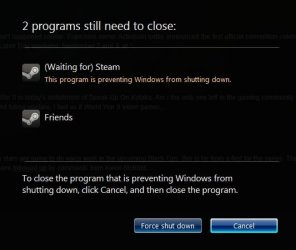
The Screen says "Waiting for background program to close" and there are two rectangular buttons and the left one may say Force Close but I'm not sure, the right on is Cancel. There is more writing there but I'm sure this is enough to get some help on.

My system is only a few months old and I've had to re-image it 3 times. I've only been using Windows 7 for the same length of time, and I was on the verge of trashing it. :devil: I haven't had any problems with my XP Pro system crashing for close to 10 years

Please Help and Thanks :geek:
 

My Computer My Computer

Computer Manufacturer/Model Number
Intel DZ68BC Home Built
OS
Windows 7 Ultimate x64
CPU
Intel I7 2600k
Motherboard
Intel DZ68BC
Memory
16 GB Corsair Vengence
Graphics Card(s)
560 Ti
Sound Card
onboard
Monitor(s) Displays
Samgung 23"
Hard Drives
SSD Crucial 128GB
Seagate 1TB Sata 3
WD 1TB Sata 3
PSU
OCZ 850W
Case
Lian-Le 7f
Cooling
Intel Std./CPU
Hey Users,

I've been seeing a strange screen that appears during shutdown. :confused: It's not there at every shutdown, and it's only on screen for a few milliseconds, so it's real hard to read.

It appears just after the blue shutdown screen.

This has been bugging me for close to a month or more. Today, I made concerted effort to see if I could read what it said by changing the background screen color. The background color had nothing to do with it, but it did help me to regulate my eyes so I could read parts of what was on the screen.

The Screen says "Waiting for background program to close" and there are two rectangular buttons and the left one may say Force Close but I'm not sure, the right on is Cancel. There is more writing there but I'm sure this is enough to get some help on.

My system is only a few months old and I've had to re-image it 3 times. I've only been using Windows 7 for the same length of time, and I was on the verge of trashing it. :devil: I haven't had any problems with my XP Pro system crashing for close to 10 years

Please Help and Thanks :geek:

Are you running Windows Live Messenger? If so, I have found it is usually the program that hangs momentarily when shutting down. If you are running WLM, try exiting from it before shutting down and see if the problem is resolved.

PS: It causes no harm, if it is the cause.

HTH
 

My Computer My Computer

Computer type
PC/Desktop
Computer Manufacturer/Model Number
Custom Built
OS
Windows 7 Professional x64
CPU
Intel i5 quad processor
Motherboard
DP67BG
Memory
16 GB
Graphics Card(s)
Radeon HD 5770
Sound Card
Realtek High Definition Audio
Monitor(s) Displays
Samsung SyncMaster
Screen Resolution
1920X1080
Hard Drives
WD 2TB (SATA Internal)
WD 1TB (USB External)
PSU
Corsair GS800
Case
Tower (Generic)
Cooling
3 Internal Fans
Keyboard
MS Wireless
Mouse
MS Optical Wired
Internet Speed
54 mbps
Antivirus
Emsisoft
Browser
IE-Version 9, Palemoon-Version 24.2.0
Hello,
No on Windows 7 Live Messanger.
My thoughts are that this screen is under the graphics window. If I knew how to close it that might help.
There may be a way to do this in the Registry...but I have not messed with a registry for years.
I remember seeing something like this when Windows was an infant, you could see the system files in those days.
I'm still the old fart that needs help. Tanks :cool:
 

My Computer My Computer

Computer Manufacturer/Model Number
Intel DZ68BC Home Built
OS
Windows 7 Ultimate x64
CPU
Intel I7 2600k
Motherboard
Intel DZ68BC
Memory
16 GB Corsair Vengence
Graphics Card(s)
560 Ti
Sound Card
onboard
Monitor(s) Displays
Samgung 23"
Hard Drives
SSD Crucial 128GB
Seagate 1TB Sata 3
WD 1TB Sata 3
PSU
OCZ 850W
Case
Lian-Le 7f
Cooling
Intel Std./CPU
Try pressing pause soon as the screen appears since you say it appears when windows is closing background programs that means there is sometime to press pause and observe what really is being displayed
 

My Computer My Computer

Computer Manufacturer/Model Number
Asus
OS
windows 7 ultimate 32 bit
CPU
AMD Athlon x2
Motherboard
Asus F1A75-M
Memory
2GB
Graphics Card(s)
onboard
Sound Card
onboard
Monitor(s) Displays
19"
Hard Drives
500GB
PSU
600W
Case
Tower
Cooling
Moderate
This is nothing alarming, but it does mean that some program is taking longer than expected to close before Windows shuts down. If it's barely displayed long enough to even read what it is, I wouldn't worry about it. The only concerning thing I've read so far is that you've had to image the machine 3 times in a few months. What was the cause/reason for that?
 

My Computer My Computer

OS
XP / Win7 x64 Pro
CPU
Intel Quad-Core Q9450 @ 3.2GHz
Motherboard
Asus P5-E
Memory
2x2GB GSkill DDR2
Graphics Card(s)
NVIDIA GeForce 8600 GTS (EVGA)
Monitor(s) Displays
Dell 2408WFP
Screen Resolution
1920x1200
1. Is there a way to turn off the Graphis Screen...Then maybe I can see what is there.
I'm fairly sure NOW that this is a program that has failed to shut down. Friday 4/20 I was able to see the other button and I beleive it says Force Shutdown but I'm not sure. I tried to click on it and I thought I saw the word "YES" when I did that. It's hard to do anything it under a second.
2. I have over 450+ (Critical and Warning) events in the event viewer, But I don't know anything about EV and I'm trying to learn. Made a Custom event log...Now I need to leard to post it. Maybe this is the reason for crashes.
3. I'm not an expert but I'm trying to get all of the hardware and bugs fixed before adding more programing.
 

My Computer My Computer

Computer Manufacturer/Model Number
Intel DZ68BC Home Built
OS
Windows 7 Ultimate x64
CPU
Intel I7 2600k
Motherboard
Intel DZ68BC
Memory
16 GB Corsair Vengence
Graphics Card(s)
560 Ti
Sound Card
onboard
Monitor(s) Displays
Samgung 23"
Hard Drives
SSD Crucial 128GB
Seagate 1TB Sata 3
WD 1TB Sata 3
PSU
OCZ 850W
Case
Lian-Le 7f
Cooling
Intel Std./CPU
I often see this screen on shut down with Windows 7 Home Premium on two different PCs. I use Thunderbird for email. It is slow to shut down, so the screen you describe stays on for as much as 10 seconds. It offers an option to force shutdown of Thunderbird, or wait for the program to close. I always wait for the program to close. I would consider you lucky if you only have to wait for a fraction of a second.
 

My Computer My Computer

OS
Windows7 home premium
If you've had to restore the original image three times, then there's either a serious issue with that computer, or you are introducing some software into that computer that's making it unstable to the point you have to install Windows again. Please list all of the software you use on a daily basis, what anti-virus you use, where you got the Windows 7 image (downloaded from official MS site, store bought DVD, etc), and anything else you think would help us figure out why you have to install Windows over and over again.
 

My Computer My Computer

Computer Manufacturer/Model Number
Dell XPS 15 L502x
OS
Windows 7 Ultimate x64 SP1
CPU
Core i7-2670QM
Memory
8GB DDR3 PC3-10600
Graphics Card(s)
Intel HD Graphics 3000 + GeForce GT 540M
Screen Resolution
1920x1080
Hard Drives
1TB 5400RPM Seagate
As others have said it's nothing to be worried about and it isn't harmful. This happens to me every time I shut down If I'm running a program called Steam. I've attached a screenshot of the screen that appears if you haven't been able to read it clearly before.
 

Attachments

  • psntc.jpg
    psntc.jpg
    20.9 KB · Views: 15

My Computer My Computer

Computer type
PC/Desktop
Computer Manufacturer/Model Number
Custom Build
OS
Windows 7 Ultimate 64-bit
CPU
Intel Core i5-3570k @ 3.4GHz (OC to 4.0 GHz Turbo Boost)
Motherboard
MSI Z77A-G45 LGA 1155 Intel Z77 ATX
Memory
ADATA XPG Gaming Series 8GB DDR3 1600MHz (2x4GB)
Graphics Card(s)
2x EVGA GTX 770 2GB Superclocked w/ ACX Cooling
Sound Card
On Board
Monitor(s) Displays
1x ASUS VG248QE 24" 144Hz 1ms LED-LCD 3D Ready
Screen Resolution
1920x1080
Hard Drives
1x Corsair Force Series 3 90GB SATA III SSD (OS);
1x Kingston SSDNow V300 Series 120GB SATA III SSD;
1x Hitachi DS7SAC100 1TB 7200 RPM 32MB Cache SATA II HDD;
1x Hitachi DT01ACA300 3TB 7200 RPM 64MB Cache SATA III HDD
PSU
EVGA Supernova 1000 P2 1000W Fully Modular Platinum Rated
Case
Rosewill Thor V2 White Full Tower
Cooling
CM Hyper 212 EVO (Push); 2x Intake 2x Exhaust Fans
Keyboard
Tt eSports Poseidon Cherry MX Brown Mechanical Keyboard
Mouse
A4Tech X7 F5 Wired Laser Mouse
Internet Speed
120 Mbps down, 40 Mbps up
Antivirus
MSE, Malwarebyte's Anti-Malware Premium
Browser
Google Chrome
Other Info
ASUS RT-N66U Dual-band N900 Gigabit Router;
Netgear WNDA4100 Dual-band N900 USB Adapter
reply to shutdown problem (ATTN Webmaster)

Webmaster I'm new to this site and can't seem to post a reply to my original thread. I've tried the reply buttons at the bottom then the top of the thread but my reply will not attack can ypu move it for me please.

Hello and thank you all for your replies,
I'm responding to all of your post with this reply.

I bought Windows 7 Ultimate from New Egg and I have the disk it is genuine and registered. I made a repair disk at install and after installing all thee hardware programs I made a system image backup.

The Pause/Break key will not the program that is giving me a problem. This key was sure may years ago and I don't believe the key works with any modern OS.

I don't use an email program named Thunder, I use Quest now owned and operated by CenturyLink and I have tried to see it this was the problem by disconnecting the eithernet cable. Problem was still there.

Intel sends out a program disk with my Mobo that had a program called Steam on it but I uninstalled it a few days after is was installed. Then before you ask I did a proper uninstall.

Windows 7 has given me a load of problems and I've had to re-image the system three times. I had a lot of problems trying to get drivers to work for a 1GB flash drive (dongle). Some of the sites I went to to find drivers loaded a lot of driver managers on my system and I hed to re-image 2 just to get the flash drive to work...I uninstalled all of these managers and any other malware I didn't know. Parts of one of these programs may indeed be the cause of the problem.

I lost my bootmgr file and probably screwed up my system trying to fix it. (cause of another re-image) But I found the Bootmgr missing KB2622803 and that help me to fix it.

Yesterday I used Tim Stitt's tutorial to make my first event but I have to read more tutorials to learn how to up load it.

According to all the info I get from the System Action Center is say my system is working properly. But if I look at the top part of the (local) Event Viewer is says in the last 7 days that I've had "4-Critical 363-Errors 133-Warning events" and that has me worrried. Then If you look at the base score for this system it's 7.6...go figure that one.

Anyway Guys I don't want to install any more software on this PC until I'm sure this is all fixed. I used XP Pro for almost 10 years and I can only recall a few incidents. I appreciate any help you can give me.:D Thanks Jim
 

My Computer My Computer

Computer Manufacturer/Model Number
Intel DZ68BC Home Built
OS
Windows 7 Ultimate x64
CPU
Intel I7 2600k
Motherboard
Intel DZ68BC
Memory
16 GB Corsair Vengence
Graphics Card(s)
560 Ti
Sound Card
onboard
Monitor(s) Displays
Samgung 23"
Hard Drives
SSD Crucial 128GB
Seagate 1TB Sata 3
WD 1TB Sata 3
PSU
OCZ 850W
Case
Lian-Le 7f
Cooling
Intel Std./CPU
The only places you should go for drivers are the manufacturer websites. For you, that's Intel and whoever made your 560 Ti. You don't need drivers for your SSD, but you might want to see if Crucial has any updated firmware for your SSD. Never use any third party software to scan and download drivers - they are mostly crap and do more damage than anything else.

I highly recommend you go to the tutorials and look at the ones on installing Windows 7.
 

My Computer My Computer

Computer Manufacturer/Model Number
Dell XPS 15 L502x
OS
Windows 7 Ultimate x64 SP1
CPU
Core i7-2670QM
Memory
8GB DDR3 PC3-10600
Graphics Card(s)
Intel HD Graphics 3000 + GeForce GT 540M
Screen Resolution
1920x1080
Hard Drives
1TB 5400RPM Seagate
FYI: The Pause key still works. But it may be program dependant.

Based on how many times you've had to restore/reinstall the machine, and the number of critical/warning events, I wonder if you've got a motherboard, memory, or some other hardware problem...
 

My Computer My Computer

OS
Windows 7 Ultimate x64
Hi
Thank you all for the replies.

I relay wanted to see what was causing this issue myself. XGamer95 thumbnail shows the screen.

As it turned out this happened because I had the magnifier Pinned to the task bar.

This issue can be marked as closed.
 

My Computer My Computer

Computer Manufacturer/Model Number
Intel DZ68BC Home Built
OS
Windows 7 Ultimate x64
CPU
Intel I7 2600k
Motherboard
Intel DZ68BC
Memory
16 GB Corsair Vengence
Graphics Card(s)
560 Ti
Sound Card
onboard
Monitor(s) Displays
Samgung 23"
Hard Drives
SSD Crucial 128GB
Seagate 1TB Sata 3
WD 1TB Sata 3
PSU
OCZ 850W
Case
Lian-Le 7f
Cooling
Intel Std./CPU
Back
Top