need help regarding hdd partition

lucasleo

Banned
Local time
1:26 AM
Messages
9
hello people.. :D
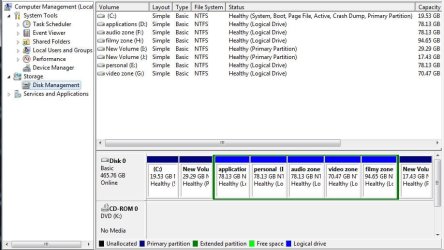
i want to merge two partitions, "new volume I" (which is beside C ) and last drive "new volume J."
which are primary partitions (not logical drives).
i tried partition magic 8.0v to merge but i didn't worked.
so, if anyone knows how to merge 2 primary partitions plzz help..

hope you'll find a solution for me.
and i really appreciate your work here.. :)
 

Attachments

  • Capture.JPG
    Capture.JPG
    74.2 KB · Views: 60
Last edited:

My Computer My Computer

At a glance

Windows 7 Ultimate 32bitAMD athlon LE-1640 2.7GHz500 gb
OS
Windows 7 Ultimate 32bit
CPU
AMD athlon LE-1640 2.7GHz
Motherboard
gigabyte
Memory
500 gb
Monitor(s) Displays
acer v203h
Keyboard
microsoft
Mouse
microsoft basic optical
Internet Speed
512kbps
Hi lucasleo...your problem is, that between the partitions you want to merge sit all your logical partitions
so you need to move the primary partitions next to each other only then can you merge them.
PLUS Partition Magic v8 is at least 5 years old...so it's not really safe on windows 7 ;)
You could try your task with a more recent manager like

Paragon Partition Manager Free Edition - partition software, resize partition

or (more for experts) with the Linux based tool gparted

Using GParted to Resize Your Windows 7 or Vista Partition - How-To Geek

-DG
 

My Computer My Computer

At a glance

Windows 7 Ultimate x86DualCore AMD Athlon 64 X2, 2600 MHz 5200+Samsung 2GB DDR2Onboard NVIDIA GeForce 6150SE nForce 430
Computer Manufacturer/Model Number
HP m8000n
OS
Windows 7 Ultimate x86
CPU
DualCore AMD Athlon 64 X2, 2600 MHz 5200+
Motherboard
Asus M2N68-LA (Narra)
Memory
Samsung 2GB DDR2
Graphics Card(s)
Onboard NVIDIA GeForce 6150SE nForce 430
Sound Card
Onboard nVIDIA nForce 6100-430 (MCP61P)
Monitor(s) Displays
Westinghouse 19" LED
Screen Resolution
1280x1024
Hard Drives
SATA II Seagate Barracuda 500GB
USB II WD Elements 500GB
USB II WD My Book 1TB
USB II WD My Book 2TB
PSU
Stock (HP)
Case
Stock (HP)
Cooling
Stock
Keyboard
Logitech Classic KB 200
Mouse
Standard HP opticle USB mouse
Looking at the screenshot, your Win7 partition is way too small.

I would immediately move the data off of I, delete it in Disk Mgmt, then extend C into that space: http://www.sevenforums.com/tutorials/2670-partition-volume-extend.html

Even that may be too small, so if you need more space for C then I'd move data off of J, delete it using free Partition Wizard bootable CD, then rightclick to Resize the extended Logical partition, left click and hold to slide the whole partition to the right to move the deleted J space next to C, then extend C into it.

http://www.partitionwizard.com/download.html
 
i don't think either of those programs that SledgeDG mentioned will do merging.

i am unaware of any free modern apps that offer the merge function.

if i find one, i'll post.

*edit* found this - can't vouch for its quality though...:huh:
 

My Computer My Computer

At a glance

ultimate 64 sp1i5 2500K [email protected]8 gigs GSkill Ripjaws 1600amd hd6950
Computer Manufacturer/Model Number
mickey megabyte 1234
OS
ultimate 64 sp1
CPU
i5 2500K [email protected]
Motherboard
MSI P67A-GD53
Memory
8 gigs GSkill Ripjaws 1600
Graphics Card(s)
amd hd6950
Sound Card
creative x-fi gamer
Monitor(s) Displays
samsung 24"
Screen Resolution
1920x1080
Hard Drives
ocz vertex 2e 60 gig, samsung f3 1tb, buffalo 2tb ext
PSU
antec 550
Case
antec three hundred
Cooling
i'm a cooling fan
Keyboard
saitek eclipse ii
Mouse
logitech g3
Internet Speed
about 4 Mbps
Other Info
i love win7

My Computer My Computer

At a glance

Windows 7 Home Premium x64AMD Phenom II X6 1600T16GB PC3-10700 (1342MHz)ATI Radeon 5770 HD (x2) CrossFire
Computer Manufacturer/Model Number
OEM - Me
OS
Windows 7 Home Premium x64
CPU
AMD Phenom II X6 1600T
Motherboard
GigaByte GZ-990FXA-UD3
Memory
16GB PC3-10700 (1342MHz)
Graphics Card(s)
ATI Radeon 5770 HD (x2) CrossFire
Sound Card
On-board RealTek chipset
Monitor(s) Displays
3x Hanns-G 1920x1080 Monitors
Screen Resolution
3x Hanns-G 1920x1080 Monitors
Hard Drives
Intel 25-V SSD 40GB: 218 MB/s AT: 0.1ms
Intel X-25M SSD 80GB: 230MB/s AT: 0.1ms
Seagate 750GB: 133 MB/s AT: 13ms (perpendicular storage)
Buffalo HD-PCTU3 1TB External drive
PSU
OCZ Stealth X Stream 750W
Case
Cheap (unknown)
Cooling
Stock
Keyboard
HP USB
Mouse
LogiTech USB
Internet Speed
1.5 Mbps - Slow - At the tail-end of a rural network
Other Info
Printer: Epson Stylus C-84
Scanner: HP 3500C Flatbed
DVD-RW: Plextor
DVD-ROM: Unknown
WEI: 7.4

My Computer My Computer

At a glance

ultimate 64 sp1i5 2500K [email protected]8 gigs GSkill Ripjaws 1600amd hd6950
Computer Manufacturer/Model Number
mickey megabyte 1234
OS
ultimate 64 sp1
CPU
i5 2500K [email protected]
Motherboard
MSI P67A-GD53
Memory
8 gigs GSkill Ripjaws 1600
Graphics Card(s)
amd hd6950
Sound Card
creative x-fi gamer
Monitor(s) Displays
samsung 24"
Screen Resolution
1920x1080
Hard Drives
ocz vertex 2e 60 gig, samsung f3 1tb, buffalo 2tb ext
PSU
antec 550
Case
antec three hundred
Cooling
i'm a cooling fan
Keyboard
saitek eclipse ii
Mouse
logitech g3
Internet Speed
about 4 Mbps
Other Info
i love win7
Mickey is right!
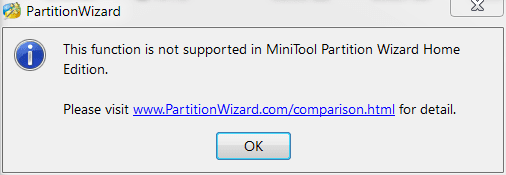
The free version of Paragon Partition Manager and Partition Wizard don't explicitly support merges.
But both do support move and resize
So move I: next to J: (or vice versa), copy the content of one of the two elsewhere (temporarily)
delete the emptied partition and resize the other one (if you not rather follow gregrocker's advice, that is)

Theoretically you even could still use Partition Magic 8 for the task if you'd use it from a bootable disk.
I just advise against it

-DG
 

My Computer My Computer

At a glance

Windows 7 Ultimate x86DualCore AMD Athlon 64 X2, 2600 MHz 5200+Samsung 2GB DDR2Onboard NVIDIA GeForce 6150SE nForce 430
Computer Manufacturer/Model Number
HP m8000n
OS
Windows 7 Ultimate x86
CPU
DualCore AMD Athlon 64 X2, 2600 MHz 5200+
Motherboard
Asus M2N68-LA (Narra)
Memory
Samsung 2GB DDR2
Graphics Card(s)
Onboard NVIDIA GeForce 6150SE nForce 430
Sound Card
Onboard nVIDIA nForce 6100-430 (MCP61P)
Monitor(s) Displays
Westinghouse 19" LED
Screen Resolution
1280x1024
Hard Drives
SATA II Seagate Barracuda 500GB
USB II WD Elements 500GB
USB II WD My Book 1TB
USB II WD My Book 2TB
PSU
Stock (HP)
Case
Stock (HP)
Cooling
Stock
Keyboard
Logitech Classic KB 200
Mouse
Standard HP opticle USB mouse

My Computer My Computer

At a glance

Win7U 64 RTMQ95508GB GskillASUS|EAH4850/HTDI/1GD3/A
OS
Win7U 64 RTM
CPU
Q9550
Motherboard
GA-EP45-UD3R
Memory
8GB Gskill
Graphics Card(s)
ASUS|EAH4850/HTDI/1GD3/A
Sound Card
xfi Plat
Monitor(s) Displays
Dell 2405fpw
Screen Resolution
1920x1200
Hard Drives
Seagate & WD sata Drives
PSU
Antec
Case
Antec
Keyboard
MS Natural Ergonomic 4000
Mouse
Logitech MX610 USB Cordless
A slight variant on the gregrocker advice. Use Partition wizard.
Backup data on I & J whatever way you want.

  1. Delete (making unallocated) I & J.
  2. Move the extended partition containing the logicals all the way to the right as per the gregrocker advice.
  3. That leaves one unallocated region to the right of C:
  4. Resize C: by moving it all the way into the unallocated space (which came fro I&J)
C: is at a reasonable size (not too big!).
You now have 1 primary and may want to reconfigure your logicals. You have 2 other spare primaries to play with.
Replace your backed up data where you want it.
 

My Computer My Computer

At a glance

Windows 7x64 Home Premium SP1Intel i7 2600kG.Skill Ripjaws (DDR3-1600) 2x4GBNvidia GeForce GTS 450; Intel HD Graphics 300...
Computer type
PC/Desktop
Computer Manufacturer/Model Number
Own build
OS
Windows 7x64 Home Premium SP1
CPU
Intel i7 2600k
Motherboard
ASUS P8Z68 Deluxe
Memory
G.Skill Ripjaws (DDR3-1600) 2x4GB
Graphics Card(s)
Nvidia GeForce GTS 450; Intel HD Graphics 3000(GT2+)
Monitor(s) Displays
Dell Ultrasharp IPS panel U2311H, Samsung SyncMaster P2350
Screen Resolution
1920x1080
Hard Drives
Samsung 850 Pro SSD 256GB, Samsung SSD 840 120GB, Seagates 1TB Barracuda ST31000528AS x2
PSU
Seasonic M12II 520W
Case
Lian Li Lancool PC-K60
Cooling
Case: 1x120mm, 3x140mm CPU: Hyper 212+
Keyboard
Logitech MK520 (wireless)
Mouse
Logitech MK520
Internet Speed
6-7 Mbps
Antivirus
Norton Security Premium, Malwarebytes on 2 (MSE on 3rd PC)
Browser
FireFox
Other Info
Audio: Logitech Z523 2.1
well thnx 4 stopping by and replying my query.

i want a few things to tell about,
#1 : there is no data in the partitions i want to merge (i.e I & J)
#2 : it seems choice of extending is not available (option is in grey color)
#3 : i want those 2 partitions to be one.

now can u tell me is it possible to merge.
 

My Computer My Computer

At a glance

Windows 7 Ultimate 32bitAMD athlon LE-1640 2.7GHz500 gb
OS
Windows 7 Ultimate 32bit
CPU
AMD athlon LE-1640 2.7GHz
Motherboard
gigabyte
Memory
500 gb
Monitor(s) Displays
acer v203h
Keyboard
microsoft
Mouse
microsoft basic optical
Internet Speed
512kbps
before you can extend, you need to move the partitions next to the one you want to extend like I is next to C
now you need to delete partition I in order to create the empty space, partition C can be extended into.

If there is no free room next to a partition the extend-option stays gray

Make sense? ;)

OK if you still want to merge I and J, move J next to I, delete I and then extend J into the newly created empty space

-DG
 

My Computer My Computer

At a glance

Windows 7 Ultimate x86DualCore AMD Athlon 64 X2, 2600 MHz 5200+Samsung 2GB DDR2Onboard NVIDIA GeForce 6150SE nForce 430
Computer Manufacturer/Model Number
HP m8000n
OS
Windows 7 Ultimate x86
CPU
DualCore AMD Athlon 64 X2, 2600 MHz 5200+
Motherboard
Asus M2N68-LA (Narra)
Memory
Samsung 2GB DDR2
Graphics Card(s)
Onboard NVIDIA GeForce 6150SE nForce 430
Sound Card
Onboard nVIDIA nForce 6100-430 (MCP61P)
Monitor(s) Displays
Westinghouse 19" LED
Screen Resolution
1280x1024
Hard Drives
SATA II Seagate Barracuda 500GB
USB II WD Elements 500GB
USB II WD My Book 1TB
USB II WD My Book 2TB
PSU
Stock (HP)
Case
Stock (HP)
Cooling
Stock
Keyboard
Logitech Classic KB 200
Mouse
Standard HP opticle USB mouse
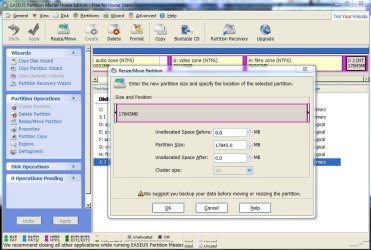
if u don,t mind, can u tell me how to move J next to I...

plz explain in detail.
 

My Computer My Computer

At a glance

Windows 7 Ultimate 32bitAMD athlon LE-1640 2.7GHz500 gb
OS
Windows 7 Ultimate 32bit
CPU
AMD athlon LE-1640 2.7GHz
Motherboard
gigabyte
Memory
500 gb
Monitor(s) Displays
acer v203h
Keyboard
microsoft
Mouse
microsoft basic optical
Internet Speed
512kbps

Attachments

  • Capture.JPG
    Capture.JPG
    109.2 KB · Views: 8
  • Capture1.JPG
    Capture1.JPG
    104 KB · Views: 6
Last edited:

My Computer My Computer

At a glance

Windows 7 Ultimate 32bitAMD athlon LE-1640 2.7GHz500 gb
OS
Windows 7 Ultimate 32bit
CPU
AMD athlon LE-1640 2.7GHz
Motherboard
gigabyte
Memory
500 gb
Monitor(s) Displays
acer v203h
Keyboard
microsoft
Mouse
microsoft basic optical
Internet Speed
512kbps
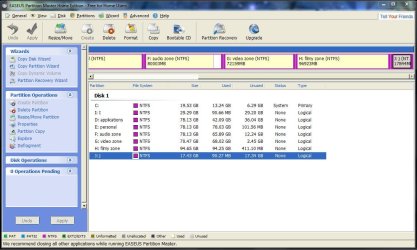
In the earlier Disk Mgmt screenshot I and J were marked Primary.

Now in Easeus they are marked Logical.

Do you know how this happened?

If you didn't convert them, then immediately burn to CD free Partition Wizard bootable CD so we can see a correct drive map from a camera snap. http://www.partitionwizard.com/download.html

Easeus is not recommended for Win as it can fail during Resizing operations, while PW will not. We have used PW CD here for hundreds of these operations without fail.
 
sorry man, i didn't mention about converting them to logical.
i converted them using EASEUS partition master.

i'm out of patience, so i converted and tried to merge with other logical drives but some wonder happened, after extending filmyzone( H ) with :J: it asked to format that drive(which is about 100gb, no back up:cry:) i have no idea what to do:confused: , clicked cancel for a couple of times:rolleyes: and it came back normal :shock:.

anyway i have decided not to do anything stupid like that without considering expert.:p
i'm hoping that you will give a better idea.:)
 

My Computer My Computer

At a glance

Windows 7 Ultimate 32bitAMD athlon LE-1640 2.7GHz500 gb
OS
Windows 7 Ultimate 32bit
CPU
AMD athlon LE-1640 2.7GHz
Motherboard
gigabyte
Memory
500 gb
Monitor(s) Displays
acer v203h
Keyboard
microsoft
Mouse
microsoft basic optical
Internet Speed
512kbps
I posted my advice earlier in #3. You haven't responded to it.

If you agree, then convert I and J back to Primary and follow the steps I gave.

If not, post back your response.
 
there are many replies so i couldnt decide what to choose.

well i dont want to add it to C.
i want those 2 partitions to 1, if its not possible is there any way to add both partitions to lo logical drive FILMYZONE(H) without formatting it.
 

My Computer My Computer

At a glance

Windows 7 Ultimate 32bitAMD athlon LE-1640 2.7GHz500 gb
OS
Windows 7 Ultimate 32bit
CPU
AMD athlon LE-1640 2.7GHz
Motherboard
gigabyte
Memory
500 gb
Monitor(s) Displays
acer v203h
Keyboard
microsoft
Mouse
microsoft basic optical
Internet Speed
512kbps
there are many replies so i couldnt decide what to choose.
To make it simple stick with the Gregrocker advice and follow it exactly.
He gets it right now and again:D
 

My Computer My Computer

At a glance

Windows 7x64 Home Premium SP1Intel i7 2600kG.Skill Ripjaws (DDR3-1600) 2x4GBNvidia GeForce GTS 450; Intel HD Graphics 300...
Computer type
PC/Desktop
Computer Manufacturer/Model Number
Own build
OS
Windows 7x64 Home Premium SP1
CPU
Intel i7 2600k
Motherboard
ASUS P8Z68 Deluxe
Memory
G.Skill Ripjaws (DDR3-1600) 2x4GB
Graphics Card(s)
Nvidia GeForce GTS 450; Intel HD Graphics 3000(GT2+)
Monitor(s) Displays
Dell Ultrasharp IPS panel U2311H, Samsung SyncMaster P2350
Screen Resolution
1920x1080
Hard Drives
Samsung 850 Pro SSD 256GB, Samsung SSD 840 120GB, Seagates 1TB Barracuda ST31000528AS x2
PSU
Seasonic M12II 520W
Case
Lian Li Lancool PC-K60
Cooling
Case: 1x120mm, 3x140mm CPU: Hyper 212+
Keyboard
Logitech MK520 (wireless)
Mouse
Logitech MK520
Internet Speed
6-7 Mbps
Antivirus
Norton Security Premium, Malwarebytes on 2 (MSE on 3rd PC)
Browser
FireFox
Other Info
Audio: Logitech Z523 2.1
What amount of free space do you have on C now? It's possible performance is already affected by the tiny partition if the page file is cramped.

I would delete I, then extend C into the space as first suggested. You'll have to delete it twice to get the Logical free space to change to Unallocated.

If you want to merge the two empty partitions, buy the paid version of free Partition Wizard bootable CD. Or using free PW CD delete I and J then Resize the Extended Logical into the Free Space to the left and right. .
 
what should be the size of C: for good performance ??
mine 19.5 gb, space free 6.6gb
 

My Computer My Computer

At a glance

Windows 7 Ultimate 32bitAMD athlon LE-1640 2.7GHz500 gb
OS
Windows 7 Ultimate 32bit
CPU
AMD athlon LE-1640 2.7GHz
Motherboard
gigabyte
Memory
500 gb
Monitor(s) Displays
acer v203h
Keyboard
microsoft
Mouse
microsoft basic optical
Internet Speed
512kbps
Back
Top