Solved Need help!!! restore deleted registry keys

jimkaritsiotis

New member
Local time
12:06 AM
Messages
6
I deleted the two registry keys below, hoping it would clean up the "Burn" menu option at the top of Windows Explorer, but it did nothing. Now, I'm unable to restore those two keys back into the registry! Can anyone help me get these back in? Thank you so much for your time!!!

HKEY_LOCAL_MACHINE\SOFTWARE\Microsoft\Windows\CurrentVersion\Explorer\CommandStore\shell\Windows.burn

HKEY_LOCAL_MACHINE\SOFTWARE\Wow6432Node\Microsoft\Windows\CurrentVersion\explorer\CommandStore\shell\Windows.burn
 

My Computer My Computer

OS
Windows 7 Ultimate x64
I forgot to mention that I deleted the entire windows.burn folder and it's subkeys. Any help is greatly appreciated!!!
 

My Computer My Computer

OS
Windows 7 Ultimate x64
Is there any chance you could paste the entries in here for me to paste back in? I created a backup, before I changed anything, and I must have screwed that up because the backup is only partial (???).

Thanks again!!!
 

My Computer My Computer

OS
Windows 7 Ultimate x64
I'm sure AddRAM may well be able to assist in wrighting you a script.
 

My Computer My Computer

Computer Manufacturer/Model Number
Cooler Master
OS
Windows 7 Home Premium 64 Bit
CPU
Core I7 1155 3.4GHZ
Memory
8GB DDR 1600
Hard Drives
64 GB SSD - OS
1TB - DATA
PSU
340 Watt Corsair
Case
Cooler Master
Cooling
Cooler Master
Ya right, where did you get that idea from ? How did you know I was reading this thread, amazing. :shock: ( just kidding , I know how )

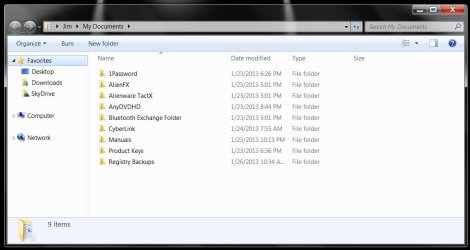
But I am curious, could you post a pic of your windows explorer.

I was going to ask, WHY did you do it in the 1st place ? Other then your reason, did it bother you that much.

I don`t mess with the registry, not since XP. I let CCleaner take care of that.

Maybe run sfc /scannow

http://www.sevenforums.com/tutorials/9733-screenshots-files-upload-post-seven-forums.html

I`m sure a registry expert will jump in.
 

My Computer My Computer

Computer type
PC/Desktop
Computer Manufacturer/Model Number
Skylake Special #666
OS
Windows 10 Pro x64
CPU
Intel Core i7 6700K
Motherboard
Asus Sabertooth Z170 Mark 1
Memory
GSkill TridentZ RGB 16GB 3600 16-16-16-36
Graphics Card(s)
EVGA GTX 980 Ti SC x2
Sound Card
Realtek High Definition
Monitor(s) Displays
AOC G2460PG
Screen Resolution
1920 x 1080 144Hz
Hard Drives
Samsung 860 Pro 256GB, Seagate Barracuda 4TB x2
PSU
EVGA 1000 P2, EVGA White Custom Braided Cables
Case
Corsair Vengeance C70 Gunmetal Black
Cooling
Corsair H100i v2, Corsair ML120 x2, Thermal Grizzly Kryonaut
Keyboard
Logitech G910 Orion Spectrum
Mouse
Logitech G700s
Internet Speed
Verizon Fios Quantum Gateway 75/75
Antivirus
Windows Defender, Malwarebytes Free 3.8.3
Browser
Chrome
Other Info
Corsair SP120 x4, LG Blu-ray Drive, Durabrand HT-395 100 Watt Dolby Digital Amp, Corsair H2100 Wireless 7.1 Headset
explorer.jpg

Thanks for the replies everybody!! Basically, I was trying to cleanup the look at the top. Lame, I know. Especially when I didn't even properly back it up! I appreciate all of your help...

Oh! I will try the scan step you listed, and also thanks for the instructions on posting a screen.
 

My Computer My Computer

OS
Windows 7 Ultimate x64
No problem. :D

Don`t know why you want to remove it, as it`s supposed to be there.
Open an EMPTY folder or partition and you`ll see it`s not there.
 
Last edited:

My Computer My Computer

Computer type
PC/Desktop
Computer Manufacturer/Model Number
Skylake Special #666
OS
Windows 10 Pro x64
CPU
Intel Core i7 6700K
Motherboard
Asus Sabertooth Z170 Mark 1
Memory
GSkill TridentZ RGB 16GB 3600 16-16-16-36
Graphics Card(s)
EVGA GTX 980 Ti SC x2
Sound Card
Realtek High Definition
Monitor(s) Displays
AOC G2460PG
Screen Resolution
1920 x 1080 144Hz
Hard Drives
Samsung 860 Pro 256GB, Seagate Barracuda 4TB x2
PSU
EVGA 1000 P2, EVGA White Custom Braided Cables
Case
Corsair Vengeance C70 Gunmetal Black
Cooling
Corsair H100i v2, Corsair ML120 x2, Thermal Grizzly Kryonaut
Keyboard
Logitech G910 Orion Spectrum
Mouse
Logitech G700s
Internet Speed
Verizon Fios Quantum Gateway 75/75
Antivirus
Windows Defender, Malwarebytes Free 3.8.3
Browser
Chrome
Other Info
Corsair SP120 x4, LG Blu-ray Drive, Durabrand HT-395 100 Watt Dolby Digital Amp, Corsair H2100 Wireless 7.1 Headset
It found no integrity violations, just fyi...

Ya right, where did you get that idea from ? How did you know I was reading this thread, amazing. :shock: ( just kidding , I know how )

But I am curious, could you post a pic of your windows explorer.

I was going to ask, WHY did you do it in the 1st place ? Other then your reason, did it bother you that much.

I don`t mess with the registry, not since XP. I let CCleaner take care of that.

Maybe run sfc /scannow

http://www.sevenforums.com/tutorials/9733-screenshots-files-upload-post-seven-forums.html

I`m sure a registry expert will jump in.
 

My Computer My Computer

OS
Windows 7 Ultimate x64
Here`s what they look like on my machine, if it helps. I guess you would add the key back if it`s not there, but let someone who knows for sure come along and help you. Chances are your burn option may no longer work in windows explorer, who knows ?
 
Last edited:

My Computer My Computer

Computer type
PC/Desktop
Computer Manufacturer/Model Number
Skylake Special #666
OS
Windows 10 Pro x64
CPU
Intel Core i7 6700K
Motherboard
Asus Sabertooth Z170 Mark 1
Memory
GSkill TridentZ RGB 16GB 3600 16-16-16-36
Graphics Card(s)
EVGA GTX 980 Ti SC x2
Sound Card
Realtek High Definition
Monitor(s) Displays
AOC G2460PG
Screen Resolution
1920 x 1080 144Hz
Hard Drives
Samsung 860 Pro 256GB, Seagate Barracuda 4TB x2
PSU
EVGA 1000 P2, EVGA White Custom Braided Cables
Case
Corsair Vengeance C70 Gunmetal Black
Cooling
Corsair H100i v2, Corsair ML120 x2, Thermal Grizzly Kryonaut
Keyboard
Logitech G910 Orion Spectrum
Mouse
Logitech G700s
Internet Speed
Verizon Fios Quantum Gateway 75/75
Antivirus
Windows Defender, Malwarebytes Free 3.8.3
Browser
Chrome
Other Info
Corsair SP120 x4, LG Blu-ray Drive, Durabrand HT-395 100 Watt Dolby Digital Amp, Corsair H2100 Wireless 7.1 Headset
Hey man, you rock!! I appreciate that very much. I will add those back in right now.

I just tested the BURN option from explorer and it works. Very head scratchy for me. If you look at your screen, I deleted the includeinlibrary one and the share one and it removed both of those options from the top of explorer. So, naturally, I assumed deleting the burn one would remove that too (since I never use it and I'm anal about a clean look (to a lame extent)).

Anyway, I will add those keys back and I guess, worst case scenario, if my computer works I'll just go with it!! Thanks again!!!

Here`s what they look like on my machine, if it helps. I guess you would add the key back if it`s not there, but let someone who knows for sure come along and help you. Chances are your burn option may no longer work in windows explorer, who knows ?
 

My Computer My Computer

OS
Windows 7 Ultimate x64
Back
Top