Hey, this is my first time on the forum so please excuse this issue is here and I couldn't find it in search.
I installed a NAS drive and created default folders on it for Docs, Pics and Videos. 2 Weeks ago my NAS drive died on me so not having the directories is causing my PC to run pretty slow. I've tried the tutorial on restoring defaults but I think due to the fact the my present and past default directories are no longer there it's not working. Can anybody help with this?
Thanks in advance for your time,
Joe
My Computer
At a glance
Windows 7 Ultimate x64 SP1AMD FX 8350 4.0GHz16GB - (2) 8GB Corsair Dominator Platinum DDR...XFX AMD Radeon HD 7970 Double D
Thank you for the fast reply. I have begun Option 2. Turns out I can see all my folders but the path is pointing to my NAS so I have modified them all in regedit without downloading the ZIP file. Did I jump the gun on that?. My other question is I don't have a My Documents but I do have Personal. Is this the same?
My Computer
At a glance
Windows 7 Ultimate x64 SP1AMD FX 8350 4.0GHz16GB - (2) 8GB Corsair Dominator Platinum DDR...XFX AMD Radeon HD 7970 Double D
Yes, you could change them manually if you like instead of using the REG files in OPTION TWO for the registry location exactly as how they are in the NOTE box at the top of the tutorial. Be sure that you do all of the other steps as well though or it will not work.
That's correct. In the registry, "Personal" is for the "My Documents" folder. The table under step 19 can help show you more on this.
My Computer
At a glance
64-bit Windows 11 Pro for WorkstationsIntel i7-8700K OC'd to 5 GHz64 GB (4x16GB) G.SKILL TridentZ RGB DDR4 3600...ASUS ROG-STRIX-GTX1080TI-O11G-GAMING
Computer type
PC/Desktop
Computer Manufacturer/Model Number
Self built custom
OS
64-bit Windows 11 Pro for Workstations
CPU
Intel i7-8700K OC'd to 5 GHz
Motherboard
ASUS ROG Maximus XI Formula Z390
Memory
64 GB (4x16GB) G.SKILL TridentZ RGB DDR4 3600 MHz
Graphics Card(s)
ASUS ROG-STRIX-GTX1080TI-O11G-GAMING
Sound Card
Integrated
Monitor(s) Displays
2 x Samsung Odyssey G7 27"
Screen Resolution
2560x1440
Hard Drives
1TB Samsung 990 PRO M.2,
4TB Samsung 990 PRO PRO M.2,
TerraMaster F8 SSD Plus NAS
PSU
Seasonic Prime Titanium 850W
Case
Thermaltake Core P3
Cooling
Corsair Hydro H115i
Keyboard
Logitech wireless K800
Mouse
Logitech MX Master 4
Internet Speed
2 Gb/s Download and 100 Mb/s Upload
Antivirus
Malwarebyte Anti-Malware Premium
Browser
Google Chrome
Other Info
Logitech Z625 speaker system,
Logitech BRIO 4K Pro webcam,
HP Color LaserJet Pro MFP M477fdn,
APC SMART-UPS RT 1000 XL - SURT1000XLI,
Galaxy S23 Plus phone
OK this is what I got after following all the directions in option 2.
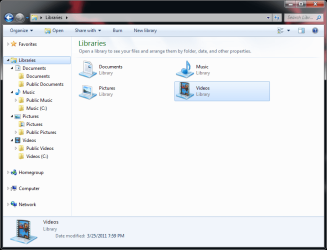
When I click on Library (See attached pic)
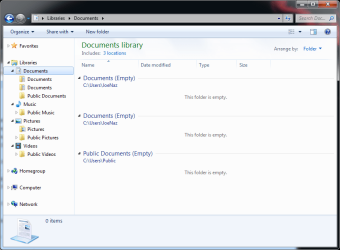
Documents Library now has 3 locations, 1 is public
Pictures has 2 locations, 1 is public
Videos and Music don't have the users location
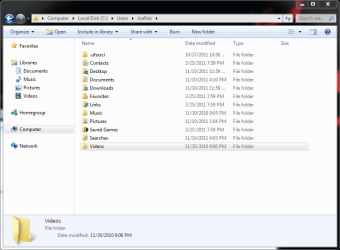
But when I go to c:\users\mJoeNaz all folders are listed. (see attached Pic)
There is only 1 Documents folder
Also Music and Videos do not have the Location tab in properties
Attachments
Capture Libraries.PNG
31.1 KB
· Views: 10
Capture Users Folder.PNG
27.2 KB
· Views: 9
My Computer
At a glance
Windows 7 Ultimate x64 SP1AMD FX 8350 4.0GHz16GB - (2) 8GB Corsair Dominator Platinum DDR...XFX AMD Radeon HD 7970 Double D
It sounds like a registry setting may still be off. Try Option Two again, but using the REG files along with all of the other steps exactly as outlined in the tutorial.
My Computer
At a glance
64-bit Windows 11 Pro for WorkstationsIntel i7-8700K OC'd to 5 GHz64 GB (4x16GB) G.SKILL TridentZ RGB DDR4 3600...ASUS ROG-STRIX-GTX1080TI-O11G-GAMING
Computer type
PC/Desktop
Computer Manufacturer/Model Number
Self built custom
OS
64-bit Windows 11 Pro for Workstations
CPU
Intel i7-8700K OC'd to 5 GHz
Motherboard
ASUS ROG Maximus XI Formula Z390
Memory
64 GB (4x16GB) G.SKILL TridentZ RGB DDR4 3600 MHz
Graphics Card(s)
ASUS ROG-STRIX-GTX1080TI-O11G-GAMING
Sound Card
Integrated
Monitor(s) Displays
2 x Samsung Odyssey G7 27"
Screen Resolution
2560x1440
Hard Drives
1TB Samsung 990 PRO M.2,
4TB Samsung 990 PRO PRO M.2,
TerraMaster F8 SSD Plus NAS
PSU
Seasonic Prime Titanium 850W
Case
Thermaltake Core P3
Cooling
Corsair Hydro H115i
Keyboard
Logitech wireless K800
Mouse
Logitech MX Master 4
Internet Speed
2 Gb/s Download and 100 Mb/s Upload
Antivirus
Malwarebyte Anti-Malware Premium
Browser
Google Chrome
Other Info
Logitech Z625 speaker system,
Logitech BRIO 4K Pro webcam,
HP Color LaserJet Pro MFP M477fdn,
APC SMART-UPS RT 1000 XL - SURT1000XLI,
Galaxy S23 Plus phone
I have an update. I did something with the properties off of the list on the right of the start menu and managed to get the 2nd documents location to disapear.
I then manually added \users\joenaz\music and \users\joenaz\video as a new save location under the properties tab but they still do not have the location tab and come up as mucis (C) and video (C) in my library (see attached)
Attachments
Capture Users Folder 2.PNG
33.8 KB
· Views: 2
My Computer
At a glance
Windows 7 Ultimate x64 SP1AMD FX 8350 4.0GHz16GB - (2) 8GB Corsair Dominator Platinum DDR...XFX AMD Radeon HD 7970 Double D
It's not dead per say. I pulled it out of the NAS enclosure and installed it directly into my PC. Then purchased Windows UFS Explorer to rescue the data. Turns out the drive is formatted XFS and has 6 partitions. The last one being the data partition. I couldn't get the data off or back it up with UFs because it would have taken an estimated time of 200+ hours and I didn't want to risk damaging the HDD any further. So after some reading I built an Ubuntu hard drive for my machine and was able to back it up with a program called GNU ddrescue. Now I'm just trying to find a way to read that image file. Or find out if just imaging the data partition and not the entire drive was a poor choice. I still have the bad NAS drive intact so I can always do it again, I'm just putting my feelers out you know?
My Computer
At a glance
Windows 7 Ultimate x64 SP1AMD FX 8350 4.0GHz16GB - (2) 8GB Corsair Dominator Platinum DDR...XFX AMD Radeon HD 7970 Double D
I wish I could help, but I do not have any experience with XFS partitions. You might create a new thread about it to see if someone may know of a way for you.
My Computer
At a glance
64-bit Windows 11 Pro for WorkstationsIntel i7-8700K OC'd to 5 GHz64 GB (4x16GB) G.SKILL TridentZ RGB DDR4 3600...ASUS ROG-STRIX-GTX1080TI-O11G-GAMING
Computer type
PC/Desktop
Computer Manufacturer/Model Number
Self built custom
OS
64-bit Windows 11 Pro for Workstations
CPU
Intel i7-8700K OC'd to 5 GHz
Motherboard
ASUS ROG Maximus XI Formula Z390
Memory
64 GB (4x16GB) G.SKILL TridentZ RGB DDR4 3600 MHz
Graphics Card(s)
ASUS ROG-STRIX-GTX1080TI-O11G-GAMING
Sound Card
Integrated
Monitor(s) Displays
2 x Samsung Odyssey G7 27"
Screen Resolution
2560x1440
Hard Drives
1TB Samsung 990 PRO M.2,
4TB Samsung 990 PRO PRO M.2,
TerraMaster F8 SSD Plus NAS
PSU
Seasonic Prime Titanium 850W
Case
Thermaltake Core P3
Cooling
Corsair Hydro H115i
Keyboard
Logitech wireless K800
Mouse
Logitech MX Master 4
Internet Speed
2 Gb/s Download and 100 Mb/s Upload
Antivirus
Malwarebyte Anti-Malware Premium
Browser
Google Chrome
Other Info
Logitech Z625 speaker system,
Logitech BRIO 4K Pro webcam,
HP Color LaserJet Pro MFP M477fdn,
APC SMART-UPS RT 1000 XL - SURT1000XLI,
Galaxy S23 Plus phone



 ersonal in search. However there are still (2) users\JoeNaz\ locations yet only 1 folder.