
Solved need help restoring the default icon for iconless exe files

Diddy7Kong

New member
Member
Local time
10:52 AM
Messages
39
if that makes sense, I have ran iconpackager to make my icons for brres, brstm, bin, brsar, thp, pac, pcs, rel, and gct files easier to spot out since the program that opens them gives them all the same icon, and iconpackager never screwed around with my icons at all, or in the past,


the problem here now, is idk what is responsable for it, but any exe files that weren't given an icon in the app's developement, are all blank sheet icons instead, so its an eyesore for me when i fumble through folders and zips with unaccociated files mixed with exe files and all i see are blank sheets, i quickly sort past them, wondering where the exe files are, and i cant change them back to the one in the system shell when its right there T_T

and even iconpackager wont let me change the icon for exe type files because it says i cannot change that, it will however, let me change the icon of just ONE exe file at a time which isnt what i want to do, because thats not defaulting the icons for all of them

here is how an application appears on my computer if it doesnt have an icon, and how they look sitting next to files like sfks and junk
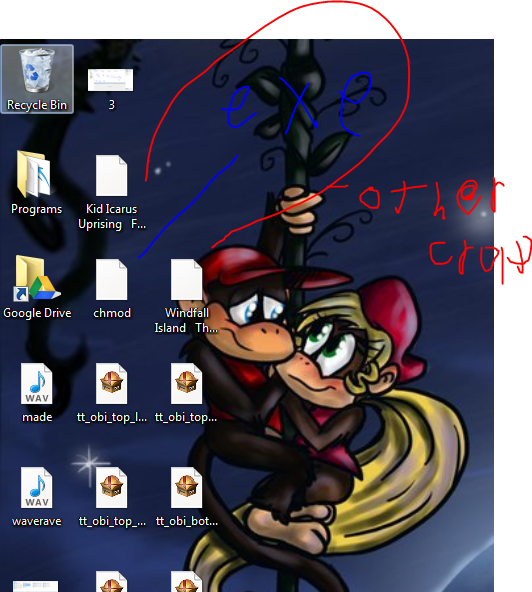
capture_by_sheshe299-d6wondp.png
 

My Computer My Computer

At a glance

Windows 7 Professional 64 bitAMD APU8GBATI radeon chipset
Computer type
Laptop
Computer Manufacturer/Model Number
HP
OS
Windows 7 Professional 64 bit
CPU
AMD APU
Motherboard
unknown
Memory
8GB
Graphics Card(s)
ATI radeon chipset
Hard Drives
500GB internal
2,048 GB external
Browser
Google Chrome

My Computer My Computer

At a glance

Windows 10 Home x64INTEL Core i5-750 Quad-Core 3.37GHzHyperX Fury Black Series 8GB (2 x 4GB) 1866MhzEVGA GeForce GTX 750 Superclocked 1GB 128-Bit...
Computer type
PC/Desktop
OS
Windows 10 Home x64
CPU
INTEL Core i5-750 Quad-Core 3.37GHz
Motherboard
ASUS P7P55D
Memory
HyperX Fury Black Series 8GB (2 x 4GB) 1866Mhz
Graphics Card(s)
EVGA GeForce GTX 750 Superclocked 1GB 128-Bit GDDR5
Monitor(s) Displays
LG 32MA68HY 32" IPS
Screen Resolution
1920 x 1080
Hard Drives
Samsung 840 Evo 120GB, SEAGATE 500GB Barracuda® 7200.12, SATA 3 Gb/s, 7200 RPM, 16MB cache
PSU
ANTEC TruePower New TP-550, 80 PLUS, 550W
Case
ANTEC Three Hundred Illusion
Cooling
COOLER MASTER Hyper 212 Plus, 4 x 120mm 1 x 140mm Noctua's
Internet Speed
85 + Mbps
Antivirus
Avast
Browser
Vivaldi
just did that, the icon is still screwed up, i reset default icons with iconpackager and it reset everything, cleared my customs... didnt change exe, the program also does not let me change the icon for exe files ONLY
 

My Computer My Computer

At a glance

Windows 7 Professional 64 bitAMD APU8GBATI radeon chipset
Computer type
Laptop
Computer Manufacturer/Model Number
HP
OS
Windows 7 Professional 64 bit
CPU
AMD APU
Motherboard
unknown
Memory
8GB
Graphics Card(s)
ATI radeon chipset
Hard Drives
500GB internal
2,048 GB external
Browser
Google Chrome
Run the System File Checker. That should reset default.

http://www.sevenforums.com/tutorials/1538-sfc-scannow-command-system-file-checker.html

Note it will reset your customizations as well

   Warning
Be aware that if you have modified your system files as in theming explorer/system files, running sfc /scannow will revert the system files such as explorer.exe back to it's default state. Make the appropriate backups of your system files that you have modified for theming if you wish to save them before running sfc /scannow.


A Guy
 

My Computer My Computer

At a glance

Windows 10 Home x64INTEL Core i5-750 Quad-Core 3.37GHzHyperX Fury Black Series 8GB (2 x 4GB) 1866MhzEVGA GeForce GTX 750 Superclocked 1GB 128-Bit...
Computer type
PC/Desktop
OS
Windows 10 Home x64
CPU
INTEL Core i5-750 Quad-Core 3.37GHz
Motherboard
ASUS P7P55D
Memory
HyperX Fury Black Series 8GB (2 x 4GB) 1866Mhz
Graphics Card(s)
EVGA GeForce GTX 750 Superclocked 1GB 128-Bit GDDR5
Monitor(s) Displays
LG 32MA68HY 32" IPS
Screen Resolution
1920 x 1080
Hard Drives
Samsung 840 Evo 120GB, SEAGATE 500GB Barracuda® 7200.12, SATA 3 Gb/s, 7200 RPM, 16MB cache
PSU
ANTEC TruePower New TP-550, 80 PLUS, 550W
Case
ANTEC Three Hundred Illusion
Cooling
COOLER MASTER Hyper 212 Plus, 4 x 120mm 1 x 140mm Noctua's
Internet Speed
85 + Mbps
Antivirus
Avast
Browser
Vivaldi
tried that and rebooted the comp, it didnt help
 

My Computer My Computer

At a glance

Windows 7 Professional 64 bitAMD APU8GBATI radeon chipset
Computer type
Laptop
Computer Manufacturer/Model Number
HP
OS
Windows 7 Professional 64 bit
CPU
AMD APU
Motherboard
unknown
Memory
8GB
Graphics Card(s)
ATI radeon chipset
Hard Drives
500GB internal
2,048 GB external
Browser
Google Chrome

My Computer My Computer

At a glance

Windows 10 Home x64INTEL Core i5-750 Quad-Core 3.37GHzHyperX Fury Black Series 8GB (2 x 4GB) 1866MhzEVGA GeForce GTX 750 Superclocked 1GB 128-Bit...
Computer type
PC/Desktop
OS
Windows 10 Home x64
CPU
INTEL Core i5-750 Quad-Core 3.37GHz
Motherboard
ASUS P7P55D
Memory
HyperX Fury Black Series 8GB (2 x 4GB) 1866Mhz
Graphics Card(s)
EVGA GeForce GTX 750 Superclocked 1GB 128-Bit GDDR5
Monitor(s) Displays
LG 32MA68HY 32" IPS
Screen Resolution
1920 x 1080
Hard Drives
Samsung 840 Evo 120GB, SEAGATE 500GB Barracuda® 7200.12, SATA 3 Gb/s, 7200 RPM, 16MB cache
PSU
ANTEC TruePower New TP-550, 80 PLUS, 550W
Case
ANTEC Three Hundred Illusion
Cooling
COOLER MASTER Hyper 212 Plus, 4 x 120mm 1 x 140mm Noctua's
Internet Speed
85 + Mbps
Antivirus
Avast
Browser
Vivaldi
neither worked, i really dont want to have to wipe my drive clean and reinstall windows JUST to fix something small like this, but its bugging me ALOT
 

My Computer My Computer

At a glance

Windows 7 Professional 64 bitAMD APU8GBATI radeon chipset
Computer type
Laptop
Computer Manufacturer/Model Number
HP
OS
Windows 7 Professional 64 bit
CPU
AMD APU
Motherboard
unknown
Memory
8GB
Graphics Card(s)
ATI radeon chipset
Hard Drives
500GB internal
2,048 GB external
Browser
Google Chrome

My Computer My Computer

At a glance

Windows 10 Home x64INTEL Core i5-750 Quad-Core 3.37GHzHyperX Fury Black Series 8GB (2 x 4GB) 1866MhzEVGA GeForce GTX 750 Superclocked 1GB 128-Bit...
Computer type
PC/Desktop
OS
Windows 10 Home x64
CPU
INTEL Core i5-750 Quad-Core 3.37GHz
Motherboard
ASUS P7P55D
Memory
HyperX Fury Black Series 8GB (2 x 4GB) 1866Mhz
Graphics Card(s)
EVGA GeForce GTX 750 Superclocked 1GB 128-Bit GDDR5
Monitor(s) Displays
LG 32MA68HY 32" IPS
Screen Resolution
1920 x 1080
Hard Drives
Samsung 840 Evo 120GB, SEAGATE 500GB Barracuda® 7200.12, SATA 3 Gb/s, 7200 RPM, 16MB cache
PSU
ANTEC TruePower New TP-550, 80 PLUS, 550W
Case
ANTEC Three Hundred Illusion
Cooling
COOLER MASTER Hyper 212 Plus, 4 x 120mm 1 x 140mm Noctua's
Internet Speed
85 + Mbps
Antivirus
Avast
Browser
Vivaldi
repair install freezes and rolls back at 99% all the time, cant do that,

only factory wipe clean install fixed it

found out iconpackager is doing the icon mess because problem reoccurred when i used it, and it was the very first thing i used when i factory reset my laptop, but i dont want to lose my custom icons for multiple formats that use the same exact icon for the one program that opens them, how can i manually, forcefully set the icon setting for blank exe files back?
 

My Computer My Computer

At a glance

Windows 7 Professional 64 bitAMD APU8GBATI radeon chipset
Computer type
Laptop
Computer Manufacturer/Model Number
HP
OS
Windows 7 Professional 64 bit
CPU
AMD APU
Motherboard
unknown
Memory
8GB
Graphics Card(s)
ATI radeon chipset
Hard Drives
500GB internal
2,048 GB external
Browser
Google Chrome
I'll post for others to look here, but Iconpackager is the cause, so using it again will obviously result in the same problem, difficult to fix.

A Guy
 

My Computer My Computer

At a glance

Windows 10 Home x64INTEL Core i5-750 Quad-Core 3.37GHzHyperX Fury Black Series 8GB (2 x 4GB) 1866MhzEVGA GeForce GTX 750 Superclocked 1GB 128-Bit...
Computer type
PC/Desktop
OS
Windows 10 Home x64
CPU
INTEL Core i5-750 Quad-Core 3.37GHz
Motherboard
ASUS P7P55D
Memory
HyperX Fury Black Series 8GB (2 x 4GB) 1866Mhz
Graphics Card(s)
EVGA GeForce GTX 750 Superclocked 1GB 128-Bit GDDR5
Monitor(s) Displays
LG 32MA68HY 32" IPS
Screen Resolution
1920 x 1080
Hard Drives
Samsung 840 Evo 120GB, SEAGATE 500GB Barracuda® 7200.12, SATA 3 Gb/s, 7200 RPM, 16MB cache
PSU
ANTEC TruePower New TP-550, 80 PLUS, 550W
Case
ANTEC Three Hundred Illusion
Cooling
COOLER MASTER Hyper 212 Plus, 4 x 120mm 1 x 140mm Noctua's
Internet Speed
85 + Mbps
Antivirus
Avast
Browser
Vivaldi

My Computer My Computer

At a glance

x64 (6.3.9600) Win8.1 Pro & soon dual boot x6...AMD A6-3420M APU with Radeon(tm) HD Graphics6.00 GBAMD Radeon(TM) HD 6520G
Computer type
Laptop
Computer Manufacturer/Model Number
HP Pavilion dv6-6c10us
OS
x64 (6.3.9600) Win8.1 Pro & soon dual boot x64 (6.1.7601) Win7_SP1 HomePrem
CPU
AMD A6-3420M APU with Radeon(tm) HD Graphics
Motherboard
Hewlett-Packard 1805
Memory
6.00 GB
Graphics Card(s)
AMD Radeon(TM) HD 6520G
Sound Card
(1) AMD High Definition Audio Device (2) IDT High Definiti
Monitor(s) Displays
HP W2072a 20" LCD (1600 x 900) @ 60 Hz
Screen Resolution
1366 x 768 x 32 bits (4294967296 colors) @ 60 Hz
Hard Drives
ST640LM0 00 HM641JI SATA Disk Device
Keyboard
Logitech k520 wireless KB
Mouse
Logitech m320 wireless mouse (bundled with KB)
Internet Speed
15/5 | 54 MB Wireless 'n'
Antivirus
Realtime: Defender or Avast | On-demand: Malwarebytes, ESET
Browser
IE 11 on Win8, IE 10 on win 7
Other Info
Media: [Gimp, Audacity, VLC] || Comm: [WEmail 2012, Skype] || Productivity: [OpenOffice,| Textpad] || Utils: [Sysinternals, cCleaner, Speccy, Defraggler]
While uninstalling iconpackager, you need to apply the default icons at first and then uninstall. Otherwise there is always a chance that the imageres.dll will be wiped out.

If imageres.dll is wiped out, then nothing other than putting the icons individually can restore the icons back. So, if by any chance that registry fix did not work (it apparently it should work), download and install Win7 orig. IconPack inst X64 by Mr-Ragnarok on deviantART
 

My Computer My Computer

At a glance

Microsoft Windows 10 Pro Insider Preview 64-bitIntel(R) Core(TM) i3-4130 CPU @ 3.40GHzCorsair Vengence 4GB x2 (8.00GB Dual-Channel ...2047MB GeForce GTS 450 (ZOTAC International)
Computer type
PC/Desktop
Computer Manufacturer/Model Number
Self Assembled
OS
Microsoft Windows 10 Pro Insider Preview 64-bit
CPU
Intel(R) Core(TM) i3-4130 CPU @ 3.40GHz
Motherboard
Gigabyte Technology Co., Ltd. B85M-D3H
Memory
Corsair Vengence 4GB x2 (8.00GB Dual-Channel DDR3 @ 798MHz)
Graphics Card(s)
2047MB GeForce GTS 450 (ZOTAC International)
Sound Card
Onboard (Realtek High Definition Audio)
Monitor(s) Displays
LG Flatron E2040T
Screen Resolution
1600x900
Hard Drives
Western Digital 1 TB
Seagate 500 GB
PSU
Corsair VS550
Case
Cooler Master K380
Cooling
Cooler Master Seidon 120V Plus
Keyboard
Logitech MK260r
Mouse
Logitech MK260r
Internet Speed
PMPL Broadband
Antivirus
Windows Defender + MBAM
Browser
Firefox
Other Info
Dell Studio 15" Laptop
sadly, NOTHING seems to work , t he ONLY this that DOES satisfy me enough is to MANUALLY right click each exe file that sits on my computer that doesnt have its own icon set by the compiler already go to properties, change icon (powered by icon packager) and manyally set the icon back for each individual exe file sitting on the machine, which is too tedious, a pain in the ass, and doesnt apply to new exe files i download
 

My Computer My Computer

At a glance

Windows 7 Professional 64 bitAMD APU8GBATI radeon chipset
Computer type
Laptop
Computer Manufacturer/Model Number
HP
OS
Windows 7 Professional 64 bit
CPU
AMD APU
Motherboard
unknown
Memory
8GB
Graphics Card(s)
ATI radeon chipset
Hard Drives
500GB internal
2,048 GB external
Browser
Google Chrome

My Computer My Computer

At a glance

Microsoft Windows 10 Pro Insider Preview 64-bitIntel(R) Core(TM) i3-4130 CPU @ 3.40GHzCorsair Vengence 4GB x2 (8.00GB Dual-Channel ...2047MB GeForce GTS 450 (ZOTAC International)
Computer type
PC/Desktop
Computer Manufacturer/Model Number
Self Assembled
OS
Microsoft Windows 10 Pro Insider Preview 64-bit
CPU
Intel(R) Core(TM) i3-4130 CPU @ 3.40GHz
Motherboard
Gigabyte Technology Co., Ltd. B85M-D3H
Memory
Corsair Vengence 4GB x2 (8.00GB Dual-Channel DDR3 @ 798MHz)
Graphics Card(s)
2047MB GeForce GTS 450 (ZOTAC International)
Sound Card
Onboard (Realtek High Definition Audio)
Monitor(s) Displays
LG Flatron E2040T
Screen Resolution
1600x900
Hard Drives
Western Digital 1 TB
Seagate 500 GB
PSU
Corsair VS550
Case
Cooler Master K380
Cooling
Cooler Master Seidon 120V Plus
Keyboard
Logitech MK260r
Mouse
Logitech MK260r
Internet Speed
PMPL Broadband
Antivirus
Windows Defender + MBAM
Browser
Firefox
Other Info
Dell Studio 15" Laptop
thanks guys, i finally found a related link within the other links posted here and that FIXED it.... but seems to have broke my dazzle in the process...
 

My Computer My Computer

At a glance

Windows 7 Professional 64 bitAMD APU8GBATI radeon chipset
Computer type
Laptop
Computer Manufacturer/Model Number
HP
OS
Windows 7 Professional 64 bit
CPU
AMD APU
Motherboard
unknown
Memory
8GB
Graphics Card(s)
ATI radeon chipset
Hard Drives
500GB internal
2,048 GB external
Browser
Google Chrome
Back
Top