
need help setting up a very simple home network configuration

phinds

New member
Local time
11:32 AM
Messages
20
I'm probably asking something has been asked before but since I don't know anything about networking I don't even know the right buzz words to do a good forum search.

I have what I think is a very simple network need, like this:

network diagram.jpg

One person told me the box with the question mark just needs to be a switch, another that it needed to be a "firewall router", and another that it needed to be BOTH a switch and a firewall router, and another that it needed to be "managed switch".

I've looked all those up but being totally new to networking I find it all very confusing.

Any suggestions?

Thanks
 

Attachments
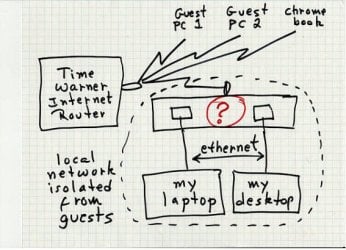
  • network diagram.jpg
    network diagram.jpg
    56 KB · Views: 23

My Computer My Computer

Computer type
PC/Desktop
Computer Manufacturer/Model Number
self built
OS
Windows 7 Pro 64 bit version 6.1 (Service Pack 1)
CPU
Intel i7
Motherboard
Asus Z97 with Intel chipset
Memory
16 GB
Graphics Card(s)
i7 on-chip graphics driver
Hard Drives
Samsung EVO 256Gig boot drive, Seagate 2TB hybrid data drive
Antivirus
Norton
Browser
several, ususally FireFox
What is the overall objective for your laptop and desktop?
 

My Computer My Computer

Computer type
PC/Desktop
Computer Manufacturer/Model Number
Custom
OS
Dual Boot: Windows 8.1 & Server 2012r2 VMs: Kali Linux, Backbox, Matriux, Windows 8.1
CPU
A10 7700 Kavari SteamRoller
Motherboard
ASUS A88XM-PLUS (FM2+ )
Memory
8GB DDR3 SDRAM PC3-8500
Graphics Card(s)
1024MB ATI AMD Radeon R7 Graphics
Sound Card
Realtek High Definition Audio
Monitor(s) Displays
Samsung
Hard Drives
SSD Crucial 120gb
WD VelociRaptor 1tb
PSU
Rosewill Gaming 650w
Case
Rosewill Galaxy 2
Internet Speed
55/12
Antivirus
Malwarebytes, MSE, SAS
Browser
FireFox, Chrome
Sorry, I should have been more clear about what it is that I am really trying to do. I want the laptop and desktop to be able to see each others hard drives, or at least one of them each for ease of file transfer, but I don't want the guest computers to be able to see any of that.
 

My Computer My Computer

Computer type
PC/Desktop
Computer Manufacturer/Model Number
self built
OS
Windows 7 Pro 64 bit version 6.1 (Service Pack 1)
CPU
Intel i7
Motherboard
Asus Z97 with Intel chipset
Memory
16 GB
Graphics Card(s)
i7 on-chip graphics driver
Hard Drives
Samsung EVO 256Gig boot drive, Seagate 2TB hybrid data drive
Antivirus
Norton
Browser
several, ususally FireFox
It depends on how isolated your guest network needs to be and if your ISP gives you more than 1 public IP address.

If its ok for your network to access the guest network but not visa versa, you can get by with just another router. Setup first router as guest network then connect your laptop and desktop to the second router.

Here are a few links to help out.
Create an isolated network using one ISP connection and modem | LAN-Tech Network Management
http://www.sevenforums.com/tutorials/91791-multi-router-network-configure.html?filter=[2]=Networking%20Internet
 

My Computer My Computer

Computer type
PC/Desktop
Computer Manufacturer/Model Number
Custom
OS
Dual Boot: Windows 8.1 & Server 2012r2 VMs: Kali Linux, Backbox, Matriux, Windows 8.1
CPU
A10 7700 Kavari SteamRoller
Motherboard
ASUS A88XM-PLUS (FM2+ )
Memory
8GB DDR3 SDRAM PC3-8500
Graphics Card(s)
1024MB ATI AMD Radeon R7 Graphics
Sound Card
Realtek High Definition Audio
Monitor(s) Displays
Samsung
Hard Drives
SSD Crucial 120gb
WD VelociRaptor 1tb
PSU
Rosewill Gaming 650w
Case
Rosewill Galaxy 2
Internet Speed
55/12
Antivirus
Malwarebytes, MSE, SAS
Browser
FireFox, Chrome
Thanks. I'll check out the links. So I take it a switch is either a bad idea or just not needed?

As far as I know, the ISP only provides a single IP address, and yes, I want my network to be able to access the guest network but not the other way 'round, although that's not crucial. Big thing is I don't want the guest network to be able to access anything on my network.
 

My Computer My Computer

Computer type
PC/Desktop
Computer Manufacturer/Model Number
self built
OS
Windows 7 Pro 64 bit version 6.1 (Service Pack 1)
CPU
Intel i7
Motherboard
Asus Z97 with Intel chipset
Memory
16 GB
Graphics Card(s)
i7 on-chip graphics driver
Hard Drives
Samsung EVO 256Gig boot drive, Seagate 2TB hybrid data drive
Antivirus
Norton
Browser
several, ususally FireFox
Thanks. I'll check out the links. So I take it a switch is either a bad idea or just not needed?

As far as I know, the ISP only provides a single IP address, and yes, I want my network to be able to access the guest network but not the other way 'round, although that's not crucial. Big thing is I don't want the guest network to be able to access anything on my network.

Correct, the switch is unnecessary.
 

My Computer My Computer

Computer type
PC/Desktop
Computer Manufacturer/Model Number
Custom
OS
Dual Boot: Windows 8.1 & Server 2012r2 VMs: Kali Linux, Backbox, Matriux, Windows 8.1
CPU
A10 7700 Kavari SteamRoller
Motherboard
ASUS A88XM-PLUS (FM2+ )
Memory
8GB DDR3 SDRAM PC3-8500
Graphics Card(s)
1024MB ATI AMD Radeon R7 Graphics
Sound Card
Realtek High Definition Audio
Monitor(s) Displays
Samsung
Hard Drives
SSD Crucial 120gb
WD VelociRaptor 1tb
PSU
Rosewill Gaming 650w
Case
Rosewill Galaxy 2
Internet Speed
55/12
Antivirus
Malwarebytes, MSE, SAS
Browser
FireFox, Chrome
Back
Top