Need help w/slow Win 7 PC

Janesdf

New member
Member
Local time
7:08 PM
Messages
94
I finally pulled my 7 year old Emachines PC with Win 7 out of storage. They were always great for my uses, but I know they are no longer available. It's running better than I thought it would, but slow and videos are choppy. I downloaded and installed all Windows updates, updated drivers, and removed old programs I no longer use.

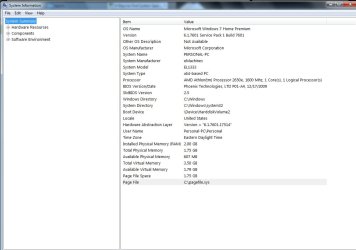
I've never done anything more than replace a hard drive or the fan, so updating this will be a new experience. Attached is an image of the system specs. Can any of you tell me what I need to replace to make this pc run faster.

Thanks in advance for any advice. Jane
 

Attachments

  • sysinfo.jpg
    sysinfo.jpg
    64.6 KB · Views: 3

My Computer

OS
Windows 7
Hi,
Single core processor and 2 gb of memory :/
 

My Computer

Computer type
PC/Desktop
Computer Manufacturer/Model Number
Custom assembled by me :}
OS
Win-7-Pro64bit 7-H-Prem-64bit
CPU
i7-5930K 2nd i9-9940x both water blocked VRM's too
Motherboard
ASUS SABERTOOTH X99 2nd ASUS x299 Apex
Memory
Trident-z 3200C14 2nd Trident-z 3600C16
Graphics Card(s)
EVGA 1080ti ftw3 2nd Titan Xp both water blocked
Sound Card
Built-in Realtek
Monitor(s) Displays
1-AOC G2460PG 24"G-Sync 144Hz/ 2nd 1-ASUS VG248QE 24" 144Hz
Screen Resolution
1920 x 1080 144Hz
Hard Drives
2-Samsung M.2 Evo & Evo Plus
2-Samsung 850 EVO 500GB SSD's/ 3-2.5 W.D. Black 1tb-&3-1tb/3-3.5 WD Black 1tb hdd's
PSU
EVGA SuperNOVA 1000-P2 2nd 1200-P2
Case
2-Corsair Obsidian Series 450D Black ATX Mid Tower
Cooling
Custom water loops
Keyboard
Logitech G710+/ 2nd Logitech G910
Mouse
2-RedDragon M901 Perdition 16400 dpi Gaming mouse = wired
Internet Speed
Comcast Ping 19ms 89.31mbps download speed 6.12mbps upload
Antivirus
Malwarebytes Pro/ Superantispyware Pro
Browser
FireFox & Pale moon
Other Info
2nd ASUS X299 Apex/Intel i9-9940x with Custom water loop/7H-Prem-x64/Corsair 450D case/Ram Trident-z 3600C16 4x8gb / Samsung970Evo plus 500gb SSD/Dual ssd EZ swap evo/PSU EVGA SuperNova 1200w-P2 80+Platinum/GPU Titan Xp /8-ML-140 on push-pull on 2-280GTX rads
Hi, what would you suggest I replace them with? I would like to keep the price on the lower end. Also, is it relatively easy to install those two items?

Thanks. Jane
 

My Computer

OS
Windows 7
Hi,
About all I can think of is adding a solid state drive
And load a 32 bit version of win-7 instead of 64 bit the activation key on the case will activate 32 bit also.

Otherwise not sure I'd put any money into it the above might help it as much as possible
Memory is easy to install you can use this tool from crucial
Crucial System Scanner | Crucial.com

You might need to use cpuid/ cpu-z and post a screen shot of the main board/ memory sections amd cpu's are pretty cheap dual or quad core
CPU-Z | Softwares | CPUID
 

My Computer

Computer type
PC/Desktop
Computer Manufacturer/Model Number
Custom assembled by me :}
OS
Win-7-Pro64bit 7-H-Prem-64bit
CPU
i7-5930K 2nd i9-9940x both water blocked VRM's too
Motherboard
ASUS SABERTOOTH X99 2nd ASUS x299 Apex
Memory
Trident-z 3200C14 2nd Trident-z 3600C16
Graphics Card(s)
EVGA 1080ti ftw3 2nd Titan Xp both water blocked
Sound Card
Built-in Realtek
Monitor(s) Displays
1-AOC G2460PG 24"G-Sync 144Hz/ 2nd 1-ASUS VG248QE 24" 144Hz
Screen Resolution
1920 x 1080 144Hz
Hard Drives
2-Samsung M.2 Evo & Evo Plus
2-Samsung 850 EVO 500GB SSD's/ 3-2.5 W.D. Black 1tb-&3-1tb/3-3.5 WD Black 1tb hdd's
PSU
EVGA SuperNOVA 1000-P2 2nd 1200-P2
Case
2-Corsair Obsidian Series 450D Black ATX Mid Tower
Cooling
Custom water loops
Keyboard
Logitech G710+/ 2nd Logitech G910
Mouse
2-RedDragon M901 Perdition 16400 dpi Gaming mouse = wired
Internet Speed
Comcast Ping 19ms 89.31mbps download speed 6.12mbps upload
Antivirus
Malwarebytes Pro/ Superantispyware Pro
Browser
FireFox & Pale moon
Other Info
2nd ASUS X299 Apex/Intel i9-9940x with Custom water loop/7H-Prem-x64/Corsair 450D case/Ram Trident-z 3600C16 4x8gb / Samsung970Evo plus 500gb SSD/Dual ssd EZ swap evo/PSU EVGA SuperNova 1200w-P2 80+Platinum/GPU Titan Xp /8-ML-140 on push-pull on 2-280GTX rads
SSD will save that system. I wouldn't even try playing 480P videos with it.
 

My Computer

Computer type
PC/Desktop
Computer Manufacturer/Model Number
ASUS X550ZE
OS
Windows 7 Home Premium 64-BIT
CPU
AMD A8 7200P
Motherboard
N/A
Memory
8GB 1600mhz
Graphics Card(s)
Radeon R5 (APU) + Radeon R5 M230 2GB Dual Graphics
Sound Card
Realtek ALC269 with SonicMaster
Monitor(s) Displays
Laptop Display
Screen Resolution
1920 x 1080 @60hz
Hard Drives
WDC WD50 00LPVX-80V0TT0 (500GB)
PSU
Laptop Charger
Mouse
ARMAGGEDON TEXTRON SCORPION 7
Internet Speed
100 mbps DOWN / 50 mbps UP
Antivirus
Windows Defender
Browser
Mozzila FireFox, Valve Steam in-game internet browser
This is what I would do:
- Buy 2+2 G of DDR2 800 memory and replace those you have. Crucial 4GB 2X 2GB PC2-6400 DDR2-800MHz 2RX8 240PIN DIMM Desktop Memory RAM CL6 | eBay
- Yes, SSD will take your computer to a much higher level. If your computer is a desktop, you don't need a big SSD. 128 G will be more than you need. Use the SSD to install Win 7 and programs and the HDD for data.
I have one of this PNY CS1311 2.5 SSD7CS1311-120-RB - Newegg.com
So far so good.
- Buy a second hand Athlon 64 X2 5050e. AMD Athlon 64 X2 5050e ADH5050IAA5DO 2.6 GHz Socket AM2+ CPU Processor 730143241908 | eBay
Emachines EL-1333-11f CPU RAM Upgrade Tutorial (digital media class) - YouTube
- Do a fresh install of Win 7 32 bits. 64 bits is only recommended it you have more than 4G of memory. Clean Install Windows 7 - Windows 7 Help Forums
 

My Computers

System One System Two

  • Computer type
    PC/Desktop
    Computer Manufacturer/Model Number
    custom build
    OS
    Windows 7 HP 64
    CPU
    i5 6600K - 800MHz to 4200MHz
    Motherboard
    GA-Z170-HD3P
    Memory
    4+4G GSkill DDR4 3000
    Graphics Card(s)
    IG - Intel 530
    Monitor(s) Displays
    Samsung 226BW
    Screen Resolution
    1680x1050
    Hard Drives
    (1) -1 SM951 – 128GB M.2 AHCI PCIe SSD drive for Windows 7 and Lubuntu
    (2) -1 WD SATA 3 - 1T for Data
    (3) -1 WD SATA 3 - 1T for backup
    PSU
    Thermaltake 450W TR2 gold
    Keyboard
    Old and good Chicony mechanical keyboard
    Mouse
    Logitech mX performance - 9 buttons (had to disable some)
    Internet Speed
    500Mb/s
    Browser
    Firefox 64
    Other Info
    TinyWall firewall
  • Computer type
    Laptop
    System Manufacturer/Model Number
    Asus Q550LF
    OS
    Windows 7 Pro
    CPU
    i7-4500U 800MHz to 3.0GHz
    Motherboard
    Asus Q550LF
    Memory
    (4+4)G DDR3 1600
    Graphics Card(s)
    IG intel 4400 + NVIDIA GeForce GT 745M
    Sound Card
    Realtek
    Monitor(s) Displays
    LG Display LP156WF4-SPH1
    Screen Resolution
    1920 x 1080
    Hard Drives
    BX500 120G SSD for Windows and programs +
    1T HDD for data
    Internet Speed
    500 Mb/s
    Browser
    Firefox
    Other Info
    TinyWall firewall
I have an eMachines computer, about as old as yours is. Yours is 64-bit, while mine is 32-bit. Therefore, if you go up to 4 GB of RAM, you will see improvement in performance. (My eMachines computer maxes out at 2 GB of RAM.) An SSD will also help; but I think the additional memory will help more. Actually, they help in different ways; so if you go with both the memory and the SSD, you will see the best improvement.

Get a new Ethernet card, if you're going to use an Ethernet cable to connect it to your router. Or get a new USB wifi adapter. Either of these will likely give you a faster internet connection than you are now getting with the Ethernet adapter which came with the computer; but I would go with the Ethernet card and Ethernet cable over the wifi adapter, if you can easily run a cable from the computer to the router.

Get a fast browser, such as Opera with ad blocking turned on. Or, to have even faster browsing, use Firefox with the NoScript security suite browser add-on. Going with NoScript means that it will take you some time to do fine-tuning. In other words, the reason NoScript speeds things up is because it blocks the incessant scripts that so many websites run in the background. But if you block ALL scripts, many sites won't run, or they will run only partially. So you have to block all scripts, and then selectively allow only those scripts which are necessary. If you will patiently go through this process, you will find that your browsing speed has greatly improved from using FireFox with NoScript.

Opera with ad blocking turned on is almost as fast as Firefox with NoScript, and there is no fine-tuning to do.

Finally, if you're open to trying something new, I suggest that you replace Windows with Linux Mint 32-bit xfce edition. I think you will find it to be a satisfactory environment. And there is lots of free software available for Linux Mint.

 
Last edited:

My Computer

Computer type
PC/Desktop
Computer Manufacturer/Model Number
Dell
OS
Linux Mint 18.2 xfce 64-bit (VMWare host) / Windows 8.1 Pro 32-bit (VMWare guest)
CPU
Haswell
Memory
4 GB
Monitor(s) Displays
Acer 23"
Screen Resolution
1920 x 1080
Hard Drives
Two hard drives, 1TB each: One for Linux, one for my data.
Keyboard
IBM Model M
Antivirus
Sophos (Linux), Trend Micro (Windows)
Browser
Firefox, Opera
Other Info
I use Samba to share my data drive with the other computers at my house and with my guest session in VMWare Workstation Player.
+1^ what megahertz said.
 

My Computer

Computer type
PC/Desktop
Computer Manufacturer/Model Number
Custom Build
OS
Win 7 Home Prem x64 SP1
CPU
AMD FX6350 Vishera 3.9Ghz
Motherboard
ASUS M5A97 R2.0
Memory
16Gb Ballistix Sport 2x8Gb DDR3-1600
Graphics Card(s)
nVidia GEForce 1050Ti 4mg
Sound Card
on board Realtek HD w/Logitech 2.1 speakers
Monitor(s) Displays
AOC 2243w
Screen Resolution
1920x1080
Hard Drives
500g Samsung Evo 850 OS SSD,
250g Samsung Evo 850 SSD for data,
1Tb Toshiba SSD for b/u's.
PSU
Corsair CX750 modular
Case
MasterCooler Elite 330
Cooling
2x case, Coolermaster Viper CPU stack
Keyboard
ms wireless desktop 2000
Mouse
ms wireless desktop 2000
Internet Speed
Cable:Average about 250Mbps down, 25Mbps Up +/-
Antivirus
MSE, Cclnr, MwBytes, SA-S
Browser
IE11
Back
Top