
Need help with a DNS error

JustinGooch

New member
Local time
5:44 PM
Messages
6
Hi I am working on a Dell Inspiron laptop for my sister she told me it was working fine one day and she turned if off and the next day she had no internet access. The networking troubleshooter keeps telling me its the modem or router but I have no trouble with internet access on my other devices. I have tried flushing the DNS cache and obtaining a new IP address and neither fixed the problem. Any advice would be much appreciated.
 

Attachments
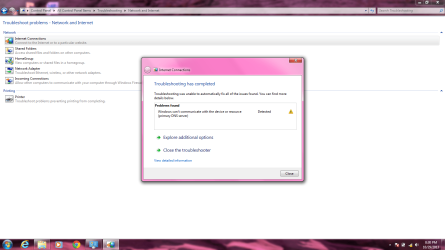
  • Print Screen Internet issue.png
    Print Screen Internet issue.png
    83.7 KB · Views: 9

My Computer

Computer type
PC/Desktop
OS
Windows 7 64bit
Welcome to Seven Forums,

I'd suggest a System Restore if there's a restore point from her laptop. You may restore it to a working state. If this didn't help can you please read and provide us some additional info and post output for us to review coming from the troubled computer? Please see the preposting guidelines here.
 

My Computer

Computer Manufacturer/Model Number
Lenovo Desktop/Samsung Laptop
OS
Win7 & Win8 64bit
CPU
Intel i5
Internet Speed
Charter-20 Mbps
Antivirus
Avast
Browser
FF, IE9 and Chrome
Hi again, so the system restore didn't fix the problem. My internet set up is through a cisco modem and a belkin wireless router and I have tried with a wired connection and a wireless connection and neither worked.
 

My Computer

Computer type
PC/Desktop
OS
Windows 7 64bit
Have you tried restarting the router? Sometimes a router will stop giving out new ip addreses after being constantly on for months or longer. Sometimes they just need a refresh.
 

My Computer

Computer type
PC/Desktop
Computer Manufacturer/Model Number
Dell
OS
Win 7 x64
CPU
Core I5
I tried restarting the router and modem both and the problem still persists. Before I got the computer my sister told me she had tried at 2 other locations other than her house and I have tried a wired and wireless connection at both mine and her house.
 

My Computer

Computer type
PC/Desktop
OS
Windows 7 64bit
Did you try getting online in safe mode with networking?
 

My Computer

Computer type
PC/Desktop
Computer Manufacturer/Model Number
Dell
OS
Win 7 x64
CPU
Core I5
Sorry for the late respond, if more than one computers are affected I'd update the router's firmware to the latest. Test your connection after and if that didn't help then reset your router to the factory default setting, feel free to backup your most current setting prior to reset.

Please give us another update.
 

My Computer

Computer Manufacturer/Model Number
Lenovo Desktop/Samsung Laptop
OS
Win7 & Win8 64bit
CPU
Intel i5
Internet Speed
Charter-20 Mbps
Antivirus
Avast
Browser
FF, IE9 and Chrome
Hi I am working on a Dell Inspiron laptop for my sister she told me it was working fine one day and she turned if off and the next day she had no internet access. The networking troubleshooter keeps telling me its the modem or router but I have no trouble with internet access on my other devices. I have tried flushing the DNS cache and obtaining a new IP address and neither fixed the problem. Any advice would be much appreciated.

Hi JustinGooch,

Please let us know the model number of the system and wireless card. If you are aware of the same then kindly follow this video to update the wireless driver:

Updating Dell Drivers

If you face problems then let me know the model number I would provide you with the direct link to update the driver.

As other system works fine then kindly connect this laptop using ethernet to check if internet works fine.

Also check on the safe mode with network and let us know the results:

http://www.sevenforums.com/tutorials/69585-safe-mode.html

Kindly update your system specs here by following this.

Keep us posted with the results so we can advise you further.
 

My Computer

Computer type
PC/Desktop
OS
Winndows 7 32 bit
Okay so I have internet access when in safe mode with networking but it's through a hard line from the router so...my wireless card is bad?
 

My Computer

Computer type
PC/Desktop
OS
Windows 7 64bit
Okay so I have internet access when in safe mode with networking but it's through a hard line from the router so...my wireless card is bad?

Have you tried connecting with the wireless while in safe mode?
Also, what AV software are you using?
 

My Computer

Computer type
PC/Desktop
Computer Manufacturer/Model Number
Dell
OS
Win 7 x64
CPU
Core I5
I did try a wireless connection while in safe mode and I still had no internet access and I'm not sure what AV software I'm using.
 

My Computer

Computer type
PC/Desktop
OS
Windows 7 64bit
I did try a wireless connection while in safe mode and I still had no internet access and I'm not sure what AV software I'm using.

Hi JustinGooch,

Please let us know what happens when you try to connect wirelessly while in safe mode. Kindly post a screenshot for the device manager of your system:

http://www.sevenforums.com/tutorials/9733-screenshots-files-upload-post-seven-forums.html

Also, perform these steps:

1. Run elevated command prompt.
2. Type netsh winsock reset > ENTER:
3. The following message should be seen: "Successfully reset the Winsock Catalog. You must restart the computer in order to complete the reset."
4. Restart computer.


ipconfig /flushdns .... press enter
ipconfig /registerdns .... press enter

Please perform these commands in elevated command prompt only.

Kindly update your system specs here by following this.
Keep us posted with the results so we can advise you further.
 

My Computer

Computer type
PC/Desktop
OS
Winndows 7 32 bit
My sister needed her computer back but thanks for the help everyone.
 

My Computer

Computer type
PC/Desktop
OS
Windows 7 64bit
My sister needed her computer back but thanks for the help everyone.

Hi JustinGooch,

Sure please perform the steps at your convenience and let us know the results so we can advise further if required.

If you have any further queries, please feel free to contact us.
 

My Computer

Computer type
PC/Desktop
OS
Winndows 7 32 bit
Back
Top