Need help with computer rebooting after going to sleep...

cloudcover

New member
Local time
1:34 PM
Messages
8
Hello -

I have an HP desktop computer running Windows 7 Ultimate x64 and am having difficulty getting it to go to sleep and stay there. When I select "Sleep" from the shutdown menu, the computer seems to go to sleep and everything shuts off for about 1 second and then it restarts from scratch (i.e., BIOS screen, etc). So it seems it's not just waking from sleep but something's actually causing it to reboot.

To eliminate possible software issues, I just did a clean/new install of Windows 7 and then went through several of the Windows Update cycles to get everything up to date. So it's a pretty bare bones install. The only real add-ons I have in the computer are a Ceton InfiniTV card, a RealTek Ethernet card, and an nVidia Geforce GT430 video card. My "clean" install has the drivers for the Ethernet card and the video card but not for the Ceton card (yet).

I've searched online and in a few forums but haven't found anything obvious. Would appreciate any suggestions on how to go about troubleshooting or diagnosing this.

Thanks!

P.S. The Ethernet card that was originally in the computer stopped working and so I had to replace it. When I did that, there were three wires attached to the old ethernet card that I had to disconnect (to remove the card). Two of them had bare contacts at the end and one has a small plastic connector on the end. I put electrical tape on the bare contacts so they wouldn't touch anything. Don't know if that has something to do with this (and whether there's a way to tell if they do).
 

My Computer My Computer

Computer type
PC/Desktop
OS
Windows 7 Ultimate x64
Type Powercfg -devicequery wake_armed - copy and paste into Command Prompt with Admin rights and hit Enter.

It will show what is preventing sleep.

You can also use the same procedure to see what caused last wake - powercfg lastwake

I keep both of these in the Run folder for easy access.
 

My Computer My Computer

Computer type
PC/Desktop
Computer Manufacturer/Model Number
Self-Built
OS
Windows 7 Professional X64
CPU
Core i7 (2nd gen) i7-2600K / 3.40GHz
Motherboard
ASUS P8Z77-V Intel 7 Series Motherboard
Memory
DDR3 2400MHz (OC) 16gb
Graphics Card(s)
Intel(R) HD Graphics 3000, -1988 Mb
Sound Card
8 ChannelsAudio Chipset Realtek ALC892
Monitor(s) Displays
LG 29UM65 Black 29"
Screen Resolution
2560 x 1080
Hard Drives
840 EVO 250 GB SSD ;2tb (2);Seagate;1tb Seagate; 750 gb Seagate; wd ext (2) 750 gb,WD 2tb X 2;WD 3TB Black
PSU
750 watt
Case
Thermaltake RX -1
Cooling
2120mm Fans Included 1Other Fan Ports 5x 200mm Fan Ports
Keyboard
Microsoft Digital Media Pro
Mouse
Microsoft Wireless 6000
Internet Speed
U-verse 18 mbps
Antivirus
MSE
Browser
Firefox, Chrome and my favorite: Pale Moon
Other Info
HdHomerun Dual Tuner.
SRS Audio Lab,
Pioneer BDR 208-DBK
PS3-What a difference in my Surround Sound Receiver!
HP 4540s - My new Toy.
Epson R280 Printer- To personalize my Dvds.
Canon MP 560 - For scanning.
The wakearmed query results in this:
HID Keyboard Device
HID-compliant mouse
HID Keyboard Device <003>

And the lastwake results in this:
Wake History Count - 1
Wake History [0]
Wake Source Count - 0

I also tried a powercfg -A command which says that sleep states S1 and S3 are available on the system but that the firmware does not support S2.

Not sure exactly what those mean and also would appreciate info on what, specifically, to do next.

Thanks again.
 

My Computer My Computer

Computer type
PC/Desktop
OS
Windows 7 Ultimate x64
Go to device mgr and click each device.

Right click the device and go to properties and Power Mgmt and uncheck Let this device wake the computer.

Repeat for all that are shown.

Make sure to check top box - let comp sleep to save power.
 

Attachments

  • dev mgr keyboard.jpg
    dev mgr keyboard.jpg
    20.6 KB · Views: 13

My Computer My Computer

Computer type
PC/Desktop
Computer Manufacturer/Model Number
Self-Built
OS
Windows 7 Professional X64
CPU
Core i7 (2nd gen) i7-2600K / 3.40GHz
Motherboard
ASUS P8Z77-V Intel 7 Series Motherboard
Memory
DDR3 2400MHz (OC) 16gb
Graphics Card(s)
Intel(R) HD Graphics 3000, -1988 Mb
Sound Card
8 ChannelsAudio Chipset Realtek ALC892
Monitor(s) Displays
LG 29UM65 Black 29"
Screen Resolution
2560 x 1080
Hard Drives
840 EVO 250 GB SSD ;2tb (2);Seagate;1tb Seagate; 750 gb Seagate; wd ext (2) 750 gb,WD 2tb X 2;WD 3TB Black
PSU
750 watt
Case
Thermaltake RX -1
Cooling
2120mm Fans Included 1Other Fan Ports 5x 200mm Fan Ports
Keyboard
Microsoft Digital Media Pro
Mouse
Microsoft Wireless 6000
Internet Speed
U-verse 18 mbps
Antivirus
MSE
Browser
Firefox, Chrome and my favorite: Pale Moon
Other Info
HdHomerun Dual Tuner.
SRS Audio Lab,
Pioneer BDR 208-DBK
PS3-What a difference in my Surround Sound Receiver!
HP 4540s - My new Toy.
Epson R280 Printer- To personalize my Dvds.
Canon MP 560 - For scanning.
Just tried that (went into the Keyboard section and the Mouse section of device manager and unchecked each tick box under power management and the confirmed that powercfg.exe -devicequery wake_armed showed nothing) and then put the computer to sleep. Unfortunately, it just woke back up right away again. Any other suggestions?

P.S. I originally thought the computer was rebooting from scratch but noticed that although the BIOS screen flashes on briefly, it then says "Resuming windows..."
 

My Computer My Computer

Computer type
PC/Desktop
OS
Windows 7 Ultimate x64
Go to control panel > power options and expand Sleep and see if you have it set to Never.

You will see those choices in Advanced Options.
Click on one of the Change Power Settings and you will see Advanced Settings.
 
Last edited:

My Computer My Computer

Computer type
PC/Desktop
Computer Manufacturer/Model Number
Self-Built
OS
Windows 7 Professional X64
CPU
Core i7 (2nd gen) i7-2600K / 3.40GHz
Motherboard
ASUS P8Z77-V Intel 7 Series Motherboard
Memory
DDR3 2400MHz (OC) 16gb
Graphics Card(s)
Intel(R) HD Graphics 3000, -1988 Mb
Sound Card
8 ChannelsAudio Chipset Realtek ALC892
Monitor(s) Displays
LG 29UM65 Black 29"
Screen Resolution
2560 x 1080
Hard Drives
840 EVO 250 GB SSD ;2tb (2);Seagate;1tb Seagate; 750 gb Seagate; wd ext (2) 750 gb,WD 2tb X 2;WD 3TB Black
PSU
750 watt
Case
Thermaltake RX -1
Cooling
2120mm Fans Included 1Other Fan Ports 5x 200mm Fan Ports
Keyboard
Microsoft Digital Media Pro
Mouse
Microsoft Wireless 6000
Internet Speed
U-verse 18 mbps
Antivirus
MSE
Browser
Firefox, Chrome and my favorite: Pale Moon
Other Info
HdHomerun Dual Tuner.
SRS Audio Lab,
Pioneer BDR 208-DBK
PS3-What a difference in my Surround Sound Receiver!
HP 4540s - My new Toy.
Epson R280 Printer- To personalize my Dvds.
Canon MP 560 - For scanning.
Okay, checked that...it's set to Sleep after 30 minutes. (The "Balanced" profile is the active one, by the way).
 

My Computer My Computer

Computer type
PC/Desktop
OS
Windows 7 Ultimate x64
Can you post a pic of Task Mgr?

I created a Custom plan and I have it set to sleep in 3 minutes.

When I click Sleep, that's how long it takes.

If you want to change Sleep (temporarily) to a couple of minutes to test it, we can see if it goes to sleep and stays asleep.
 

My Computer My Computer

Computer type
PC/Desktop
Computer Manufacturer/Model Number
Self-Built
OS
Windows 7 Professional X64
CPU
Core i7 (2nd gen) i7-2600K / 3.40GHz
Motherboard
ASUS P8Z77-V Intel 7 Series Motherboard
Memory
DDR3 2400MHz (OC) 16gb
Graphics Card(s)
Intel(R) HD Graphics 3000, -1988 Mb
Sound Card
8 ChannelsAudio Chipset Realtek ALC892
Monitor(s) Displays
LG 29UM65 Black 29"
Screen Resolution
2560 x 1080
Hard Drives
840 EVO 250 GB SSD ;2tb (2);Seagate;1tb Seagate; 750 gb Seagate; wd ext (2) 750 gb,WD 2tb X 2;WD 3TB Black
PSU
750 watt
Case
Thermaltake RX -1
Cooling
2120mm Fans Included 1Other Fan Ports 5x 200mm Fan Ports
Keyboard
Microsoft Digital Media Pro
Mouse
Microsoft Wireless 6000
Internet Speed
U-verse 18 mbps
Antivirus
MSE
Browser
Firefox, Chrome and my favorite: Pale Moon
Other Info
HdHomerun Dual Tuner.
SRS Audio Lab,
Pioneer BDR 208-DBK
PS3-What a difference in my Surround Sound Receiver!
HP 4540s - My new Toy.
Epson R280 Printer- To personalize my Dvds.
Canon MP 560 - For scanning.
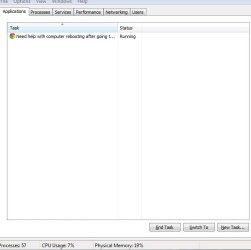
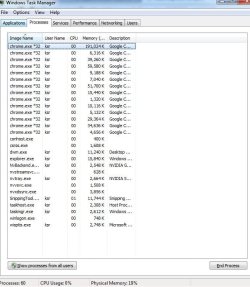
Here are a couple of screen grabs of the Task Manager (showing running Apps and Processes). The tab with running Services was quite long so I didn't include that but can do that if necessary.

I had tried setting a custom plan with sleep of 2 minutes (by coincidence) but it didn't make any difference. After being idle for 2 minutes, it went to sleep, but then restarted right away. :(
 

Attachments

  • TaskMgr Apps.JPG
    TaskMgr Apps.JPG
    25.5 KB · Views: 10
  • TaskMgr Processes.JPG
    TaskMgr Processes.JPG
    68.4 KB · Views: 0

My Computer My Computer

Computer type
PC/Desktop
OS
Windows 7 Ultimate x64
I need to see applications on task mgr.

Sorry - see you added that.

Are you running any SSD programs, i.e. Magician?

When it restarted, what did last wake say?
 

My Computer My Computer

Computer type
PC/Desktop
Computer Manufacturer/Model Number
Self-Built
OS
Windows 7 Professional X64
CPU
Core i7 (2nd gen) i7-2600K / 3.40GHz
Motherboard
ASUS P8Z77-V Intel 7 Series Motherboard
Memory
DDR3 2400MHz (OC) 16gb
Graphics Card(s)
Intel(R) HD Graphics 3000, -1988 Mb
Sound Card
8 ChannelsAudio Chipset Realtek ALC892
Monitor(s) Displays
LG 29UM65 Black 29"
Screen Resolution
2560 x 1080
Hard Drives
840 EVO 250 GB SSD ;2tb (2);Seagate;1tb Seagate; 750 gb Seagate; wd ext (2) 750 gb,WD 2tb X 2;WD 3TB Black
PSU
750 watt
Case
Thermaltake RX -1
Cooling
2120mm Fans Included 1Other Fan Ports 5x 200mm Fan Ports
Keyboard
Microsoft Digital Media Pro
Mouse
Microsoft Wireless 6000
Internet Speed
U-verse 18 mbps
Antivirus
MSE
Browser
Firefox, Chrome and my favorite: Pale Moon
Other Info
HdHomerun Dual Tuner.
SRS Audio Lab,
Pioneer BDR 208-DBK
PS3-What a difference in my Surround Sound Receiver!
HP 4540s - My new Toy.
Epson R280 Printer- To personalize my Dvds.
Canon MP 560 - For scanning.
Nope, no SSD programs that I know about. It's a clean install with just Google Chrome as the only application that I installed (other than the Nvidia and Realtek drivers).
 

My Computer My Computer

Computer type
PC/Desktop
OS
Windows 7 Ultimate x64
I wish I could help more, but I don't know why you are having this problem.

You did check in Advanced Options, right?

What did last wake say?

Another thing to try - close your Chrome Browser and see if that helps.

I know if I have a radio station running, the comp will not sleep.
 
Last edited:

My Computer My Computer

Computer type
PC/Desktop
Computer Manufacturer/Model Number
Self-Built
OS
Windows 7 Professional X64
CPU
Core i7 (2nd gen) i7-2600K / 3.40GHz
Motherboard
ASUS P8Z77-V Intel 7 Series Motherboard
Memory
DDR3 2400MHz (OC) 16gb
Graphics Card(s)
Intel(R) HD Graphics 3000, -1988 Mb
Sound Card
8 ChannelsAudio Chipset Realtek ALC892
Monitor(s) Displays
LG 29UM65 Black 29"
Screen Resolution
2560 x 1080
Hard Drives
840 EVO 250 GB SSD ;2tb (2);Seagate;1tb Seagate; 750 gb Seagate; wd ext (2) 750 gb,WD 2tb X 2;WD 3TB Black
PSU
750 watt
Case
Thermaltake RX -1
Cooling
2120mm Fans Included 1Other Fan Ports 5x 200mm Fan Ports
Keyboard
Microsoft Digital Media Pro
Mouse
Microsoft Wireless 6000
Internet Speed
U-verse 18 mbps
Antivirus
MSE
Browser
Firefox, Chrome and my favorite: Pale Moon
Other Info
HdHomerun Dual Tuner.
SRS Audio Lab,
Pioneer BDR 208-DBK
PS3-What a difference in my Surround Sound Receiver!
HP 4540s - My new Toy.
Epson R280 Printer- To personalize my Dvds.
Canon MP 560 - For scanning.
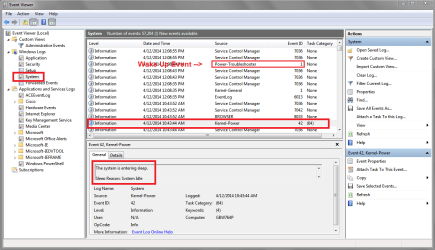
Look in Event Viewer to see if you can find entries for what is happening.
If the Computer is going to Sleep you should have a Kernel-Power Event ID 42 entry.
If the PC is resuming from Sleep you should have a Power-Troubleshooter Event ID 1 entry.

Also look in Administrative Events to see if there are any errors at the "Sleep/WakeUp" time.

In an Elevated command prompt enter Powercfg -requests
Do you have any requests (other than none) listed?

You can check in BIOS to make sure "Wake on LAN" is not enabled.
It may be called something different in your BIOS, if you have the option.

Here is tutorial for Sleep Problems:
Power Options and Sleep Mode Problems

EVSSP01.PNG
 

My Computer My Computer

Computer type
PC/Desktop
Computer Manufacturer/Model Number
home built
OS
Multi-Boot W7_Pro_x64 W8.1_Pro_x64 W10_Pro_x64 +Linux_VMs +Chromium_VM
CPU
AMD Athlon II x4 620
Motherboard
Gigabyte GA-MA785G-UD3H
Memory
6GB GSkill DDR2 800
Graphics Card(s)
AMD 4670 GPU + AMD 4200 IGP
Sound Card
on board Realtek ALC889A
Monitor(s) Displays
RCA 40" LCD TV, Insignia 32" LCD TV, HP 15" LCD monitor
Screen Resolution
1680 x 1050
Hard Drives
OCZ Vertex 3 120GB,
Samsung F3 1TB (3),
Several others - WD, Seagate, Hitachi, ...
PSU
Corsair 500 W
Case
Rosewill mid tower
Cooling
CM 90mm rifle
Keyboard
Gyration wireless, Logitech wireless, Dell USB wired
Mouse
Gyration wireless, Logitech wireless, V7 USB wired
Internet Speed
Spectrum - 100Mbps D / 10Mbps U
Antivirus
Avast, MBAM3, EMET, WinPatrol
Browser
Pale Moon, Firefox, IE
Other Info
2 multi-boot PC's
Mainly HTPC/Office/Gen purpose (no gaming).
Trendnet USB KVM.
LG DVD burner/Blue Ray Player.
Tray system for removable SATA backup drives.

Not currently OCd, under-volted.
I use Hybrid sleep, rarely re-boot or shutdown.

Hauppauge HD-PVR, Avermedia PCIe TV Tuner, Hauppauge PCI TV Tuner.
Back
Top