Solved need help with data transfer via SATA to USB

Amaterasu

Member
Member
Local time
8:26 PM
Messages
74
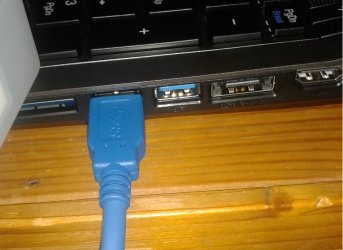
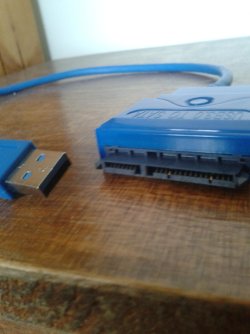
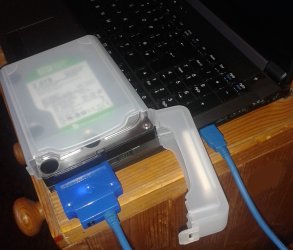
i'm going abroad for a while with my laptop. i can't take my desktop pc, but i can take the hard drive which has 1.5 TB of data on it. my laptop top hard drive is only 750GB big so i bought a USB 3.0 to SATA cable so that i can you my hard drive when i'm away i plug my hard drive into my laptop it is on and you can hear it and in the bottom corner on my laptop screen it said installed new drive software but my hard drive is not show up on my laptop i have taken some picture as you can see below so how do i get it to show up on my laptop please help me i have 1 month untill i leave thanks jake
 

Attachments
  • 2.jpg
    2.jpg
    184.1 KB · Views: 2
  • 3.jpg
    3.jpg
    370.2 KB · Views: 1
  • 1.jpg
    1.jpg
    169.2 KB · Views: 0
  • 4.jpg
    4.jpg
    280.2 KB · Views: 1

My Computer My Computer

At a glance

Windows 7 Ultimate 64-bit SP1Intel i7-3930K 3.20GHz 6-Core ProcessorG Skill Ripjaws Z 32GB DDR3 1866MHzEVGA Nvidia GeForce GTX 980 4GB
Computer type
PC/Desktop
Computer Manufacturer/Model Number
Custom Build
OS
Windows 7 Ultimate 64-bit SP1
CPU
Intel i7-3930K 3.20GHz 6-Core Processor
Motherboard
Asus Sabertooth X79
Memory
G Skill Ripjaws Z 32GB DDR3 1866MHz
Graphics Card(s)
EVGA Nvidia GeForce GTX 980 4GB
Monitor(s) Displays
29" LG Curved Ultrawide IPS Monitor
Screen Resolution
2560 x 1080
Hard Drives
Samsung 850 Pro 128GB
PSU
Corsair AX760
Case
Aerocool DS200
Cooling
Cooler Master Nepton 240M
Keyboard
Wireless Keyboard
Mouse
Wireless Mouse
Internet Speed
32MB
Antivirus
Bitdefender
Browser
Google Chrome
Other Info
TP-LINK Archer T9E Network adapter
With the drive connected, if you go to Disk Management, does it show up there?
Start > type: "Computer Management" in the search box > Disk Management

Does this drive contain an operating system?

BTW: where did you get that hard drive case? That's great! I want one.
 

My Computer My Computer

At a glance

Windows 7 64 Bit Home Premium SP1i7-3820GSkill F3-14900CL9Q - 16GBEVGA GeForce GTX660 - Driver 352.86
Computer type
PC/Desktop
Computer Manufacturer/Model Number
Home Built - Jan 2013
OS
Windows 7 64 Bit Home Premium SP1
CPU
i7-3820
Motherboard
Asus P9X79-PRO - Bios 4608
Memory
GSkill F3-14900CL9Q - 16GB
Graphics Card(s)
EVGA GeForce GTX660 - Driver 352.86
Sound Card
On board Realtek ALC898
Monitor(s) Displays
Acer S271HL
Screen Resolution
1920 x 1080
Hard Drives
#1- Samsung 840 Pro Series
#2- Western Digital WD1002FAEX Sata3 Black
#3- Western Digital WD1002FAEX Sata3 Black
PSU
Corsair CMPSU-850TX-V2 - 850 watt (by Seasonic)
Case
Corsair Obsidian 550D
Cooling
Standard 3 120mm case fans, Cooler Master Hyper 212 EVO
Keyboard
MS KC-0405
Mouse
Intellimouse 5-button
Internet Speed
56 Mbits/Sec (on a good day)
Antivirus
Avast & Malwarebytes
Browser
Firefox
Other Info
Asus DVD - DRW-24B1ST 24X
With the drive connected, if you go to Disk Management, does it show up there?
Start > type: "Computer Management" in the search box > Disk Management

Does this drive contain an operating system?

BTW: where did you get that hard drive case? That's great! I want one.

hi there sorry for the late reply

yes it does should up there

yes my laptop and the hard drive have windows 7 ultimate

got the case off ebay 5 colours to choose from it think it was like £2 i had a look in my ebay history to see if i could find it but i couldn't find it sorry
 
Last edited:

My Computer My Computer

At a glance

Windows 7 Ultimate 64-bit SP1Intel i7-3930K 3.20GHz 6-Core ProcessorG Skill Ripjaws Z 32GB DDR3 1866MHzEVGA Nvidia GeForce GTX 980 4GB
Computer type
PC/Desktop
Computer Manufacturer/Model Number
Custom Build
OS
Windows 7 Ultimate 64-bit SP1
CPU
Intel i7-3930K 3.20GHz 6-Core Processor
Motherboard
Asus Sabertooth X79
Memory
G Skill Ripjaws Z 32GB DDR3 1866MHz
Graphics Card(s)
EVGA Nvidia GeForce GTX 980 4GB
Monitor(s) Displays
29" LG Curved Ultrawide IPS Monitor
Screen Resolution
2560 x 1080
Hard Drives
Samsung 850 Pro 128GB
PSU
Corsair AX760
Case
Aerocool DS200
Cooling
Cooler Master Nepton 240M
Keyboard
Wireless Keyboard
Mouse
Wireless Mouse
Internet Speed
32MB
Antivirus
Bitdefender
Browser
Google Chrome
Other Info
TP-LINK Archer T9E Network adapter
From my experience it is not a good idea to open a system drive from another PC. All kinds of things can happen with the permissions. You also take a great risk transporting this drive. One knock on it and you get a headcrash and you lose your system.

I would recommend to buy another drive just for the data and copy that on the original system where the drive belongs. If it is not too much data you may even get away with a big USB stick. Last 32GB stick I bought was $22.

They also sold refurbished 60GB SSDs for $39. Those risk nothing during transport. Maybe there are similar options in the UK.
 

My Computer My Computer

At a glance

Vista, Windows7, Mint Mate, Zorin, Windows 8from 1.6GHz Duo to i7
Computer Manufacturer/Model Number
HP, Dell, Gateway, Toshiba - 4 laptops and 2 desktops
OS
Vista, Windows7, Mint Mate, Zorin, Windows 8
CPU
from 1.6GHz Duo to i7
Monitor(s) Displays
2x HP w2207
Hard Drives
5x HDD, 7x SSD, 12x Externals
Keyboard
with trackball - no mices
Mouse
Trackball mice
Internet Speed
DSL 6000
From my experience it is not a good idea to open a system drive from another PC. All kinds of things can happen with the permissions. You also take a great risk transporting this drive. One knock on it and you get a headcrash and you lose your system.

I would recommend to buy another drive just for the data and copy that on the original system where the drive belongs. If it is not too much data you may even get away with a big USB stick. Last 32GB stick I bought was $22.

They also sold refurbished 60GB SSDs for $39. Those risk nothing during transport. Maybe there are similar options in the UK.

i have 1.5 TB of data i don't think it will fit on a memory stick and i have a 32 GB memory stick
 

My Computer My Computer

At a glance

Windows 7 Ultimate 64-bit SP1Intel i7-3930K 3.20GHz 6-Core ProcessorG Skill Ripjaws Z 32GB DDR3 1866MHzEVGA Nvidia GeForce GTX 980 4GB
Computer type
PC/Desktop
Computer Manufacturer/Model Number
Custom Build
OS
Windows 7 Ultimate 64-bit SP1
CPU
Intel i7-3930K 3.20GHz 6-Core Processor
Motherboard
Asus Sabertooth X79
Memory
G Skill Ripjaws Z 32GB DDR3 1866MHz
Graphics Card(s)
EVGA Nvidia GeForce GTX 980 4GB
Monitor(s) Displays
29" LG Curved Ultrawide IPS Monitor
Screen Resolution
2560 x 1080
Hard Drives
Samsung 850 Pro 128GB
PSU
Corsair AX760
Case
Aerocool DS200
Cooling
Cooler Master Nepton 240M
Keyboard
Wireless Keyboard
Mouse
Wireless Mouse
Internet Speed
32MB
Antivirus
Bitdefender
Browser
Google Chrome
Other Info
TP-LINK Archer T9E Network adapter
And I guess you have to carry 1.5TB of data around.
 

My Computer My Computer

At a glance

Vista, Windows7, Mint Mate, Zorin, Windows 8from 1.6GHz Duo to i7
Computer Manufacturer/Model Number
HP, Dell, Gateway, Toshiba - 4 laptops and 2 desktops
OS
Vista, Windows7, Mint Mate, Zorin, Windows 8
CPU
from 1.6GHz Duo to i7
Monitor(s) Displays
2x HP w2207
Hard Drives
5x HDD, 7x SSD, 12x Externals
Keyboard
with trackball - no mices
Mouse
Trackball mice
Internet Speed
DSL 6000
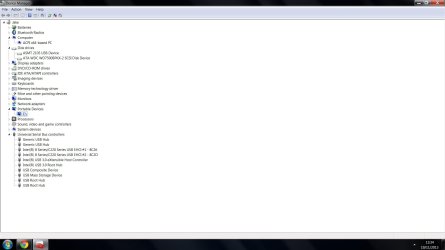
First, your drive is connected and recognized by Windows. That is good.

Check in Disk Management to see that the drive has a drive letter. If it does not, try and give it one.

If that drive just has one big partition (C) and that partition contains an operating system then it is probably flagged ACTIVE at the hardware level.
Window will sometimes ignore partitions that are marked ACTIVE while running another operating system.

If you post a screenshot of your Disk Management window with that drive connected - expanded so we can read everything - we may be able to see what is going on in an instant.
 

My Computer My Computer

At a glance

Windows 7 64 Bit Home Premium SP1i7-3820GSkill F3-14900CL9Q - 16GBEVGA GeForce GTX660 - Driver 352.86
Computer type
PC/Desktop
Computer Manufacturer/Model Number
Home Built - Jan 2013
OS
Windows 7 64 Bit Home Premium SP1
CPU
i7-3820
Motherboard
Asus P9X79-PRO - Bios 4608
Memory
GSkill F3-14900CL9Q - 16GB
Graphics Card(s)
EVGA GeForce GTX660 - Driver 352.86
Sound Card
On board Realtek ALC898
Monitor(s) Displays
Acer S271HL
Screen Resolution
1920 x 1080
Hard Drives
#1- Samsung 840 Pro Series
#2- Western Digital WD1002FAEX Sata3 Black
#3- Western Digital WD1002FAEX Sata3 Black
PSU
Corsair CMPSU-850TX-V2 - 850 watt (by Seasonic)
Case
Corsair Obsidian 550D
Cooling
Standard 3 120mm case fans, Cooler Master Hyper 212 EVO
Keyboard
MS KC-0405
Mouse
Intellimouse 5-button
Internet Speed
56 Mbits/Sec (on a good day)
Antivirus
Avast & Malwarebytes
Browser
Firefox
Other Info
Asus DVD - DRW-24B1ST 24X
First, your drive is connected and recognized by Windows. That is good.

Check in Disk Management to see that the drive has a drive letter. If it does not, try and give it one.

If that drive just has one big partition (C) and that partition contains an operating system then it is probably flagged ACTIVE at the hardware level.
Window will sometimes ignore partitions that are marked ACTIVE while running another operating system.

If you post a screenshot of your Disk Management window with that drive connected - expanded so we can read everything - we may be able to see what is going on in an instant.

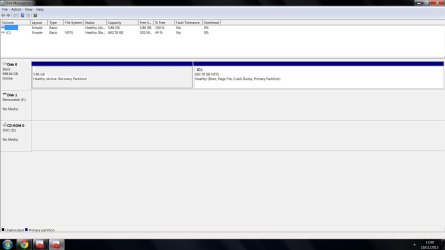
hi there i think i was looking in the wrong place this is the first time i have tried to do this so i'm a beginner at this stuff here are the picture you asked for
 

Attachments

  • 1.jpg
    1.jpg
    78.7 KB · Views: 2
  • 2.jpg
    2.jpg
    95.9 KB · Views: 5

My Computer My Computer

At a glance

Windows 7 Ultimate 64-bit SP1Intel i7-3930K 3.20GHz 6-Core ProcessorG Skill Ripjaws Z 32GB DDR3 1866MHzEVGA Nvidia GeForce GTX 980 4GB
Computer type
PC/Desktop
Computer Manufacturer/Model Number
Custom Build
OS
Windows 7 Ultimate 64-bit SP1
CPU
Intel i7-3930K 3.20GHz 6-Core Processor
Motherboard
Asus Sabertooth X79
Memory
G Skill Ripjaws Z 32GB DDR3 1866MHz
Graphics Card(s)
EVGA Nvidia GeForce GTX 980 4GB
Monitor(s) Displays
29" LG Curved Ultrawide IPS Monitor
Screen Resolution
2560 x 1080
Hard Drives
Samsung 850 Pro 128GB
PSU
Corsair AX760
Case
Aerocool DS200
Cooling
Cooler Master Nepton 240M
Keyboard
Wireless Keyboard
Mouse
Wireless Mouse
Internet Speed
32MB
Antivirus
Bitdefender
Browser
Google Chrome
Other Info
TP-LINK Archer T9E Network adapter
Just for your information - this is only a 750GB disk and the amount of data (without the OS) on it is appr. 390GB (in decimal).
 

My Computer My Computer

At a glance

Vista, Windows7, Mint Mate, Zorin, Windows 8from 1.6GHz Duo to i7
Computer Manufacturer/Model Number
HP, Dell, Gateway, Toshiba - 4 laptops and 2 desktops
OS
Vista, Windows7, Mint Mate, Zorin, Windows 8
CPU
from 1.6GHz Duo to i7
Monitor(s) Displays
2x HP w2207
Hard Drives
5x HDD, 7x SSD, 12x Externals
Keyboard
with trackball - no mices
Mouse
Trackball mice
Internet Speed
DSL 6000
that was my laptop not my desktop hard drive
 

My Computer My Computer

At a glance

Windows 7 Ultimate 64-bit SP1Intel i7-3930K 3.20GHz 6-Core ProcessorG Skill Ripjaws Z 32GB DDR3 1866MHzEVGA Nvidia GeForce GTX 980 4GB
Computer type
PC/Desktop
Computer Manufacturer/Model Number
Custom Build
OS
Windows 7 Ultimate 64-bit SP1
CPU
Intel i7-3930K 3.20GHz 6-Core Processor
Motherboard
Asus Sabertooth X79
Memory
G Skill Ripjaws Z 32GB DDR3 1866MHz
Graphics Card(s)
EVGA Nvidia GeForce GTX 980 4GB
Monitor(s) Displays
29" LG Curved Ultrawide IPS Monitor
Screen Resolution
2560 x 1080
Hard Drives
Samsung 850 Pro 128GB
PSU
Corsair AX760
Case
Aerocool DS200
Cooling
Cooler Master Nepton 240M
Keyboard
Wireless Keyboard
Mouse
Wireless Mouse
Internet Speed
32MB
Antivirus
Bitdefender
Browser
Google Chrome
Other Info
TP-LINK Archer T9E Network adapter
That is very odd. Disk Management recognizes a removable drive E:, but does not detect any media.
This makes me think there may be an issue with the SATA to USB connector. It is showing power but not data (a guess).

Can you test that drive and that connector on another computer? Have you tested that drive in a desktop (recently) to see if you can read data?
 

My Computer My Computer

At a glance

Windows 7 64 Bit Home Premium SP1i7-3820GSkill F3-14900CL9Q - 16GBEVGA GeForce GTX660 - Driver 352.86
Computer type
PC/Desktop
Computer Manufacturer/Model Number
Home Built - Jan 2013
OS
Windows 7 64 Bit Home Premium SP1
CPU
i7-3820
Motherboard
Asus P9X79-PRO - Bios 4608
Memory
GSkill F3-14900CL9Q - 16GB
Graphics Card(s)
EVGA GeForce GTX660 - Driver 352.86
Sound Card
On board Realtek ALC898
Monitor(s) Displays
Acer S271HL
Screen Resolution
1920 x 1080
Hard Drives
#1- Samsung 840 Pro Series
#2- Western Digital WD1002FAEX Sata3 Black
#3- Western Digital WD1002FAEX Sata3 Black
PSU
Corsair CMPSU-850TX-V2 - 850 watt (by Seasonic)
Case
Corsair Obsidian 550D
Cooling
Standard 3 120mm case fans, Cooler Master Hyper 212 EVO
Keyboard
MS KC-0405
Mouse
Intellimouse 5-button
Internet Speed
56 Mbits/Sec (on a good day)
Antivirus
Avast & Malwarebytes
Browser
Firefox
Other Info
Asus DVD - DRW-24B1ST 24X

My Computers My Computers

  • At a glance

    Windows 11 ProRyzen 9 5900X32GB G Skill DDR4-3600EVGA RTX 3080 FTW 3 Ultra
    Computer type
    PC/Desktop
    Computer Manufacturer/Model Number
    ALWAYS UNDER CONSTRUCTION
    OS
    Windows 11 Pro
    CPU
    Ryzen 9 5900X
    Motherboard
    Asus X570 Crosshair Viii Hero
    Memory
    32GB G Skill DDR4-3600
    Graphics Card(s)
    EVGA RTX 3080 FTW 3 Ultra
    Sound Card
    On Board/Sennheiser PC37X Headset
    Monitor(s) Displays
    3 X Asus 27"
    Screen Resolution
    2560x1440
    Hard Drives
    2 X 1 TB NVME drives
    PSU
    EVGA 850
    Case
    Phanteks Eclipse P400A
    Cooling
    EVGA 280 AIO
    Keyboard
    Logitech G510s/ Logitech G13
    Mouse
    Logitech G502
    Internet Speed
    24/1
    Antivirus
    ESET/MBAM Pro/SAS Pro
    Browser
    Chrome/ Firefox/ Edge
  • At a glance

    Windows 11 ProIntel Ultra 9 288V32 GB LPDDR5X 8533
    Computer type
    Laptop
    System Manufacturer/Model Number
    Dell 16 Plus
    OS
    Windows 11 Pro
    CPU
    Intel Ultra 9 288V
    Memory
    32 GB LPDDR5X 8533
    Monitor(s) Displays
    16" Mini-LED HDR600 Touch 90 Hz
    Screen Resolution
    2560X1600
    Hard Drives
    1 TB NVME
Have you considered starting up your laptop, then plugging in your hard drive. It should activate a virtual drive (letter) for it. You should be able to then open it and see what data you need. What I get is you are trying to copy data to you laptop? You are running close on time correct? Windows has a great program that will copy data quickly with a few commands. The program is called 'Robocopy'. You run it from a Command Window. To get the syntax to run it, type: >robocopy /help. It will list all of the commands you need to copy your data quickly and completely.
 

My Computer My Computer

At a glance

Windows 7 Home Premium 64-bit
Computer type
Laptop
Computer Manufacturer/Model Number
Toshiba
OS
Windows 7 Home Premium 64-bit
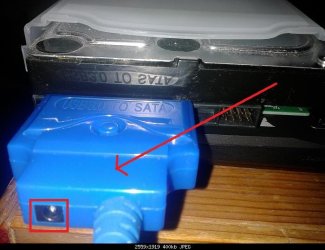
first off thanks for everyone help so what i read is that it doesn't have enough power from a usb 3.0 to power a 3.5 inch drive so i think i have 2 options it looks like the cable has a port on the back of it to stick in another power source into it or buy a hard drive caddy like THIS am i right?
 

Attachments

  • 3.jpg
    3.jpg
    49.8 KB · Views: 14
Last edited:

My Computer My Computer

At a glance

Windows 7 Ultimate 64-bit SP1Intel i7-3930K 3.20GHz 6-Core ProcessorG Skill Ripjaws Z 32GB DDR3 1866MHzEVGA Nvidia GeForce GTX 980 4GB
Computer type
PC/Desktop
Computer Manufacturer/Model Number
Custom Build
OS
Windows 7 Ultimate 64-bit SP1
CPU
Intel i7-3930K 3.20GHz 6-Core Processor
Motherboard
Asus Sabertooth X79
Memory
G Skill Ripjaws Z 32GB DDR3 1866MHz
Graphics Card(s)
EVGA Nvidia GeForce GTX 980 4GB
Monitor(s) Displays
29" LG Curved Ultrawide IPS Monitor
Screen Resolution
2560 x 1080
Hard Drives
Samsung 850 Pro 128GB
PSU
Corsair AX760
Case
Aerocool DS200
Cooling
Cooler Master Nepton 240M
Keyboard
Wireless Keyboard
Mouse
Wireless Mouse
Internet Speed
32MB
Antivirus
Bitdefender
Browser
Google Chrome
Other Info
TP-LINK Archer T9E Network adapter
Yes, I am surprised it did not come with it. There is not enough power from USB 3.0 to run a hard drive at what 7k rpm?
 

My Computer My Computer

At a glance

Windows 7 Home Premium 64-bit
Computer type
Laptop
Computer Manufacturer/Model Number
Toshiba
OS
Windows 7 Home Premium 64-bit
The RPM has nothing to do with it. 2.5" HDDs are designed to run on 5v, 3.5" HDD's are designed to run on 12v. USB ports only put out 5v.
But you are right - that adapter should have come with a 12v power supply. Maybe it was an option?

OP: the hard drive caddy should work if it is designed for 3.5" HDDs.
 

My Computer My Computer

At a glance

Windows 7 64 Bit Home Premium SP1i7-3820GSkill F3-14900CL9Q - 16GBEVGA GeForce GTX660 - Driver 352.86
Computer type
PC/Desktop
Computer Manufacturer/Model Number
Home Built - Jan 2013
OS
Windows 7 64 Bit Home Premium SP1
CPU
i7-3820
Motherboard
Asus P9X79-PRO - Bios 4608
Memory
GSkill F3-14900CL9Q - 16GB
Graphics Card(s)
EVGA GeForce GTX660 - Driver 352.86
Sound Card
On board Realtek ALC898
Monitor(s) Displays
Acer S271HL
Screen Resolution
1920 x 1080
Hard Drives
#1- Samsung 840 Pro Series
#2- Western Digital WD1002FAEX Sata3 Black
#3- Western Digital WD1002FAEX Sata3 Black
PSU
Corsair CMPSU-850TX-V2 - 850 watt (by Seasonic)
Case
Corsair Obsidian 550D
Cooling
Standard 3 120mm case fans, Cooler Master Hyper 212 EVO
Keyboard
MS KC-0405
Mouse
Intellimouse 5-button
Internet Speed
56 Mbits/Sec (on a good day)
Antivirus
Avast & Malwarebytes
Browser
Firefox
Other Info
Asus DVD - DRW-24B1ST 24X
ok will get a power cable for it thanks again
 

My Computer My Computer

At a glance

Windows 7 Ultimate 64-bit SP1Intel i7-3930K 3.20GHz 6-Core ProcessorG Skill Ripjaws Z 32GB DDR3 1866MHzEVGA Nvidia GeForce GTX 980 4GB
Computer type
PC/Desktop
Computer Manufacturer/Model Number
Custom Build
OS
Windows 7 Ultimate 64-bit SP1
CPU
Intel i7-3930K 3.20GHz 6-Core Processor
Motherboard
Asus Sabertooth X79
Memory
G Skill Ripjaws Z 32GB DDR3 1866MHz
Graphics Card(s)
EVGA Nvidia GeForce GTX 980 4GB
Monitor(s) Displays
29" LG Curved Ultrawide IPS Monitor
Screen Resolution
2560 x 1080
Hard Drives
Samsung 850 Pro 128GB
PSU
Corsair AX760
Case
Aerocool DS200
Cooling
Cooler Master Nepton 240M
Keyboard
Wireless Keyboard
Mouse
Wireless Mouse
Internet Speed
32MB
Antivirus
Bitdefender
Browser
Google Chrome
Other Info
TP-LINK Archer T9E Network adapter
yes technically you are correct.
 

My Computer My Computer

At a glance

Windows 7 Home Premium 64-bit
Computer type
Laptop
Computer Manufacturer/Model Number
Toshiba
OS
Windows 7 Home Premium 64-bit
Back
Top