
Hello,
Story: My games crash, i first thought it's my windows, then i thought it's the drivers and/or my graphics card, and THEN i kinda got to the idea where it's my directX causing it.
Problem: Most of my games crash, or makes my graphics card go "weird" ( By weird i mean, it shows wrong colors and then crashes the game ).
Games that crash:
GTA V
Fallout 4
Sid Meier's Civilization V .. & more.
What i did:
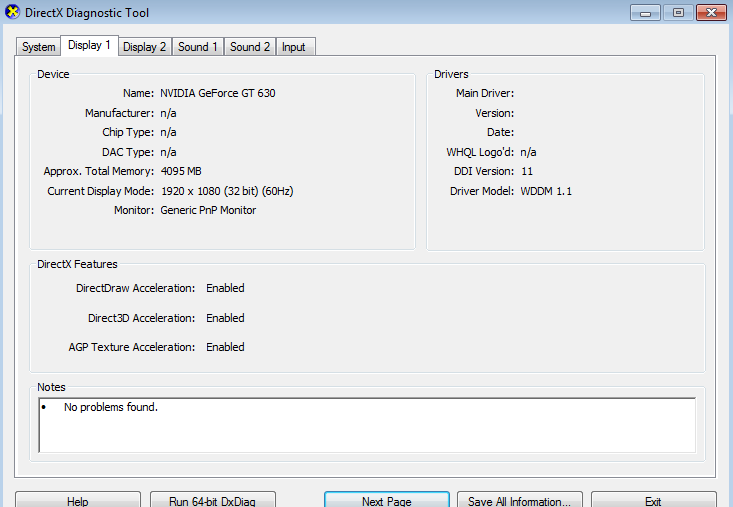
#1 I contacted GTA V support about the issue and they ask you for your dxdiag and msinfo32 yet i have these 2 issues:
msinfo32:

dxdiag:

#2: I re-installed my drivers, tried every single new & old drivers.
#3: Made sure my "DirectX" is up to date, and windows update are done.
#4: Disabled nvidia HD audio in-case it was causing any issues.
#5: Tried playing with the clock of my graphic card ? " Overclocking or w/e "
#6: Changed the Value of TdrDelay & TdrLevel in regedit
How do i know/why do i think it's DirectX and msinfo32 thingy causing the problem?
I used to constantly crash on Sid Meier Civ V, when running the game using Dx11, i even tried switching my graphics card, and it still crashed me, and the graphics never loaded as they should've, BUT once i switched to Dx9 it loaded perfectly !
Note:I am using a nVidia GT 630, i ALWAYS crash at fallout 4 startup however, when i switch to my old nVidia GT 520 the game loads, no crashes. ( bad FPS ofc )
Note #2: All games are 100% legit, bought, downloaded and played using Steam.
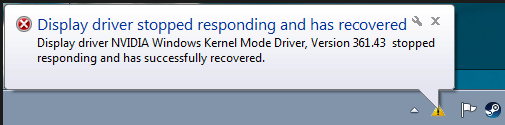
Note #3: I get this message on few games that crash " Display driver stopped responding and has recovered"
Resolution: I tried everything possible and from what i see/been through the past few months, i think it's the DirectX 11 being corrupted/bad ? Once i switched to Dx9 everything runs perfectly & i can tell it's not my graphics card problem cause it's a new one. ( Even tried a different one. )
Note: I passed the video card stability test that nVidia suggested to me.
Quick Questions :
:
#1 Is there a way to UNINSTALL DirectX 11 and re-install it?
#2 Is it really the problem causing it?
#3 Why can't my dxdiag show me info and shows " N/a" instead?
#4 Why msinfo32 says " Can't collect information" "Cannot acces the Windows Managment Instrumentation software"
Anyone that got any idea about whats going on, and can/willing to help is greatly appreciated <3
Thanks!
Story: My games crash, i first thought it's my windows, then i thought it's the drivers and/or my graphics card, and THEN i kinda got to the idea where it's my directX causing it.
Problem: Most of my games crash, or makes my graphics card go "weird" ( By weird i mean, it shows wrong colors and then crashes the game ).
Games that crash:
GTA V
Fallout 4
Sid Meier's Civilization V .. & more.
What i did:
#1 I contacted GTA V support about the issue and they ask you for your dxdiag and msinfo32 yet i have these 2 issues:
msinfo32:
dxdiag:
#2: I re-installed my drivers, tried every single new & old drivers.
#3: Made sure my "DirectX" is up to date, and windows update are done.
#4: Disabled nvidia HD audio in-case it was causing any issues.
#5: Tried playing with the clock of my graphic card ? " Overclocking or w/e "
#6: Changed the Value of TdrDelay & TdrLevel in regedit
How do i know/why do i think it's DirectX and msinfo32 thingy causing the problem?
I used to constantly crash on Sid Meier Civ V, when running the game using Dx11, i even tried switching my graphics card, and it still crashed me, and the graphics never loaded as they should've, BUT once i switched to Dx9 it loaded perfectly !
Note:I am using a nVidia GT 630, i ALWAYS crash at fallout 4 startup however, when i switch to my old nVidia GT 520 the game loads, no crashes. ( bad FPS ofc )
Note #2: All games are 100% legit, bought, downloaded and played using Steam.
Note #3: I get this message on few games that crash " Display driver stopped responding and has recovered"
Resolution: I tried everything possible and from what i see/been through the past few months, i think it's the DirectX 11 being corrupted/bad ? Once i switched to Dx9 everything runs perfectly & i can tell it's not my graphics card problem cause it's a new one. ( Even tried a different one. )
Note: I passed the video card stability test that nVidia suggested to me.
Quick Questions
:#1 Is there a way to UNINSTALL DirectX 11 and re-install it?
#2 Is it really the problem causing it?
#3 Why can't my dxdiag show me info and shows " N/a" instead?
#4 Why msinfo32 says " Can't collect information" "Cannot acces the Windows Managment Instrumentation software"
Anyone that got any idea about whats going on, and can/willing to help is greatly appreciated <3
Thanks!
My Computer
- Computer type
- PC/Desktop
- Computer Manufacturer/Model Number
- Lenovo
- OS
- Windows 7, 64 bit
- Motherboard
- Not sure

 but i did what you told me to do in the instructions above, and the issue is still there :/


