Need help with Mozilla Thunderbird.

klxdrt

New member
Member
VIP
Local time
2:28 PM
Messages
188
:cry: Recently went to Thunderbird from Outlook 2003 and need some direction.

I've been on the the Mozilla Forum several times with questions, read their 9yr old manual, the Nidelven IT manual & so far virtually all responses were vague.

All I'm looking for is some illustrated info about how to setup and use the Menu bar, toolbar and status bar & related panes & a host of everyday business functions of email. I'm not a techie, but have been using configuring email clients for 25 yr, & am not interested in the tech underpinings to get work done.

Any help, direction, etc you guys can give will be appreciated.
 

Attachments

  • cheers klx chainwheel.png
    cheers klx chainwheel.png
    5.7 KB · Views: 1,780

My Computer

Computer type
PC/Desktop
Computer Manufacturer/Model Number
locally made
OS
w7 pro 32 bit w/XP virt enabled.
CPU
AMD A6-3650
Motherboard
ASUS F1A55-M CSM
Memory
4 GB DDR3 RAM
Graphics Card(s)
NVIDIA GeForce 210
Sound Card
NVIDIA High Definition Audio
Monitor(s) Displays
28" HD monitor
Screen Resolution
1680 x 1050 x 32 bits (4294967296 colors) @ 59 Hz
Hard Drives
2 x 500 GB Western Digital Blue Hard Drive
PSU
?
Case
?
Cooling
3-4 fans
Keyboard
big yellow keys
Mouse
logitec
Internet Speed
60 mb
Antivirus
panda
Browser
ff
Other Info
scanner, webcam, bw printer, fax modem, cd/dvd burner, PC usb ports: 2 usb3, 6 usb2 plus 7 port usb hub, 2 tb usb3, 1 Tb usb3, 500Mb usb2, 120Mb USB2 portable drives, asst of flash drives 250 Mb to 32 Gb. backup PC, office
Given your statement "...how to setup and use the Menu bar, toolbar and status bar & related panes & a host of everyday business functions of email. I'm not a techie, but have been using configuring email clients for 25 yr..." I'll get you started.

Right click next to the first tab then select (check) Menu Bar and Mail Toolbar. These should look familiar - look around in them.

Right click next to Menu > Help and click Customize... then set what you want on the toolbar.

Click Menu > Edit > Preferences and look around - set as desired.

Click Menu > Edit > Account Settings - it should look familiar to you.

That should get you started!

Regards,
GEWB
 

My Computer

Computer type
PC/Desktop
Computer Manufacturer/Model Number
(7 different computers booting up to 10 systems)
OS
Linux Mint / XP / Win7 Home, Pro, Ultimate / Win8.1 / Win10
Other Info
Four desktops, two laptops, one notebook and one tablet
request for TB help

GEWB,

Thanks for your suggestions w/nav and the quick resp.

From your response I was able to get TB to a send/rec email at least as good as the pony express. With all the talk I've been hearing about TB one would think it would be better that OE I've used
for decades flawlessly sending/receiving thousands, thousands of business emails with & w/o attachments.

I'm in the process capturing TB screens & notating them for a web so experts like on this forum may view the situation clearer. I'm sure there are solutions, however hidden, obtuse, or out of date. When this is solved I may even create a simple pdf manual & give to Mozilla and anyone else who may find it helpful.

Do you have any suggestions about email clients that are at least half as functional, easy to use, set-up as OE? I've downloaded all the the WM version to no avail. They won't download or install & any form of html is not up to my business & security protocols. I use W7 Pro, 32 bit.

I've downloaded, set up & "tried to use" then removed the following email clients: Claws Mail, Postbox Express, Opera, Pegasus, IncrediMail, InScribe. Most had "too much of nothing", then I tried TB & I'm not impressed.

Sorry if if I have high expectations, I come from the lost generation.
 

Attachments

  • cheers klx chainwheel.png
    cheers klx chainwheel.png
    5.7 KB · Views: 1,565
  • moon landing sm.jpg
    moon landing sm.jpg
    20.1 KB · Views: 905

My Computer

Computer type
PC/Desktop
Computer Manufacturer/Model Number
locally made
OS
w7 pro 32 bit w/XP virt enabled.
CPU
AMD A6-3650
Motherboard
ASUS F1A55-M CSM
Memory
4 GB DDR3 RAM
Graphics Card(s)
NVIDIA GeForce 210
Sound Card
NVIDIA High Definition Audio
Monitor(s) Displays
28" HD monitor
Screen Resolution
1680 x 1050 x 32 bits (4294967296 colors) @ 59 Hz
Hard Drives
2 x 500 GB Western Digital Blue Hard Drive
PSU
?
Case
?
Cooling
3-4 fans
Keyboard
big yellow keys
Mouse
logitec
Internet Speed
60 mb
Antivirus
panda
Browser
ff
Other Info
scanner, webcam, bw printer, fax modem, cd/dvd burner, PC usb ports: 2 usb3, 6 usb2 plus 7 port usb hub, 2 tb usb3, 1 Tb usb3, 500Mb usb2, 120Mb USB2 portable drives, asst of flash drives 250 Mb to 32 Gb. backup PC, office


My Computer

Computer type
Laptop
Computer Manufacturer/Model Number
ASUS
OS
Microsoft Windows 7 Home Premium 64-bit 7601 Multiprocessor Free Service Pack 1
CPU
AMD C-60 APU with Radeon(tm) HD Graphics
Motherboard
ASUSTeK COMPUTER INC. X501U
Memory
4.00 GB
Graphics Card(s)
AMD Radeon HD 6290 Graphics
Sound Card
(1) AMD High Definition Audio Device (2) Realtek High Defi
Screen Resolution
1366 x 768 x 32 bits (4294967296 colors) @ 60 Hz
Hard Drives
Hitachi HTS545050A7E380 SATA Disk Device
Antivirus
Comodo CIS & FW, SecureAplus App Whitelisting, Threatfire
Browser
Cyberfox 64bit, Opera 64bit, Airfox
Other Info
Spy-The-Spy, HitmanPro.Alert, Norton Connect Safe, MJRegWatcher, BitDefender TrafficLight, Voodoo Shield, Zemana AntiMalware
I haven't used OE for 15 years - I hated it and regular Outhouse, er Outlook, isn't much better - forced to use it 10 years in business.

I've been using Evolution for the past 12 years (in Linux) but I used TBird for a few years. My wife still uses TBird so I maintain it for her. Not sure why it is slow for you as TBird is actually quite good for an "old" program.

Regards,
GEWB
 

My Computer

Computer type
PC/Desktop
Computer Manufacturer/Model Number
(7 different computers booting up to 10 systems)
OS
Linux Mint / XP / Win7 Home, Pro, Ultimate / Win8.1 / Win10
Other Info
Four desktops, two laptops, one notebook and one tablet
Callender,

Thanks for the eM Client sugestion. Read thru website but didn't download, but your suggestion piqued my interest.

Below are the few simple requirements I require in an email program:

-Import/export my current email contacts in csv?
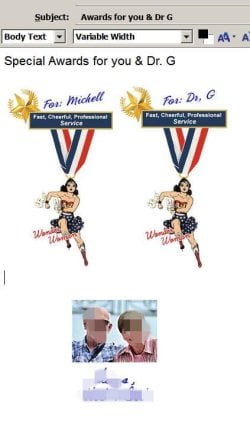
-Insert a single or multiple jpg/png images into the body of an email, either side by side or one over another? (Sample below)
-Is a spam/phishing filter built in?
-Import/export blocked senders
-IMAP & POP3 capabilities?
-Create named folders for organizing incoming emails?
-Can these folders be colorized or otherwise differentiated for readability and efficiency?
-Select a color scheme/font for optimum contrast, legibility, etc. I wear tri-focals with 20:20 corrected and a 27" HD monitor, 17" HD monitor on laptop.

Do you know if eM client can do these simple functions? Please advise.
 

Attachments

  • cheers klx chainwheel.png
    cheers klx chainwheel.png
    5.7 KB · Views: 1,247
  • awards.jpg
    awards.jpg
    36.4 KB · Views: 679

My Computer

Computer type
PC/Desktop
Computer Manufacturer/Model Number
locally made
OS
w7 pro 32 bit w/XP virt enabled.
CPU
AMD A6-3650
Motherboard
ASUS F1A55-M CSM
Memory
4 GB DDR3 RAM
Graphics Card(s)
NVIDIA GeForce 210
Sound Card
NVIDIA High Definition Audio
Monitor(s) Displays
28" HD monitor
Screen Resolution
1680 x 1050 x 32 bits (4294967296 colors) @ 59 Hz
Hard Drives
2 x 500 GB Western Digital Blue Hard Drive
PSU
?
Case
?
Cooling
3-4 fans
Keyboard
big yellow keys
Mouse
logitec
Internet Speed
60 mb
Antivirus
panda
Browser
ff
Other Info
scanner, webcam, bw printer, fax modem, cd/dvd burner, PC usb ports: 2 usb3, 6 usb2 plus 7 port usb hub, 2 tb usb3, 1 Tb usb3, 500Mb usb2, 120Mb USB2 portable drives, asst of flash drives 250 Mb to 32 Gb. backup PC, office

You had the best one around in my opinion. Why did you leave Outlook 2003? It is old, but if it still works, what the heck. I still use it in my laptop. Nothing wrong with it. I don't think there is anything as good. TB is supposed to be "similar" but I don't think so. I say stick with Outlook 2003.
 

My Computer

Computer type
PC/Desktop
Computer Manufacturer/Model Number
Custom Build
OS
Windows 7 Home Premium 32-Bit - Build 7600 SP1
CPU
Intel Core i3-2120 3.30Ghz
Motherboard
Asus P8Z68-V LX Intel Z68 Socket H2 ATX
Memory
Kingston 4 GB DDR3 1333 mhz
Graphics Card(s)
AMD Radeon HD6670
Sound Card
Sound Blaster Audigy SE 24-Bit
Monitor(s) Displays
Asus VE228
Screen Resolution
1440 X 900
Hard Drives
OCZ Vertex 3 120 GB Sata 3 SSD ==
Kingston SH103/S3 120 G Hyper X 120 GB SSD ==
Western Digital 500 GB Caviar Green 7200 RPM ==
PSU
Corsair CX600M == 600 Watt
Case
NZXT Apollo - Silver with Clear Side Panel
Cooling
Three 120 mm Fans
Keyboard
Microsoft Natural 4000
Mouse
Microsoft Custom Optical 3000
Internet Speed
AT&T Fiber Optic Wireless Network
Antivirus
Microsoft Security Essentials
Browser
Chrome
Other Info
120 mm Blue LED Fan -- Three Blue LED Lazer Light Sticks
bigmck,

:)You make a good point; however; my response would include many disparate reasons beyond the scope of this forum & I'm not a typist. Typing is not my strong suite & I'm somewhat vision impaired & wear tri-focals. If we were having a coffee at Starbucks I could explain in a few minutes.

I'll do some re-valuation. In the mean time, do you have any experience or working knowledge of Em Client ?sp?
 

Attachments

  • cheers klx chainwheel.png
    cheers klx chainwheel.png
    5.7 KB · Views: 1,441

My Computer

Computer type
PC/Desktop
Computer Manufacturer/Model Number
locally made
OS
w7 pro 32 bit w/XP virt enabled.
CPU
AMD A6-3650
Motherboard
ASUS F1A55-M CSM
Memory
4 GB DDR3 RAM
Graphics Card(s)
NVIDIA GeForce 210
Sound Card
NVIDIA High Definition Audio
Monitor(s) Displays
28" HD monitor
Screen Resolution
1680 x 1050 x 32 bits (4294967296 colors) @ 59 Hz
Hard Drives
2 x 500 GB Western Digital Blue Hard Drive
PSU
?
Case
?
Cooling
3-4 fans
Keyboard
big yellow keys
Mouse
logitec
Internet Speed
60 mb
Antivirus
panda
Browser
ff
Other Info
scanner, webcam, bw printer, fax modem, cd/dvd burner, PC usb ports: 2 usb3, 6 usb2 plus 7 port usb hub, 2 tb usb3, 1 Tb usb3, 500Mb usb2, 120Mb USB2 portable drives, asst of flash drives 250 Mb to 32 Gb. backup PC, office
Callender,

Thanks for the eM Client sugestion. Read thru website but didn't download, but your suggestion piqued my interest.

Below are the few simple requirements I require in an email program:

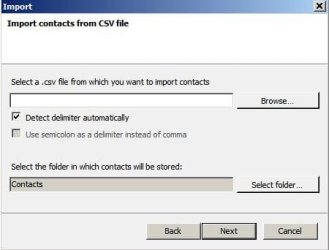
-Import/export my current email contacts in csv?

Yes but you can also import an entire PST file. The wizard takes care of importing accounts anyway.

CSV_Import.jpg
PST_import.jpg


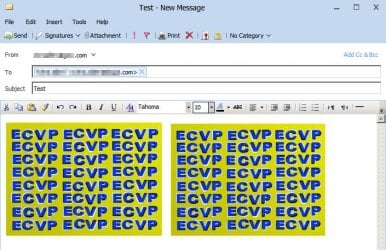
-Insert a single or multiple jpg/png images into the body of an email, either side by side or one over another?

You can insert images optionally with links:

Images.jpg

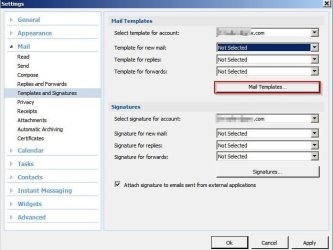
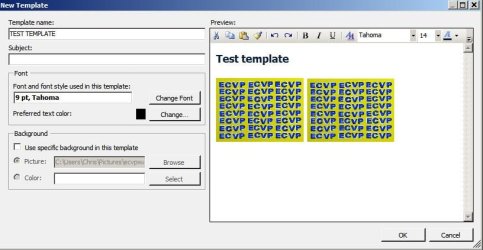
Or you can define templates to use for messages that can include images, colours, fonts.

Templates.jpg

New Template.jpg

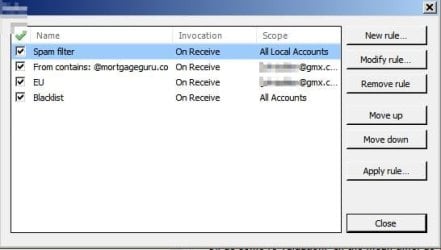
-Is a spam/phishing filter built in?

Yes and you can also create your own spam filters.

Filters_eM Client.jpg

-Import/export blocked senders

I don't think so.

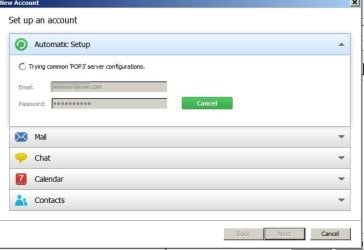
-IMAP & POP3 capabilities?

Yes.

Accounts Setup.jpg

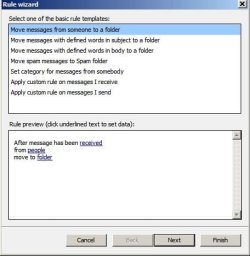
-Create named folders for organizing incoming emails?

Yes and it's also possible to create rules to automatically filter emails into those folders as they arrive.

Rule wizard.jpg
Rule wizard 2.jpg

-Can these folders be colorized or otherwise differentiated for readability and efficiency?

No but you can add a "colour category" for all messages in a particular folder.

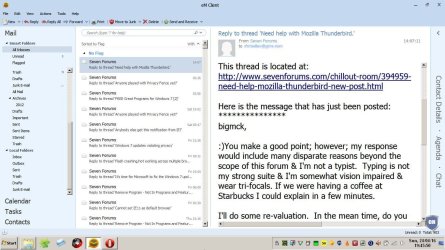
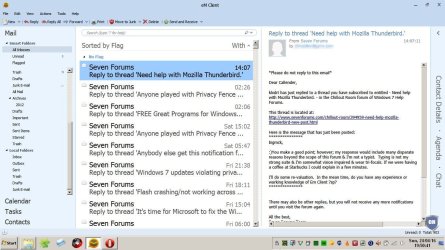
You can change how messages appear in preview pane, or when composing. You can shrink/ zoom text using [CTRL and Mouse wheel] or [CTRL+] and [CTRL-]

Appearance.jpg

-Select a color scheme/font for optimum contrast, legibility, etc. I wear tri-focals with 20:20 corrected and a 27" HD monitor, 17" HD monitor on laptop.

You can create your own custom theme but that's not something that I personally know how to do.

There are eight built in themes to choose from though.

There are so many settings that it would be tricky to get used to and set up the way you like.

For that reason what I did when I first used eM Client was to install it as my "non default" email client and temporarily kept Thunderbird as default.
 
Last edited:

My Computer

Computer type
Laptop
Computer Manufacturer/Model Number
ASUS
OS
Microsoft Windows 7 Home Premium 64-bit 7601 Multiprocessor Free Service Pack 1
CPU
AMD C-60 APU with Radeon(tm) HD Graphics
Motherboard
ASUSTeK COMPUTER INC. X501U
Memory
4.00 GB
Graphics Card(s)
AMD Radeon HD 6290 Graphics
Sound Card
(1) AMD High Definition Audio Device (2) Realtek High Defi
Screen Resolution
1366 x 768 x 32 bits (4294967296 colors) @ 60 Hz
Hard Drives
Hitachi HTS545050A7E380 SATA Disk Device
Antivirus
Comodo CIS & FW, SecureAplus App Whitelisting, Threatfire
Browser
Cyberfox 64bit, Opera 64bit, Airfox
Other Info
Spy-The-Spy, HitmanPro.Alert, Norton Connect Safe, MJRegWatcher, BitDefender TrafficLight, Voodoo Shield, Zemana AntiMalware
More examples:

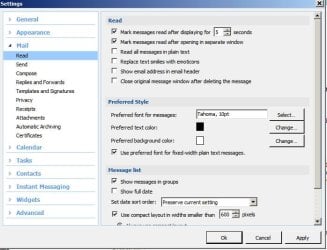
Use large font in preview pane:

Preview Pane font.jpg

Use large font in message list:

Message list font.jpg
 

My Computer

Computer type
Laptop
Computer Manufacturer/Model Number
ASUS
OS
Microsoft Windows 7 Home Premium 64-bit 7601 Multiprocessor Free Service Pack 1
CPU
AMD C-60 APU with Radeon(tm) HD Graphics
Motherboard
ASUSTeK COMPUTER INC. X501U
Memory
4.00 GB
Graphics Card(s)
AMD Radeon HD 6290 Graphics
Sound Card
(1) AMD High Definition Audio Device (2) Realtek High Defi
Screen Resolution
1366 x 768 x 32 bits (4294967296 colors) @ 60 Hz
Hard Drives
Hitachi HTS545050A7E380 SATA Disk Device
Antivirus
Comodo CIS & FW, SecureAplus App Whitelisting, Threatfire
Browser
Cyberfox 64bit, Opera 64bit, Airfox
Other Info
Spy-The-Spy, HitmanPro.Alert, Norton Connect Safe, MJRegWatcher, BitDefender TrafficLight, Voodoo Shield, Zemana AntiMalware
Callender,

FYI: I hardly ever get a forum response like yours & I've been using forums since 93 or 94 and...

WOW, I'm impressed with the professional presentation & informative quality of the material posted. I'm running Outlook 2003 alongside TB, So I'm sure adding eM Client won't be an issue.

I copied/pasted your response to Evernote for continuous use, any time, any where
& I'll share it with friends & collegues if it's ok with you.
 

Attachments

  • cheers klx chainwheel.png
    cheers klx chainwheel.png
    5.7 KB · Views: 833

My Computer

Computer type
PC/Desktop
Computer Manufacturer/Model Number
locally made
OS
w7 pro 32 bit w/XP virt enabled.
CPU
AMD A6-3650
Motherboard
ASUS F1A55-M CSM
Memory
4 GB DDR3 RAM
Graphics Card(s)
NVIDIA GeForce 210
Sound Card
NVIDIA High Definition Audio
Monitor(s) Displays
28" HD monitor
Screen Resolution
1680 x 1050 x 32 bits (4294967296 colors) @ 59 Hz
Hard Drives
2 x 500 GB Western Digital Blue Hard Drive
PSU
?
Case
?
Cooling
3-4 fans
Keyboard
big yellow keys
Mouse
logitec
Internet Speed
60 mb
Antivirus
panda
Browser
ff
Other Info
scanner, webcam, bw printer, fax modem, cd/dvd burner, PC usb ports: 2 usb3, 6 usb2 plus 7 port usb hub, 2 tb usb3, 1 Tb usb3, 500Mb usb2, 120Mb USB2 portable drives, asst of flash drives 250 Mb to 32 Gb. backup PC, office

No Problem. :)
 

My Computer

Computer type
Laptop
Computer Manufacturer/Model Number
ASUS
OS
Microsoft Windows 7 Home Premium 64-bit 7601 Multiprocessor Free Service Pack 1
CPU
AMD C-60 APU with Radeon(tm) HD Graphics
Motherboard
ASUSTeK COMPUTER INC. X501U
Memory
4.00 GB
Graphics Card(s)
AMD Radeon HD 6290 Graphics
Sound Card
(1) AMD High Definition Audio Device (2) Realtek High Defi
Screen Resolution
1366 x 768 x 32 bits (4294967296 colors) @ 60 Hz
Hard Drives
Hitachi HTS545050A7E380 SATA Disk Device
Antivirus
Comodo CIS & FW, SecureAplus App Whitelisting, Threatfire
Browser
Cyberfox 64bit, Opera 64bit, Airfox
Other Info
Spy-The-Spy, HitmanPro.Alert, Norton Connect Safe, MJRegWatcher, BitDefender TrafficLight, Voodoo Shield, Zemana AntiMalware
Back
Top