Hi,
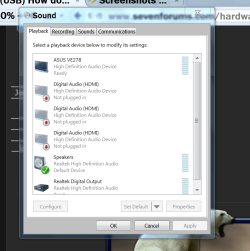
I just bought a second monitor and when I plugged it in the HDMI behind my Desktop Computer, I lost all my sound and if I unplug it, the sound comes back! The reason I use a HDMI is because I don't have a DVI cable and there is only one spot for VGA (already used). My question is how to enable sound for both monitors?
Thanks in advance,
Yannik
Ps:
My other question is quite simple: Is it possible to purchase a wireless keyboard but still use a wire mouse?
I just bought a second monitor and when I plugged it in the HDMI behind my Desktop Computer, I lost all my sound and if I unplug it, the sound comes back! The reason I use a HDMI is because I don't have a DVI cable and there is only one spot for VGA (already used). My question is how to enable sound for both monitors?
Thanks in advance,
Yannik
Ps:
My other question is quite simple: Is it possible to purchase a wireless keyboard but still use a wire mouse?
My Computer
- OS
- Windows 7 Home Premium 64bit.
- CPU
- Intel Core i7 CPU
- Motherboard
- Gigabyte X58A-UD3R
- Memory
- 6.00 GB RAM
- Graphics Card(s)
- ATI Radeon HD 5700 Series
- Sound Card
- Creative Sb-X-Fi
- Monitor(s) Displays
- Acer 24 inch
- Screen Resolution
- 1400 X 1050
- Hard Drives
- 1 Tb
- Case
- NZXT Mid Tower
- Mouse
- Kensington Expert Mouse
- Internet Speed
- Cable