Need help with powercfg -requestsoverride

rbmcgee

New member
Local time
8:05 AM
Messages
13
Location
Carmel, IN, USA
I would like to be able to put the display to sleep even though media player classic (mpc-hc) is running.

I open an admin command prompt and type

powercfg -requests

requests_zps0p0bfwqw.jpg


As you can see, mpc-hc.exe is preventing me from putting the display to sleep.

So I enter an override command:
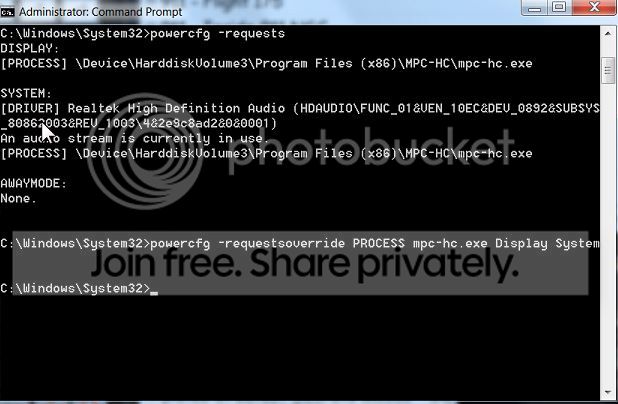
requestoveride_zpsrofjruxk.jpg


Unfortunately, when I execute -requests again, "mpc-hc" still will prevent display sleeping. Even after reboot the -request still shows mpc-hc.exe preventing display sleep and it does indeed prevent display sleep.

What am I doing wrong?
 

My Computer My Computer

Computer type
PC/Desktop
OS
w7 64

My Computer My Computer

Computer type
PC/Desktop
Computer Manufacturer/Model Number
Custom Build
OS
Windows 7 Ultimate x64 SP1
CPU
AMD Phenom 2 1090T
Motherboard
Gigabyte GA-890FXA-UD5
Memory
2x8GB Kingston HyperX Fury Black 1600Mhz Unganged
Graphics Card(s)
MSI GTX 970 Gaming 4G
Sound Card
Realtek On-Board HD 7.1 Audio / Logitech G35
Monitor(s) Displays
3xAcer GD245HQ
Screen Resolution
1920x1080
Hard Drives
Samsung 850 Pro 512GB SSD - OS /
WD Caviar Black SATA 3 - 1 TBx2 - Dynamic RAID 0 /
WD Caviar Green SATA 2 - 640GBx2 - Dynamic RAID 0 /
WD Caviar Green SATA 2 - 640GB - Internal Backup /
Seagate Barracude SATA 3 - 3TB - External Backup/ Sync
PSU
HighPower 1000W
Case
Cooler Master HAF 932
Cooling
Noctua NH-D14
Keyboard
Logitech G19
Mouse
Logitech G500
Internet Speed
100/4 Mbit Cable (100GB quota)
Antivirus
ZoneAlarm Extreme Security / MBAM Pro / MBAE Free / SAS Free
Browser
IE 11 - Firefox - Chrome
Other Info
Logitech F710/ G27/ G940/ Z5500 // TrackIR 5 // Nvidia 3D Surround Vision
Thanks for your reply although you're not getting at the problem.

I know how to put the monitor to sleep. I do it.

Unfortunately, the monitor pops back awake again 1n a couple seconds.

The reason the monitor wakes up again is because MPC is running and mpc has a powercfg request that prevents the monitor from sleeping while mpc is running (see picture 1)

The way to overcome this request is to command a -requessoverride for this particular program so that mpc will no longer demand that the monitor wakes-up/stay awake.

To the best of my knowledge, the syntax I've executed for this command is correct. MPC should no appear under "Display" for -requests.

My problem is that that is not happening. Either I'm not using the correct syntax or there is something else I don't understand/haven't checked.
 

My Computer My Computer

Computer type
PC/Desktop
OS
w7 64
Well, I just downloaded MPC portable (zip) and listened to a 4 minute song while both my screens turned off. Either installed version is different or something else is waking your screens? It would take a couple of minutes to actually test the first tutorial. Up to you of course.
 

My Computer My Computer

Computer type
PC/Desktop
Computer Manufacturer/Model Number
Custom Build
OS
Windows 7 Ultimate x64 SP1
CPU
AMD Phenom 2 1090T
Motherboard
Gigabyte GA-890FXA-UD5
Memory
2x8GB Kingston HyperX Fury Black 1600Mhz Unganged
Graphics Card(s)
MSI GTX 970 Gaming 4G
Sound Card
Realtek On-Board HD 7.1 Audio / Logitech G35
Monitor(s) Displays
3xAcer GD245HQ
Screen Resolution
1920x1080
Hard Drives
Samsung 850 Pro 512GB SSD - OS /
WD Caviar Black SATA 3 - 1 TBx2 - Dynamic RAID 0 /
WD Caviar Green SATA 2 - 640GBx2 - Dynamic RAID 0 /
WD Caviar Green SATA 2 - 640GB - Internal Backup /
Seagate Barracude SATA 3 - 3TB - External Backup/ Sync
PSU
HighPower 1000W
Case
Cooler Master HAF 932
Cooling
Noctua NH-D14
Keyboard
Logitech G19
Mouse
Logitech G500
Internet Speed
100/4 Mbit Cable (100GB quota)
Antivirus
ZoneAlarm Extreme Security / MBAM Pro / MBAE Free / SAS Free
Browser
IE 11 - Firefox - Chrome
Other Info
Logitech F710/ G27/ G940/ Z5500 // TrackIR 5 // Nvidia 3D Surround Vision
No offense GokAy, but you seem to be missing the entire point of this thread.

This thread is not about commands to put the display to sleep or about mpc or any version of it.

This thread is about a program (in my case, this is mpc, but it could be any program) that prevents the display from going to sleep. The way you can see which programs are set to prevent sleep, you open an admin command prompt and type "powercfg -requests". What this command returns are, at the current moment, which processes and/or drivers are either preventing the pc or the monitor from going to sleep.

In the first post, picture #1 you can see that mpc-hc.exe is preventing the monitor from going to sleep. Once again, it could be any program, at any time, this is simply my situation.

The way to remove this program (once again any program) from the list of things preventing the monitor from going to sleep is to type (in my specific case):
powercfg -requestsoverride PROCESS mpc-hc.exe Display settings

As a result of that command, mpc-hc (or any program) should be removed from the requests listed under "Display". In my specific case, under "Display" should be "None" since mpc-hc.exe was the only thing listed there.

This thread is about my command (powercfh -requestsoverride PROCESS mpc-hc.exe Display settings) does not remove mpc-hc.exe from the display category.

Is my syntax wrong or am I not understanding something?

Once again, GokAy, don't waste your time on:
1) Determine what commands are available to put the monitor to sleep, or,
2) How to remove the offending program and use a different program.
 

My Computer My Computer

Computer type
PC/Desktop
OS
w7 64
No offense taken mate. I am running the same program as you do, just the portable one because I didn't want to install it.

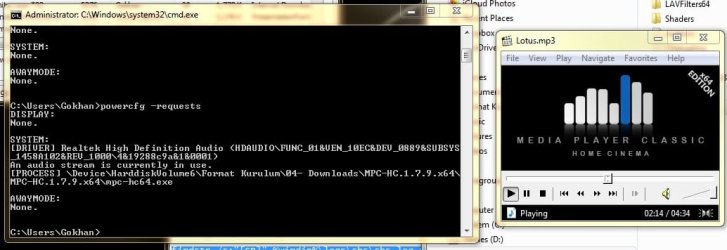
Just did this:
- I started MPC and ran that command, it reported None for display (for all actually but display is what matters, right?).
- Then I started playing the MP3 and ran the command again, it showed the same as yours under System, but Display was None again.

powercfg.jpg

Are you playing a video file or have some visualization (I am not familiar, does MPC has such features)?

One thing I noticed is (may be relevant or not) your MPC is 32 bit, but there is a 64bit version. Would you care to install the 64bit and try that one?
 

My Computer My Computer

Computer type
PC/Desktop
Computer Manufacturer/Model Number
Custom Build
OS
Windows 7 Ultimate x64 SP1
CPU
AMD Phenom 2 1090T
Motherboard
Gigabyte GA-890FXA-UD5
Memory
2x8GB Kingston HyperX Fury Black 1600Mhz Unganged
Graphics Card(s)
MSI GTX 970 Gaming 4G
Sound Card
Realtek On-Board HD 7.1 Audio / Logitech G35
Monitor(s) Displays
3xAcer GD245HQ
Screen Resolution
1920x1080
Hard Drives
Samsung 850 Pro 512GB SSD - OS /
WD Caviar Black SATA 3 - 1 TBx2 - Dynamic RAID 0 /
WD Caviar Green SATA 2 - 640GBx2 - Dynamic RAID 0 /
WD Caviar Green SATA 2 - 640GB - Internal Backup /
Seagate Barracude SATA 3 - 3TB - External Backup/ Sync
PSU
HighPower 1000W
Case
Cooler Master HAF 932
Cooling
Noctua NH-D14
Keyboard
Logitech G19
Mouse
Logitech G500
Internet Speed
100/4 Mbit Cable (100GB quota)
Antivirus
ZoneAlarm Extreme Security / MBAM Pro / MBAE Free / SAS Free
Browser
IE 11 - Firefox - Chrome
Other Info
Logitech F710/ G27/ G940/ Z5500 // TrackIR 5 // Nvidia 3D Surround Vision
Update: I started a movie, and can't get the monitors to sleep.
Ran the command: powercfg -requestsoverride process mpc-hc64.exe display (don't need system as far as I understand)
then verified: powercfg -requestsoverride
still no go

will try some more

Edit: I gave up as I am out of ideas, tried running cmd as admin too. From what I searched in Google, this feature was added sometime in the past and there are a few requests to have an option to sleep the monitors during a playback (people trying to listen only while going to sleep etc)
 

My Computer My Computer

Computer type
PC/Desktop
Computer Manufacturer/Model Number
Custom Build
OS
Windows 7 Ultimate x64 SP1
CPU
AMD Phenom 2 1090T
Motherboard
Gigabyte GA-890FXA-UD5
Memory
2x8GB Kingston HyperX Fury Black 1600Mhz Unganged
Graphics Card(s)
MSI GTX 970 Gaming 4G
Sound Card
Realtek On-Board HD 7.1 Audio / Logitech G35
Monitor(s) Displays
3xAcer GD245HQ
Screen Resolution
1920x1080
Hard Drives
Samsung 850 Pro 512GB SSD - OS /
WD Caviar Black SATA 3 - 1 TBx2 - Dynamic RAID 0 /
WD Caviar Green SATA 2 - 640GBx2 - Dynamic RAID 0 /
WD Caviar Green SATA 2 - 640GB - Internal Backup /
Seagate Barracude SATA 3 - 3TB - External Backup/ Sync
PSU
HighPower 1000W
Case
Cooler Master HAF 932
Cooling
Noctua NH-D14
Keyboard
Logitech G19
Mouse
Logitech G500
Internet Speed
100/4 Mbit Cable (100GB quota)
Antivirus
ZoneAlarm Extreme Security / MBAM Pro / MBAE Free / SAS Free
Browser
IE 11 - Firefox - Chrome
Other Info
Logitech F710/ G27/ G940/ Z5500 // TrackIR 5 // Nvidia 3D Surround Vision
GokAy,

Now we're on the same page.

The command you entered should have removed that process/program from under the "Display" section. As you verified, it does not. But it should.

What I'm looking for is some specific guidance on why it isn't removed.
 

My Computer My Computer

Computer type
PC/Desktop
OS
w7 64
In the requestsoverride command try putting the entire string you have in the request, and wrap it in double quotes.
Instead of mpc-hc.exe the override will have "\Device\ ..... mpc-hc.exe" (exactly as you see it in the request).

You may also need to do this for the driver.

An EXAMPLE of a command using the entire string:

powercfg -requestsoverride DRIVER "High Definition Audio Device (HDAUDIO\FUNC_01&VEN_10EC&DEV_0883&SUBSYS_147B8E01&REV_1000\4&39ab38b6&0&0001)" SYSTEM
 

My Computer My Computer

Computer type
PC/Desktop
Computer Manufacturer/Model Number
home built
OS
Multi-Boot W7_Pro_x64 W8.1_Pro_x64 W10_Pro_x64 +Linux_VMs +Chromium_VM
CPU
AMD Athlon II x4 620
Motherboard
Gigabyte GA-MA785G-UD3H
Memory
6GB GSkill DDR2 800
Graphics Card(s)
AMD 4670 GPU + AMD 4200 IGP
Sound Card
on board Realtek ALC889A
Monitor(s) Displays
RCA 40" LCD TV, Insignia 32" LCD TV, HP 15" LCD monitor
Screen Resolution
1680 x 1050
Hard Drives
OCZ Vertex 3 120GB,
Samsung F3 1TB (3),
Several others - WD, Seagate, Hitachi, ...
PSU
Corsair 500 W
Case
Rosewill mid tower
Cooling
CM 90mm rifle
Keyboard
Gyration wireless, Logitech wireless, Dell USB wired
Mouse
Gyration wireless, Logitech wireless, V7 USB wired
Internet Speed
Spectrum - 100Mbps D / 10Mbps U
Antivirus
Avast, MBAM3, EMET, WinPatrol
Browser
Pale Moon, Firefox, IE
Other Info
2 multi-boot PC's
Mainly HTPC/Office/Gen purpose (no gaming).
Trendnet USB KVM.
LG DVD burner/Blue Ray Player.
Tray system for removable SATA backup drives.

Not currently OCd, under-volted.
I use Hybrid sleep, rarely re-boot or shutdown.

Hauppauge HD-PVR, Avermedia PCIe TV Tuner, Hauppauge PCI TV Tuner.
Dave,

I'm going to try that approach. Before I do just a quick question. The driver seems like it's just preventing the system from sleeping, not the monitor from sleeping. Since, in my case, I only care about the monitor and not the whole PC, do you think I need to address the driver issue?
 

My Computer My Computer

Computer type
PC/Desktop
OS
w7 64
Good question ...
Yea, skip my driver override suggestion for what you want to do, and see how it works for you.

The systems i've worked on, i was trying to fix PC sleep issues, not just monitor sleep.
 

My Computer My Computer

Computer type
PC/Desktop
Computer Manufacturer/Model Number
home built
OS
Multi-Boot W7_Pro_x64 W8.1_Pro_x64 W10_Pro_x64 +Linux_VMs +Chromium_VM
CPU
AMD Athlon II x4 620
Motherboard
Gigabyte GA-MA785G-UD3H
Memory
6GB GSkill DDR2 800
Graphics Card(s)
AMD 4670 GPU + AMD 4200 IGP
Sound Card
on board Realtek ALC889A
Monitor(s) Displays
RCA 40" LCD TV, Insignia 32" LCD TV, HP 15" LCD monitor
Screen Resolution
1680 x 1050
Hard Drives
OCZ Vertex 3 120GB,
Samsung F3 1TB (3),
Several others - WD, Seagate, Hitachi, ...
PSU
Corsair 500 W
Case
Rosewill mid tower
Cooling
CM 90mm rifle
Keyboard
Gyration wireless, Logitech wireless, Dell USB wired
Mouse
Gyration wireless, Logitech wireless, V7 USB wired
Internet Speed
Spectrum - 100Mbps D / 10Mbps U
Antivirus
Avast, MBAM3, EMET, WinPatrol
Browser
Pale Moon, Firefox, IE
Other Info
2 multi-boot PC's
Mainly HTPC/Office/Gen purpose (no gaming).
Trendnet USB KVM.
LG DVD burner/Blue Ray Player.
Tray system for removable SATA backup drives.

Not currently OCd, under-volted.
I use Hybrid sleep, rarely re-boot or shutdown.

Hauppauge HD-PVR, Avermedia PCIe TV Tuner, Hauppauge PCI TV Tuner.
Still no go.

I tried "\Device...mpc-hc.exe". I even tried "C:\Program Files...mpc.exe"

I just don't understand how this works.

In my case, mpc.exe is still listed as preventing display sleep and does indeed prevent display sleep.
 

My Computer My Computer

Computer type
PC/Desktop
OS
w7 64
It could be the way MPC is programmed.
You might ask on the MPC forum (if they have one), or check their documentation.

If I am watching a movie, i would not want the monitor to go to sleep, while the movie is playing...
 

My Computer My Computer

Computer type
PC/Desktop
Computer Manufacturer/Model Number
home built
OS
Multi-Boot W7_Pro_x64 W8.1_Pro_x64 W10_Pro_x64 +Linux_VMs +Chromium_VM
CPU
AMD Athlon II x4 620
Motherboard
Gigabyte GA-MA785G-UD3H
Memory
6GB GSkill DDR2 800
Graphics Card(s)
AMD 4670 GPU + AMD 4200 IGP
Sound Card
on board Realtek ALC889A
Monitor(s) Displays
RCA 40" LCD TV, Insignia 32" LCD TV, HP 15" LCD monitor
Screen Resolution
1680 x 1050
Hard Drives
OCZ Vertex 3 120GB,
Samsung F3 1TB (3),
Several others - WD, Seagate, Hitachi, ...
PSU
Corsair 500 W
Case
Rosewill mid tower
Cooling
CM 90mm rifle
Keyboard
Gyration wireless, Logitech wireless, Dell USB wired
Mouse
Gyration wireless, Logitech wireless, V7 USB wired
Internet Speed
Spectrum - 100Mbps D / 10Mbps U
Antivirus
Avast, MBAM3, EMET, WinPatrol
Browser
Pale Moon, Firefox, IE
Other Info
2 multi-boot PC's
Mainly HTPC/Office/Gen purpose (no gaming).
Trendnet USB KVM.
LG DVD burner/Blue Ray Player.
Tray system for removable SATA backup drives.

Not currently OCd, under-volted.
I use Hybrid sleep, rarely re-boot or shutdown.

Hauppauge HD-PVR, Avermedia PCIe TV Tuner, Hauppauge PCI TV Tuner.
Actually, GokAy got the scenario exactly right. Bedroom, bedtime, sound, but no light.

As far as MPC is concerned, yes, the program itself tells windows not to sleep the monitor while running. I've got other programs that make the same statement to windows.

It's my understanding that powercfg -requests will show you the programs that have that coding (because the statement will show up under display, or under system if it is meant to prevent the entire PC from sleeping).

It is my understanding that in the world of preventing sleeping, it is ultimately in control of windows, regardless of what the programmers intended.

It is also my understanding that powercfg gives this power to the admin of the pc.

Perhaps my understanding is incorrect and it is possible that there is nothing the OS can do about it and therefore nothing the admin can do.
 

My Computer My Computer

Computer type
PC/Desktop
OS
w7 64
If you are still seeing the request, maybe to override was not entered correctly ???
When you entered the entire command did you manually type it in, or did you copy from the requests CMD window, and paste with that for the override ?
I copy the text from the CMD window, i probably would make a typo trying to manually key it.

Regarding "Actually, GokAy got the scenario exactly right. Bedroom, bedtime, sound, but no light."
If the real problem is the light from the display, you could try using a screen saver of Blank.
That would not turn off the display, but might be a workaround that would be better for you ???

My setup is pretty convoluted with multiple/multi-user/multi-boot PCs, multiple displays, multiple audio devices, KVM, multi keyboards, multi mice ...
Some of the audio output devices use the monitor speakers, if and when wanted.
If the monitor turns off, and that is also the current audio output device, audio would also be lost.
I don't want to lose audio or video, anytime Media is playing, for any user, using any current config choices ...
 

My Computer My Computer

Computer type
PC/Desktop
Computer Manufacturer/Model Number
home built
OS
Multi-Boot W7_Pro_x64 W8.1_Pro_x64 W10_Pro_x64 +Linux_VMs +Chromium_VM
CPU
AMD Athlon II x4 620
Motherboard
Gigabyte GA-MA785G-UD3H
Memory
6GB GSkill DDR2 800
Graphics Card(s)
AMD 4670 GPU + AMD 4200 IGP
Sound Card
on board Realtek ALC889A
Monitor(s) Displays
RCA 40" LCD TV, Insignia 32" LCD TV, HP 15" LCD monitor
Screen Resolution
1680 x 1050
Hard Drives
OCZ Vertex 3 120GB,
Samsung F3 1TB (3),
Several others - WD, Seagate, Hitachi, ...
PSU
Corsair 500 W
Case
Rosewill mid tower
Cooling
CM 90mm rifle
Keyboard
Gyration wireless, Logitech wireless, Dell USB wired
Mouse
Gyration wireless, Logitech wireless, V7 USB wired
Internet Speed
Spectrum - 100Mbps D / 10Mbps U
Antivirus
Avast, MBAM3, EMET, WinPatrol
Browser
Pale Moon, Firefox, IE
Other Info
2 multi-boot PC's
Mainly HTPC/Office/Gen purpose (no gaming).
Trendnet USB KVM.
LG DVD burner/Blue Ray Player.
Tray system for removable SATA backup drives.

Not currently OCd, under-volted.
I use Hybrid sleep, rarely re-boot or shutdown.

Hauppauge HD-PVR, Avermedia PCIe TV Tuner, Hauppauge PCI TV Tuner.
I understand why a media player, any media player, would instruct windows not to sleep the display and not to invoke the screensaver while "I'm" playing. It's normally a feature rather than a bug.

It was my understanding that even though the software instructs windows, it is ultimately up to windows to obey or not obey this request.

It was also my belief that windows passes this control to the admin in the form of a program called powercfg.

Apparently I'm wrong about this and it is the program that maintains ultimate authority and windows is harmless to do anything about it.

I'm confident that in certain situations powercfg does have control over specific power management features, but in other situations, powercfg does not.

Dave, scr will carry the exact same problem as monitor sleep.
I've typed the attempt dozens of times. Surely at least one of those times I typed it correctly. I also took a snapshot of the command that was typed and included it in the first post. You provided an adjusted suggestion. If anyone sees anything wrong with the code, please let me know.
 

My Computer My Computer

Computer type
PC/Desktop
OS
w7 64
Just to be clear on what I'm trying to accomplish ...

I do not want the monitor to fall asleep. As a matter of fact, in power options I have the monitor falling asleep set to never.

I do however, have the ability to execute a command that specifically puts the monitor to sleep. If MPC is running (but minimized so there is nothing actually changing on the desktop), the monitor will go to sleep and then pop right back awake.

After researching, I found out that the reason this was happening was because of the setting in powercfg where mpc prevents the monitor from going to sleep.

The objective of this thread was to understand how to remove mpc from under the "display" section of powercfg.
 

My Computer My Computer

Computer type
PC/Desktop
OS
w7 64
Back
Top