Need help with Recovery Manager

Combine

New member
Power User
Local time
9:07 AM
Messages
79
Location
Buenos Aires
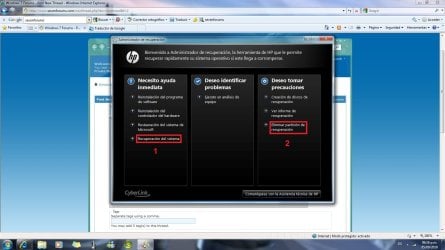
If there's here any user with a Hewlett-Packard PC that has preinstalled Windows 7 , maybe has notice that has some recovery tools, which are call "Recovery Manager" and is showed in the start menu. Inside the program there are many options, and two of them are which I need further information. (Sory but the interface is in Spanish, anywhere options are positioned in the same place of the English version... I think :s)
post5.jpg

One of them (mark as number 1 in red) allows to restore the computer to its original factory condition. So what I figure out is that the program will format the hard drive and will install install everything from scratch. Am I rigth?
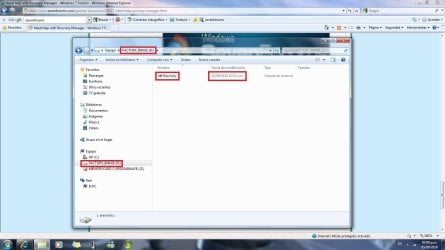
The other option (mark as number 2 in red) allows to delete the recovery partition. Is that recovery partition the same which is common name as FACTORY_IMAGE ?

If anyone KNOWS something about this, please give me a hand, thanks.
 

My Computer My Computer

Computer Manufacturer/Model Number
HP Pavilon Slimline
OS
Windows 7 Ultimate 64 bits
CPU
Dual Core Intel Core 2 Duo E7500
Motherboard
MSI MS-7525 (Boston)
Memory
2x[2048 MB DDR2-SDRAM (PC2-6400 / 800 MHz), 2 Gb]; Total:4Gb
Graphics Card(s)
Intel(R) G33/G31 Express Chipset Family (256 MB)
Sound Card
Realtek ALC662 @ Intel 82801GB ICH7 - HD Audio Controller
Monitor(s) Displays
HP 2009m 20'' LCD
Screen Resolution
1600x900
Hard Drives
SAMSUNG HD642JJ (596 GB)
Unless it gives you a further option for Non-Destructive Recovery which saves your files, a Factory Recovery will wipe the HD first before putting it back to factory condition.

It can also be run from boot by tapping the F11 key at bootup.

Make the Recovery Disk set from within that Windows7 utility now so you have another option, or can then consider wiping the Recovery partition although having it as another backup is probably wise with a Win7 computer.

Many tech enthusiasts find a clean-copy retail installer for their version to clean reinstall without the factory bloatware, using the Product Key on COA sticker on machine. In that case, you can wipe the HD before reinstalling, but make the Recovery disks first as sometimes the maker requires factory install to service hardware warranty.
 
Last edited:
But as far as I understand, there is a difference between the FACTORY_IMAGE and the set of disk, rigth? I mean they are not the same. The facory image has being updated since I first used the pc. And the set of disk seems to just content the files needed to recover the pc to its original condition, rigth?.
 

My Computer My Computer

Computer Manufacturer/Model Number
HP Pavilon Slimline
OS
Windows 7 Ultimate 64 bits
CPU
Dual Core Intel Core 2 Duo E7500
Motherboard
MSI MS-7525 (Boston)
Memory
2x[2048 MB DDR2-SDRAM (PC2-6400 / 800 MHz), 2 Gb]; Total:4Gb
Graphics Card(s)
Intel(R) G33/G31 Express Chipset Family (256 MB)
Sound Card
Realtek ALC662 @ Intel 82801GB ICH7 - HD Audio Controller
Monitor(s) Displays
HP 2009m 20'' LCD
Screen Resolution
1600x900
Hard Drives
SAMSUNG HD642JJ (596 GB)
Are you referring to the Recovery partition contents on your HD?

How has that been updated since you got computer?

Normally it just sits there as always until you need to make your disks or run it from boot. I don't think anything should write to that partition as it can corrupt it.

Can you post a screenshot of the file you are referring to and your Disk management drive map and listins so we can see? Use Snipping Tool in Start menu.
 
There is no difference between the set of disks you create and the recovery partition. All the disks are is a copy of the data in that partition so that you can restore the computer to its factory condition either by means of the recovery partition or the disks you created.
 

My Computer My Computer

Computer type
PC/Desktop
Computer Manufacturer/Model Number
Dwarf Dwf/11/2012 r09/2013
OS
Windows 8.1 Pro RTM x64
CPU
Intel Core-i5-3570K 4-core @ 3.4GHz (Ivy Bridge) (OC 4.4GHz)
Motherboard
ASRock Z77 Extreme4-M
Memory
4 x 4GB DDR3-1600 Corsair Vengeance CMZ8GX3M2A1600C9B (16GB)
Graphics Card(s)
MSI GeForce GTX770 Gaming OC 2GB
Sound Card
Realtek High Definition on board solution (ALC 898)
Monitor(s) Displays
ViewSonic VA1912w Widescreen (VGA)
Screen Resolution
1440x900
Hard Drives
OCZ Agility 3 SSD 120GB SATA III x2 (RAID 0)
Samsung HD501LJ 500GB SATA II x2
Hitachi HDS721010CLA332 1TB SATA II
Iomega 1.5TB Ext USB 2.0
WD 2.0TB Ext USB 3.0
PSU
XFX Pro Series 850W Semi-Modular
Case
Gigabyte IF233
Cooling
1 x 120mm Front Inlet 1 x 120mm Rear Exhaust
Keyboard
Microsoft Comfort Curve Keyboard 3000 (USB)
Mouse
Microsoft Comfort Mouse 3000 for Business (USB)
Internet Speed
NetGear DG834Gv3 ADSL Modem/Router (Ethernet) ~4.0 Mb/s (O2)
Antivirus
Avast! 8.0.1497
Browser
IE 11
Other Info
Optical Drive: HL-DT-ST BD-RE BH10LS30 SATA Bluray
Lexmark S305 Printer/Scanner/Copier (USB)
WEI Score: 8.1/8.1/8.5/8.5/8.25
Asus Eee PC 1011PX Netbook (Windows 7 x86 Starter)
Here is the disk management:
diskmanagement.jpg

And here you can notice it has been modified:
post6.jpg
 

My Computer My Computer

Computer Manufacturer/Model Number
HP Pavilon Slimline
OS
Windows 7 Ultimate 64 bits
CPU
Dual Core Intel Core 2 Duo E7500
Motherboard
MSI MS-7525 (Boston)
Memory
2x[2048 MB DDR2-SDRAM (PC2-6400 / 800 MHz), 2 Gb]; Total:4Gb
Graphics Card(s)
Intel(R) G33/G31 Express Chipset Family (256 MB)
Sound Card
Realtek ALC662 @ Intel 82801GB ICH7 - HD Audio Controller
Monitor(s) Displays
HP 2009m 20'' LCD
Screen Resolution
1600x900
Hard Drives
SAMSUNG HD642JJ (596 GB)
Unhide your hidden files in Control Panel>Folder Options>View and look in the Recovery partition to see what was written to it on the date shown. Post back a screenshot. Expand the folder(s) for that date.

It is possible a Backup has written to that partition incorrectly. If so, delete the backup files once you confirm this with certainty, then change the file path where your Backup saves to.

Make the Recovery Disks now if you haven't already done so. If it will product the disks, then you may not have to worry about files which have already been written there corrupting the partition as long as no more are added.

Do you wish to do something with the Recovery partition now, other than sort this out?
 
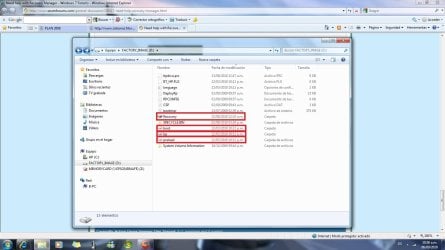
post7.jpg

The "folders" that are boxed in red, are those that I have no access, and they are modified. There are also other files modified, but I can see them.
Maybe HP gave a particular funtion to the unit they call FACTORY_IMAGE and I don't know which is it; or maybe is something wrong...
 

My Computer My Computer

Computer Manufacturer/Model Number
HP Pavilon Slimline
OS
Windows 7 Ultimate 64 bits
CPU
Dual Core Intel Core 2 Duo E7500
Motherboard
MSI MS-7525 (Boston)
Memory
2x[2048 MB DDR2-SDRAM (PC2-6400 / 800 MHz), 2 Gb]; Total:4Gb
Graphics Card(s)
Intel(R) G33/G31 Express Chipset Family (256 MB)
Sound Card
Realtek ALC662 @ Intel 82801GB ICH7 - HD Audio Controller
Monitor(s) Displays
HP 2009m 20'' LCD
Screen Resolution
1600x900
Hard Drives
SAMSUNG HD642JJ (596 GB)
Did you expand the Recovery folder to look inside at what was written to on 8/22? Maybe look at what was put in the Recycle Bin also in August.

Will it make Recovery disks or cue up to do a factory recovery by running Factory Recovery from Windows, or tapping the F12 key at bootup?

If so I would not worry about it - especially if you have the disks made - except to verify what is being written to it so you can see if it is a backup program which needs to have its file path changed to secondary or external HD.

Is there something else you wish to do now with the Factory Recovery partition?
 
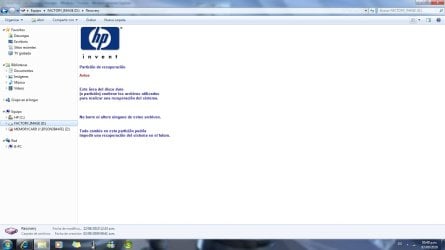
I can not acces the Recovery folder, even after changing the option of show hidden files and folder and uncheck the option of hide system protected files. Here is a pic of what I can only see inside:
post 8.jpg

Is in Spanish, but in English it says :

Recovery partition

Warning

This area of the hard disk (or partition) contains the needed files to perform a system recovery.

Do not delete or modify any of this files.

Any change in this partition could prevent a system recovery in the future.

So here is something wrong. But I will tell you the full story about why I want to recover my windows.
It happened that my sister came one day with the idea of upgrading the OS to Ultimate (I used to have Windows 7 Home Premium) as well as a friend told her it was possible. So, without advising me, she run the Windows Anytime Upgrade and wrote a key. Then the OS upgraded to Ultimate, without problem. Some weeks ago I was trying to download the Windows XP mode, but previously a genuine windows veryfication was needed to run. I clic OK and some seconds later appeared a window telling me my Windows version was illegal. Of course my sister doesn't know anything about it. Up to know I found some "ways" to be able to use the pc until I fiss this mess. So what I want to do is to run the recovery manager to stay with my ORIGINAL Windows 7 Home Premium. I'm not sure if it will work.

But even before this matter, when I have Windows Home Premium, I had looked inside the FACTORY_IMAGE and noticed that some folders were usually been modified. The Recicle bin, for example, that is inside there always has been modified.
It seems like if the system were doing backups of some things in that partition.

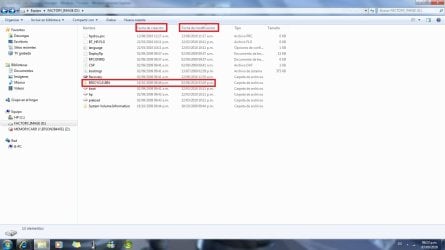
Here is a pic with the dates of creation and modification of the folders. Take a look of the one boxed in red:
post9.jpg

Do you think I could recover my Windows 7 Home Premium if I use some way of recovery like the set of disks?

P.D.: I can not remember if I burn the disk after or before the change of my version of Windows. :confused:
 

My Computer My Computer

Computer Manufacturer/Model Number
HP Pavilon Slimline
OS
Windows 7 Ultimate 64 bits
CPU
Dual Core Intel Core 2 Duo E7500
Motherboard
MSI MS-7525 (Boston)
Memory
2x[2048 MB DDR2-SDRAM (PC2-6400 / 800 MHz), 2 Gb]; Total:4Gb
Graphics Card(s)
Intel(R) G33/G31 Express Chipset Family (256 MB)
Sound Card
Realtek ALC662 @ Intel 82801GB ICH7 - HD Audio Controller
Monitor(s) Displays
HP 2009m 20'' LCD
Screen Resolution
1600x900
Hard Drives
SAMSUNG HD642JJ (596 GB)
So you have the Recovery Disk set already made from the Recovery Partition. Have you tried booting it to see if it will run?

There are three ways to run your Recovery partition normally: Look in All Programs to find the same Recovery Manager which helped you burn the disks to run Recovery from there.

Next you can run Recovery by tapping the key given on first boot screen to Run Recovery from boot. Go to HP Support Downloads webpage for your model computer to read the Manual to see the exact steps, or consult your setup literature.

Finally, you can boot to run the Recovery Disks you made.

Be sure to back up your files first, and gather your program installers. If you lost any Product Keys for programs you installed (like Office) then audit them from the HD using Belarc Advisor.
 
My doubt is about the set of disk. How to use them. Now I suspect that they are to boot from them, rigth?

And my other doubt, a bigger one, is if the recovery will work, as it seems that the factory files were modified. So the last hope are the disk, but if they are the same that is inside the partition (the set of disks and the partition have almost the same size), maybe it could not work, unlees the disks were something different...

I'm trying to see HP support web, but now it's not working properly...
 

My Computer My Computer

Computer Manufacturer/Model Number
HP Pavilon Slimline
OS
Windows 7 Ultimate 64 bits
CPU
Dual Core Intel Core 2 Duo E7500
Motherboard
MSI MS-7525 (Boston)
Memory
2x[2048 MB DDR2-SDRAM (PC2-6400 / 800 MHz), 2 Gb]; Total:4Gb
Graphics Card(s)
Intel(R) G33/G31 Express Chipset Family (256 MB)
Sound Card
Realtek ALC662 @ Intel 82801GB ICH7 - HD Audio Controller
Monitor(s) Displays
HP 2009m 20'' LCD
Screen Resolution
1600x900
Hard Drives
SAMSUNG HD642JJ (596 GB)
Externally backup? So if I do a backup in a partition, it will NOT work then? Or there's a way to backup in a partition and then recover the system from it?
 

My Computer My Computer

Computer Manufacturer/Model Number
HP Pavilon Slimline
OS
Windows 7 Ultimate 64 bits
CPU
Dual Core Intel Core 2 Duo E7500
Motherboard
MSI MS-7525 (Boston)
Memory
2x[2048 MB DDR2-SDRAM (PC2-6400 / 800 MHz), 2 Gb]; Total:4Gb
Graphics Card(s)
Intel(R) G33/G31 Express Chipset Family (256 MB)
Sound Card
Realtek ALC662 @ Intel 82801GB ICH7 - HD Audio Controller
Monitor(s) Displays
HP 2009m 20'' LCD
Screen Resolution
1600x900
Hard Drives
SAMSUNG HD642JJ (596 GB)
I would not trust backup to a partition if I plan to use Recovery Disks, as they normally are destructive and format the drive first.

However, it may offer you options to save your files if you start Recovery from within Windows, which is why I suggested you check if that works first.

There is no substitute for keeping your files backed up at all times, though. If you have files you cannot afford to lose and don't have an external or secondary HD, send them over the network to another computer or put them on DVD (capacity: 4.7 gb).
 
Back
Top