Need help with slow laptop

FDM

New member
Member
VIP
Local time
3:30 AM
Messages
132
I have an older laptop that I use on limited occasions - it is running Win7 64 bit Premium with a Celelon 900 CPU, 250GB HDD (68GB used) and 3 GB ram.

I know that the Celeron 900 is no noted for speed and not fast be today's standards but recently it has become agonizingly slow to respond to anything I attempt to open (sometimes several minutes). I have run a variety of cleaners, optimizers, disk checks/repairs, antispyware, virus and maleware scans to no avail. Also have disabled most all startups and switched most all services to manual.
I have Comcast that provides between 80 and 90 Mbps internet speed.

I would appreciate any suggestions on any additional steps I might undertake to resolve this slow response issue.
 

My Computer My Computer

At a glance

Win 7
OS
Win 7
What do you mean, when you say an "older laptop"? That doesn't tell us much or give us much to go on. Eh?

I have several old laptops, from different makers, that now run Windows Ultimate/32 and all work great.
One is an older Toshiba, that originally came out with Windows XP on it, but now with 2gb of ram, and a 120 GB SSD, and a new battery, it's running great, and I use it almost every day.

But because of the natural tendency of a laptop to run slower than a desktop, to conserve power and generate less heat, they do require some great tweaking and tuning to get the best performance out of them.

Of course, keeping the HD clean of junk, is important, but there's a lot more to getting the very best performance out of any laptop. Adding an SSD will really ramp up the performance of any laptop.

When you're using a small and slow HD, a huge jump in performance can be had by telling Windows to move its Kernel off of the HD and into ram memory on boot-up, where it can run MUCH faster. I do that on every computer I set up or tune up. You can find that registry tweak, by doing a Google search.

It's amazing to me, how many things like the above mentioned tweak, that are already built into the Windows Registry by the programmers at Microsoft. I call those things "Safe Defaults", that do nothing but slow down the operation of Windows. I applaud the guys who have taken the time and made the effort to find those Defaults and post their 'fixes' to the internet.

Good Luck!
TechnoMage :cool:
 

My Computer My Computer

At a glance

Win 7 Pro, SP1, x86, Win-11/Pro/64AMD8GB CrucialVarious
Computer type
PC/Desktop
Computer Manufacturer/Model Number
Various
OS
Win 7 Pro, SP1, x86, Win-11/Pro/64
CPU
AMD
Motherboard
Various
Memory
8GB Crucial
Graphics Card(s)
Various
Sound Card
OnBoard
Monitor(s) Displays
Acer 21.5"
Hard Drives
Crucial SSD, 500 GB
PSU
OEM
Case
SFF Slim Line Case
Cooling
OEM
Keyboard
eMachines
Mouse
Logitech Wireless
Internet Speed
varies
Antivirus
Windows Defender/Super Anti-Spyware
Browser
Firefox
I would appreciate any suggestions on any additional steps I might undertake to resolve this slow response issue.

Run a diagnostic on the HD(I assume it is a spinner.) If it is on the way out it is common that the OS retries the operation when trying to read or write data. The necessity to perform the operations multiple times could be what is slowing the system down.

Also I would back up your data while the HD is still working.

If the diagnostic says the drive is good then you can go from there. But old drive suddenly slow is often an indicator of immanent drive failure. Do the backup first just in case.
 

My Computer My Computer

At a glance

Windows 7 32 bitAMD 5200+ dual core2 GBNVidia GeForce 6150SE 128 MB
Computer Manufacturer/Model Number
HP Media Center
OS
Windows 7 32 bit
CPU
AMD 5200+ dual core
Memory
2 GB
Graphics Card(s)
NVidia GeForce 6150SE 128 MB
Monitor(s) Displays
CRT
Screen Resolution
1280x1024
Hard Drives
500 GB Sata internal :

SIIG USB 3.0 docking stations w/WD Caviar Black 6 Gb/s drives
Keyboard
PS/2
Mouse
PS/2 Wheel Mouse
Other Info
SIIG USB 3.0 PCIexpress card.
Try to go for SSD, as it really fast response.

Before SSD, the laptop booting take more than 2+ minutes.
After SSD, the booting take much less then 1 minute.

As for surfing, it also help and the webpages loading is really fast.

For a limited SSD, it is best to install Windows + Program Files, as it take about 50GB, depend on number of programs.
But do take note you need to add, say, 30 to 50 GB for those necessary files, that is the pagefile, system restore point for example. This may take up to 20GB, depend.
Including any new programs you want to install in the future.

All those downloaded & data files, put it into another HDD, such as 250GB.
Finally, do consider some storage for backup image, and others.
 

My Computer My Computer

At a glance

Windows 7 x64
Computer type
Laptop
Computer Manufacturer/Model Number
Toshiba L630 and L735
OS
Windows 7 x64
Hard Drives
240 GB SSD
Turn off automatic updates. They will push a Celeron CPU to 100%.
 

My Computer My Computer

At a glance

Windows 7 Home Premium 64 bitIntel I5-4440 3.104 GBAMD Radeon HD 6900
Computer type
PC/Desktop
Computer Manufacturer/Model Number
Custom
OS
Windows 7 Home Premium 64 bit
CPU
Intel I5-4440 3.10
Motherboard
Asus
Memory
4 GB
Graphics Card(s)
AMD Radeon HD 6900
Hard Drives
one, 500GB, 7200 RPM
Antivirus
MS Security Essentials
Browser
IE 11, Chrome
Windows 7 is nearing the end of its supported life and MS is grudgingly still providing updates, but....
I've already seen Win-7 updates totally disable Win-7.
So my best advise (only a suggestion) is to just disable Windows Updates, unless, you have the capability to do a complete C: drive backup or clone, before accepting any more MS updates.

Just last week, I had a customer who got an MS Update and then his PC would no longer boot up.
Some critical system files were either deleted or corrupted and no attempt at a repair would work.
So the only fix possible was to Restore a year old backup. That's never good, to have to use a backup that is a year old. That's why I do my own backups on a weekly (not weakly) basis.

Once I got that man's PC back up and running normally, and all his software up to date, I made for him another Backup Image file, using my old favorite Backup program, "Ghost 11.5".

:cool:
 
Last edited:

My Computer My Computer

At a glance

Win 7 Pro, SP1, x86, Win-11/Pro/64AMD8GB CrucialVarious
Computer type
PC/Desktop
Computer Manufacturer/Model Number
Various
OS
Win 7 Pro, SP1, x86, Win-11/Pro/64
CPU
AMD
Motherboard
Various
Memory
8GB Crucial
Graphics Card(s)
Various
Sound Card
OnBoard
Monitor(s) Displays
Acer 21.5"
Hard Drives
Crucial SSD, 500 GB
PSU
OEM
Case
SFF Slim Line Case
Cooling
OEM
Keyboard
eMachines
Mouse
Logitech Wireless
Internet Speed
varies
Antivirus
Windows Defender/Super Anti-Spyware
Browser
Firefox
Hi,
Click Start and type in the search box
resource monitor
Hit the enter key or click on the suggestion
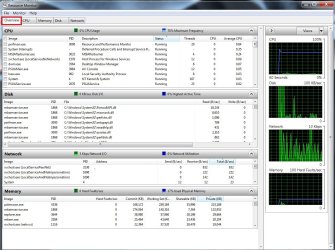
You should land on the Overview page post a screen shot so we might see what is going on
resource monitor overview.jpg

Most common cause lately has been svchost.exe acting up so if you see that on the top of the cpu list see if these windows updates are installed KB3020369 & KB3172605
If not manually install them.
 

My Computer My Computer

At a glance

Win-7-Pro64bit 7-H-Prem-64biti7-5930K 2nd i9-9940x both water blocked VRM'...Trident-z 3200C14 2nd Trident-z 3600C16EVGA 1080ti ftw3 2nd Titan Xp both water blocked
Computer type
PC/Desktop
Computer Manufacturer/Model Number
Custom assembled by me :}
OS
Win-7-Pro64bit 7-H-Prem-64bit
CPU
i7-5930K 2nd i9-9940x both water blocked VRM's too
Motherboard
ASUS SABERTOOTH X99 2nd ASUS x299 Apex
Memory
Trident-z 3200C14 2nd Trident-z 3600C16
Graphics Card(s)
EVGA 1080ti ftw3 2nd Titan Xp both water blocked
Sound Card
Built-in Realtek
Monitor(s) Displays
1-AOC G2460PG 24"G-Sync 144Hz/ 2nd 1-ASUS VG248QE 24" 144Hz
Screen Resolution
1920 x 1080 144Hz
Hard Drives
2-Samsung M.2 Evo & Evo Plus
2-Samsung 850 EVO 500GB SSD's/ 3-2.5 W.D. Black 1tb-&3-1tb/3-3.5 WD Black 1tb hdd's
PSU
EVGA SuperNOVA 1000-P2 2nd 1200-P2
Case
2-Corsair Obsidian Series 450D Black ATX Mid Tower
Cooling
Custom water loops
Keyboard
Logitech G710+/ 2nd Logitech G910
Mouse
2-RedDragon M901 Perdition 16400 dpi Gaming mouse = wired
Internet Speed
Comcast Ping 19ms 89.31mbps download speed 6.12mbps upload
Antivirus
Malwarebytes Pro/ Superantispyware Pro
Browser
FireFox & Pale moon
Other Info
2nd ASUS X299 Apex/Intel i9-9940x with Custom water loop/7H-Prem-x64/Corsair 450D case/Ram Trident-z 3600C16 4x8gb / Samsung970Evo plus 500gb SSD/Dual ssd EZ swap evo/PSU EVGA SuperNova 1200w-P2 80+Platinum/GPU Titan Xp /8-ML-140 on push-pull on 2-280GTX rads
followed your suggestion and when resource monitor opens the window is empty? I have disabled windows update becasue it was not working since then a noticeable imprisonment in CPU usage.
 

My Computer My Computer

At a glance

Win 7
OS
Win 7
Hi,
I'd make sure these updates are installed KB3020369 & KB3172605 they have consistently worked to chill svchost.exe from acting up which is associated with the update system.
 

My Computer My Computer

At a glance

Win-7-Pro64bit 7-H-Prem-64biti7-5930K 2nd i9-9940x both water blocked VRM'...Trident-z 3200C14 2nd Trident-z 3600C16EVGA 1080ti ftw3 2nd Titan Xp both water blocked
Computer type
PC/Desktop
Computer Manufacturer/Model Number
Custom assembled by me :}
OS
Win-7-Pro64bit 7-H-Prem-64bit
CPU
i7-5930K 2nd i9-9940x both water blocked VRM's too
Motherboard
ASUS SABERTOOTH X99 2nd ASUS x299 Apex
Memory
Trident-z 3200C14 2nd Trident-z 3600C16
Graphics Card(s)
EVGA 1080ti ftw3 2nd Titan Xp both water blocked
Sound Card
Built-in Realtek
Monitor(s) Displays
1-AOC G2460PG 24"G-Sync 144Hz/ 2nd 1-ASUS VG248QE 24" 144Hz
Screen Resolution
1920 x 1080 144Hz
Hard Drives
2-Samsung M.2 Evo & Evo Plus
2-Samsung 850 EVO 500GB SSD's/ 3-2.5 W.D. Black 1tb-&3-1tb/3-3.5 WD Black 1tb hdd's
PSU
EVGA SuperNOVA 1000-P2 2nd 1200-P2
Case
2-Corsair Obsidian Series 450D Black ATX Mid Tower
Cooling
Custom water loops
Keyboard
Logitech G710+/ 2nd Logitech G910
Mouse
2-RedDragon M901 Perdition 16400 dpi Gaming mouse = wired
Internet Speed
Comcast Ping 19ms 89.31mbps download speed 6.12mbps upload
Antivirus
Malwarebytes Pro/ Superantispyware Pro
Browser
FireFox & Pale moon
Other Info
2nd ASUS X299 Apex/Intel i9-9940x with Custom water loop/7H-Prem-x64/Corsair 450D case/Ram Trident-z 3600C16 4x8gb / Samsung970Evo plus 500gb SSD/Dual ssd EZ swap evo/PSU EVGA SuperNova 1200w-P2 80+Platinum/GPU Titan Xp /8-ML-140 on push-pull on 2-280GTX rads
Thanks for the assistance thrashzone. I am at a dead end regarding how to see which updates have been installed. Since I disabled windows update and configured it to never download or install updates I have not figured out how to make that determination? Any suggestions?
Since disabling WU the CPU usage is so far in normal ranges and not at 100% consistently.
 

My Computer My Computer

At a glance

Win 7
OS
Win 7

My Computer My Computer

At a glance

Win-7-Pro64bit 7-H-Prem-64biti7-5930K 2nd i9-9940x both water blocked VRM'...Trident-z 3200C14 2nd Trident-z 3600C16EVGA 1080ti ftw3 2nd Titan Xp both water blocked
Computer type
PC/Desktop
Computer Manufacturer/Model Number
Custom assembled by me :}
OS
Win-7-Pro64bit 7-H-Prem-64bit
CPU
i7-5930K 2nd i9-9940x both water blocked VRM's too
Motherboard
ASUS SABERTOOTH X99 2nd ASUS x299 Apex
Memory
Trident-z 3200C14 2nd Trident-z 3600C16
Graphics Card(s)
EVGA 1080ti ftw3 2nd Titan Xp both water blocked
Sound Card
Built-in Realtek
Monitor(s) Displays
1-AOC G2460PG 24"G-Sync 144Hz/ 2nd 1-ASUS VG248QE 24" 144Hz
Screen Resolution
1920 x 1080 144Hz
Hard Drives
2-Samsung M.2 Evo & Evo Plus
2-Samsung 850 EVO 500GB SSD's/ 3-2.5 W.D. Black 1tb-&3-1tb/3-3.5 WD Black 1tb hdd's
PSU
EVGA SuperNOVA 1000-P2 2nd 1200-P2
Case
2-Corsair Obsidian Series 450D Black ATX Mid Tower
Cooling
Custom water loops
Keyboard
Logitech G710+/ 2nd Logitech G910
Mouse
2-RedDragon M901 Perdition 16400 dpi Gaming mouse = wired
Internet Speed
Comcast Ping 19ms 89.31mbps download speed 6.12mbps upload
Antivirus
Malwarebytes Pro/ Superantispyware Pro
Browser
FireFox & Pale moon
Other Info
2nd ASUS X299 Apex/Intel i9-9940x with Custom water loop/7H-Prem-x64/Corsair 450D case/Ram Trident-z 3600C16 4x8gb / Samsung970Evo plus 500gb SSD/Dual ssd EZ swap evo/PSU EVGA SuperNova 1200w-P2 80+Platinum/GPU Titan Xp /8-ML-140 on push-pull on 2-280GTX rads
WU is a pain in the a*s.
But dust in the ventilator or the CPU is a main problem also.
The CPU will downgrade when it becomes to hot.
Blow it out with a pressed air bottle.
WU is better manually done when you decide to leave it for a while.
Automatic search for updates is using far to much resources.

Windows index search is also a CPU killer.
 

My Computer My Computer

At a glance

Microsoft Windows 7 Ultimate 64-bits 7601 Mul...Intel(R) Core(TM)2 Duo CPU E8400 @ 3.00GHz8,00 GB(1) Intel(R) G41 Express Chipset (2) Intel(R)...
Computer type
PC/Desktop
OS
Microsoft Windows 7 Ultimate 64-bits 7601 Multiprocessor Free Service Pack 1
CPU
Intel(R) Core(TM)2 Duo CPU E8400 @ 3.00GHz
Motherboard
ASRock G41MH/USB3.
Memory
8,00 GB
Graphics Card(s)
(1) Intel(R) G41 Express Chipset (2) Intel(R) G41 Express
Sound Card
(1) VIA High Definition Audio (2) Intel(R) High Definition
Monitor(s) Displays
S24B350 Samsung
Screen Resolution
1920 x 1080 x 32 bits (4294967296 colors) @ 60 Hz
Hard Drives
(1) ST31000528AS ATA Device (2) Generic- Compact Flash USB Device (3) Generic- MS/MS-Pro USB Device (4) Generic- SD/MMC USB Device (5) Generic- SM/xD-Picture USB Device
Antivirus
ZoneAlarm Free Antivirus + Firewall version: 12.0.104.000 Vs
press win+r then type sysdm.cpl press enter go to the advanced tab and where it says performance click settings now just disable some visual effects.
 

My Computer My Computer

At a glance

chrome osCeleron N30502 gb
Computer type
Laptop
Computer Manufacturer/Model Number
Samsung
OS
chrome os
CPU
Celeron N3050
Memory
2 gb
Browser
firefox
Back
Top