Need partition help on my newly installed 5t hdd

William11

New member
Local time
3:40 AM
Messages
4
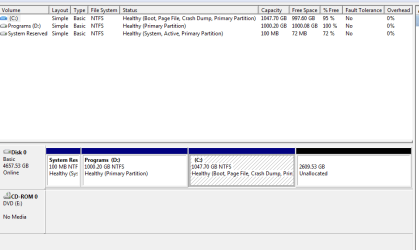
I put a clean install of Windows 7 Professional on a brand-new 5T drive, and am now stuck with losing 607 Gb of space, due to my uninformed choices of MBR, and while installing the OS I made 2 partitions - one for the OS ~1T, and one for programs, also ~1T.

Thinking that I'd be able to make more partitions after I got the OS installed, I went on with the process to a successful conclusion. However, when I tried to make more partitions on that drive I got the message that I would lose the 607 Gb above the 2T limit.:confused::o

MiniToolSnip1.PNG

Because the disk is MBR, and the 2T limit plus only being allowed 4 partitions, the partitioning software will only allow my to make one more partition - thus the message about losing ~607 Gb.

I have tried extending the C: partition, but for some reason I am only given the choice to shrink it because the software is showing 0 b available before or after the C: partition. No option given for extending D: since it's not up against any free space.

I'm wondering if this will work: Would I be allowed to delete partition D: and then make 2 new partitions out of the resulting 3.7 T of allocated space?

The only other choice I'm thinking of (other than deleting the OS and starting over) is questionable:

Can I safely merge C: and D: partitions without danger to the OS on C:? That should allow me to make 2 more partitions, right? unfortunately that would make the OS partition quite a bit larger than it needs to be, so I'm not in favor of it . . .


I've read all the tutorials here and other folks who've had similar trouble, but found none exactly answering what I need to do.

Thanks
 

My Computer My Computer

At a glance

Windows 7 Professional x64i7 @920 @ 2.67Ghz gen 1Kingston HyperX DDR3 - 2@4GbAMD Radeon HD 6850 1Gb
Computer type
PC/Desktop
Computer Manufacturer/Model Number
Dell XPS Studio 435MT
OS
Windows 7 Professional x64
CPU
i7 @920 @ 2.67Ghz gen 1
Motherboard
OR849J X58
Memory
Kingston HyperX DDR3 - 2@4Gb
Graphics Card(s)
AMD Radeon HD 6850 1Gb
Hard Drives
New Toshiba SATA 5T 7200rpm 128mb cache
Antivirus
Avira free
Browser
Mozilla Firfox
Post a screen shot of Windows Disk Management showing all partitions on all disks.

As far as I know, if you intend to use more than about 2.2 TB of that 5 TB drive, you have to start over and go with GPT rather than MBR. The only exception would be that some motherboard manufacturer's offer a utility that will deceive Windows into thinking that the space above the 2.2 TB limit is another drive---when in fact it is the same drive.

I don't know how well such utilities work, but my inclination would be to avoid them.

Partition Wizard is the tool of choice for manipulating partitions and free space, but a screen shot of Windows Disk Management would be most helpful as it's what most of us here are accustomed to inspecting.

Are you willing to use only 2.2 TB of that 5 TB drive?
 

My Computer My Computer

At a glance

Windows 7 Home Premium SP1, 64-bitIntel Skylake i5-6600K, not overclocked8 GB HyperX DDR4-2666 (2 x 4 GB)none; graphics are integrated on CPU
Computer type
PC/Desktop
Computer Manufacturer/Model Number
Ignatz Special; 4 speed manual gearbox; factory air conditioning; one of one
OS
Windows 7 Home Premium SP1, 64-bit
CPU
Intel Skylake i5-6600K, not overclocked
Motherboard
AsRock Z170M Extreme 4, micro ATX
Memory
8 GB HyperX DDR4-2666 (2 x 4 GB)
Graphics Card(s)
none; graphics are integrated on CPU
Sound Card
onboard: Realtek ALC1150; external: USB Behringer UF0-202
Monitor(s) Displays
Dell S2340M 23 inch IPS
Screen Resolution
1600 x 900
Hard Drives
System: Crucial MX100 series SSD, 128 GB;
Data: Samsung Spinpoint 103SJ, 1 TB;
Backup: WD Caviar Green WD30EZRX-00D8PB0, 3 TB
PSU
Rosewill SilentNight 500 watt fanless, semi-modular
Case
Antec Solo II
Cooling
Noctua NH-U12S; Noctua F12 intake, Noctua S12A exhaust
Keyboard
Microsoft 200 6JH-00001 USB
Mouse
Dell or Microsoft optical wired; USB
Antivirus
Microsoft Security Essentials and Malwarebytes Premium
Browser
Pale Moon
Other Info
All fans PWM; speeds at idle: CPU circa 500 rpm; intake circa 600 rpm; exhaust circa 600 rpm; CPU temps 27 idle and 47 C load in a warm room (27 C/81 F) when running Intel Extreme Tuning Utility stress test.
Disk managment. I'll post that as soon as i get back to my pc. My op has a screen shot of all the partitions on the one and only disk. Is it not clear from that screen shot what I'm describing? Not sure why you're asking me if I'd be happy using only 2.2T, since my original post includes a picture showing my three drive using over that, and my op also states I'm trying to not lose 607 Gb by making the last partition 2.2T - meaning i have access to ~4T now. Using Partition software. Isn't my op clear?
 

My Computer My Computer

At a glance

Windows 7 Professional x64i7 @920 @ 2.67Ghz gen 1Kingston HyperX DDR3 - 2@4GbAMD Radeon HD 6850 1Gb
Computer type
PC/Desktop
Computer Manufacturer/Model Number
Dell XPS Studio 435MT
OS
Windows 7 Professional x64
CPU
i7 @920 @ 2.67Ghz gen 1
Motherboard
OR849J X58
Memory
Kingston HyperX DDR3 - 2@4Gb
Graphics Card(s)
AMD Radeon HD 6850 1Gb
Hard Drives
New Toshiba SATA 5T 7200rpm 128mb cache
Antivirus
Avira free
Browser
Mozilla Firfox
Disk managment. I'll post that as soon as i get back to my pc. My op has a screen shot of all the partitions on the one and only disk. Is it not clear from that screen shot what I'm describing? Not sure why you're asking me if I'd be happy using only 2.2T, since my original post includes a picture showing my three drive using over that, and my op also states I'm trying to not lose 607 Gb by making the last partition 2.2T - meaning i have access to ~4T now. Using Partition software. Isn't my op clear?

It isn't clear to me.

I see 2.6 TB unallocated. Maybe you nonetheless include that as "using".

Maybe you include the 2.6 TB unallocated as part of the "having access to ~4T now".

I suppose we have a semantic difference on the usability or accessibility of the unallocated 2.6 TB.

Of course, I may be seeing things that simply aren't there.
 

My Computer My Computer

At a glance

Windows 7 Home Premium SP1, 64-bitIntel Skylake i5-6600K, not overclocked8 GB HyperX DDR4-2666 (2 x 4 GB)none; graphics are integrated on CPU
Computer type
PC/Desktop
Computer Manufacturer/Model Number
Ignatz Special; 4 speed manual gearbox; factory air conditioning; one of one
OS
Windows 7 Home Premium SP1, 64-bit
CPU
Intel Skylake i5-6600K, not overclocked
Motherboard
AsRock Z170M Extreme 4, micro ATX
Memory
8 GB HyperX DDR4-2666 (2 x 4 GB)
Graphics Card(s)
none; graphics are integrated on CPU
Sound Card
onboard: Realtek ALC1150; external: USB Behringer UF0-202
Monitor(s) Displays
Dell S2340M 23 inch IPS
Screen Resolution
1600 x 900
Hard Drives
System: Crucial MX100 series SSD, 128 GB;
Data: Samsung Spinpoint 103SJ, 1 TB;
Backup: WD Caviar Green WD30EZRX-00D8PB0, 3 TB
PSU
Rosewill SilentNight 500 watt fanless, semi-modular
Case
Antec Solo II
Cooling
Noctua NH-U12S; Noctua F12 intake, Noctua S12A exhaust
Keyboard
Microsoft 200 6JH-00001 USB
Mouse
Dell or Microsoft optical wired; USB
Antivirus
Microsoft Security Essentials and Malwarebytes Premium
Browser
Pale Moon
Other Info
All fans PWM; speeds at idle: CPU circa 500 rpm; intake circa 600 rpm; exhaust circa 600 rpm; CPU temps 27 idle and 47 C load in a warm room (27 C/81 F) when running Intel Extreme Tuning Utility stress test.
I have - now - the ability to make a fourth partition - which, because of the 2.2T limit means I will lose the ~607 Gb, as mentioned in the op. I've got access to over 4T because I am allowed up to 4 partitions - which is why my op details that, and asks if the changes I proposed would be a good way to have - 1) the 4 allowable patitions, each being under the 2.2T limit and -2) save the ~607 Gb from being stuck as unallocated if I were to just make a new partition without first correcting the original partitions - and without losing my OS in the process.

Really - all there in the op. Sorry it confused you.
 

My Computer My Computer

At a glance

Windows 7 Professional x64i7 @920 @ 2.67Ghz gen 1Kingston HyperX DDR3 - 2@4GbAMD Radeon HD 6850 1Gb
Computer type
PC/Desktop
Computer Manufacturer/Model Number
Dell XPS Studio 435MT
OS
Windows 7 Professional x64
CPU
i7 @920 @ 2.67Ghz gen 1
Motherboard
OR849J X58
Memory
Kingston HyperX DDR3 - 2@4Gb
Graphics Card(s)
AMD Radeon HD 6850 1Gb
Hard Drives
New Toshiba SATA 5T 7200rpm 128mb cache
Antivirus
Avira free
Browser
Mozilla Firfox
here is the screenshot from Dis Management you asked for -
 

Attachments

  • DiskMngt1.PNG
    DiskMngt1.PNG
    10.3 KB · Views: 1

My Computer My Computer

At a glance

Windows 7 Professional x64i7 @920 @ 2.67Ghz gen 1Kingston HyperX DDR3 - 2@4GbAMD Radeon HD 6850 1Gb
Computer type
PC/Desktop
Computer Manufacturer/Model Number
Dell XPS Studio 435MT
OS
Windows 7 Professional x64
CPU
i7 @920 @ 2.67Ghz gen 1
Motherboard
OR849J X58
Memory
Kingston HyperX DDR3 - 2@4Gb
Graphics Card(s)
AMD Radeon HD 6850 1Gb
Hard Drives
New Toshiba SATA 5T 7200rpm 128mb cache
Antivirus
Avira free
Browser
Mozilla Firfox
Back
Top