Need recommendation for a good all-around Back Up strategy

Dick Jagger

New member
Member
Local time
6:49 AM
Messages
74
I posted this in another thread on a slightly different topic so perhaps it was overlooked, but I am looking for advice on general backup strategies including imaging and specific folder and file backups.

I have successfully made image backups using Macrium free, and found that program easy to use, easy to customize which partitions to backup in the image, and most importantly easy to restore the entire image to a new HDD as I had to do when I replaced my hard drive.

I saved the image on an external usb drive. I used the boot cd that the program allows you to create in order to navigate to the saved disk image. All of the installed programs were restore and copied onto the new drive just as it was before. I used this program a few times to create images from when I used Vista, and I now make monthly images of my Windows 7 installation to the external drive. The greatest part of the program for me though, is easily attachching any of the saved images in order to browse folders for files or programs that I have since uninstalled. It's simple to copy any installation exe's over to the active c drive and run the program set up.

One problem, though, is making backups of folders and files as a separate process from my monthly imaging. With Macrium free there is no way to do this, as far as I know. I used to be able to create the backups this way in Vista, but I never could figure out how to restore them or otherwise use the backed up data. I have all of my media and photo files (~300GB) on an external 1tb drive, that is left out of this imaging process.

I have previously manually copied/pasted the two needed folders to another usb drive, but the data is not compressed this way and takes up too much space. Yesterday, I tried using Windows 7 back up to do this but it took around 18 hours to backup this much data. Then, I couldn't browse the back up or verify that it was working. I just got Acronis true image home, and tried to run the same back up of my media and photo folders, and was told it would take 9 hours to complete.

What do all of you do for backups of folders and files separate from OS and data imaging? What is the best reasonably simple all around backup and restore strategy?

Thanks.
 

My Computer My Computer

At a glance

Windows 7 UltimateIntel Pentium Dual CPU T3400 @ 2.16GHz4.0GB Dual-Channel DDR2 @ 332MHzMobile Intel(R) 4 Series Express Chipset Fami...
Computer Manufacturer/Model Number
Acer Aspire 4730Z
OS
Windows 7 Ultimate
CPU
Intel Pentium Dual CPU T3400 @ 2.16GHz
Motherboard
Acer Aspire 4730Z V1.22 GL40
Memory
4.0GB Dual-Channel DDR2 @ 332MHz
Graphics Card(s)
Mobile Intel(R) 4 Series Express Chipset Family 1309 MB
Sound Card
Realtek High Definition Audio
Monitor(s) Displays
AOC 2795V
Screen Resolution
1920 x 1080
Hard Drives
500GB Hitachi HTS545050B9A300 ATA Travelstar
I use Acronis for everything.

Did you let Acronis run its Course?

I have seen it, on occasion, say backing up my games Drive will take 5hrs or something along that line at the start, and 5min later its saying 20Min.
Which ends up being a bit more accurate.
 

My Computer My Computer

At a glance

Windows 7 Home Premium 64bitIntel Core i7 2700k8GB Mushkin Redline Ridgebacks @1866EVGA GTX570 SC
Computer Manufacturer/Model Number
Custom (Self Build)
OS
Windows 7 Home Premium 64bit
CPU
Intel Core i7 2700k
Motherboard
eVGA P67 SLI
Memory
8GB Mushkin Redline Ridgebacks @1866
Graphics Card(s)
EVGA GTX570 SC
Sound Card
XiFi Titanium HD
Monitor(s) Displays
LG W2453V
Screen Resolution
1920x1080
Hard Drives
Intel 320 80GB -- Intel X25-V 40GB --WD Black 1TB x2 -- WD Blue 640GB
PSU
Seasonic x750
Case
Corsair 600T SE White
Cooling
eVGA Superclocked CPU Cooler
Keyboard
Saitek Cyborg
Antivirus
Kaspersky
Browser
IE
Other Info
LG BD/DVD
Acronis seems to be a very complete backup program, but no, I did not let it run to back up the folders in question. I was unsure/unclear exactly how I would later have access to the backed up data on the usb drive, so i didn't let it go for the 9 hours.

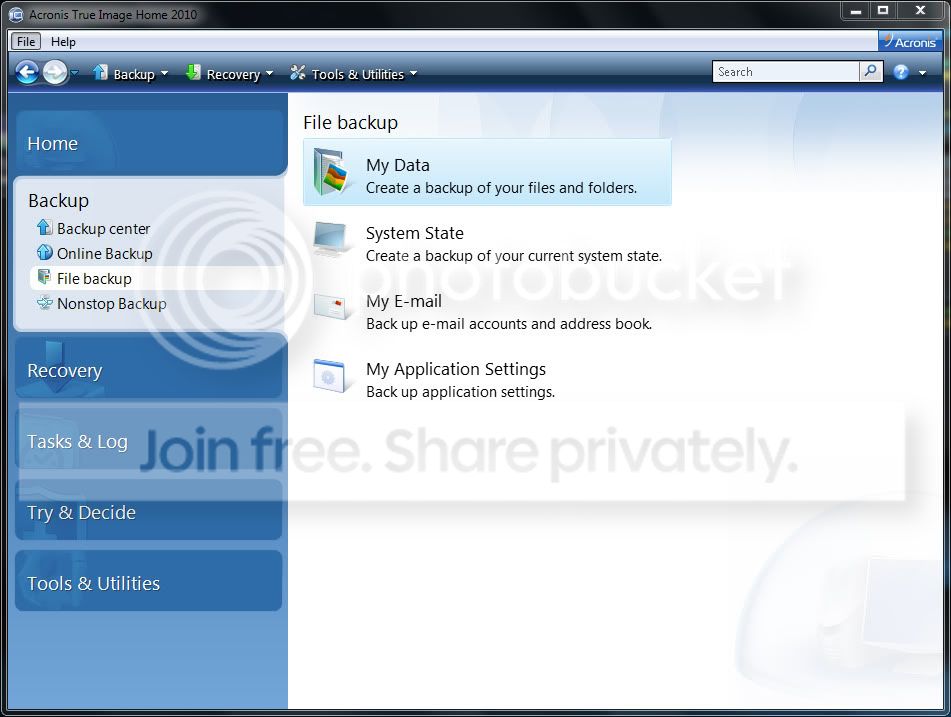
I do like Macrium's very simple user interface, compared to Acronis', with four main options under Backup>file backup:
AcronisBackupcapture01.jpg


Though, I think I'll try it again now based on your experience with the less than accurate completion time calculations...
 

My Computer My Computer

At a glance

Windows 7 UltimateIntel Pentium Dual CPU T3400 @ 2.16GHz4.0GB Dual-Channel DDR2 @ 332MHzMobile Intel(R) 4 Series Express Chipset Fami...
Computer Manufacturer/Model Number
Acer Aspire 4730Z
OS
Windows 7 Ultimate
CPU
Intel Pentium Dual CPU T3400 @ 2.16GHz
Motherboard
Acer Aspire 4730Z V1.22 GL40
Memory
4.0GB Dual-Channel DDR2 @ 332MHz
Graphics Card(s)
Mobile Intel(R) 4 Series Express Chipset Family 1309 MB
Sound Card
Realtek High Definition Audio
Monitor(s) Displays
AOC 2795V
Screen Resolution
1920 x 1080
Hard Drives
500GB Hitachi HTS545050B9A300 ATA Travelstar
Many really like Macrium.

I prefer Acronis myself, but then again it may just be that Im used to it.

Remember, you can set it up to do Incremental Backups when chooing the Folder to back up (or disc/partition even), at whatever intervals you choose.
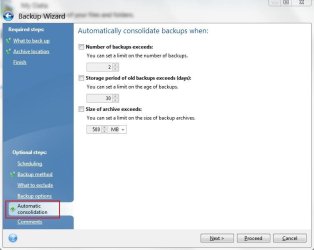
As well as Consoladating when x amount of Incrementals are made, or length of time has passed.

Backups after that 1st Full One will take a very short time.

I like setting all my backups that way (System Images as well as other File-Folder backups)
because I do not need to worry about making Backups or Images. It does it on its own when Im not using the PC :)
 

My Computer My Computer

At a glance

Windows 7 Home Premium 64bitIntel Core i7 2700k8GB Mushkin Redline Ridgebacks @1866EVGA GTX570 SC
Computer Manufacturer/Model Number
Custom (Self Build)
OS
Windows 7 Home Premium 64bit
CPU
Intel Core i7 2700k
Motherboard
eVGA P67 SLI
Memory
8GB Mushkin Redline Ridgebacks @1866
Graphics Card(s)
EVGA GTX570 SC
Sound Card
XiFi Titanium HD
Monitor(s) Displays
LG W2453V
Screen Resolution
1920x1080
Hard Drives
Intel 320 80GB -- Intel X25-V 40GB --WD Black 1TB x2 -- WD Blue 640GB
PSU
Seasonic x750
Case
Corsair 600T SE White
Cooling
eVGA Superclocked CPU Cooler
Keyboard
Saitek Cyborg
Antivirus
Kaspersky
Browser
IE
Other Info
LG BD/DVD
I swear by ACRONIS. It takes a little getting used to. it is probably best to let it do an automatic back up immediately after install so that you have something to fall back on. Then play around with it.:D
 

My Computer My Computer

At a glance

Windows 7 32 bitIntel Core 2 Duo E8400 @ 3.00GHz4GBAOC LM729 on NVIDIA GeForce 7300 SE/7200 GS
Computer Manufacturer/Model Number
Privately built
OS
Windows 7 32 bit
CPU
Intel Core 2 Duo E8400 @ 3.00GHz
Motherboard
ASAUS P5KPL/1600
Memory
4GB
Graphics Card(s)
AOC LM729 on NVIDIA GeForce 7300 SE/7200 GS
Sound Card
On board
Monitor(s) Displays
AOC LM729 @ 1280x1024
Screen Resolution
1280 X 1024
Hard Drives
1X150BG 1X250GB
PSU
Intel core 2 DUO E8400
Case
Antec
Keyboard
Trust PS/2
Mouse
Trust PS/2
Internet Speed
10Mb
How about the storage space for keeping all of the backups then, or is there a way to set it to overwrite the previous backups each time? Also, I saw that there is an option to save as a .zip file or as .tib; which would allow the safest level of compression? I am concerned about managing the available storage space on my back up usb drive. Thanks.
 

My Computer My Computer

At a glance

Windows 7 UltimateIntel Pentium Dual CPU T3400 @ 2.16GHz4.0GB Dual-Channel DDR2 @ 332MHzMobile Intel(R) 4 Series Express Chipset Fami...
Computer Manufacturer/Model Number
Acer Aspire 4730Z
OS
Windows 7 Ultimate
CPU
Intel Pentium Dual CPU T3400 @ 2.16GHz
Motherboard
Acer Aspire 4730Z V1.22 GL40
Memory
4.0GB Dual-Channel DDR2 @ 332MHz
Graphics Card(s)
Mobile Intel(R) 4 Series Express Chipset Family 1309 MB
Sound Card
Realtek High Definition Audio
Monitor(s) Displays
AOC 2795V
Screen Resolution
1920 x 1080
Hard Drives
500GB Hitachi HTS545050B9A300 ATA Travelstar
I store my back ups on a 1TB plug in hard drive, with the latest two on my second internal drive, drive D, as a further safety measure. I delete the oldest of these two each time I make a new one.:geek:
 

My Computer My Computer

At a glance

Windows 7 32 bitIntel Core 2 Duo E8400 @ 3.00GHz4GBAOC LM729 on NVIDIA GeForce 7300 SE/7200 GS
Computer Manufacturer/Model Number
Privately built
OS
Windows 7 32 bit
CPU
Intel Core 2 Duo E8400 @ 3.00GHz
Motherboard
ASAUS P5KPL/1600
Memory
4GB
Graphics Card(s)
AOC LM729 on NVIDIA GeForce 7300 SE/7200 GS
Sound Card
On board
Monitor(s) Displays
AOC LM729 @ 1280x1024
Screen Resolution
1280 X 1024
Hard Drives
1X150BG 1X250GB
PSU
Intel core 2 DUO E8400
Case
Antec
Keyboard
Trust PS/2
Mouse
Trust PS/2
Internet Speed
10Mb
I just found out the hard way using Acronis that I don't have enough disc space for the backup I was running today. There doesn't seem to be a way to assess the amount of disc space that will be needed for a file data backup while you are setting it up.

I used "normal" compression of my 265GB data set and tried to back it up onto a hard drive that had apparently only 163GB free. It ran for four and half hours and finally gave me a warning message that the disk is full. There is no way to split it and continue backing up the remaining data to another location. It would be great if there was a calculator to evaluate the size of the data backup based on the amount of compression and if the destination space available is adequate. It should have assessed this first and gave a warning before running most of the day.
 

My Computer My Computer

At a glance

Windows 7 UltimateIntel Pentium Dual CPU T3400 @ 2.16GHz4.0GB Dual-Channel DDR2 @ 332MHzMobile Intel(R) 4 Series Express Chipset Fami...
Computer Manufacturer/Model Number
Acer Aspire 4730Z
OS
Windows 7 Ultimate
CPU
Intel Pentium Dual CPU T3400 @ 2.16GHz
Motherboard
Acer Aspire 4730Z V1.22 GL40
Memory
4.0GB Dual-Channel DDR2 @ 332MHz
Graphics Card(s)
Mobile Intel(R) 4 Series Express Chipset Family 1309 MB
Sound Card
Realtek High Definition Audio
Monitor(s) Displays
AOC 2795V
Screen Resolution
1920 x 1080
Hard Drives
500GB Hitachi HTS545050B9A300 ATA Travelstar

My Computer My Computer

At a glance

MS Windows 7 Ultimate SP1 64-bitAMD A10-4600M6.00 GB Dual-Channel DDR3 @ 798MHz (11-11-12-28)AMD Radeon HD 7660G
Computer Manufacturer/Model Number
Toshiba Satellite S875D-S7239 laptop
OS
MS Windows 7 Ultimate SP1 64-bit
CPU
AMD A10-4600M
Motherboard
AMD Pumori (Socket FT1)
Memory
6.00 GB Dual-Channel DDR3 @ 798MHz (11-11-12-28)
Graphics Card(s)
AMD Radeon HD 7660G
Sound Card
High Definition Audio Device
Monitor(s) Displays
Generic PnP Monitor (1600x900@60Hz)
Screen Resolution
1600x900@60Hz
Hard Drives
SSD 119GB Corsair CSSD-V128GB2 ATA Device
Keyboard
Standard PS/2 Keyboard
Mouse
HP Wireless Optical Mobile Mouse Model FHA-3410
Internet Speed
What the local pub, local coffee shop offers.
Other Info
Optical Drive:MATSHITA BD-CMB UJ160B ATA Device


Also have an Asus ha1002xp netbook with Win 7 Ultimate installed.
How about the storage space for keeping all of the backups then, or is there a way to set it to overwrite the previous backups each time? Also, I saw that there is an option to save as a .zip file or as .tib; which would allow the safest level of compression? I am concerned about managing the available storage space on my back up usb drive. Thanks.

I just use the default Compression level. (Normal)


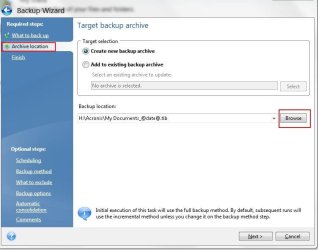
The options for .tib or .zip are are for reserve Copys of the backup.
In otherwords, two copys if the same backup, one is excluded from the settings you make.

The 1st Will be the Main backup in .tib format. The second is a reserve in whichever format you prefer.

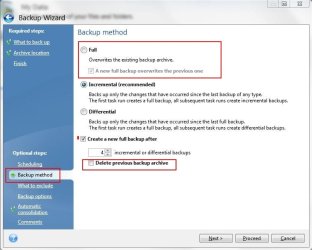
Lets say you have a backup setup like this:
Do a Full backup, and then do incrementals for 6 days.
On day 7, Create a new Full back, and delete the old.

Every week it will Delete the previous main backup, and create a fresh new one.
If you have the reserve copy it will not be deleted.

I honestly do not see the point in this.

Because, you can have it set up for Automatic backups as described above, yet make a complete new one with no schedule of the same File/Folder and it will be excluded as well.

For Example, Make a scheduled backup For pictures. It will follow the guidelines you set, and delete old making a new one weekly (or whatever schedule you set)

If you want a untouched (non-updated) safe point, You can simply make a monthly Backup of the same File/Folder without a schedule, and it will be left untouched by Acronis.


The settings for Incremental, Differential, Consolodate, and Delete Previous are done on per Backup Basis.
When you choose to backup something (be it System image or File/Folder) just follow the guidelines on the left to set it all up.
 

Attachments

  • location.JPG
    location.JPG
    38.7 KB · Views: 7
  • Capture1.JPG
    Capture1.JPG
    44.3 KB · Views: 4
  • Capture2.JPG
    Capture2.JPG
    32.1 KB · Views: 3

My Computer My Computer

At a glance

Windows 7 Home Premium 64bitIntel Core i7 2700k8GB Mushkin Redline Ridgebacks @1866EVGA GTX570 SC
Computer Manufacturer/Model Number
Custom (Self Build)
OS
Windows 7 Home Premium 64bit
CPU
Intel Core i7 2700k
Motherboard
eVGA P67 SLI
Memory
8GB Mushkin Redline Ridgebacks @1866
Graphics Card(s)
EVGA GTX570 SC
Sound Card
XiFi Titanium HD
Monitor(s) Displays
LG W2453V
Screen Resolution
1920x1080
Hard Drives
Intel 320 80GB -- Intel X25-V 40GB --WD Black 1TB x2 -- WD Blue 640GB
PSU
Seasonic x750
Case
Corsair 600T SE White
Cooling
eVGA Superclocked CPU Cooler
Keyboard
Saitek Cyborg
Antivirus
Kaspersky
Browser
IE
Other Info
LG BD/DVD
Back
Top