Need some help PC is freezing ALOT

PHILLIES SMOKE

New member
Local time
9:28 AM
Messages
10
Location
Missouri
My Specs:

CPU - AMD 9590 4.71 ghz
GPU - Radeon 7970HD
Mobo - ASUS Sabertooth R2.0 990fx
RAM - G.Skill RipjawsX 8GB 1866 DDR3
Cooler - H60


Okay I built this PC less than 3 months ago and it is now freezing when gaming or sometimes just when surfing the web. I have ran Virus scans Malware scans and Memtest86 and no errors show. I'm extremely new to computers so any advice would be extremely helpful.

Thanks,

PHILLIES SMOKE
 

My Computer My Computer

Computer type
PC/Desktop
OS
Windows 7 Ultimate x64
CPU
AMD FX(tm)-9590 Eight-Core Processor 4.71ghz
Motherboard
ASUS SABERTOOTH 990FX R2.0
Memory
G.Skill RipjawsX 8gb 1866 ddr3
Graphics Card(s)
AMD Radeon HD 7970
OS - Windows 7 ultimate 64 bit
 

My Computer My Computer

Computer type
PC/Desktop
OS
Windows 7 Ultimate x64
CPU
AMD FX(tm)-9590 Eight-Core Processor 4.71ghz
Motherboard
ASUS SABERTOOTH 990FX R2.0
Memory
G.Skill RipjawsX 8gb 1866 ddr3
Graphics Card(s)
AMD Radeon HD 7970
Is Windows fully updated? Are all the manufacturer drivers up to date?
 

My Computer My Computer

Computer type
PC/Desktop
Computer Manufacturer/Model Number
Golden Mk. I.4
OS
Windows 10 Pro x64 ; Xubuntu x64
CPU
Intel i7 860 @ 2.80 GHz O/C'ed to 4.0GHz
Motherboard
Gigabyte P55A-UD3R Rev.1. Award BIOS F13
Memory
16GB Corsair Vengance DDR3 @ 661 MHz Dual Channel (9-9-9-24)
Graphics Card(s)
EVGA NVidia GTX 560 1024MB
Sound Card
Realtek Integrated
Monitor(s) Displays
Dual Samsung SyncMaster 2494HS
Screen Resolution
1920*1080 and 1920*1080
Hard Drives
1*Samsung 840 EVO 120GB SSD;
1*OCZ Vertex 2 60GB SSD;
2*Samsung F3 SpinPoint 1TB in RAID0;
1*Samsung F1 SpinPoint 1TB;
2*Western Digital 1TB External USB 3.0
1*Western Digital 500GB External USB 3.0
1*Seagate 500GB External USB 2.0
PSU
Thermaltake ToughPower QFan 750W
Case
Thermaltake Element S VK60001W2Z
Cooling
Corsair H60 Water Cooling, 2*230mm and 2*80mm case fans
Keyboard
Logitech G110
Mouse
Logitech MX518
Golden,

I'm not really sure how to about doing that exactly.
 

My Computer My Computer

Computer type
PC/Desktop
OS
Windows 7 Ultimate x64
CPU
AMD FX(tm)-9590 Eight-Core Processor 4.71ghz
Motherboard
ASUS SABERTOOTH 990FX R2.0
Memory
G.Skill RipjawsX 8gb 1866 ddr3
Graphics Card(s)
AMD Radeon HD 7970
When you built the PC, there should have been a DVD accompanying the motherboard - it contains critical system drivers. Did you install those?

Perform a Windows Update.
 

My Computer My Computer

Computer type
PC/Desktop
Computer Manufacturer/Model Number
Golden Mk. I.4
OS
Windows 10 Pro x64 ; Xubuntu x64
CPU
Intel i7 860 @ 2.80 GHz O/C'ed to 4.0GHz
Motherboard
Gigabyte P55A-UD3R Rev.1. Award BIOS F13
Memory
16GB Corsair Vengance DDR3 @ 661 MHz Dual Channel (9-9-9-24)
Graphics Card(s)
EVGA NVidia GTX 560 1024MB
Sound Card
Realtek Integrated
Monitor(s) Displays
Dual Samsung SyncMaster 2494HS
Screen Resolution
1920*1080 and 1920*1080
Hard Drives
1*Samsung 840 EVO 120GB SSD;
1*OCZ Vertex 2 60GB SSD;
2*Samsung F3 SpinPoint 1TB in RAID0;
1*Samsung F1 SpinPoint 1TB;
2*Western Digital 1TB External USB 3.0
1*Western Digital 500GB External USB 3.0
1*Seagate 500GB External USB 2.0
PSU
Thermaltake ToughPower QFan 750W
Case
Thermaltake Element S VK60001W2Z
Cooling
Corsair H60 Water Cooling, 2*230mm and 2*80mm case fans
Keyboard
Logitech G110
Mouse
Logitech MX518
Golden,

Yeah I did all of that but I know they updated the drivers earlier this month and I don't know if I have them or not but this issue been on going for a while now.

PHILLIES SMOKE
 

My Computer My Computer

Computer type
PC/Desktop
OS
Windows 7 Ultimate x64
CPU
AMD FX(tm)-9590 Eight-Core Processor 4.71ghz
Motherboard
ASUS SABERTOOTH 990FX R2.0
Memory
G.Skill RipjawsX 8gb 1866 ddr3
Graphics Card(s)
AMD Radeon HD 7970
Lets check for system file corruptions.

1. Click Start
orb.png

2. In the search box, type cmd
3. In the list that appears, right-click on cmd.exe and choose Run as administrator
4. In the command window that opens, type sfc /scannow and hit enter.

Report the output from the command window once it finishes.

More detail: http://www.sevenforums.com/tutorials/1538-sfc-scannow-command-system-file-checker.html
 

My Computer My Computer

Computer type
PC/Desktop
Computer Manufacturer/Model Number
Golden Mk. I.4
OS
Windows 10 Pro x64 ; Xubuntu x64
CPU
Intel i7 860 @ 2.80 GHz O/C'ed to 4.0GHz
Motherboard
Gigabyte P55A-UD3R Rev.1. Award BIOS F13
Memory
16GB Corsair Vengance DDR3 @ 661 MHz Dual Channel (9-9-9-24)
Graphics Card(s)
EVGA NVidia GTX 560 1024MB
Sound Card
Realtek Integrated
Monitor(s) Displays
Dual Samsung SyncMaster 2494HS
Screen Resolution
1920*1080 and 1920*1080
Hard Drives
1*Samsung 840 EVO 120GB SSD;
1*OCZ Vertex 2 60GB SSD;
2*Samsung F3 SpinPoint 1TB in RAID0;
1*Samsung F1 SpinPoint 1TB;
2*Western Digital 1TB External USB 3.0
1*Western Digital 500GB External USB 3.0
1*Seagate 500GB External USB 2.0
PSU
Thermaltake ToughPower QFan 750W
Case
Thermaltake Element S VK60001W2Z
Cooling
Corsair H60 Water Cooling, 2*230mm and 2*80mm case fans
Keyboard
Logitech G110
Mouse
Logitech MX518
Lets check for system file corruptions.

1. Click Start
orb.png

2. In the search box, type cmd
3. In the list that appears, right-click on cmd.exe and choose Run as administrator
4. In the command window that opens, type sfc /scannow and hit enter.

Report the output from the command window once it finishes.

More detail: http://www.sevenforums.com/tutorials/1538-sfc-scannow-command-system-file-checker.html


Windows Resource Protection did not find any integrity violations.
 

My Computer My Computer

Computer type
PC/Desktop
OS
Windows 7 Ultimate x64
CPU
AMD FX(tm)-9590 Eight-Core Processor 4.71ghz
Motherboard
ASUS SABERTOOTH 990FX R2.0
Memory
G.Skill RipjawsX 8gb 1866 ddr3
Graphics Card(s)
AMD Radeon HD 7970
Could we start by completely filling out your system specs in the UserCP please. If you want to know what we are looking for, click my system specs at the bottom left of this post. You will see mine. That is more of what we need. This will help you http://www.sevenforums.com/tutorials/180324-system-info-see-your-system-specs.html

Have you updated your Graphics drivers and when and how long did you run memtest86+. It needs to be run for 8 passes to do a complete test. When running it, your are looking for errors in the ram, but also in the dimm slots. It is best run overnight as it will take several hours to run. this can help http://www.sevenforums.com/tutorials/105647-ram-test-memtest86.html.

You can look up your motherboard on Asus' web site and download updated drivers from there. They will be much more current than the ones on the driver CD.

Also have you been keeping track of your CPU and GPU temps?
 
Last edited:

My Computers My Computers

System One System Two

  • Computer type
    PC/Desktop
    Computer Manufacturer/Model Number
    ALWAYS UNDER CONSTRUCTION
    OS
    Windows 11 Pro
    CPU
    Ryzen 9 5900X
    Motherboard
    Asus X570 Crosshair Viii Hero
    Memory
    32GB G Skill DDR4-3600
    Graphics Card(s)
    EVGA RTX 3080 FTW 3 Ultra
    Sound Card
    On Board/Sennheiser PC37X Headset
    Monitor(s) Displays
    3 X Asus 27"
    Screen Resolution
    2560x1440
    Hard Drives
    2 X 1 TB NVME drives
    PSU
    EVGA 850
    Case
    Phanteks Eclipse P400A
    Cooling
    EVGA 280 AIO
    Keyboard
    Logitech G510s/ Logitech G13
    Mouse
    Logitech G502
    Internet Speed
    24/1
    Antivirus
    ESET/MBAM Pro/SAS Pro
    Browser
    Chrome/ Firefox/ Edge
  • Computer type
    Laptop
    System Manufacturer/Model Number
    Dell 16 Plus
    OS
    Windows 11 Pro
    CPU
    Intel Ultra 9 288V
    Memory
    32 GB LPDDR5X 8533
    Monitor(s) Displays
    16" Mini-LED HDR600 Touch 90 Hz
    Screen Resolution
    2560X1600
    Hard Drives
    1 TB NVME
Could we start by completelt filling out your system specs in the UserCP please. If you want to know what we are looking for, click my system specs at the bottom left of this post. You will see mine. That is more of what we need. This will help you http://www.sevenforums.com/tutorials/180324-system-info-see-your-system-specs.html

Have you updated your Graphics drivers and when and how long did you run memtest86+. It needs to be run for 8 passes to do a complete test. When running it, your are looking for errors in the ram, but also in the dimm slots. It is best run overnight as it will take several hours to run. this can help http://www.sevenforums.com/tutorials/105647-ram-test-memtest86.html.

You can look up your motherboard on Asus' web site and download updated drivers from there. They will be much more current than the ones on the driver CD.

Also have you been keeping track of your CPU and GPU temps?


I ran the memtest86+ for about 5 hours and it made 5 passes I've been using CPUID to keep an eye on my temps. I having trouble figuring out how to work the new drivers for my mobo because they come in a CAP file.
 

My Computer My Computer

Computer type
PC/Desktop
OS
Windows 7 Ultimate x64
CPU
AMD FX(tm)-9590 Eight-Core Processor 4.71ghz
Motherboard
ASUS SABERTOOTH 990FX R2.0
Memory
G.Skill RipjawsX 8gb 1866 ddr3
Graphics Card(s)
AMD Radeon HD 7970
A cap file is a BIOS update, I'm not sure about the AMD motherboards, but the Intel ones, extract them to a USB drive. Go into bios and in the tools section use the bios updater and follow the directions. However, I would try not to update bios if the computer is unstable. If you BSOD during a bios update or lose power, it can ruin the motherboard.

The drivers we are refering to are the other ones. The most important being the chipset drivers, also the sata and USB 3.0 drivers, if you have usb 3.0. There is a long list of drivers there. You will most likely need the lan drivers to enable the network adapter to get online. Just lok at them and use only the drivers you will use. If there is a wireless driver there and you won't be using wireless, don't download it, for example. All the hardware drivers need to be installed though. But, again, the chipset are the most important and should be installed first as soon as the OS installation is completed.

Also, update your graphics driver from the AMD web site. Be sure to uninstall the older drivers before you install new ones though.

Also, do you have Service Pack 1 installed? Have you completely downloaded all of the Windows updates?
 

My Computers My Computers

System One System Two

  • Computer type
    PC/Desktop
    Computer Manufacturer/Model Number
    ALWAYS UNDER CONSTRUCTION
    OS
    Windows 11 Pro
    CPU
    Ryzen 9 5900X
    Motherboard
    Asus X570 Crosshair Viii Hero
    Memory
    32GB G Skill DDR4-3600
    Graphics Card(s)
    EVGA RTX 3080 FTW 3 Ultra
    Sound Card
    On Board/Sennheiser PC37X Headset
    Monitor(s) Displays
    3 X Asus 27"
    Screen Resolution
    2560x1440
    Hard Drives
    2 X 1 TB NVME drives
    PSU
    EVGA 850
    Case
    Phanteks Eclipse P400A
    Cooling
    EVGA 280 AIO
    Keyboard
    Logitech G510s/ Logitech G13
    Mouse
    Logitech G502
    Internet Speed
    24/1
    Antivirus
    ESET/MBAM Pro/SAS Pro
    Browser
    Chrome/ Firefox/ Edge
  • Computer type
    Laptop
    System Manufacturer/Model Number
    Dell 16 Plus
    OS
    Windows 11 Pro
    CPU
    Intel Ultra 9 288V
    Memory
    32 GB LPDDR5X 8533
    Monitor(s) Displays
    16" Mini-LED HDR600 Touch 90 Hz
    Screen Resolution
    2560X1600
    Hard Drives
    1 TB NVME
A cap file is a BIOS update, I'm not sure about the AMD motherboards, but the Intel ones, extract them to a USB drive. Go into bios and in the tools section use the bios updater and follow the directions. However, I would try not to update bios if the computer is unstable. If you BSOD during a bios update or lose power, it can ruin the motherboard.

The drivers we are refering to are the other ones. The most important being the chipset drivers, also the sata and USB 3.0 drivers, if you have usb 3.0. There is a long list of drivers there. You will most likely need the lan drivers to enable the network adapter to get online. Just lok at them and use only the drivers you will use. If there is a wireless driver there and you won't be using wireless, don't download it, for example. All the hardware drivers need to be installed though. But, again, the chipset are the most important and should be installed first as soon as the OS installation is completed.

Also, update your graphics driver from the AMD web site. Be sure to uninstall the older drivers before you install new ones though.

Also, do you have Service Pack 1 installed? Have you completely downloaded all of the Windows updates?


Yeah I have Service Pack 1 and all the windows updates where do i find the chipset drivers?
 

My Computer My Computer

Computer type
PC/Desktop
OS
Windows 7 Ultimate x64
CPU
AMD FX(tm)-9590 Eight-Core Processor 4.71ghz
Motherboard
ASUS SABERTOOTH 990FX R2.0
Memory
G.Skill RipjawsX 8gb 1866 ddr3
Graphics Card(s)
AMD Radeon HD 7970

My Computers My Computers

System One System Two

  • Computer type
    PC/Desktop
    Computer Manufacturer/Model Number
    ALWAYS UNDER CONSTRUCTION
    OS
    Windows 11 Pro
    CPU
    Ryzen 9 5900X
    Motherboard
    Asus X570 Crosshair Viii Hero
    Memory
    32GB G Skill DDR4-3600
    Graphics Card(s)
    EVGA RTX 3080 FTW 3 Ultra
    Sound Card
    On Board/Sennheiser PC37X Headset
    Monitor(s) Displays
    3 X Asus 27"
    Screen Resolution
    2560x1440
    Hard Drives
    2 X 1 TB NVME drives
    PSU
    EVGA 850
    Case
    Phanteks Eclipse P400A
    Cooling
    EVGA 280 AIO
    Keyboard
    Logitech G510s/ Logitech G13
    Mouse
    Logitech G502
    Internet Speed
    24/1
    Antivirus
    ESET/MBAM Pro/SAS Pro
    Browser
    Chrome/ Firefox/ Edge
  • Computer type
    Laptop
    System Manufacturer/Model Number
    Dell 16 Plus
    OS
    Windows 11 Pro
    CPU
    Intel Ultra 9 288V
    Memory
    32 GB LPDDR5X 8533
    Monitor(s) Displays
    16" Mini-LED HDR600 Touch 90 Hz
    Screen Resolution
    2560X1600
    Hard Drives
    1 TB NVME

My Computer My Computer

Computer type
PC/Desktop
Computer Manufacturer/Model Number
Golden Mk. I.4
OS
Windows 10 Pro x64 ; Xubuntu x64
CPU
Intel i7 860 @ 2.80 GHz O/C'ed to 4.0GHz
Motherboard
Gigabyte P55A-UD3R Rev.1. Award BIOS F13
Memory
16GB Corsair Vengance DDR3 @ 661 MHz Dual Channel (9-9-9-24)
Graphics Card(s)
EVGA NVidia GTX 560 1024MB
Sound Card
Realtek Integrated
Monitor(s) Displays
Dual Samsung SyncMaster 2494HS
Screen Resolution
1920*1080 and 1920*1080
Hard Drives
1*Samsung 840 EVO 120GB SSD;
1*OCZ Vertex 2 60GB SSD;
2*Samsung F3 SpinPoint 1TB in RAID0;
1*Samsung F1 SpinPoint 1TB;
2*Western Digital 1TB External USB 3.0
1*Western Digital 500GB External USB 3.0
1*Seagate 500GB External USB 2.0
PSU
Thermaltake ToughPower QFan 750W
Case
Thermaltake Element S VK60001W2Z
Cooling
Corsair H60 Water Cooling, 2*230mm and 2*80mm case fans
Keyboard
Logitech G110
Mouse
Logitech MX518
All of the drivers seem to be up to date what is weird is that it doesn't really freeze until put under stress like gaming or just running prime95 for 5-10 minutes.
 

My Computer My Computer

Computer type
PC/Desktop
OS
Windows 7 Ultimate x64
CPU
AMD FX(tm)-9590 Eight-Core Processor 4.71ghz
Motherboard
ASUS SABERTOOTH 990FX R2.0
Memory
G.Skill RipjawsX 8gb 1866 ddr3
Graphics Card(s)
AMD Radeon HD 7970
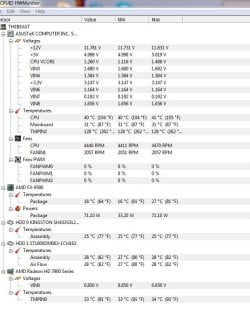
OK, if you are overclocking anything stop and set everything to defaults. When you put stress on the system, if there is any hardware weakness or malfunctioning hardware, it will show up. The trick, and what's so time consuming is determining what piece that is. What errors are you getting in Prime95? There should be a text message in the prime95 folder. Go to BIOS and tell me what your +12V, +5V and +3.3V readings are. What CPU temps are you getting in Prime? You have to keep a close whatch on temps while running the test. Temps can get out of hand very quickly and cause the computer to shut down. Also, do a video card stress test with Furmark. http://www.sevenforums.com/tutorials/100356-video-card-stress-test-furmark.html But, the same goes with Furmark, watch your graphics card temps very closely and stop the test if they get too high.

EDIT: If you don't already have it download and install CPUz from the top right hand corner of the page V 1.67. Please use the snipping tool and post screenshots (http://www.sevenforums.com/tutorials/9733-screenshots-files-upload-post-seven-forums.html) of the CPU, Mainboard, Memory and SPD tabs.
 

My Computers My Computers

System One System Two

  • Computer type
    PC/Desktop
    Computer Manufacturer/Model Number
    ALWAYS UNDER CONSTRUCTION
    OS
    Windows 11 Pro
    CPU
    Ryzen 9 5900X
    Motherboard
    Asus X570 Crosshair Viii Hero
    Memory
    32GB G Skill DDR4-3600
    Graphics Card(s)
    EVGA RTX 3080 FTW 3 Ultra
    Sound Card
    On Board/Sennheiser PC37X Headset
    Monitor(s) Displays
    3 X Asus 27"
    Screen Resolution
    2560x1440
    Hard Drives
    2 X 1 TB NVME drives
    PSU
    EVGA 850
    Case
    Phanteks Eclipse P400A
    Cooling
    EVGA 280 AIO
    Keyboard
    Logitech G510s/ Logitech G13
    Mouse
    Logitech G502
    Internet Speed
    24/1
    Antivirus
    ESET/MBAM Pro/SAS Pro
    Browser
    Chrome/ Firefox/ Edge
  • Computer type
    Laptop
    System Manufacturer/Model Number
    Dell 16 Plus
    OS
    Windows 11 Pro
    CPU
    Intel Ultra 9 288V
    Memory
    32 GB LPDDR5X 8533
    Monitor(s) Displays
    16" Mini-LED HDR600 Touch 90 Hz
    Screen Resolution
    2560X1600
    Hard Drives
    1 TB NVME
OK, if you are overclocking anything stop and set everything to defaults. When you put stress on the system, if there is any hardware weakness or malfunctioning hardware, it will show up. The trick, and what's so time consuming is determining what piece that is. What errors are you getting in Prime95? There should be a text message in the prime95 folder. Go to BIOS and tell me what your +12V, +5V and +3.3V readings are. What CPU temps are you getting in Prime? You have to keep a close whatch on temps while running the test. Temps can get out of hand very quickly and cause the computer to shut down. Also, do a video card stress test with Furmark. http://www.sevenforums.com/tutorials/100356-video-card-stress-test-furmark.html But, the same goes with Furmark, watch your graphics card temps very closely and stop the test if they get too high.

EDIT: If you don't already have it download and install CPUz from the top right hand corner of the page V 1.67. Please use the snipping tool and post screenshots (http://www.sevenforums.com/tutorials/9733-screenshots-files-upload-post-seven-forums.html) of the CPU, Mainboard, Memory and SPD tabs.

No overclocking at all would never risk it with the equipment i have video card does awesome with furmark temps are under controll when freezing happens. I'm not sure how to check for errors in prime95.
 

My Computer My Computer

Computer type
PC/Desktop
OS
Windows 7 Ultimate x64
CPU
AMD FX(tm)-9590 Eight-Core Processor 4.71ghz
Motherboard
ASUS SABERTOOTH 990FX R2.0
Memory
G.Skill RipjawsX 8gb 1866 ddr3
Graphics Card(s)
AMD Radeon HD 7970
Phillies Smoke, excuse me if I ask something we have already tried or discussed. But, what Brand, make and size of PSU do you have? Could you get me the PSU readings from bios as well as the CPUz screenshots please. have you run memtest86+ and did you download it from this site Memtest86+ - Advanced Memory Diagnostic Tool. And how many passes?
 

My Computers My Computers

System One System Two

  • Computer type
    PC/Desktop
    Computer Manufacturer/Model Number
    ALWAYS UNDER CONSTRUCTION
    OS
    Windows 11 Pro
    CPU
    Ryzen 9 5900X
    Motherboard
    Asus X570 Crosshair Viii Hero
    Memory
    32GB G Skill DDR4-3600
    Graphics Card(s)
    EVGA RTX 3080 FTW 3 Ultra
    Sound Card
    On Board/Sennheiser PC37X Headset
    Monitor(s) Displays
    3 X Asus 27"
    Screen Resolution
    2560x1440
    Hard Drives
    2 X 1 TB NVME drives
    PSU
    EVGA 850
    Case
    Phanteks Eclipse P400A
    Cooling
    EVGA 280 AIO
    Keyboard
    Logitech G510s/ Logitech G13
    Mouse
    Logitech G502
    Internet Speed
    24/1
    Antivirus
    ESET/MBAM Pro/SAS Pro
    Browser
    Chrome/ Firefox/ Edge
  • Computer type
    Laptop
    System Manufacturer/Model Number
    Dell 16 Plus
    OS
    Windows 11 Pro
    CPU
    Intel Ultra 9 288V
    Memory
    32 GB LPDDR5X 8533
    Monitor(s) Displays
    16" Mini-LED HDR600 Touch 90 Hz
    Screen Resolution
    2560X1600
    Hard Drives
    1 TB NVME

Attachments

  • Temps.JPG
    Temps.JPG
    74.5 KB · Views: 1

My Computer My Computer

Computer type
PC/Desktop
OS
Windows 7 Ultimate x64
CPU
AMD FX(tm)-9590 Eight-Core Processor 4.71ghz
Motherboard
ASUS SABERTOOTH 990FX R2.0
Memory
G.Skill RipjawsX 8gb 1866 ddr3
Graphics Card(s)
AMD Radeon HD 7970
Back
Top