

- Local time
- 12:39 PM
- Messages
- 16,796
The difference between the official refresh iso files is just one file. It is a file called ei.cfg in the sources folder.
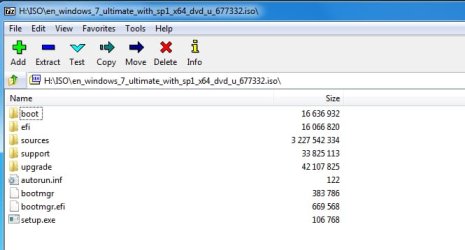
This is en_windows_7_ultimate_with_sp1_x64_dvd_u_677332.iso aka X17-59465.iso
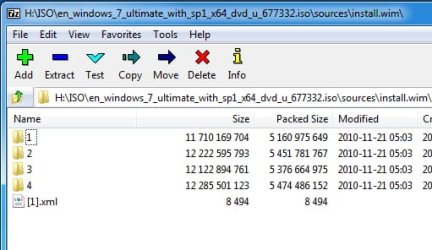
The sources\install.wim contains all 4 x64 images.
Setup.exe offers to install the image that is listed in the little text file sources\ei.cfg. It will also show you the license file that is listed
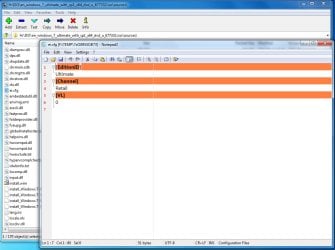
If you want it to offer you all of the images, just delete the ei.cfg text file.
Therefore, if you have any one of the official refresh iso files, that is all you need. You can use it to clean install/upgrade install/repair install any edition
This is en_windows_7_ultimate_with_sp1_x64_dvd_u_677332.iso aka X17-59465.iso
The sources\install.wim contains all 4 x64 images.
Setup.exe offers to install the image that is listed in the little text file sources\ei.cfg. It will also show you the license file that is listed
If you want it to offer you all of the images, just delete the ei.cfg text file.
Therefore, if you have any one of the official refresh iso files, that is all you need. You can use it to clean install/upgrade install/repair install any edition
My Computers
-
At a glance
7 X64i5 84002x8gb 3200mhz- Computer type
- PC/Desktop
- OS
- 7 X64
- CPU
- i5 8400
- Motherboard
- gigabyte b365m ds3h
- Memory
- 2x8gb 3200mhz
- Hard Drives
- various
- PSU
- pure power 11 400w cm
- Case
- Coolermaster
- Cooling
- cryorig m9i
-
At a glance
7x64g54008gb ddr4 2400- Computer type
- PC/Desktop
- OS
- 7x64
- CPU
- g5400
- Motherboard
- ga b365m ds3h
- Memory
- 8gb ddr4 2400
- PSU
- xfx pro 450w


