Need to remove old windows 7 from partition

Raner

New member
Local time
10:57 PM
Messages
40
Hi All
I need a bit of help in removing windows 7 files only from a parition. I have three dirves. Two are SSD drives and one hard drive.I have new windows 7 on c:drive,and have windows xp and windows 7 old O.S. on hard drive on seprate partitions, windows xp partion is on E:drive and old windows 7 is on G:drive, Here is the thing I want to keep G:drive or that partition intacted but just want to remove the old windows 7 O.S. That partition is 800 GB's and there is a lot of files stored in it. The main reason is I want to boot xp or new windows 7 option when I turn computer on. The season my pc is setup this way is I upgraded it and when I did the upgrade is when I installed the two ssd drives so I decited to just do a fresh windows 7 install on one of the ssd and the old windows 7 stayed on the old hard 800 GB partition,When I added the new windows 7 it messed up my boot screen and I no longer get the option to boot old or new version of windows and I need it back, because I still want to use Windows XP Pro to game with, Windows 7 X 64 has to many issues with a lot of my old gaming software and hardware. Thanks For anyhelp that I can get to resolve this issue Rene G.
 
Last edited:

My Computer My Computer

At a glance

windows 7 professional x 64
OS
windows 7 professional x 64
Formatting the partition would delete everything but leave the partition intact. If you have an OS on a partition and you delete it then everything on that partition will be deleted but I am sure you know that.
 

My Computer My Computer

At a glance

Win7 Ultimate x64Intel Core i7 950 (4x 3066 MHz with HT) Quad ...6GB DDR3 1333MhzNvidia GTS 450 (1024MB GDDR5 | DX 11)
Computer Manufacturer/Model Number
Deviantsystems
OS
Win7 Ultimate x64
CPU
Intel Core i7 950 (4x 3066 MHz with HT) Quad Core
Motherboard
Asus P6X58D-E
Memory
6GB DDR3 1333Mhz
Graphics Card(s)
Nvidia GTS 450 (1024MB GDDR5 | DX 11)
Sound Card
Intel HD Audio via Realtek ALC889 with 8-channel support
Monitor(s) Displays
Sony Bravia 32"
Screen Resolution
1080i, x1768x992
Hard Drives
2x WD 1TB 7200 RPM Sata
PSU
OCZ ModXStream Pro 600W 80+
Case
Lian Li PC-7FN
Cooling
Processor cooling: Scythe Big Shuriken SCBSK-1000
Keyboard
Microsoft Ergonomic
Mouse
Logitec Trackball
hi , No I just want to delete the OS from that partition and leave all the other files intacked.
 

My Computer My Computer

At a glance

windows 7 professional x 64
OS
windows 7 professional x 64
Temperarily move all your important files you want to keep to another drive, then format that partition.
 

My Computer My Computer

At a glance

Windows 7 Home Premium 64 bitIntel Core 2 quad Extreme Q9770 @ 3.2 GHz4x2 GB Muskin 1600 MHz ramNVidia GTX 250
Computer Manufacturer/Model Number
Dell XPS 730
OS
Windows 7 Home Premium 64 bit
CPU
Intel Core 2 quad Extreme Q9770 @ 3.2 GHz
Memory
4x2 GB Muskin 1600 MHz ram
Graphics Card(s)
NVidia GTX 250
Sound Card
Soundblaster X-Fi Fatality Champion
Monitor(s) Displays
2 Dell 2007WFP Ultrascans
Screen Resolution
3360 x 1050
Hard Drives
WD Black 1TB sata, 2-WD Black 500 sata, 2-Seagate 500 Go external
PSU
1000 Watt
Cooling
air
Keyboard
MS Natrual Keyboard Pro
Mouse
Logitech Wireless Trackball
Internet Speed
DSL Elite
Waiting for the screenshot of your full Disk Management drive map with listings. Use Snipping Tool in Start Menu.

When you have separate HD's the cleanest method of Dual Booting is via the BIOS Boot Order or one-time BIOS Boot Menu key. Set preferred SSD as first to boot in BIOS boot order settings. When you want to boot the other HD, use the one-time BIOS Boot Menu key given on first boot screen or in your Manual or Setup literature.

This keeps the SSD/HD's independent to come and go as you please.

If you like this arrangement, you can remove any remaining Windows Dual Boot Menu by installing EasyBCD 2.0 and deleting the other OS on Edit Boot Menu tab. Or you can add the other OS if you prefer a Windows Dual Boot Menu, which interlocks your drives and makes them harder to remove.
 
Hey Grerocker
Can't do a screen shot I am a work and the computer in question is my home computer, however I can supply a screenshot for you when I get home, is that all right. Thanks Raner
 

My Computer My Computer

At a glance

windows 7 professional x 64
OS
windows 7 professional x 64
Sure.

Do you think you'd prefer booting via BIOS Boot menu as described rather than messing with a Windows Dual Boot Menu?

Be sure to label the Drives (type name in each one's Properties box) so we can advise you better.
 
Hey Gregrocker
Well I'll take a look at the bios tonight and see what is going in there, however if I can set up the duel boot options with the new version on windows 7 that is on C:drive and Windows Xp that is on E: drive Well partition showing up as E: drive, than that will do the trick for me. I don't care if the old windows 7 O.S. stays in G:drive or the partition that showes up as G:drive as long it does not mess up my duel boot options screen. Can't remember if windows Xp Drive letter is E or F drive but it does not matter you get the idea as to what I'm trying to say. Thanks Raner
 

My Computer My Computer

At a glance

windows 7 professional x 64
OS
windows 7 professional x 64
The correct way to remove the OS is to backup any needed data then delete G in C Disk Management, then create New partition(s) there. http://www.sevenforums.com/tutorials/2674-partition-volume-create-new.html

If it still remains on the Dual Boot Menu, remove the ghost listing in msconfig>Boot or using EasyBCD 2.0 Edit OS tab.

However we need to see the screenshot first to advise you for certain as there may be complications.
 
Last edited:
O.K. Gregrocker Thanks for taking the time on helping with my problem and I'll take a snip or screenshot of your full Disk Management drive map with listings. I am going to be at work till 8:00 P.M. Central Time so I'll be late when I post it but it will be in there by tomorow for sure. Thanks again Raner
 

My Computer My Computer

At a glance

windows 7 professional x 64
OS
windows 7 professional x 64
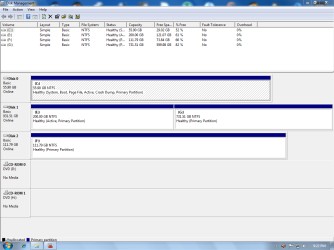
Hey Gregrocker here is screenshot you needed let me know what you think.

SSD Disk 0 (C) has New Windows 7 Pro ( I want to keep in Duel Boot Setup)

Hard Drive Disk 1 (E) has Windows XP Pro ( I need to keep in Duel Boot Setup)
Disk 1 (G) has Old Windows 7 Pro ( I need to remove from Boot Order)

SSD Disk 2 (F) has games in it only

Let me know if you need any other infromation. Thanks Raner
 

Attachments

  • Disc manager.PNG
    Disc manager.PNG
    33.7 KB · Views: 41
Last edited:

My Computer My Computer

At a glance

windows 7 professional x 64
OS
windows 7 professional x 64
See if you can access the one-time BIOS Boot menu to boot into XP HD now. Look for the key on BIOS Boot Screen to tap repeatedly at bootup or use one of these:
Asus - F8
HP/Compaq - Esc
Sony - F2
Acer - F12
Gateway - F10
eMachnes - F10
Toshiba - F12
Dell - F12
IBM/Lenovo - the blue Thinkvantage button

Next see if you can open your User folders on G from C. If so, we can help you link and move your C User folders to G which can then act as a data drive for C and even for XP if you want. This is the best arrangement for a smaller SSD - to move the User folders to a larger HD. http://www.sevenforums.com/tutorials/18629-user-folders-change-default-location.html.

If not, do you have a place to back up the files you want from G long enough to format it?
 
Gregrocker, got in in the bios but only one OS is Present it is the C drive New Windows 7, no Xp or old windows 7 Present, and thanks again for all you time Raner.
 

My Computer My Computer

At a glance

windows 7 professional x 64
OS
windows 7 professional x 64
Problem solved: Thanks to the help of GREGROCKER, what we finally did was I gave gregrocker permission to get in to my PC with Team Viewer and he deleted all the old windows 7 files and hooked up E:dive and G:diver so windows 7 would use the G:drive to dump everything in it so the E drive is running windows 7 and the program files only. Now that I only have windows 7 and xp O.S. when I start my PC I get the screen to choose which O.S. I want to boot up. He did a very good job, so if you post and he is helping you do what he says and your problem will be fixed, he knows his way around windows 7 and if I don't miss my guess he is pretty good with xp also. Well so long for now and Thanks again GREGROCKER. Raner
 
Last edited:

My Computer My Computer

At a glance

windows 7 professional x 64
OS
windows 7 professional x 64
Problem solved: Thanks to the help of GREGROCKER, what we finally did was I gave gregrocker permission to get in to my PC with viewmaster
Raner, can you please tell me what viewmaster is?
Is it a remote PC controller such as PC anywhere ect:?

Thanks
D.
 

My Computer My Computer

At a glance

Windows 7 Ultimate -32 bitIntel T8100 Duo 2.01 GB3gbnVidia GeForce 8400M GS
Computer Manufacturer/Model Number
HP dv6885SE THRIVE (Special Edition) Notebook
OS
Windows 7 Ultimate -32 bit
CPU
Intel T8100 Duo 2.01 GB
Memory
3gb
Graphics Card(s)
nVidia GeForce 8400M GS
Monitor(s) Displays
Widescreen 15.4 in TFT active matrix
Screen Resolution
Max Resolution 1280 x 800 ( WXGA )
Hard Drives
250GB SATA- 5400.0 rpm
Case
Notebook
Internet Speed
35MB down/6MB up
Other Info
CD-RW/DVD-RW/Light Scribe
My mistake on team master

I was at work when I did the last post, and it is Team Viewer not View Master, sorry about that. Raner
 

My Computer My Computer

At a glance

windows 7 professional x 64
OS
windows 7 professional x 64
Works great, too!

images


The problem with helping root out dead Windows OS files is that taking ownership doesn't work on some, permissioning Everyone doesn't work on others, some have to be permissioned down to the youngest child (which is where the Viewmaster comes in).

This left Raner with his old Win7's User folders on G which were then linked from his new C installation. XP Repair install got his XP bootable again, which he did himself.
 
Back
Top