Solved Need to swap some data in Excel

mach04

New member
Pro User
Local time
8:48 PM
Messages
367
Hi,

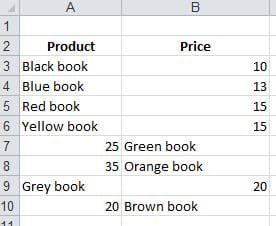
I need to rearrange some data that are mistyped in an Excel sheet. Imagine two columns and many rows. There are some data that need to swap their places so it gets under the appropriate column.
The data in this sheet are quite huge and I am thinking of a method like when clicking on those appropriate rows, be able to swap the data with each other.

I have attached a simple snapshot to further explain my problem.
As you see the prices are not gathered under the appropriate column and I need to select those and swap their places with the other column. So that A7 swaps its place with B7 and so on, so all the product names are gathered in one column and the price in the other column.

Any helps are highly appreciated.
 

Attachments
  • Excel.JPG
    Excel.JPG
    17.4 KB · Views: 395

My Computer My Computer

At a glance

Windows 7 Home Premium x64, Windows 8 Proi5-2430M8 GbnVidia GeForce 610M
Computer type
Laptop
Computer Manufacturer/Model Number
Acer Aspire 5750G
OS
Windows 7 Home Premium x64, Windows 8 Pro
CPU
i5-2430M
Motherboard
Acer JE50_HR
Memory
8 Gb
Graphics Card(s)
nVidia GeForce 610M
Sound Card
Realtek High Definition Audio
Antivirus
Avast
Browser
Chrome
You can do that with Macro.
I have put screenshots for major steps in attachment of this post.
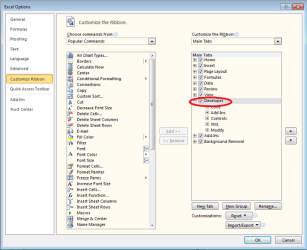
Firstly, you need to activate Developer tab.
File - Options - Customize Ribbon - Main Tabs - Developer tab - Ok
Then on Developer tab click Record Macro button.
You will see a Record Macro window.

Assign a Shortcut key, for example type y.
Store in This Workbook
Then click ok.
On Developer tab button Record Macro will turn into Stop Recording, click it to turn it off. Now it will be back to Record Macro. Then click on big Macros button on the left.

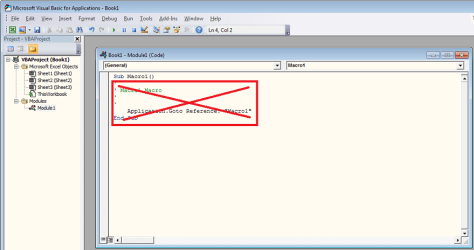
You will see a new window delete everything except first line and paste the following code on the second line:
Code:
[SIZE=1]'July 07, 2006 - James Cone - San Francisco, USA 
On Error GoTo SwapError 
Dim rngSelect As Excel.Range 
Dim rngOne As Excel.Range 
Dim rngTwo As Excel.Range 
Dim lngNum As Long 
Dim strGeneric As String 
Dim varValueOne As Variant 
Set rngSelect = Excel.Selection 
'If entire columns or rows selected, don't use, resize to used range boundries. 
If rngSelect.Rows.Count = ActiveSheet.Rows.Count Then 
Set rngSelect = Application.Intersect(rngSelect, ActiveSheet.UsedRange.EntireRow) 
ElseIf rngSelect.Columns.Count = ActiveSheet.Columns.Count Then 
Set rngSelect = Application.Intersect(rngSelect, ActiveSheet.UsedRange.EntireColumn) 
End If 
'Check for merged cells and the number of areas/cells selected. 
If rngSelect.MergeCells Or IsNull(rngSelect.MergeCells) Then 
strGeneric = "Unmerge cells in the selection and try again. " 
ElseIf rngSelect.Areas.Count > 2 Then 
strGeneric = "Can only swap two selections." & vbCr & _ 
"There are " & rngSelect.Areas.Count & " selections on the worksheet. " 
ElseIf rngSelect.Areas.Count = 1 Then 
If rngSelect.Columns.Count = 2 Then 
Set rngOne = rngSelect.Columns(1).Cells 
Set rngTwo = rngSelect.Columns(2).Cells 
ElseIf rngSelect.Rows.Count = 2 Then 
Set rngOne = rngSelect.Rows(1).Cells 
Set rngTwo = rngSelect.Rows(2).Cells 
ElseIf rngSelect.Count <> 2 Then 
strGeneric = " Two selections are necessary. " 
ElseIf Application.CountA(rngSelect) = 0 Then 
strGeneric = "The selection is blank. " 
Else 
Set rngOne = rngSelect(1) 
Set rngTwo = rngSelect(2) 
End If 
Else 'Two areas 
Set rngOne = rngSelect.Areas(1) 
Set rngTwo = rngSelect.Areas(2) 
If rngOne.Rows.Count <> rngTwo.Rows.Count Or _ 
rngOne.Columns.Count <> rngTwo.Columns.Count Then 
strGeneric = "The two selections must be the same size. " 
ElseIf Application.CountA(rngOne) + Application.CountA(rngTwo) = 0 Then 
strGeneric = "Both selections are blank. " 
End If 
End If 
If Len(strGeneric) Then 
MsgBox strGeneric, vbInformation, " Swap Cells" 
GoTo CleanUp 
ElseIf rngOne.Address = rngTwo.Address Then 
GoTo CleanUp 
End If 
'With multiple cells Apply formats and formulas to each cell. 
If rngOne.Count > 1 Then 
Application.ScreenUpdating = False 
For lngNum = 1 To rngOne.Count 
Set rngSelect = rngOne(lngNum) 
With rngSelect 
strGeneric = .NumberFormat 
varValueOne = .Formula 
.NumberFormat = rngTwo(lngNum).NumberFormat 
.Formula = rngTwo(lngNum).Formula 
End With 
rngTwo(lngNum).NumberFormat = strGeneric 
rngTwo(lngNum).Formula = varValueOne 
Next 
Application.ScreenUpdating = True 
Else 'One cell vs. one cell 
strGeneric = rngOne.NumberFormat 
varValueOne = rngOne.Formula 
rngOne.NumberFormat = rngTwo.NumberFormat 
rngOne.Formula = rngTwo.Formula 
rngTwo.NumberFormat = strGeneric 
rngTwo.Formula = varValueOne 
End If 
CleanUp: 
On Error Resume Next 
Set rngSelect = Nothing 
Set rngOne = Nothing 
Set rngTwo = Nothing 
Exit Sub 
SwapError: 
Application.ScreenUpdating = True 
MsgBox "Error " & Err.Number & " - " & Err.Description & " ", vbCritical, " Swap Cells" 
GoTo CleanUp 
End Sub[/SIZE]
(Code is taken from Is there an easy way to swap the contents of two cells in ..)

Then close this window with the code and try how it works in main Excel window.

Now if you select an area with two columns - you can switch content between them with Ctrl+y shortcut. You can only select one area. So, in your example you would have to apply it two times: rows 7&8 and row 10, but if 9 would have been switched too, you can select rows7 to 10.

Check out how it work in file in attachment (Excel blocks unknown macros by default, so you have to enable it when opened).
 

Attachments

  • Excel1.png
    Excel1.png
    40.3 KB · Views: 14
  • Excel5.png
    Excel5.png
    27.1 KB · Views: 11
  • Macro.zip
    Macro.zip
    18.8 KB · Views: 9

My Computer My Computer

At a glance

Windows 8.1 ; Windows 7 x86 (Dec2008-Jan2013)
Computer type
PC/Desktop
OS
Windows 8.1 ; Windows 7 x86 (Dec2008-Jan2013)
Other Info
"The scale icon at the top right of a post or tutorial is how you can give rep to the member."
Thanks for the reply. I have tried the code in the example and somehow it satisfies my need, but how can the code be modified so when cells are selected (more than two) it swaps the data. I am dealing with a large data.
 

My Computer My Computer

At a glance

Windows 7 Home Premium x64, Windows 8 Proi5-2430M8 GbnVidia GeForce 610M
Computer type
Laptop
Computer Manufacturer/Model Number
Acer Aspire 5750G
OS
Windows 7 Home Premium x64, Windows 8 Pro
CPU
i5-2430M
Motherboard
Acer JE50_HR
Memory
8 Gb
Graphics Card(s)
nVidia GeForce 610M
Sound Card
Realtek High Definition Audio
Antivirus
Avast
Browser
Chrome
in C3: =IF(A3>B3,B3,A3)
in D3: =IF(A3<=B3,B3,A3)

  • Copy down C3:D3 as many times as needed
  • Select C:D (both columns). Copy and "paste special"->values.
  • Copy relevant cells from C:D to A:B
  • Delete C:D
 

My Computer My Computer

At a glance

Microsoft Windows 7 Home Premium 64-bits 7601...Intel(R) Core(TM) i3 CPU M 370 @ 2.40GHz4,00 GBATI Mobility Radeon HD 5400 Series
Computer type
Laptop
Computer Manufacturer/Model Number
ACER ASPIRE 5742G
OS
Microsoft Windows 7 Home Premium 64-bits 7601 Multiprocessor Free Service Pack 1
CPU
Intel(R) Core(TM) i3 CPU M 370 @ 2.40GHz
Motherboard
Acer Aspire 5742G
Memory
4,00 GB
Graphics Card(s)
ATI Mobility Radeon HD 5400 Series
Sound Card
(1) AMD High Definition Audio Device (2) Realtek High Defi
Screen Resolution
1366 x 768 x 32 bits (4294967296 colors) @ 60 Hz
Hard Drives
WDC WD5000BEVT-22ZAT0
more than two
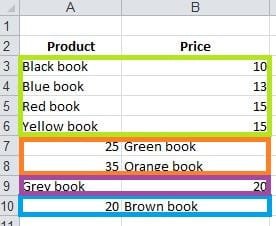
You can swap more than two cells, as long as they are in one selection. Check screenshot in attachment.
You can swap all green selection OR all orange selection cells (or both) at once. But you can not combine selections, that are not border each other: orange and blue can not be swapped at once.
 

Attachments

  • Excel_.JPG
    Excel_.JPG
    19.8 KB · Views: 380

My Computer My Computer

At a glance

Windows 8.1 ; Windows 7 x86 (Dec2008-Jan2013)
Computer type
PC/Desktop
OS
Windows 8.1 ; Windows 7 x86 (Dec2008-Jan2013)
Other Info
"The scale icon at the top right of a post or tutorial is how you can give rep to the member."
in C3: =IF(A3>B3,B3,A3)
in D3: =IF(A3<=B3,B3,A3)

  • Copy down C3:D3 as many times as needed
  • Select C:D (both columns). Copy and "paste special"->values.
  • Copy relevant cells from C:D to A:B
  • Delete C:D
did it work?
 

My Computer My Computer

At a glance

Microsoft Windows 7 Home Premium 64-bits 7601...Intel(R) Core(TM) i3 CPU M 370 @ 2.40GHz4,00 GBATI Mobility Radeon HD 5400 Series
Computer type
Laptop
Computer Manufacturer/Model Number
ACER ASPIRE 5742G
OS
Microsoft Windows 7 Home Premium 64-bits 7601 Multiprocessor Free Service Pack 1
CPU
Intel(R) Core(TM) i3 CPU M 370 @ 2.40GHz
Motherboard
Acer Aspire 5742G
Memory
4,00 GB
Graphics Card(s)
ATI Mobility Radeon HD 5400 Series
Sound Card
(1) AMD High Definition Audio Device (2) Realtek High Defi
Screen Resolution
1366 x 768 x 32 bits (4294967296 colors) @ 60 Hz
Hard Drives
WDC WD5000BEVT-22ZAT0
Neutron16
Sorry for the late reply as I was very busy. Thanks for the macro, I managed to correct the data manually. Anyhow I am going to work with it in my spare time to see if I can make it work for with a larger amount of data.
Also thanks to the rest for your input.
 

My Computer My Computer

At a glance

Windows 7 Home Premium x64, Windows 8 Proi5-2430M8 GbnVidia GeForce 610M
Computer type
Laptop
Computer Manufacturer/Model Number
Acer Aspire 5750G
OS
Windows 7 Home Premium x64, Windows 8 Pro
CPU
i5-2430M
Motherboard
Acer JE50_HR
Memory
8 Gb
Graphics Card(s)
nVidia GeForce 610M
Sound Card
Realtek High Definition Audio
Antivirus
Avast
Browser
Chrome
Back
Top