.NET Framework 3.5 won't install...

Sinjinn

New member
Local time
5:37 PM
Messages
2
Alright, this is my first forum post ever. Usually I can find solutions to my problems by lurking, but not this time apparently.

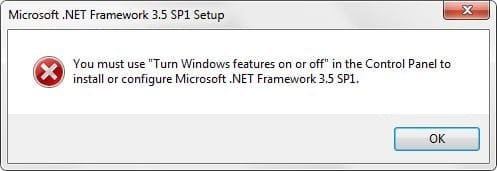
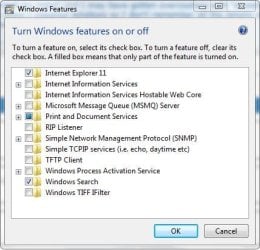
So my problem is this: I'm trying to install "Remove Empty Directories" (Remove Empty Directories | SourceForge.net), but .NET Framework 3.5 is one of its dependencies. The installer for RED downloaded .NET for me and attempted to install it, but it gave me an error saying that I can only install it through the Turn on or off Windows Features dialog. Well, I go there and the Microsoft .NET framework 3.5 isn't listed. Then I downloaded the .NET install and attempted that, but it told me the same thing about using the Windows Features dialog. I ran a .NET cleanup utility thing and repeated all the above steps but received the same results.

When I installed Windows I customized my install and I may have gotten overzealous with "streamlining" my install. It's been over 6 months since I installed Windows so I don't remember all the details of what I did, but this is the first time I've seen any negative result of my stripped down version.

Has anyone had a similar problem? What can I do to fix this?
 

Attachments
  • Windows Features.JPG
    Windows Features.JPG
    39.9 KB · Views: 29
  • Error.JPG
    Error.JPG
    19.2 KB · Views: 29

My Computer

Computer type
Laptop
Computer Manufacturer/Model Number
Dell XPS L702X
OS
Windows Home Premium 64
CPU
Intel i7-2670QM
Memory
8 GB
Graphics Card(s)
Intel HD Graphics 3000, NVIDIA GeForce GT 555M
Browser
Chrome
Try installing the .NET Framework 4.0 Full.
 

My Computer

Computer type
PC/Desktop
Computer Manufacturer/Model Number
HP
OS
Windows 7 Pro 32bit
CPU
Dual Core
Antivirus
Trend Micro
I've tried that in several ways, rebooted and the problem still persists. Any other thoughts.
 

My Computer

Computer type
Laptop
Computer Manufacturer/Model Number
Dell XPS L702X
OS
Windows Home Premium 64
CPU
Intel i7-2670QM
Memory
8 GB
Graphics Card(s)
Intel HD Graphics 3000, NVIDIA GeForce GT 555M
Browser
Chrome
ShottaS
No point to doing that - programs which are dependent on .NET 3.5 will NOT run without it installed. .NET 4.5.x (the latest incarnation of .NET 4) is only an upgrade to .NET 4.0 - which is NOT an upgrade to .NET 3.5

Sinjinn
The only thing I can recommend is that you do a repair install and get the system back to the way it was designed to be - you can then switch off the parts you don't want to use.
 

My Computer

Computer type
Laptop
Computer Manufacturer/Model Number
Asus K52F or Lenovo B51-80
OS
Win 7 x64 Home Premium (and x86 VirtualBox VM)/Win10
CPU
i3 370M/i7 6500U
Motherboard
Asus/Lenovo
Memory
8GB - finally :)/8GB
Graphics Card(s)
it's an i3, dude!/dual Intel&nVidia
Sound Card
onboard
Monitor(s) Displays
15.6" built-in
Screen Resolution
1366x768/1920x1080
Hard Drives
750GB Seagate internal
Sundry external drives attached to other computers on the local network
1TB SSD on the Lenovo
PSU
n/a
Internet Speed
as much as I can get - usually on a dongle/phone, so <1MB/s
Antivirus
MSE/Defender
Browser
IE11/12/Edge/Chrome/FF(if I must)
Once again I agree with Noel.
.Net Framework 3.5 I do believe comes with the Windows 7 installation and a Repair install should fix the problem. I believe this because on my systems its date is 2009.

That being said if you use Remove Empty Directories | SourceForge.net again you will probable just end up with the same problem.
 

My Computer

Computer type
PC/Desktop
Computer Manufacturer/Model Number
Home made Desktop
OS
Windows 10 Pro. 64/ version 1709 Windows 7 Pro/64
CPU
Intel i7-6800K @ 4.3
Motherboard
ASUS X-99 Deluxe II
Memory
Corsair Platinum 16 gig @2400
Graphics Card(s)
EVGA GTX 1070 OC
Monitor(s) Displays
Asus 27" LED LCD/VE278Q
Screen Resolution
1920-1080 or 1280-720 HDMI
Hard Drives
INTEL SSD 730-240 Gb Sata 3.0/
PSU
EVGA Platium 1200W
Case
Phanteks Luxe Tempered Glass 8 fans/ one radiator
Cooling
XSPC/ Water Cooled CPU
Keyboard
Das 4 Professional
Mouse
Logitech M705/MX Anywhere 2-S
Internet Speed
100 mbits
Antivirus
Microsoft Security Essentials/ Malwarebytes Premium 3.0/ SAS
Browser
I.E. 11 default/Firefox/ ISP Time Warner Cable/Spectrum
Other Info
LG BluRay Burner/
Sound system-KLipsch-THX/
Icy Dock ssd Hot Swap bays.
Pretty interesting your not showing any Media features listing either :confused:
Net frame work 4.5.2 is my newest update that showed up just today,
But yes 3.5.1 is still in windows features,
For me CorelDraw x6 requires 4.5.0 and all newer versions delivered through the windows update system,
Cheers
 

My Computer

Computer type
PC/Desktop
Computer Manufacturer/Model Number
Custom assembled by me :}
OS
Win-7-Pro64bit 7-H-Prem-64bit
CPU
i7-5930K 2nd i9-9940x both water blocked VRM's too
Motherboard
ASUS SABERTOOTH X99 2nd ASUS x299 Apex
Memory
Trident-z 3200C14 2nd Trident-z 3600C16
Graphics Card(s)
EVGA 1080ti ftw3 2nd Titan Xp both water blocked
Sound Card
Built-in Realtek
Monitor(s) Displays
1-AOC G2460PG 24"G-Sync 144Hz/ 2nd 1-ASUS VG248QE 24" 144Hz
Screen Resolution
1920 x 1080 144Hz
Hard Drives
2-Samsung M.2 Evo & Evo Plus
2-Samsung 850 EVO 500GB SSD's/ 3-2.5 W.D. Black 1tb-&3-1tb/3-3.5 WD Black 1tb hdd's
PSU
EVGA SuperNOVA 1000-P2 2nd 1200-P2
Case
2-Corsair Obsidian Series 450D Black ATX Mid Tower
Cooling
Custom water loops
Keyboard
Logitech G710+/ 2nd Logitech G910
Mouse
2-RedDragon M901 Perdition 16400 dpi Gaming mouse = wired
Internet Speed
Comcast Ping 19ms 89.31mbps download speed 6.12mbps upload
Antivirus
Malwarebytes Pro/ Superantispyware Pro
Browser
FireFox & Pale moon
Other Info
2nd ASUS X299 Apex/Intel i9-9940x with Custom water loop/7H-Prem-x64/Corsair 450D case/Ram Trident-z 3600C16 4x8gb / Samsung970Evo plus 500gb SSD/Dual ssd EZ swap evo/PSU EVGA SuperNova 1200w-P2 80+Platinum/GPU Titan Xp /8-ML-140 on push-pull on 2-280GTX rads
Back
Top